
springbooot2 thymeleaf 配置以及加载资源文件。Cannot find template location: classpath:/templates/ (please add some templates or check your Thymeleaf configuration)
最近在学习springbooot2 和 thymeleaf
程序文件
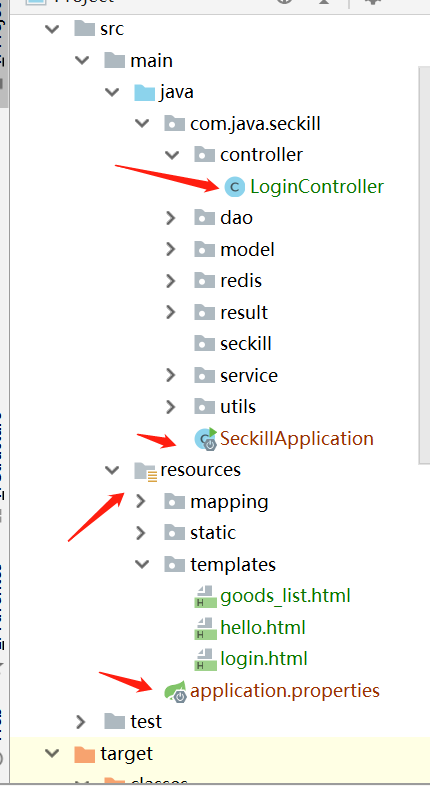
application.properties文件配置:
#thymeleaf

spring.thymeleaf.prefix=classpath:/templates/

spring.thymeleaf.suffix=.html

spring.thymeleaf.cache=false

spring.thymeleaf.servlet.content-type=text/html

spring.thymeleaf.enabled=true

spring.thymeleaf.encoding=UTF-8

spring.thymeleaf.mode=HTML

spring.thymeleaf.check-template-location=true

# 静态文件请求匹配方式

spring.mvc.static-path-pattern=/**

# 修改默认的静态寻址资源目录

spring.resources.static-locations = classpath:/templates/,classpath:/resources/,classpath:/static/,classpath:/public/

#热部署生效

spring.devtools.restart.enabled=true
在编译的时候,发现一直报这个错误:
Cannot find template location: classpath:/templates/ (please add some templates or check your Thymeleaf configuration)
之后再网上找了各种答案,发现都不能使用
-------------------------------------------------------------------------------------------------------------------
下面是正确的方案:
在pom.xml中引入如下配置
<build>

        <plugins>

            <plugin>

                <groupId>org.springframework.boot</groupId>

                <artifactId>spring-boot-maven-plugin</artifactId>

            </plugin>

        </plugins>

        <resources>

            <resource>

                <!--加载资源目录-->

                <directory>src/main/resources</directory>

                <includes>

                    <!--加载配置文件-->

                    <include>**/*.xml</include>

                    <include>**/*.properties</include>

                    <!--加载模板文件-->

                    <include>**/*.html</include>

                    <!--加载静态文件-->

                    <include>/static/</include>

                </includes>

            </resource>

        </resources>

    </build>
在pom.xml中引入的文件,这样application.properties文件中可注释文件路径配置。
server.port=9099

#thymeleaf

#spring.thymeleaf.prefix=classpath:/templates/

spring.thymeleaf.suffix=.html

spring.thymeleaf.cache=false

spring.thymeleaf.servlet.content-type=text/html

spring.thymeleaf.enabled=true

spring.thymeleaf.encoding=UTF-8

spring.thymeleaf.mode=HTML

spring.thymeleaf.check-template-location=true

# 静态文件请求匹配方式

#spring.mvc.static-path-pattern=/**

# 修改默认的静态寻址资源目录

#spring.resources.static-locations = classpath:/templates/,classpath:/resources/,classpath:/static/,classpath:/public/

#热部署生效

spring.devtools.restart.enabled=true
LoginController中:
package com.java.seckill.controller;

import org.springframework.stereotype.Controller;

import org.springframework.web.bind.annotation.RequestMapping;

import org.springframework.web.bind.annotation.ResponseBody;

@Controller

@RequestMapping("/login")

public class LoginController {

    @RequestMapping("/index")

    public String Index() {

        return "login";

    }

    @RequestMapping("/login")

    @ResponseBody

    public Boolean login(){

        return true;

    }

}
直接访问:http://localhost:9099/login/index
springbooot2 thymeleaf 配置以及加载资源文件。Cannot find template location: classpath:/templates/ (please add some templates or check your Thymeleaf configuration)的更多相关文章
- spring加载资源文件中classpath*与classpath的区别
在spring和MyBatis继承的时候,配置mapperLocations.一开始配置是这样的. 需要加载路径为com/thomas/base/mapper和com/thomas/bu/mapper ...
- Spring boot 国际化自动加载资源文件问题
Spring boot 国际化自动加载资源文件问题 最近在做基于Spring boot配置的项目.中间遇到一个国际化资源加载的问题,正常来说只要在application.properties文件中定义 ...
- Style样式的四种使用(包括用C#代码动态加载资源文件并设置样式)
Posted on 2012-03-23 11:21 祥叔 阅读(2886) 评论(6) 编辑 收藏 在Web开发中,我们通过CSS来控制页面元素的样式,一般常用三种方式: 1. 内联样式 ...
- Maven,预加载资源文件
预加载资源文件需要先启用功能: <build> <resources> <resource> <directory>src/main/resources ...
- 动态加载资源文件(ResourceDictionary)
原文:动态加载资源文件(ResourceDictionary) 在xaml中控件通过绑定静态资源StaticResource来获取样式Style有多种方式: 1.在项目的启动文件App中<App ...
- Java加载资源文件的两种方法
处理配置文件对于Java程序员来说再常见不过了,不管是Servlet,Spring,抑或是Structs,都需要与配置文件打交道.Java将配置文件当作一种资源(resource)来处理,并且提供了两 ...
- PyQt5(5)——加载资源文件
在实际中我们需要美化界面,就需要许多的自定义图片. 但是我们发现直接导入图像使用,等程序运行时会报错.???? 这就需要建立资源文件并且加载它们,程序就可以顺利运行了. 设计界面是如何加载资源文件呢? ...
- NHibernate动态加载资源文件
最近做项目,又用到了以前做过的ORM框架--NHibernate. 此次想要实现的目标: 1.简单SQL用NHibernate的Session的CRUD方法实现 2.复杂SQL用Native SQL实 ...
- Java加载资源文件几种方法
from: http://andyzhu.blog.51cto.com/4386758/775836/ import java.net.URL; import org.springframework. ...
随机推荐
- python爬虫学习之查询IP地址对应的归属地
话不多说,直接上代码吧. import requests def getIpAddr(url): response = requests.get(url) response.encoding=resp ...
- 文本编辑器 EditPlus 的激活与设置
说明 1.EditPlus是Windows的文本编辑器,具有内置的FTP,FTPS和sftp功能.虽然它可以作为一个很好的记事本替代品,但它也为网页作者和程序员提供了许多强大的功能. 2.语法高亮显示 ...
- Python开发端口扫描器
首先是最常用的端口扫描器: 虽说有nmap等强大的工具,不过如果由于条件限制无法安装Nmap呢? 我这个脚本写的比较简单,默认扫描1-65535全部的端口 实际的话,可以根据需要自己修改脚本来实现定制 ...
- Spring详解(八)------事务管理
PS:本篇博客源码下载链接:http://pan.baidu.com/s/1mi3NhX2 密码:3io2 1.事务介绍 事务(Transaction),一般是指要做的或所做的事情.在计算机术语中是指 ...
- 【MySQL】存储emoji表情报错(Incorrect string value: '\xF0\x9F\x98\x82\xF0\x9F...')的解决方案
Emoji表情字符现在在APP已经广泛支持了.但是MySQL的UTF8编码对Emoji字符的支持却不是那么好.所以我们经常会遇到这样的异常: Java.sql.SQLException: Inco ...
- HTML_CSS笔记
常用标记 水平标记:<hr/> 换行标记:<br/> 段落标记:<p></p> 标题标记:<h1></h1>~~<h6&g ...
- 【sping揭秘】25、Spring远程方案
分化:RMI,EJB,Hessian Spring有 Rmi,http,hessian,burlap 基于rmi的remoting方案 RMI要求远程类对象包路径和本地一致 基于HTTP的轻量级rem ...
- 《JQuery技术内幕》读书笔记——自调用匿名函数剖析
Javascript语言中的自调用匿名函数格式如下: (function(){ //do somethings })(); 它还有另外两种等价写法如下: //等价写法一 (function(){ // ...
- Python GUI之tkinter窗口视窗教程大集合(看这篇就够了)
一.前言 由于本篇文章较长,所以下面给出内容目录方便跳转阅读,当然也可以用博客页面最右侧的文章目录导航栏进行跳转查阅. 一.前言 二.Tkinter 是什么 三.Tkinter 控件详细介绍 1. T ...
- Chapter 4 Invitations——7
The next day, I was surprised that Jessica wasn't her usual gushing self in Trig and Spanish. 第二天,我很 ...