
Java加载资源文件的两种方法
处理配置文件对于Java程序员来说再常见不过了,不管是Servlet,Spring,抑或是Structs,都需要与配置文件打交道。Java将配置文件当作一种资源(resource)来处理,并且提供了两个类来读取这些资源,一个是Class类,另一个是ClassLoader类。
当我们自己的程序需要处理配置文件时(比如xml文件或properties文件),通常会遇到两个问题:
(1)我的配置文件应该放在哪里?
(2)怎么我的配置文件找不到了?
在了解了Java加载资源文件的机制后,以上这两个问题便迎刃而解了。
对于第一个问题,答案是:请将你的资源文件放在classpath里,如果资源文件在jar中,请将该jar文件也加到classpath里面。
对于第二个问题,就得看你是使用的是哪个类(Class还是ClassLoader)来加载资源文件了,所以接下来分别讨论一下Class类和ClassLoader类对于资源文件的加载机制。
(一)用Class类加载资源文件
通过调用Class类的getResourceAsStream方法来加载资源文件:
public InputStream getResourceAsStream(String pathToConfigFile);
该方法接收一个String类型的参数(pathToConfigFile)来表示资源文件的地址,如果加载成功,则返回该资源文件的输入流(InputStream),如果失败,则返回null。重要的是,在传入pathToConfigFile参数时,有两种方式,第一种方式为绝对定位方式,即pathToConfigFile以"/"开头,此时Java以classpath为根目录,直接加上pathToConfigFile来搜索资源文件。第二种方式为相对定位方式,即pathToConfigFile不以"/"开头,此时资源文件的全路径应该为:调用getResourceAsStream方法的类的package路径加上pathToConfigFile。(在将package转为目录时将"."变成"/")
举个例子,在IntelliJ Idea中创建一个java工程,目录结构如下:
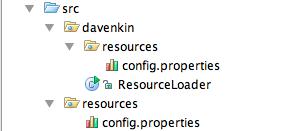
该工程里有两个resources文件夹,一个位于davenkin文件夹下,一个直接位于src文件夹下。第一个resources文件夹下有一个config.properties文件,其内容为:
| name = ConfigUnderDavenkin |
第二个resources文件夹下也有一个config.properties文件,其内容为:
| name = ConfigUnderSrc |
在davenkin包下定义ResourceLoader.java来加载资源文件:
|
package davenkin; import java.io.IOException; public class ResourceLoader } public void loadProperties1() throws IOException //also can be this way: private void printProperties(InputStream input) throws IOException |
输出结果为第二个resources文件夹下config.properties的内容:
| ConfigUnderSrc |
原因在于(请注意ReourceLoader.java文件中的红色部分):我们给出的资源文件路径(/resources/config.properties)以"/"开头,即使用的是绝对定位方式,所以找到的是直接在classpath下的resources文件夹。如果去掉资源文件文件路径前的"/",则采用的是相对定位方式,此时应该输出davenkin/resources/config.properties文件的内容。
(二)用ClassLoader类加载资源文件
ClassLoader类也提供和Class类相同的加载方法:
public InputStream getResourceAsStream(String pathToConfigFile);
用ClassLoader加载配置文件时,pathToConfigFile均不能以"/"开头,在查找时直接在classpath下进行查找。Class类在查找资源文件时,也是代理(delegate)给ClassLoader完成查找功能的,请参考Java官方文档。
在使用Class和ClassLoader加载资源文件时,有几种区别细微的方法,修改ResourceLoader.java文件如下:
|
package davenkin; import java.io.IOException; public class ResourceLoader public void loadProperties1() throws IOException public void loadProperties2() throws IOException input = this.getClass().getResourceAsStream("/resources/config.properties"); public void loadProperties3() throws IOException public void loadProperties4() throws IOException public void loadProperties5() throws IOException public void loadProperties6() throws IOException printProperties(input); private void printProperties(InputStream input) throws IOException |
以上程序输出结果为(请仔细揣摩,稍不小心(比如多加了一个"/"或少加了一个"/"),就会报NullPointerException异常,表明你的资源文件没有找到):
| ConfigUnderSrc ConfigUnderSrc ConfigUnderDavenkin ConfigUnderSrc ConfigUnderSrc ConfigUnderSrc |
Java加载资源文件的两种方法的更多相关文章
- xml文件 加载properties文件的两种方法与注意事项
1.遇到的问题: 配置redisSpringContext.xml 时,遇到 properties加载失败,提示BeanDefinitionStoreException 和 java.lang. ...
- 动态加载script文件的两种方法
第一种就是利用ajax方式,把script文件代码从后台加载到前台,然后对加载到的内容通过eval()执行代码.第二种是,动态创建一个script标签,设置其src属性,通过把script标签插入到页 ...
- 加载xib文件的两种方式
一.加载xib文件的两种方式 1.方法一(NewsCell是xib文件的名称) NSArray *objects = [[NSBundle mainBundle] loadNibNamed:@&quo ...
- Spring加载properties文件的两种方式
在项目中如果有些参数经常需要修改,或者后期可能需要修改,那我们最好把这些参数放到properties文件中,源代码中读取properties里面的配置,这样后期只需要改动properties文件即可, ...
- Java加载资源文件几种方法
from: http://andyzhu.blog.51cto.com/4386758/775836/ import java.net.URL; import org.springframework. ...
- windows/tomcat 修改java虚拟机JVM以utf-8字符集加载class文件的两种方式
1.情景展示 做了这么长时间的java开发,但是,你知道JVM是以怎样的编码加载.解析class文件的吗? 我们知道,通常情况下,我们会将java文件的字符集修改成utf-8,这样,理所当然地就认 ...
- java加载资源文件
className.class.getResourceAsStream 用法: 第一: 要加载的文件和.class文件在同一目录下,例如:com.x.y 下有类Test.class ,同时有资源文件c ...
- [ARM-Linux开发]Linux下加载.ko驱动模块的两种方法:insmod与modprobe
假设要加载的驱动程序模块名为SHT21.ko 加载驱动模块 方法一: 进入SHT21.ko驱动模块文件所在的目录,然后直接 insmod SHT21.ko 即可 方法二: 将SHT21.ko文 ...
- 加载properties文件的三种方法
源代码: package a.one; import java.io.FileInputStream; import java.io.InputStream; import java.util.Pro ...
随机推荐
- JS中的循环---最全的循环总结
在讲循环的之前,先知道一下循环结构的执行步骤 1.声明循环变量: 2.判断循环条件; 3.执行循环体操作: 4.更新循环变量: 5.然后循环执行2-4,直到条件不成立,跳出循环. 1while循环 v ...
- Winform C# 简单实现子窗口显示进度条
主窗口代码 using System; using System.Collections.Generic; using System.ComponentModel; using System.Data ...
- Java8一:Lambda表达式教程
1. 什么是λ表达式 λ表达式本质上是一个匿名方法.让我们来看下面这个例子: public int add(int x, int y) { return x + y; } 转成 ...
- 移动端效果之LoadMore
写在前面 列表一直是展示数据的一个重要方式,在手机端的列表展示又和PC端展示不同,毕竟手机端主要靠滑.之前手机端之前一直使用的IScroll,但是IScroll本身其实有很多兼容性BUG,想改动一下需 ...
- Python进阶---面向对象第三弹(进阶篇)
Python对象中一些方法 一.__str__ class Teacher: def __init__(self,name,age): self.name=name self.age=age self ...
- Mac_Homebrew
Homebrew作为OS X上强大的包管理器,为系统软件提供了非常方便的安装方式,独特式的解决了包的依赖问题,并不再需要烦人的sudo,一键式编译,无参数困扰,真的,你值得拥有. brew 的安装: ...
- npm -v;报错 cannot find module "wrapp"
1.node -v正常.npm-v就报错.. 说明:在官网上下载了安装了好几次.一用到npm就报这个错.园友们,我不太懂node,你们遇到这个问题怎么解决的? 2.报错 cannot find mod ...
- JS 三目运算符和RETURN
以前写的博客,现在搬过来 首先三目运算符和return的正确用法是这样的: (function test(){ var foo = []; return typeof foo === 'object' ...
- Mysql相关知识点总结(一)
information_schema库:information_schema库中的表大都是temporory表,都是只读的,不能进行更新.删除和插入等操作,也不能加触发器,因为它们实际只是一个视图,不 ...
- css3实现聊天气泡
1: <div class="comment"></div><style type="text/css"> .comment ...