
springbooot2 thymeleaf 配置以及加载资源文件。Cannot find template location: classpath:/templates/ (please add some templates or check your Thymeleaf configuration)
最近在学习springbooot2 和 thymeleaf
程序文件
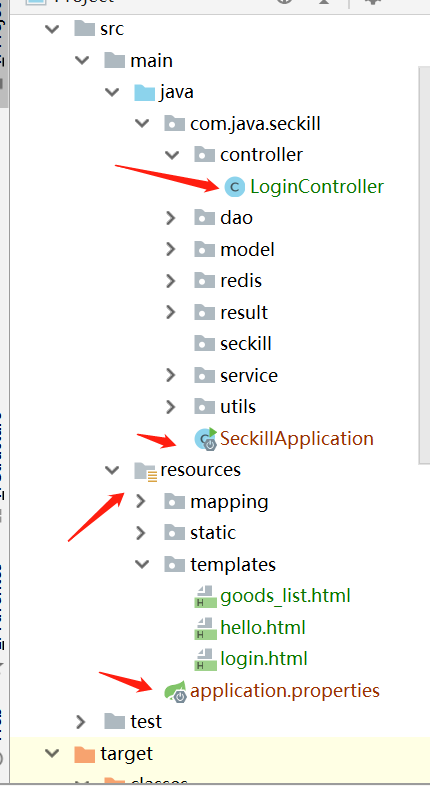
application.properties文件配置:
#thymeleaf

spring.thymeleaf.prefix=classpath:/templates/

spring.thymeleaf.suffix=.html

spring.thymeleaf.cache=false

spring.thymeleaf.servlet.content-type=text/html

spring.thymeleaf.enabled=true

spring.thymeleaf.encoding=UTF-8

spring.thymeleaf.mode=HTML

spring.thymeleaf.check-template-location=true

# 静态文件请求匹配方式

spring.mvc.static-path-pattern=/**

# 修改默认的静态寻址资源目录

spring.resources.static-locations = classpath:/templates/,classpath:/resources/,classpath:/static/,classpath:/public/

#热部署生效

spring.devtools.restart.enabled=true
在编译的时候,发现一直报这个错误:
Cannot find template location: classpath:/templates/ (please add some templates or check your Thymeleaf configuration)
之后再网上找了各种答案,发现都不能使用
-------------------------------------------------------------------------------------------------------------------
下面是正确的方案:
在pom.xml中引入如下配置
<build>

        <plugins>

            <plugin>

                <groupId>org.springframework.boot</groupId>

                <artifactId>spring-boot-maven-plugin</artifactId>

            </plugin>

        </plugins>

        <resources>

            <resource>

                <!--加载资源目录-->

                <directory>src/main/resources</directory>

                <includes>

                    <!--加载配置文件-->

                    <include>**/*.xml</include>

                    <include>**/*.properties</include>

                    <!--加载模板文件-->

                    <include>**/*.html</include>

                    <!--加载静态文件-->

                    <include>/static/</include>

                </includes>

            </resource>

        </resources>

    </build>
在pom.xml中引入的文件,这样application.properties文件中可注释文件路径配置。
server.port=9099

#thymeleaf

#spring.thymeleaf.prefix=classpath:/templates/

spring.thymeleaf.suffix=.html

spring.thymeleaf.cache=false

spring.thymeleaf.servlet.content-type=text/html

spring.thymeleaf.enabled=true

spring.thymeleaf.encoding=UTF-8

spring.thymeleaf.mode=HTML

spring.thymeleaf.check-template-location=true

# 静态文件请求匹配方式

#spring.mvc.static-path-pattern=/**

# 修改默认的静态寻址资源目录

#spring.resources.static-locations = classpath:/templates/,classpath:/resources/,classpath:/static/,classpath:/public/

#热部署生效

spring.devtools.restart.enabled=true
LoginController中:
package com.java.seckill.controller;

import org.springframework.stereotype.Controller;

import org.springframework.web.bind.annotation.RequestMapping;

import org.springframework.web.bind.annotation.ResponseBody;

@Controller

@RequestMapping("/login")

public class LoginController {

    @RequestMapping("/index")

    public String Index() {

        return "login";

    }

    @RequestMapping("/login")

    @ResponseBody

    public Boolean login(){

        return true;

    }

}
直接访问:http://localhost:9099/login/index
springbooot2 thymeleaf 配置以及加载资源文件。Cannot find template location: classpath:/templates/ (please add some templates or check your Thymeleaf configuration)的更多相关文章
- spring加载资源文件中classpath*与classpath的区别
在spring和MyBatis继承的时候,配置mapperLocations.一开始配置是这样的. 需要加载路径为com/thomas/base/mapper和com/thomas/bu/mapper ...
- Spring boot 国际化自动加载资源文件问题
Spring boot 国际化自动加载资源文件问题 最近在做基于Spring boot配置的项目.中间遇到一个国际化资源加载的问题,正常来说只要在application.properties文件中定义 ...
- Style样式的四种使用(包括用C#代码动态加载资源文件并设置样式)
Posted on 2012-03-23 11:21 祥叔 阅读(2886) 评论(6) 编辑 收藏 在Web开发中,我们通过CSS来控制页面元素的样式,一般常用三种方式: 1. 内联样式 ...
- Maven,预加载资源文件
预加载资源文件需要先启用功能: <build> <resources> <resource> <directory>src/main/resources ...
- 动态加载资源文件(ResourceDictionary)
原文:动态加载资源文件(ResourceDictionary) 在xaml中控件通过绑定静态资源StaticResource来获取样式Style有多种方式: 1.在项目的启动文件App中<App ...
- Java加载资源文件的两种方法
处理配置文件对于Java程序员来说再常见不过了,不管是Servlet,Spring,抑或是Structs,都需要与配置文件打交道.Java将配置文件当作一种资源(resource)来处理,并且提供了两 ...
- PyQt5(5)——加载资源文件
在实际中我们需要美化界面,就需要许多的自定义图片. 但是我们发现直接导入图像使用,等程序运行时会报错.???? 这就需要建立资源文件并且加载它们,程序就可以顺利运行了. 设计界面是如何加载资源文件呢? ...
- NHibernate动态加载资源文件
最近做项目,又用到了以前做过的ORM框架--NHibernate. 此次想要实现的目标: 1.简单SQL用NHibernate的Session的CRUD方法实现 2.复杂SQL用Native SQL实 ...
- Java加载资源文件几种方法
from: http://andyzhu.blog.51cto.com/4386758/775836/ import java.net.URL; import org.springframework. ...
随机推荐
- Asp.Net WebApi核心对象解析(二)
在接着写Asp.Net WebApi核心对象解析(下篇)之前,还是一如既往的扯扯淡,元旦刚过,整个人还是处于晕的状态,一大早就来处理系统BUG,简直是坑爹(好在没让我元旦赶过来该BUG),队友挖的坑, ...
- 在MFC中支持sqlite3
在vc环境下支持sqlite3的方法有很多,sqlite官网也有推荐sqlitewrappers列表,我选用的是CppSqlite 建立MFC工程的步骤我就不赘述了,以下操作均假设你已经创建好了一个M ...
- 在Spring-Boot中实现通用Auth认证的几种方式
code[class*="language-"], pre[class*="language-"] { background-color: #fdfdfd; - ...
- Spring boot 内置tomcat禁止不安全HTTP方法
Spring boot 内置tomcat禁止不安全HTTP方法 在tomcat的web.xml中可以配置如下内容,让tomcat禁止不安全的HTTP方法 <security-constraint ...
- Metasploit Framework(1)基本命令、简单使用
文章的格式也许不是很好看,也没有什么合理的顺序 完全是想到什么写一些什么,但各个方面都涵盖到了 能耐下心看的朋友欢迎一起学习,大牛和杠精们请绕道 基本的控制台命令介绍: banner 查看metasp ...
- C语言中关键字restrict的概念,使用范围,例子
概念: restrict,C语言中的一种类型限定符(Type Qualifiers),用于告诉编译器,对象已经被指针所引用,不能通过除该指针外所有其他直接或间接的方式修改该对象的内容. 渊源: res ...
- 描述一下 cookies,sessionStorage 和 localStorage 的区别
cookie是网站为了标示用户身份而储存在用户本地终端(Client Side)上的数据(通常经过加密),数据会在浏览器和服务器间来回传递.sessionStorage和localStorage不会自 ...
- Mac idea激活
感谢https://blog.csdn.net/HALEN001/article/details/81137092 1.下载IntelliJ IDEA 2018.2.2版本和破解补丁Jetbrains ...
- ionic3 npm install cordova error syscall rename
突然出现cordova 不是内部或外部命令,也不是可运行的程序或批处理文件. 可是之前cordova安装后一直用的好好的啊,后来尝试重新安装cordova 出现这个错误.也尝试重新安装了最新版本的no ...
- 课程回顾-Structuring Machine Learning Projects
正交化 Orthogonalization单一评价指标保证训练.验证.测试的数据分布一致不同的错误错误分析数据分布不一致迁移学习 transfer learning多任务学习 Multi-task l ...