
loadrunner跑场景的时候出现:Abnormal termination, caused by mdrv process termination
1.问题
loadrunner跑场景的时候出现:Abnormal termination, caused by mdrv process termination。
备注:我使用的是RTE协议录制的脚本。
2.一些资料
2.1关于mdrv.exe意外终止的可能出现情况说明
Hi, Users facing this mdrv process abnormal termination can try one of these options found from one of the LR articles. The Loadrunner vusers are run by a process called 'mdrv.exe'. Whenever this process encounters errors due to various reasons it may terminate. Some of the possible reasons are as follows
- The Host machine ( Load generator) is running too many Vusers as a result of which it system resources are being maximized. ( i.e. Consistent over 90% CPU and Memory utilization). The mdrv process does not get enough resources to process the request as a result it fails
- If you have Custom C coding, there is a possibility of allocated memory not being freed or memory violation errors which can lead to 'mdrv process termination'.
- Replay the script with think time.
- Turn off extended log when running the script in the controller.
- Do not use the controller itself as the loadgenerator. i.e. have a remote LoadGenerator.
- Introduce iteration pacing, if running more than one iteration each vuser.
- Open the file C:\WinNT\wlrun7.ini in a text editor, modify the entry from: AgentMaxThreadsPerDriver=50 to AgentMaxThreadsPerDriver=20 or 10
- Run Agent as process instead of service Launch command prompt and navigate to C:\Program Files\Mercury\Loadrunner\Launch_service\bin and run the command magentserive -remove. This will remove the agent. Now run the command magentproc -install This will install the agent as a process.
- Run vusers as process instead of threads.Please go to Runtime Settings > Miscellaneous > Multithreading > RunVuser as a process.
原文地址:http://loadrunner.wetpaint.com/page/Abnormal+termination,+caused+by+mdrv+process+termination
2.2 mmdrv和mdrv的异同
在LoadRunner运行脚本过程中,在任务管理器中我们可以看到有一个或多个名为“mmdrv”的进程在运行,与此同时当我们查看 LoadRunner/bin目录下的文件时还会看到一个“mdrv.exe”文件,那么mmdrv.exe和mdrv.exe有什么异同?
其实mmdrv是mdrv的封套,mmdrv通常应用于一些协议(例如 web http/html)中对内存进行优化应用,但实质上mmdrv在优化内存时会启动mdrv。二者都可以按以下命令格式来启动并运行测试脚本: mmdrv/mdrv -usr <script path>
例如在windows的command窗口中首先切换目录至LoadRunner的bin目录下,然后运行以下命令:
>mmdrv -usr D:/qa/product/Space/project/space-3.0.1/performancetest/script/firstpage/script_loadfirstpage/script_loadfirstpage.usr
这样脚本就会在后台运行(不会启动LoadRunner control界面,但可以在任务管理器中看到mmdrv进程运行情况),运行结果可查看脚本目录中的日志文件,如:output.txt,mdrv*.xxx.log(其中“*”是不同的字符标识,如Q6n、R5u;“xxx”是数字代码,如229、505)。
mmdrv和mdrv使用的更多说明可在command窗口中LoadRunner/bin目录下启动mmdrv或mdrv,可看到如下说明(注意到:不论是输入mmdrv还是输入mdrv,显示的帮助窗口都是mdrv的说明内容,这更说明了mmdrv是对mdrv的包装):

2.3 Loadrunn中的多线程与多进程
Loadrunner支持多线程环境,使用多线程的方法能使每台负载生成器运行更多的VU,但是只有支持线程安全的协议,才能使用Loadrunner的VU并发方式。
以下协议不能支持线程并发
Sybase-Dblib,Infomix,Tuxedo,and PeopleSoft-Tuxedo
当使用进程并发是,在任务管理器中有mdrv.exe的进程,比如下图,用10个VU用户并发,就会在任务管理器中出现10个mmdrv进程
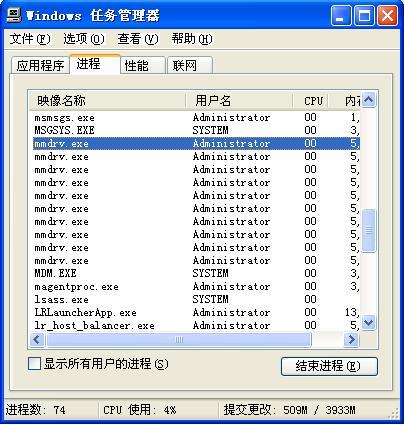
如果以多线程方式并发,只会出现一个mmdrv进程,一个进程可以支持50VU的线程并发。
Loadrunner的参考帮助还说明了,如果采用多线程方式并发,Load Generator将会比多进程支持更多的用户,具体的一个VU占用内存的取值根据Loadrunner的版本不同而不同。
3.解决方案
根据上述的资料,首先关闭了扩展日志,然后加入了思考时间,并且减少了单个压力机上虚拟用户,转而由多个压力机一起运行脚本。此问题解决。
loadrunner跑场景的时候出现:Abnormal termination, caused by mdrv process termination的更多相关文章
- (Loadrunner)Abnormal termination, caused by mdrv process termination.(转)
Load generator跑了太多用户导致CPU和内存爆满,进程无法处理请求 确认自定义的代码是否释放内存 合理调整或增加思考时间 关闭extended log 尽量避免使用Load generat ...
- Loadrunner 在controller中运行socket脚本时报错:Abnormal termination, caused by mdrv process termination 的原因和解决方法
原因: 网上给出的可能的原因大致有两个: 1. 压力负载机器的资源不足(CPU,内存) 2. 分配内存和释放内存的语句不匹配. 并给出了一些解决方案,最开始我以为是加了IP地址的原因,不断尝试增加 ...
- loadrunner跑场景时报错Full MDB file. New error messages will be ignored
这个原因是在controller跑场景时,controller的日志文件占用内存太大 解决办法:先找到controller的日志文件Results——Results Setting——找到日志的路径, ...
- LoadRunner测试场景中添加负载生成器
如何在LoadRunner测试场景中添加负载生成器 本文对如何在LoadRunner的测试场景中添加负载生成器,如何使用负载生成器的方法,总结形成操作指导手册,以指导测试人员指导开展相关工作. 1.什 ...
- Abnormal build process termination IDEA启动报错
报错如下: Error:Abnormal build process termination: "C:Program FilesJavajdk1.11.0_1injava" -Xm ...
- loadrunner多场景的串行执行以及定时执行
方法一: 既然是脚本串行执行,那在场景设计中必然是要用多个脚本,要注意的是需要将Scenario Schedule中的Schedule by设置为Group的模式.然后按实际需要依次设置每个脚本的Sc ...
- LoadRunner 多场景批处理
@echo off echo *********************************echo ****多场景测试*************echo ******************** ...
- Loadrunner:场景运行较长时间后报错:Message id [-17999] was not saved - Auto Log cache is too small to contain the message.
loadrunner运行时间较长后,跑数据过程老是失败,有如下error: Message id [-17999] was not saved - Auto Log cache is too smal ...
- Loadrunner:场景中添加负载生成器
场景中添加负载生成器: (1)远程机子(假设ip为192.168.134.23)开启负载生成器 开始菜单找到:LoadRunner Agent Process 开启后任务栏会显示如下图: (2)场景中 ...
随机推荐
- Object C学习笔记16-委托(delegate)
在.NET中都知道委托(delegate),通俗点的解释就是可以将方法作为一个参数传到另外一个方法中使用. 委托是一种引用方法的类型.一旦为委托分配了方法,委托将与该方法具有完全相同的行为.委托方法的 ...
- cryptdb中wrapper.lua的分析
因为cryptDB是在mysql-proxy的基础上来实现了,可以看成是为mysql-proxy添加了新的.为mysql-proxy已经为开发人员提供了相应的接口.如果开发人员只需要通过lua脚本语言 ...
- poj3580 伸展树(区间翻转 区间搬移 删除结点 加入结点 成段更新)
好题.我做了很久,学了大牛们的区间搬移.主要的代码都有注释. #include<cstdio> #include<cstring> #include<iostream&g ...
- NOI题库--图论 宗教信仰
1526:宗教信仰 总时间限制: 5000ms 内存限制: 65536kB 描述 世界上有许多宗教,你感兴趣的是你学校里的同学信仰多少种宗教. 你的学校有n名学生(0 < n <= 500 ...
- USACO 3.2 ratios 高斯消元
题目原意很简单,就是解一个三元一次方程组 直接高斯消元解方程组,枚举最后一列的倍数(k) 注意double的精度,有很多细节需要处理 /* PROB:ratios LANG:C++ */ #inclu ...
- javascript显示实时时间
<html> <script language=Javascript> function time(){ //获得显示时间的div t_div = document.getEl ...
- Android 服务类Service 的详细学习
http://blog.csdn.net/vipzjyno1/article/details/26004831 Android服务类Service学习四大组建 目录(?)[+] 什么是服务 服务有 ...
- map 几种遍历方法
public static void main(String[] args) { Map<String, String> map = new HashMap<String, Stri ...
- Intent和Intent Filter Context
http://www.android-doc.com/reference/android/content/Intent.html An intent is an abstract descriptio ...
- ECSHOP验证码背景图修改教程
ECSHOP验证码背景图修改教程 ECSHOP教程/ ecshop教程网(www.ecshop119.com) 2013-11-18 ECSHOP验证码背景图修改教程: ECSHOP前后台的某些地 ...