
[Shapefile C Library]读取shp图形(.net Wapper)
ShapeLib的.net Wapper版可以在官网下载到,在WorldWind中也有使用。ORG据说也是使用的ShapeLib实现的shp文件的读写。
官网:http://shapelib.maptools.org/
1. C++读取shpfile文件代码
int main()

{

	//读取shp

	const char * pszShapeFile = "data\\LineSegments2.shp";

	SHPHandle hShp= SHPOpen(pszShapeFile, "r");

	int nShapeType, nVertices;

	int nEntities = 0;

	double* minB = new double[4];

	double* maxB = new double[4];

	SHPGetInfo(hShp, &nEntities, &nShapeType, minB, maxB);

	printf("ShapeType:%d\n", nShapeType);

	printf("Entities:%d\n", nEntities);

	for (int i = 0; i < nEntities;i++)

	{

		int iShape = i;

		SHPObject *obj = SHPReadObject(hShp, iShape);

		printf("--------------Feature:%d------------\n",iShape);

		int parts = obj->nParts;

		int verts=obj->nVertices;

		printf("nParts:%d\n", parts);

		printf("nVertices:%d\n", verts);

		for (size_t i = 0; i < verts; i++)

		{

			double x=obj->padfX[i];

			double y = obj->padfY[i];

			printf("%f,%f;", x,y);

		}

		printf("\n");

	}

	SHPClose(hShp);

	system("pause");

}
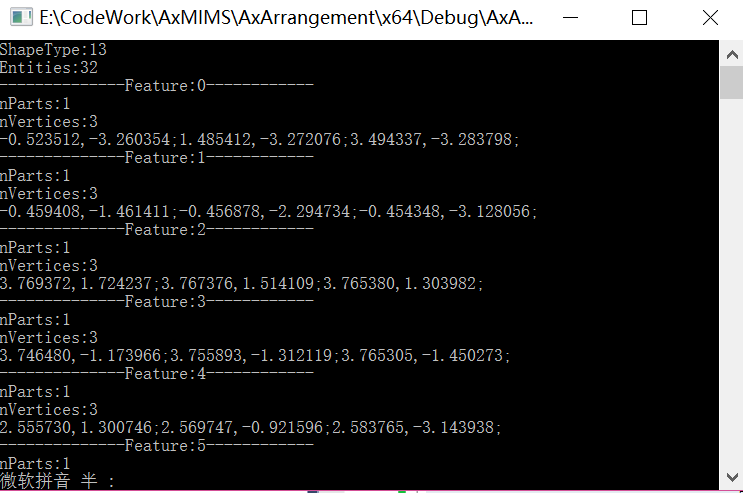
输出结果:
2. 以下是.net读取Shp文件中图形的代码:
  private void button1_Click(object sender, EventArgs e)

         {

             OpenFileDialog dlg = new OpenFileDialog();

             dlg.Filter = "(*.shp)|*.shp";

             if (dlg.ShowDialog() == DialogResult.OK)

             {

                 string fileName = dlg.FileName;

                 txtFilePath.Text = fileName;

                 ReadSHP(fileName);

             }

         }

         private void ReadSHP(string FILENAME)

         {

             IntPtr hShp;

             hShp = ShapeLib.SHPOpen(FILENAME, "rb+");

             // get shape info and verify shapes were created correctly

             double[] minB = new double[];

             double[] maxB = new double[];

             int nEntities = ;

             ShapeLib.ShapeType shapeType = ;

             ShapeLib.SHPGetInfo(hShp, ref nEntities, ref shapeType, minB, maxB);

             listBox1.Items.Add(string.Format("Number Entries: {0}", nEntities));

             listBox1.Items.Add(string.Format("ShapeType: {0}", shapeType));

             listBox1.Items.Add(string.Format("Min XY: {0}, {1}", minB[], minB[]));

             listBox1.Items.Add(string.Format("Max XY: {0}, {1}", maxB[], maxB[]));

             // test SHPReadObject on the first shape

             for (int i = ; i < nEntities; i++)

             {

                 int iShape = i;

                 listBox1.Items.Add(string.Format("Shape({0}): ", iShape));

                 IntPtr pshpObj = ShapeLib.SHPReadObject(hShp, iShape);

                 // Get the SHPObject associated with our IntPtr pshpObj

                 // We create a new SHPObject in managed code, then use Marshal.PtrToStructure

                 // to copy the unmanaged memory pointed to by pshpObj into our managed copy.

                 ShapeLib.SHPObject shpObj = new ShapeLib.SHPObject();

                 Marshal.PtrToStructure(pshpObj, shpObj);

                 listBox1.Items.Add(string.Format("Min XY of shape({0}): ({1}, {2})", iShape, shpObj.dfXMin, shpObj.dfYMin));

                 listBox1.Items.Add(string.Format("Max XY of shape({0}): ({1}, {2})", iShape, shpObj.dfXMax, shpObj.dfYMax));

                 listBox1.Items.Add(string.Format("Points of shape({0}): ({1})", iShape, shpObj.nVertices));

                 int parts = shpObj.nParts;

                 listBox1.Items.Add(string.Format("Parts of shape({0}): ({1})", iShape, parts));

                 if (parts>)

                 {

                     int[] partStart = new int[parts];

                     Marshal.Copy(shpObj.paPartStart, partStart, , parts);

                     for (int j = ; j < partStart.Length; j++)

                     {

                         listBox1.Items.Add(string.Format("FirstPart of shape({0}): ({1})", iShape, partStart[j]));

                     }

                     int[] partType = new int[parts];

                     Marshal.Copy(shpObj.paPartType, partType, , parts);

                     for (int j = ; j < partType.Length; j++)

                     {

                         listBox1.Items.Add(string.Format("FirstPartType of shape({0}): ({1})", iShape, (MapTools.ShapeLib.PartType)partType[j]));

                     }

                 }

                 ShapeLib.SHPDestroyObject(pshpObj);

             }

             ShapeLib.SHPClose(hShp);

             Console.WriteLine("\nPress any key to continue...");

             Console.ReadLine();

         }
3.新建shp并保存属性
//简化后保存

	const char* saveFileName = "data\\simplyRoom.shp";

	int nShpTpyeSave = SHPT_POLYGON;

	SHPHandle outShp = SHPCreate(saveFileName, nShpTpyeSave);

	DBFHandle dbf_h = DBFCreate(saveFileName);

	int fieldIdx=DBFAddField(dbf_h, "Shape", FTInteger, 2, 0);

	SHPObject *psShape;

	for (int ir=0;ir<rooms_.size();ir++)

	{

		printf("--------------Room:%d------------\n",ir);

		std::vector<Coordinate> coords=rooms_[ir].simplyCoords_;

		double *xCoords = new double[coords.size()];

		double *yCoords = new double[coords.size()];

		for (int ip=0;ip<coords.size();ip++)

		{

			double x=coords[ip].x;

			double y=coords[ip].y;

			xCoords[ip] = x;

			yCoords[ip] = y;

			printf("%f,%f;\n", x,y);

		}

		printf("\n");

		psShape = SHPCreateObject(nShpTpyeSave, -1, 0, NULL, NULL, coords.size(), xCoords, yCoords, NULL, NULL);

		std::cout << std::endl;

		int ishape=SHPWriteObject(outShp, -1, psShape);

		SHPDestroyObject(psShape);

		DBFWriteIntegerAttribute(dbf_h, ishape, 0, ishape);

	}

	SHPClose(outShp);

	DBFClose(dbf_h);
[Shapefile C Library]读取shp图形(.net Wapper)的更多相关文章
- [Shapefile C Library]读写shp图形(C++&.net Wapper)
ShapeLib的.net Wapper版可以在官网下载到,在WorldWind中也有使用.ORG据说也是使用的ShapeLib实现的shp文件的读写. 官网:http://shapelib.mapt ...
- C#读取shp文件并获取图形保存到sde要素类中(不使用ESRI的类库,纯c#实现)
说明:首先要将sde要素类发布成对应的要素服务,通过对要素服务的操作,实现数据在sde要素类中的增删 //向服务器发出请求 public string getPostData(string postS ...
- GDAL读取Shp问题解决:Unable to open EPSG support file gcs.csv
在GIS软件的开发中,经常用到开源库GDAL读取Shp数据,当shp数据中包含投影信息时,可能会遇到“Unable to open EPSG support file gcs.csv”错误提示,该错误 ...
- VS2017编译GDAL(64bit)+解决C#读取Shp数据中文路径的问题
编译GDAL过程比较繁琐,查阅了网上相关资料,同时通过实践,完成GDAL的编译,同时解决了SHP数据中文路径及中文字段乱码的问题,本文以“gdal-2.3.2”版本为例阐述整个编译过程. 一.编译准备 ...
- grads 读取shp
自从GrADS2.0.a8版本开始,GrADS引入了对shp图形的支持,关于此格式在这里不多说, 于是今晚就简单测试了一下最简单画图和查询命令(后续还将测试输出shp图形的命令) 测试数据采用的 ...
- Silverlight项目笔记8:层次布局、客户端读取shp、ExecuteCountAsync、柱状图、url传参
1.层次布局 由于地图窗口和菜单栏都在一个父容器内,在浏览器缩小到一定程度点击地图弹出infoWindow时,会出现菜单栏遮挡infoWindow中间部分的现象,于是通过设置Canvas.ZIndex ...
- GDAL C#读取shp中文属性值乱码问题
GDAL的C#版本读取shp中,如果属性值中含有中文,读出来有可能是乱码的问题,根据SWIG生成的C#代码调试发现问题所在,在Ogr.cs文件中有这么一个函数,代码如下: internal stati ...
- Java 在PPT中创建SmartArt图形、读取SmartArt图形中的文本
一.概述及环境准备 SmartArt 图形通过将文字.图形从多种不同布局.组合来表现内容和观点的逻辑关系,能够快速.有效地传达设计者的意图和信息.这种图文表达的视觉表示形式常用于PPT,Word,Ex ...
- GeoJson的生成与解析,JSON解析,Java读写geojson,geotools读取shp文件,Geotools中Geometry对象与GeoJson的相互转换
GeoJson的生成与解析 一.wkt格式的geometry转成json格式 二.json格式转wkt格式 三.json格式的数据进行解析 四.Java读写geojson 五.geotools读取sh ...
随机推荐
- Laptop Issue Letter (读取Excel中指定内容,然后生成新的Excel文件)
$xl = New-Object -ComObject "Excel.Application" $cmdbwb = $xl.Workbooks.Open("F:\Ivan ...
- foreach语句
foreach语句他无非就是for循环的封装,为了提高开发速度才创造出来的.他其实跟for循环一样,只不过写起来比较简便,他是1.5版本才出来的一种封装语法.并没有什么奇特之处他里面的机制就是for循 ...
- ASP.NET MVC系列 框架搭建(二)之仓储层的优化
大神勿喷,小神默默学. 会了就是不值一提的东西,不会就是绝对的高大上. 最后上传源码.希望能给读者带来一些新的认识及知识. 还没上过头条..各位大神,请点支持一下小弟. 陆续更新.更新到你会为止!! ...
- discuz全局数组变量 后台各项设置 完整版
$_G 保存了 Discuz! 中所有的预处理数据 缓存能够很好的提高程序的性能,一些配置数据没必要每次都查询数据库,只要在修改了的时候更新下缓存即可. Discuz! 中所有的缓存保存在 $_G[c ...
- 【翻译】CEDEC2014跨世代多平台并行开发PS4版如龙维新开发的一年
本篇PPT讲述的是如龙4的开发过程中,集中在PS3和PS4并行开发中所遇到和解决的一些问题.如64位指针,DX9向DX11移植API的问题,以及在PS4上使用并行渲染在1080P下让FPS达到60等. ...
- 【军哥谈CI框架】之入门教程之第二讲:分析CI结构和CI是怎么工作的
[军哥谈CI框架]之入门教程之第二讲:分析CI结构和CI是怎么工作的 之入门教程之第二讲:分析CI结构和CI是如何工作的大家好!上一节,我们共同部署了一个CI网站,做到这一点非常简单,但是,亲们, ...
- LR中HTTP协议录制模式选择
在LR中使用HTML/HTTP协议进行脚本录制时面临正确选择HTTP-based script / URL-base script 录制模式的问题,以下是比较官方的建议:1)基于浏览器的应用程序推荐使 ...
- Redis安装及初步使用
一.Centos下安装Redis1.wget http://dl.fedoraproject.org/pub/epel/6/x86_64/epel-release-6-8.noarch.rpm2.rp ...
- 判断i在字符串中出现的次数(2016.1.12P141-1)
// 方法一,利用substring截取获得出现的次数 String number = "iminigrikejijavabi"; String a = number; int c ...
- 正则基础之 \b 单词边界
本文转载自: http://www.jb51.net/article/19330.htm 1概述 “\b”匹配单词边界,不匹配任何字符. “\b”匹配的只是一个位置,这个位置的一侧是构成单词的字符,另 ...