
[Shapefile C Library]读写shp图形(C++&.net Wapper)
ShapeLib的.net Wapper版可以在官网下载到,在WorldWind中也有使用。ORG据说也是使用的ShapeLib实现的shp文件的读写。
官网:http://shapelib.maptools.org/
1. C++读取shpfile文件代码
int main()

{

	//读取shp

	const char * pszShapeFile = "data\\LineSegments2.shp";

	SHPHandle hShp= SHPOpen(pszShapeFile, "r");

	int nShapeType, nVertices;

	int nEntities = 0;

	double* minB = new double[4];

	double* maxB = new double[4];

	SHPGetInfo(hShp, &nEntities, &nShapeType, minB, maxB);

	printf("ShapeType:%d\n", nShapeType);

	printf("Entities:%d\n", nEntities);

	for (int i = 0; i < nEntities;i++)

	{

		int iShape = i;

		SHPObject *obj = SHPReadObject(hShp, iShape);

		printf("--------------Feature:%d------------\n",iShape);

		int parts = obj->nParts;

		int verts=obj->nVertices;

		printf("nParts:%d\n", parts);

		printf("nVertices:%d\n", verts);

		for (size_t i = 0; i < verts; i++)

		{

			double x=obj->padfX[i];

			double y = obj->padfY[i];

			printf("%f,%f;", x,y);

		}

		printf("\n");

	}

	SHPClose(hShp);

	system("pause");

}
输出结果:
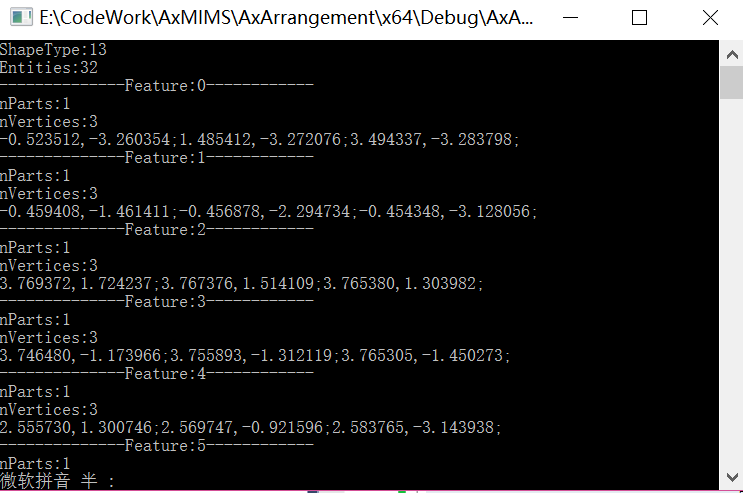
2. 以下是.net读取Shp文件中图形的代码:
  private void button1_Click(object sender, EventArgs e)

         {

             OpenFileDialog dlg = new OpenFileDialog();

             dlg.Filter = "(*.shp)|*.shp";

             if (dlg.ShowDialog() == DialogResult.OK)

             {

                 string fileName = dlg.FileName;

                 txtFilePath.Text = fileName;

                 ReadSHP(fileName);

             }

         }

         private void ReadSHP(string FILENAME)

         {

             IntPtr hShp;

             hShp = ShapeLib.SHPOpen(FILENAME, "rb+");

             // get shape info and verify shapes were created correctly

             double[] minB = new double[];

             double[] maxB = new double[];

             int nEntities = ;

             ShapeLib.ShapeType shapeType = ;

             ShapeLib.SHPGetInfo(hShp, ref nEntities, ref shapeType, minB, maxB);

             listBox1.Items.Add(string.Format("Number Entries: {0}", nEntities));

             listBox1.Items.Add(string.Format("ShapeType: {0}", shapeType));

             listBox1.Items.Add(string.Format("Min XY: {0}, {1}", minB[], minB[]));

             listBox1.Items.Add(string.Format("Max XY: {0}, {1}", maxB[], maxB[]));

             // test SHPReadObject on the first shape

             for (int i = ; i < nEntities; i++)

             {

                 int iShape = i;

                 listBox1.Items.Add(string.Format("Shape({0}): ", iShape));

                 IntPtr pshpObj = ShapeLib.SHPReadObject(hShp, iShape);

                 // Get the SHPObject associated with our IntPtr pshpObj

                 // We create a new SHPObject in managed code, then use Marshal.PtrToStructure

                 // to copy the unmanaged memory pointed to by pshpObj into our managed copy.

                 ShapeLib.SHPObject shpObj = new ShapeLib.SHPObject();

                 Marshal.PtrToStructure(pshpObj, shpObj);

                 listBox1.Items.Add(string.Format("Min XY of shape({0}): ({1}, {2})", iShape, shpObj.dfXMin, shpObj.dfYMin));

                 listBox1.Items.Add(string.Format("Max XY of shape({0}): ({1}, {2})", iShape, shpObj.dfXMax, shpObj.dfYMax));

                 listBox1.Items.Add(string.Format("Points of shape({0}): ({1})", iShape, shpObj.nVertices));

                 int parts = shpObj.nParts;

                 listBox1.Items.Add(string.Format("Parts of shape({0}): ({1})", iShape, parts));

                 if (parts>)

                 {

                     int[] partStart = new int[parts];

                     Marshal.Copy(shpObj.paPartStart, partStart, , parts);

                     for (int j = ; j < partStart.Length; j++)

                     {

                         listBox1.Items.Add(string.Format("FirstPart of shape({0}): ({1})", iShape, partStart[j]));

                     }

                     int[] partType = new int[parts];

                     Marshal.Copy(shpObj.paPartType, partType, , parts);

                     for (int j = ; j < partType.Length; j++)

                     {

                         listBox1.Items.Add(string.Format("FirstPartType of shape({0}): ({1})", iShape, (MapTools.ShapeLib.PartType)partType[j]));

                     }

                 }

                 ShapeLib.SHPDestroyObject(pshpObj);

             }

             ShapeLib.SHPClose(hShp);

             Console.WriteLine("\nPress any key to continue...");

             Console.ReadLine();

         }
3.新建shp并保存属性
//简化后保存

	const char* saveFileName = "data\\simplyRoom.shp";

	int nShpTpyeSave = SHPT_POLYGON;

	SHPHandle outShp = SHPCreate(saveFileName, nShpTpyeSave);

	DBFHandle dbf_h = DBFCreate(saveFileName);

	int fieldIdx=DBFAddField(dbf_h, "Shape", FTInteger, 2, 0);

	SHPObject *psShape;

	for (int ir=0;ir<rooms_.size();ir++)

	{

		printf("--------------Room:%d------------\n",ir);

		std::vector<Coordinate> coords=rooms_[ir].simplyCoords_;

		double *xCoords = new double[coords.size()];

		double *yCoords = new double[coords.size()];

		for (int ip=0;ip<coords.size();ip++)

		{

			double x=coords[ip].x;

			double y=coords[ip].y;

			xCoords[ip] = x;

			yCoords[ip] = y;

			printf("%f,%f;\n", x,y);

		}

		printf("\n");

		psShape = SHPCreateObject(nShpTpyeSave, -1, 0, NULL, NULL, coords.size(), xCoords, yCoords, NULL, NULL);

		std::cout << std::endl;

		int ishape=SHPWriteObject(outShp, -1, psShape);

		SHPDestroyObject(psShape);

		DBFWriteIntegerAttribute(dbf_h, ishape, 0, ishape);

	}

	SHPClose(outShp);

	DBFClose(dbf_h);
[Shapefile C Library]读写shp图形(C++&.net Wapper)的更多相关文章
- [Shapefile C Library]读取shp图形(.net Wapper)
ShapeLib的.net Wapper版可以在官网下载到,在WorldWind中也有使用.ORG据说也是使用的ShapeLib实现的shp文件的读写. 官网:http://shapelib.mapt ...
- 关于GDAL读写Shp乱码的问题总结
目录 1. 正文 1.1. shp文件本身的编码的问题 1.2. 设置读取的编码方式 1.2.1. GDAL设置 1.2.2. 解码方式 1.2.3. 其他 2. 参考 1. 正文 最近在使用GDAL ...
- 通过geotools读写shp文件
依赖jar包 读取shp public static void main(String[] path) { DbaseFileReader reader = null; try { reader = ...
- python GDAL 读写shp文件
gdal包用于处理栅格数据,ogr用于处理矢量数据. 1 #!C:\Program Files\pythonxy\python\python.exe 2 #-*- coding:gb2312 -*- ...
- delphi使用Foxit Quick PDF Library读写pdf文本和图片
简介: Debenu Quick PDF Library(PDF编程开发工具)提供一套全方位的 PDF API 函数,帮助您快速简便地处理 PDF 文件.从文档属性的基本操作到创建您自己的 PDF 查 ...
- shp系列(一)——利用C++进行shp文件的读(打开)与写(创建)开言
博客背景和目的 最近在用C++写一个底层的东西,需要读取和创建shp文件.虽然接触shp文件已经几年了,但是对于shp文件内到底包含什么东西一直是一知半解.以前使用shp文件都是利用软件(如ArcGI ...
- C#、C++用GDAL读shp文件(转载)
C#.C++用GDAL读shp文件 C#用GDAL读shp文件 (2012-08-14 17:09:45) 标签: 杂谈 分类: c#方面的总结 1.目前使用开发环境为VS2008+GDAL1.81 ...
- grads 读取shp
自从GrADS2.0.a8版本开始,GrADS引入了对shp图形的支持,关于此格式在这里不多说, 于是今晚就简单测试了一下最简单画图和查询命令(后续还将测试输出shp图形的命令) 测试数据采用的 ...
- Android GIS开发系列-- 入门季(13)Gdal简单写个shp文件
Gdal是用来读写栅格与矢量数据的,在Gdal官网,可以下载相关的资源进行平台的编译.其实Arcgis底层也是用Gdal来读取shp文件的,那在Android中可以直接读写shp文件吗,是可以的.这里 ...
随机推荐
- HandlerSocket介绍
HandlerSocket的原理 HandlerSocket的应用场景: MySQL自身的局限性,很多站点都采用了MySQL+Memcached的经典架构,甚至一些网站放弃MySQL而采用NoSQL产 ...
- Docker详解
一.Docker 简介 Docker 两个主要部件: Docker: 开源的容器虚拟化平台 Docker Hub: 用于分享.管理 Docker 容器的 Docker SaaS 平台 -- Docke ...
- hdu3746 Cyclic Nacklace【nxt数组应用】【最小循环节】
Cyclic Nacklace Time Limit: 2000/1000 MS (Java/Others) Memory Limit: 32768/32768 K (Java/Others)T ...
- TOP100summit【分享实录-网易】构建云直播分发网络
本篇文章内容来自2016年TOP100summit网易视频云.网易杭州研究院服务端技术专家邵峰的案例分享.编辑:Cynthia 邵峰:网易视频云.网易杭州研究院服务端技术专家浙江大学计算机专业博士毕业 ...
- ROS中打开单目摄像头
1.安装功能包 $ sudo apt-get install ros-kinetic-usb-cam 2.启动launch文件 $ roslaunch usb_cam usb_cam-test.lau ...
- Prometheus的架构及持久化
原文: https://my.oschina.net/go4it/blog/855598 Prometheus是什么 Prometheus是一个开源的系统监控和报警工具,特点是 多维数据模型(时序列数 ...
- [No0000126]SSL/TLS原理详解与WCF中的WS-Security
SSL/TLS作为一种互联网安全加密技术 1. SSL/TLS概览 1.1 整体结构 SSL是一个介于HTTP协议与TCP之间的一个可选层,其位置大致如下: SSL:(Secure Socket La ...
- 从一条巨慢SQL看基于Oracle的SQL优化(重磅彩蛋+PPT)
本文根据DBAplus社群第110期线上分享整理而成,文末还有好书送哦~ 讲师介绍 丁俊 新炬网络首席性能优化专家 SQL审核产品经理 DBAplus社群联合发起人.<剑破冰山-Oracle开发 ...
- 动画支持的一些keypath
transform.scale = 比例轉換 transform.scale.x = 闊的比例轉換 transform.scale.y = 高的比例轉換 transform.rotation.z = ...
- Transfrom笔记
1.在不是以左上角为缩放点进行缩放时,其实比例不能为0,因为0将导致缩放可能出现动画效果不可控,务必选取0.1等较小值来变化