
PHPExcel 类
//引入工具类

require_once 'PHPExcel.php';


//HandleExcel.class.php 文件

class HandleExcel extends PHPExcel{

    private $file;

    private $fileType;

    private $objProperty; //文档属性对象

    private $objReader;

    private $objWriter;

    private $property = array();

    public function __construct($property = array()){

        parent::__construct();

        if($property){

            $this->property = $property;

            $this->setProperty($this->property);

        }

    }

    /*

     * 设置文档属性

    * $property = array('title'=>'标题', 'creator' => '作者');

    */

    public function setProperty($property = array()){

        $this->objProperty = $this->getProperties();

        if(!empty($property['creator']))$this->objProperty->setCreator($property['creator']);

        if(!empty($property['title'])) $this->objProperty->setTitle($property['title']);

        if(!empty($property['subject']))$this->objProperty->setSubject($property['subject']);

        if(!empty($property['laster']))$this->objProperty->setLastModifiedBy($property['laster']);

        if(!empty($property['description']))$this->objProperty->setDescription($property['description']);

        if(!empty($property['keyword']))$this->objProperty->setKeywords($property['keyword']);

        if(!empty($property['category']))$this->objProperty->setCategory($property['category']);

    }

    /*

     * 添加数据

    * $data = array( 'name'=>'tom', 'age'=>'13');

    * $dataCnf = array('name=>'a1', 'age'=>'b2');

    * */

    public function addData($data, $field = array(), $index = ''){

        $objAdd = ($index)? $this->setActiveSheetIndex($index) : $this->getActiveSheet();

        //根据data自动创建位置数据对应位置.

        if($field){

            $data = array_merge( array(0 => $field), $data);

            $excelRowCnf = array('a','b','c','d','e','f','g','h','i','j','k','l','m','n','o','p','q','r','s','t','u','v','w','x','y','z');

            $excelLine = 1;

            foreach($data as $key => $row){

                $excelRow = 0;

                foreach($field as $fieldName => $text){

                    $data['new'][$key][$excelRowCnf[$excelRow].$excelLine] = $row[$fieldName];

                    $excelRow++;

                }

                unset($data[$key]);

                $excelLine++;

            }

            $data = $data['new'];

        }

        //添加

        foreach($data as $row){

            foreach($row as $place => $val){

                if(empty($place) || empty($val)) continue;

                $objAdd->setCellValue($place, $val);

            }

        }

    }

    //生成文件

    public function saveFile($savePath, $output = false, $type = 'Excel5'){

        $this->objWriter = PHPExcel_IOFactory::createWriter($this, $type);

        if($output){

            $savePath = iconv ('utf-8', 'gb2312', $savePath);

            header('Content-Type: application/vnd.ms-excel');

            header('Content-Disposition: attachment;filename="'.$savePath.'"');

            header('Cache-Control: max-age=0');

            // If you're serving to IE 9, then the following may be needed

            header('Cache-Control: max-age=1');

            // If you're serving to IE over SSL, then the following may be needed

            header ('Expires: Mon, 26 Jul 1997 05:00:00 GMT'); // Date in the past

            header ('Last-Modified: '.gmdate('D, d M Y H:i:s').' GMT'); // always modified

            header ('Cache-Control: cache, must-revalidate'); // HTTP/1.1

            header ('Pragma: public'); // HTTP/1.0

            $this->objWriter->save('php://output');

            exit;

        }

        $this->objWriter->save($savePath);

    }

    /* -------------------------------------- 读取文件 ---------------------------- */

    //设置读对象

    private function setReader($file, $type = null){

        $this->file = $file;

        if($type){

            $this->fileType = $type;

            $this->objReader = PHPExcel_IOFactory::createReader($type)->load($file);

        }else{

            $this->fileType = PHPExcel_IOFactory::identify($file);

            $this->objReader = PHPExcel_IOFactory::load($file);

        }

    }

    //加载文件

    public function loadFile($file, $type = null){

        $this->setReader($file, $type);

        $this->sheetData = $this->objReader->getActiveSheet()->toArray(null,true,true,true);

    }

    //返回需要的数据

    public function dataFormat($meed, $start = 1, $end = null){

        foreach($this->sheetData as $line => $row){

            if($start && $line < $start) continue;

            if($end && $line > $end) break;

            foreach($row as $key => $val){

                if(array_key_exists($key, $meed)){

                    $data[$line][$meed[$key]] = $val;

                }

            }

        }

        return array_merge($data);

    }

    //工作表信息

    public function sheetInfo($file = null){

        ($file)? null : $file = $this->file;

        $info = $this->objReader->listWorksheetInfo($file);

        return $info;

    }

}


set_time_limit(0);
//使用如下:
require_once 'HandleExcel.class.php';

$myExcel = new HandleExcel();

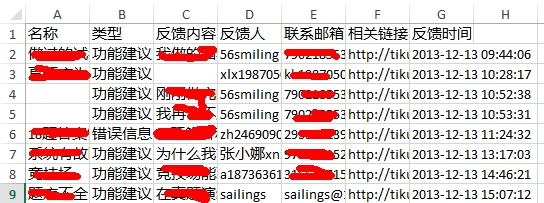
$fieldCnf = array('title'=>'名称','type'=>'类型', 'content'=>'反馈内容', 'name'=>'反馈人', 'reg_mail'=>'联系邮箱','from_link'=>'相关链接', 'addtime'=>'反馈时间');

/*说明一下, $record 是查询得到的二维数组数据
array(
 array('title' => '这是标题1', 'type'=>1, 'content'=>'内容文字' ... ),
 array('title' => '这是标题2', 'type'=>3, 'content'=>'内容文字' ... )
 ...
)
*/
$myExcel->addData($record, $fieldCnf);
// ->saveFile(文件名, 是否输出到浏览器? )

$myExcel->saveFile('用户反馈数据.xls', true);
最后, 得到的excel文件显示如下:
PHPExcel 类的更多相关文章
- 用PHPExcel类读取excel文件的内容
这里对PHPExcel类不做介绍,有兴趣的朋友可以自己查阅资料 在classes文件夹下有个PHPExcel.php文件,这个文件是这个类库的主要入口文件,在用之前,要引入这个类 其他的类,在此类中会 ...
- ThinkPHP5调用PHPExcel类实现导入导出
注意:extend是放置第三方类的地方,不要乱配置命名空间那些,引起不必要的类错误 代码如下 <?php namespace app\index\controller; use think\Co ...
- TP3.2加载外部PHPexcel类,实现导入和导出
TP3.2加载外部PHPexcel类,实现导入和导出 导入: 1.将下载好的PHPexcel文件放到libray/Org/Uti/文件夹下,将PHPEXCEL.PHP改为PHPEXCEL.class. ...
- php利用PHPExcel类导出导入Excel用法
PHPExcel类是php一个excel表格处理插件了,下面我来给大家介绍利用PHPExcel类来导入与导出excel表格的应用方法,有需要了解的朋友不防参考参考(PHPExcel自己百度下载这里不介 ...
- ThinkPHP3.2.3使用PHPExcel类操作excel导出excel
如何导入excel请看:ThinkPHP3.2.3使用PHPExcel类操作excel导入读取excel // 引入PHPExcel类 import("Org.Util.PHPExccel& ...
- thinkphp引入PHPExcel类---thinkPHP类库扩展-----引入没有采用命名空间的类库
最近项目中遇到引入PHPExcel第三方类库 但是下载的phpExcel类没有命名空间,而且所有接口文件的命名都是以.php结尾 而不是tp中的.class.php 解决办法很简单:在引入没有采用命 ...
- 关于PHPExcel类占用内存问题
最近在帮一家公司做后台excel导出功能,使用的工具类是phpexcel,因为这个类功能比较强大.全面. 但是遇到下面一个问题: 当导出数据量达到一定数量级的时候,比如说1000条,服务器出现卡顿.白 ...
- php使用PHPexcel类读取excel文件(循环读取每个单元格的数据)
error_reporting(E_ALL); date_default_timezone_set('Asia/ShangHai'); include_once('Classes/PHPExcel/I ...
- ThinkPHP3.2.3使用PHPExcel类操作excel导入读取excel
方法一: 1. 下载PHPExcel并保存在如下位置: 2. 在控制器中引用 vendor("PHPExcel.PHPExcel"); $objReader = \PHPExcel ...
随机推荐
- ProcDump
https://technet.microsoft.com/en-us/sysinternals/dd996900.aspx
- 转:Java NIO系列教程(九) Pipe
Java NIO 管道是2个线程之间的单向数据连接.Pipe有一个source通道和一个sink通道.数据会被写到sink通道,从source通道读取. 这里是Pipe原理的图示: 创建管道 通过Pi ...
- tolua.cast的实用方法
local name = (tolua.cast(sender, "ccui.Button")):getTitleText()
- java笔记--关于线程死锁
关于线程死锁 什么是死锁: 在编写多线程的时候,必须要注意资源的使用问题,如果两个或多个线程分别拥有不同的资源, 而同时又需要对方释放资源才能继续运行时,就会发生死锁. 简单来说:死锁就是当一个或多个 ...
- 成为Android高手必须掌握的28大项内容和10个建议
(一)成为Android高手必须掌握的8项基本要求 [1] Android操作系统概述1. Android系统架构. 2. Android利用设计理念. 3. ...
- cocos2d调度器(定时执行某函数)
调度器(scheduler) 继承关系 原理介绍 Cocos2d-x调度器为游戏提供定时事件和定时调用服务.所有Node对象都知道如何调度和取消调度事件,使用调度器有几个好处: 每当Node不再可见或 ...
- ZeroMQ(java)中组件间数据传输(Pipe的实现)
在ZeroMQ(java)中,整个IO的处理流程都是分层来进行的,当然处于最下端的肯定是前面介绍过的poller以及StreamEngin了....涉及到上层的话就还有session,以及socket ...
- 调用python 报R6034 错误
R6034 指的是:"An application has made an attempt to load the C runtime library incorrectly. Please ...
- django-cms 代码研究(四)CMS_TEMPLATE标签
CMS_TEMPLATE 继承这个东东可以在实现很灵活的布局,如下:
- Maximum Product Subarray
Find the contiguous subarray within an array (containing at least one number) which has the largest ...