
ELK——在 CentOS/Linux 把 Kibana 3.0 部署在 Nginx 1.9.12
迁移到:http://www.bdata-cap.com/newsinfo/1712690.html
上一篇文章《安装 logstash 2.2.0、elasticsearch 2.2.0 和 Kibana 3.0》,介绍了如何安装 Logstash、Elasticsearch 以及用 Python 的 SimpleHTTPServer 模块部署 Kibana。
本文介绍如何在 Linux 上把 Kibana 部署在 Nginx。
假设,我机器 IP 是 10.1.8.166,Kibana 和 Nginx 都安装在这个机器上。
- 下载 Nginx。下载 Nginx,并上传到你的服务器上,我放在 /usr/local/src/nginx。
- 解压 Nginx。
[root@vcyber nginx]# pwd
/usr/local/src/nginx
[root@vcyber nginx-1.9.12]# tar -zxvf nginx-1.5.9.tar.gz
[root@vcyber nginx]# ls
nginx-1.9.12 nginx-1.9.12.tar.gz
[root@vcyber nginx]#
- 配置 Nginx。指定把 Nginx 安装到 /usr/local/nginx。
[root@vcyber nginx]# cd nginx-1.9.12
[root@vcyber nginx-1.9.12]# ls
auto CHANGES.ru configure html Makefile objs src
CHANGES conf contrib LICENSE man README
[root@vcyber nginx-1.9.12]# ./configure --prefix=/usr/local/nginx
checking for OS
+ Linux 2.6.32-504.23.4.el6.x86_64 x86_64
checking for C compiler ... found
+ using GNU C compiler
+ gcc version: 4.4.7 20120313 (Red Hat 4.4.7-16) (GCC)
checking for gcc -pipe switch ... found
checking for -Wl,-E switch ... found
checking for gcc builtin atomic operations ... found
checking for C99 variadic macros ... found
checking for gcc variadic macros ... found
checking for gcc builtin 64 bit byteswap ... found
checking for unistd.h ... found
……
./configure: error: the HTTP rewrite module requires the PCRE library.
You can either disable the module by using --without-http_rewrite_module
option, or install the PCRE library into the system, or build the PCRE library
statically from the source with nginx by using --with-pcre=<;path> option.
[root@vcyber nginx-1.9.12]#
具体配置参数,参看 http://nginx.org/en/linux_packages.html
报错了~说,HTTP rewrite 模块需要 pcre-devel 库。安装一个就行。因为我机器用了有段时间,也懒得看是否有,总之,没有再安装。
- 安装 PCRE 库。
[root@vcyber bin]# yum -y install pcre-devel
Loaded plugins: fastestmirror
Setting up Install Process
Loading mirror speeds from cached hostfile
* base: mirrors.yun-idc.com
* epel: mirrors.yun-idc.com
* extras: mirrors.yun-idc.com
* updates: mirrors.yun-idc.com
Resolving Dependencies
-->; Running transaction check
--->; Package pcre-devel.x86_64 0:7.8-7.el6 will be installed
-->; Finished Dependency Resolution
……
Complete!
[root@vcyber bin]#
Nginx 除了依赖 pcre-devel 库,还有 openssl、openssl-devel、zlib-devel、gcc。如果你的机器上没有,就用 yum 安装一下。
- 再试一次
[root@vcyber nginx-1.9.12]# ls
auto CHANGES.ru configure html Makefile objs src
CHANGES conf contrib LICENSE man README
[root@vcyber nginx-1.9.12]# ./configure --prefix=/usr/local/nginx
checking for OS
+ Linux 2.6.32-504.23.4.el6.x86_64 x86_64
checking for C compiler ... found
+ using GNU C compiler
+ gcc version: 4.4.7 20120313 (Red Hat 4.4.7-16) (GCC)
checking for gcc -pipe switch ... found
……
Configuration summary
+ using system PCRE library
+ OpenSSL library is not used
+ md5: using system crypto library
+ sha1: using system crypto library
+ using system zlib library
nginx path prefix: "/usr/local/nginx"
……
[root@vcyber nginx-1.9.12]#
这次成功了~
- 编译安装 Nginx。
[root@vcyber nginx-1.9.12]# make & make install
- 检查是否安装成功。
[root@vcyber sbin]# pwd
/usr/local/nginx/sbin
[root@vcyber sbin]# ./nginx -t
nginx: the configuration file /usr/local/nginx/conf/nginx.conf syntax is ok
nginx: configuration file /usr/local/nginx/conf/nginx.conf test is successful
[root@vcyber sbin]#
显示,OK 和 successful。
- 启动 Nginx
[root@vcyber sbin]# ./nginx
[root@vcyber sbin]#
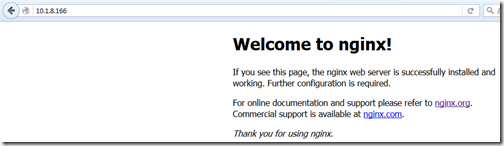
在浏览器地址栏输入,访问80端口,
- 把 Kibana 部署到 Nginx。
其实,很简单~只需要修改 Nginx 配置 nginx.conf 的 server 小节即可。下面配置文件,是截取,并不完整。
[root@vcyber conf]# pwd
/usr/local/nginx/conf
[root@vcyber conf]# cat nginx.conf
#user nobody;
worker_processes 1;
#error_log logs/error.log;
#error_log logs/error.log notice;
#error_log logs/error.log info;
#pid logs/nginx.pid;
events {
worker_connections 1024;
}
http {
include mime.types;
default_type application/octet-stream;
#log_format main '$remote_addr - $remote_user [$time_local] "$request" '
# '$status $body_bytes_sent "$http_referer" '
# '"$http_user_agent" "$http_x_forwarded_for"';
#access_log logs/access.log main;
sendfile on;
#tcp_nopush on;
#keepalive_timeout 0;
keepalive_timeout 65;
#gzip on;
server {
listen 80;
server_name localhost;
#charset koi8-r;
#access_log logs/host.access.log main;
location / {
#root html;
root /usr/local/kibana/kibana-3.0/src;
index index.html index.htm;
}
……
}
……
}
[root@vcyber conf]#
server.location 下的 root,指向你 Kibana 的位置,必须是 Kibana 的 src 位置。
安装 logstash 2.2.0、elasticsearch 2.2.0 和 Kibana 3.0
为调试 Logstash Grok 表达式,安装 GrokDebuger 环境
ELK——在 CentOS/Linux 把 Kibana 3.0 部署在 Nginx 1.9.12的更多相关文章
- CentOS Linux release 7.6.1810全新安装 Zimbra 8.8.12邮箱
1.1 基础环境配置 1.1.1 主机名配置 [root@mail ~]# hostnamectl --static set-hostname mail.example.com [root@mai ...
- centos下gitlab私服完整安装部署(nginx+MySQL+redis+gitlab-ce+gitlab-shell+)
系统环境cat /etc/redhat-release CentOS release 6.8 (Final) nginx -vnginx version: nginx/1.9.15 redis-cli ...
- ELK——安装 logstash 2.2.0、elasticsearch 2.2.0 和 Kibana 3.0
本文内容 Elasticsearch logstash Kibana 参考资料 本文介绍安装 logstash 2.2.0 和 elasticsearch 2.2.0,操作系统环境版本是 CentOS ...
- linux centos安装编译phantomjs 2.0的方法
phantomjs 2.0最新版的官方不提供编译好的文件下载,只能自己编译,有教程但是过于简单,特别是服务器上要安装N多的支持.折腾到现在终于装好了并且能正常运行了,截图mark一下: linux c ...
- centos / Linux 服务环境下安装 Redis 5.0.3
原文:centos / Linux 服务环境下安装 Redis 5.0.3 1.首先进入你要安装的目录 cd /usr/local 2.下载目前最新稳定版本 Redis 5.0.3 wget http ...
- Centos LInux 7.0 内核3.1 升级简化流程
Centos LInux 7.0 内核3.1 升级建华流程 1)#导入ELRepo软件仓库的公共秘钥rpm --import https://www.elrepo.org/RPM-GPG-KEY-el ...
- ELK 架构之 Elasticsearch、Kibana、Logstash 和 Filebeat 安装配置汇总(6.2.4 版本)
相关文章: ELK 架构之 Elasticsearch 和 Kibana 安装配置 ELK 架构之 Logstash 和 Filebeat 安装配置 ELK 架构之 Logstash 和 Filebe ...
- ELK6.0部署:Elasticsearch+Logstash+Kibana搭建分布式日志平台
一.前言 1.ELK简介 ELK是Elasticsearch+Logstash+Kibana的简称 ElasticSearch是一个基于Lucene的分布式全文搜索引擎,提供 RESTful API进 ...
- 编译安装 Centos 7 x64 + tengine.2.0.3 (实测+笔记)
系统硬件:vmware vsphere (CPU:2*4核,内存2G) 系统版本:CentOS Linux release 7.0.1406 安装步骤: 1.系统环境 1.1 更新系统 [root@c ...
随机推荐
- [Chapter 3 Process]Practice 3.8: Describe the differences among short-term, medium-term, long-term scheduling
3.8 Describe the differences among short-term, medium-term, and longterm scheduling. 答案: 长期调度决定哪些进程进 ...
- web form 复合控件
DropDownList 下拉列表 会被编译为select option ps.name 服务端常用,id 客户端常用 一般用法: 一.将数据放进去 方法一:同WinForm相同,给定数据源,然后绑定 ...
- App开发的过程
直播App开发的过程 第一步:分解直播App的功能,我们以X客为例 视频直播功能,这是一款直播App最主要的功能,要能支持视频直播RTMP推流,使画面传输流畅.清晰(美颜后的清晰,你懂的聊天功能,用户 ...
- 用c语言写的简单计算器
这是自己在学习C语言,凭借自己的兴趣,将课本的知识运用后整理的关于C语言计算器的代码.计算器实现的功能有:加.减.乘.除.求余.功能简单,但对于初学者的我来说能把它写出来,排除每个错误依旧是个难题.前 ...
- PHP中想过获取系统内置的所有常量吗?
print_r(get_defined_constants(true)); OK!这样就可以了,赶紧去试试吧
- Web大文件下载控件更新-Xproer.HttpDownloader
资源下载:cab安装包(x86),cab安装包(x64),xpi安装包,crx安装包,nat安装包,exe安装包,开发文档,根证书,VC库, 更新时间:2016-08-19 版本号:1,2,56, ...
- (转)CSS 为不同大小的浏览器视窗使用不同的样式表
转自:http://www.iefans.net/liulanqi-shichuang-butong-yangshibiao/ 同一个网站,访问它的浏览器可能会是不同的宽度,常见的有320px,480 ...
- Jquery插件实现点击获取验证码后60秒内禁止重新获取
通过jquery.cookie.js插件可以快速实现“点击获取验证码后60秒内禁止重新获取(防刷新)”的功能 先到官网(http://plugins.jquery.com/cookie/ )下载coo ...
- gromacs, quake III和vrsqrtps
看标题大家可能觉得三个词汇风马牛不相及,第一个是解蛋白质分子动力学的软件,第二个是上三代宅男最爱雷神之锤,第三个则是一个存在于IntelSSE及AVX中的一个指令,他的作用是快速求平方根的倒数. 起因 ...
- emum类(2)
emum定义如下: public abstract class Enum<E extends Enum<E>>extends Objectimplements Comparab ...