
字典集合Dictionary<K,V>和构造的应用==>>体检套餐项目
效果
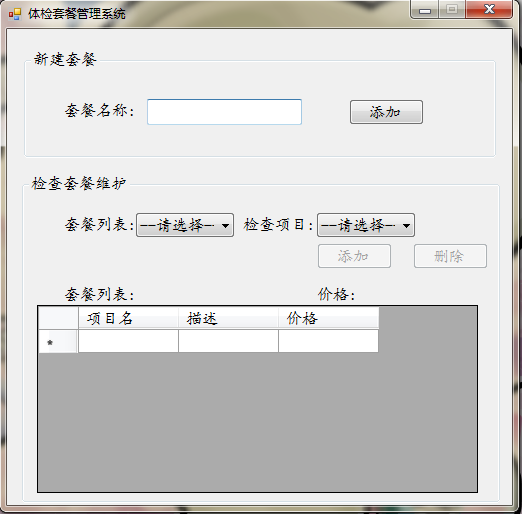
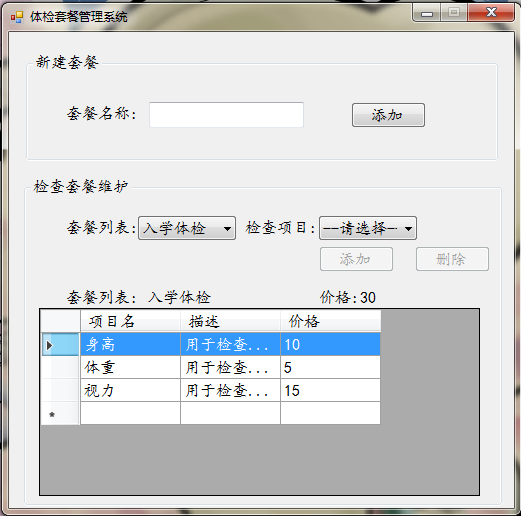
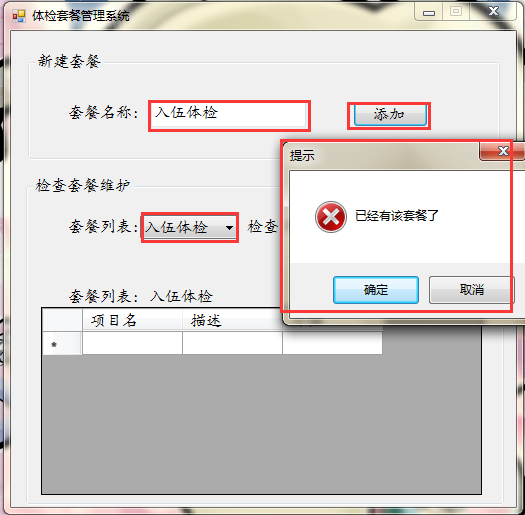
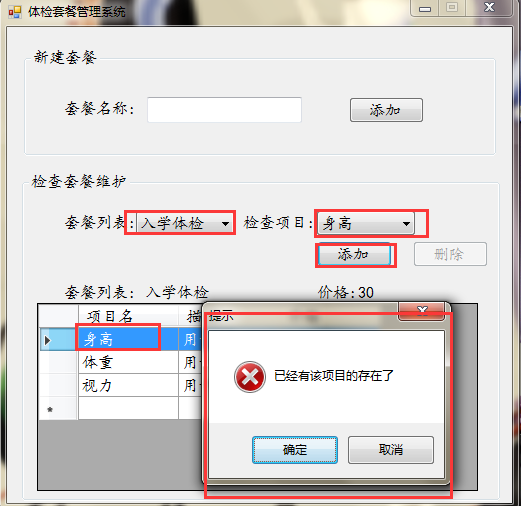
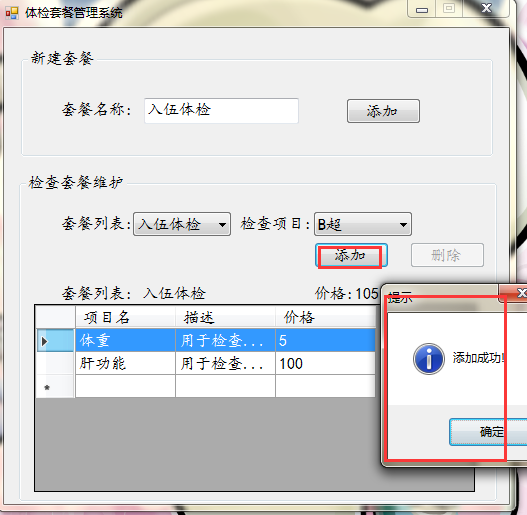
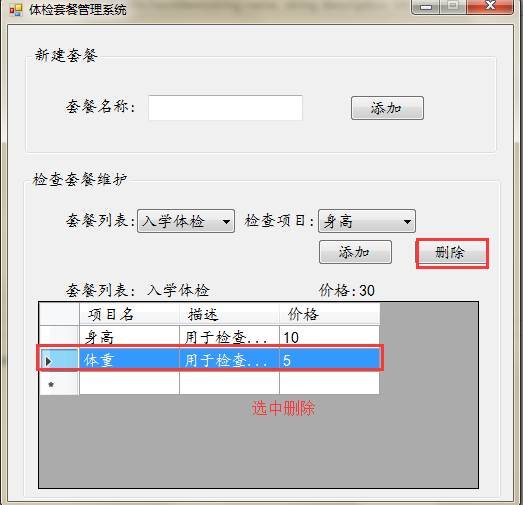
首先,我们先来准备我们需要的类
1.检查项目类
using System;

using System.Collections.Generic;

using System.Linq;

using System.Text;

using System.Threading.Tasks;

namespace 第五章_体检套餐管理系统_

{

    //项目类

   public class HealthCheckItem

    {

       //项目描述

        public string  Description { get; set; }

       //项目名称

        public string  Name { get; set; }

       //项目价格

        public int Price { get; set; }

       //无参构造

        public HealthCheckItem() { }

       //带参构造

        public HealthCheckItem(string name,string description,int price)

        {

            this.Name = name;

            this.Price = price;

            this.Description = description;

        }

    }

}
2.套餐类
using System;

using System.Collections.Generic;

using System.Linq;

using System.Text;

using System.Threading.Tasks;

namespace 第五章_体检套餐管理系统_

{

    //套餐类

   public class HealthCheckSet

    {

        //HealthCheckItem的集合

        public List<HealthCheckItem> Item { get; set; }

       //套餐价格

        public int Price { get; set; }

       //套餐名称

        public string Name { get; set; }

       //无参构造

        public HealthCheckSet() { }

       //带参构造

        public HealthCheckSet(string name,List<HealthCheckItem> item)

        {

            this.Name = name;

            this.Item = item;

        }

        //计算总价格

        public void CalcPrice()

        {

            int totalPrice = ;

            foreach (HealthCheckItem item in this.Item)

            {

                totalPrice += item.Price;

            }

            this.Price = totalPrice;

        }

    }

}
然后我们就可以来实现主页面的一些功能键了
1.主界面的初始工作
        //建立所有 检查项目 集合

       // List<HealthCheckItem> Alllist = new List<HealthCheckItem>();

        Dictionary<string, HealthCheckItem> Alllist = new Dictionary<string, HealthCheckItem>();

        //建立 套餐中的 检查项目 集合

        List<HealthCheckItem> list = new List<HealthCheckItem>();

        //使用字典保存套餐集合

        Dictionary<string, HealthCheckSet> dictionary = new Dictionary<string, HealthCheckSet>();

        //初始化检查项目

        HealthCheckItem item, item2, item3, item4, item5, item6, item7;

        //定义一个默认套餐

        HealthCheckSet moren;

        //初始化检查项目的方法

        public void main()

        {

             item = new HealthCheckItem("身高","用于检查身高",);

             item2 = new HealthCheckItem("体重","用于检查体重",);

             item3 = new HealthCheckItem("视力","用于检查视力",);

             item4 = new HealthCheckItem("听力","用于检查听力",);

             item5 = new HealthCheckItem("肝功能","用于检查肝功能",);

             item6 = new HealthCheckItem("B超","用于检查B超", );

             item7 = new HealthCheckItem("心电图","用于检查心电图",);

             Alllist.Add(item.Name,item);

             Alllist.Add(item2.Name,item2);

             Alllist.Add(item3.Name,item3);

             Alllist.Add(item4.Name, item4);

             Alllist.Add(item5.Name,item5);

             Alllist.Add(item6.Name,item6);

             Alllist.Add(item7.Name,item7);

            //dictionary.Add(item.Name,item);

        }

        //生成默认套餐数据

        public void yuan()

        {

            list.Add(item);

            list.Add(item2);

            list.Add(item3);

            moren = new HealthCheckSet("入学体检",list);

            //计算价格

            moren.CalcPrice();

            this.dictionary.Add("入学体检", moren);

        }

        //套餐列表 下拉框的加载方法

        public void combox()

        {

            cbm_sum.Items.Clear();

            cbm_sum.Items.Add("--请选择--");

            foreach (string item in dictionary.Keys)

            {

                cbm_sum.Items.Add(item);

            }

            //默认第一项为选中

            cbm_sum.SelectedIndex = ;

        }

        //检查项目 下拉框的加载方法

        public void combox2()

        {

            cmb_xiang.Items.Clear();

            cmb_xiang.Items.Add("--请选择--");

            foreach (string item in Alllist.Keys)

            {

                cmb_xiang.Items.Add(item);

            }

            //默认第一项为选中

            cmb_xiang.SelectedIndex = ;

        }

        private void FrmMain_Load(object sender, EventArgs e)

        {

            main(); //初始化检查项目

            yuan();  //生成默认套餐数据

            combox();  //套餐列表 下拉框的加载

            combox2();//检查项目 下拉框的加载

        }
   //填充套餐的DataGridView的方法

        public void UpdateSet(HealthCheckSet set)

        {

            if (set.Item == null)

            {

                //给DataGridView的数据源赋空值

                dgv.DataSource = new BindingList<HealthCheckItem>();

                return;

            }

            else

            {

                dgv.DataSource = new BindingList<HealthCheckItem>(set.Item);

            }

        }
2.添加套餐按钮
  //添加套餐

        private void but_add_Click(object sender, EventArgs e)

        {

            if (txt_name.Text!="")

            {

               //判断字典中是否有你想要添加的套餐

                if (dictionary.Keys.Contains(txt_name.Text))

                {

                        MessageBox.Show("已经有该套餐了", "提示", MessageBoxButtons.OKCancel, MessageBoxIcon.Error);

                        return;

                }

                    else

                    {

                        //给health实例化

                        List<HealthCheckItem> hao = new List<HealthCheckItem>();

                        HealthCheckSet health = new HealthCheckSet();

                        health.Item = hao;

                        health.Name = "";

                        health.Price = ;

                        this.dictionary.Add(txt_name.Text, health);

                        combox();

                        cbm_sum.Text = txt_name.Text;

                        txt_name.Text = "";

                    }

            }

            else

            {

                MessageBox.Show("添加的不能为空!", "提示", MessageBoxButtons.OKCancel, MessageBoxIcon.Error);

            }

        }
3.选择(改变)套餐
  //选择套餐

        private void cbm_sum_SelectedIndexChanged(object sender, EventArgs e)

        {

            string setName = cbm_sum.Text;

            if (cbm_sum.Text=="--请选择--")

            {

                //给DataGridView的数据源赋空值

                dgv.DataSource = new BindingList<HealthCheckItem>();

                lab_xianshiname.Text = "";

                cmb_xiang.Text = "";

                lab_xianshiprice.Text = "";

                but_new.Enabled = false;

                return;

            }

            else

            {

                lab_xianshiname.Text = setName;

                if ( dictionary[setName]!=null)

                {

                    //根据套餐名给DataGridView绑定数据

                    UpdateSet(dictionary[setName]);

                }

                else

                {

                    //给DataGridView的数据源赋空值

                    dgv.DataSource = new BindingList<HealthCheckItem>();

                }

                //根据套餐名给其中的检查项求总价格

                lab_xianshiprice.Text = dictionary[setName].Price.ToString();

            }

        }
4.添加检查项目按钮
//添加项目

        private void but_new_Click(object sender, EventArgs e)

        {

            string name = cmb_xiang.Text;

            //根据你选择的套餐找到相应的项目集合,同时判断聚合中是否有你想要添加的项

            if (!dictionary[cbm_sum.Text].Item.Contains(Alllist[name]))//没有,添加

            {

                dictionary[cbm_sum.Text].Item.Add(Alllist[name]);

                MessageBox.Show("添加成功!","提示",MessageBoxButtons.OK,MessageBoxIcon.Information);

                dgv.DataSource = new BindingList<HealthCheckItem>(dictionary[cbm_sum.Text].Item);

                dictionary[cbm_sum.Text].CalcPrice();

                //根据套餐名给其中的检查项求总价格

                lab_xianshiprice.Text = dictionary[cbm_sum.Text].Price.ToString();

            }

            else//有,则提示

            {

                MessageBox.Show("已经有该项目的存在了", "提示", MessageBoxButtons.OKCancel, MessageBoxIcon.Error);

            }

        }
5.删除按钮
        //删除

        private void but_shan_Click(object sender, EventArgs e)

        {

            string key = dgv.SelectedRows[].Cells[].Value.ToString();

            this.dictionary[cbm_sum.Text].Item.Remove(Alllist[key]);

            dgv.DataSource = new BindingList<HealthCheckItem>(dictionary[cbm_sum.Text].Item);

            but_shan.Enabled = false;//删除按钮的禁用

        }

        public string name;

        //选中

        private void dgv_CellClick(object sender, DataGridViewCellEventArgs e)

        {

            if (dgv.SelectedRows.Count!=||dgv.SelectedRows[].Cells[].Value==null)

            {

                MessageBox.Show("请你正确的选择一行!","提示",MessageBoxButtons.OKCancel,MessageBoxIcon.Error);

                return;

            }

            else

            {

                name = dgv.SelectedRows[].Cells[].Value.ToString();

                but_shan.Enabled = true;//删除按钮的可用

            }

        }
6.添加按钮的可用或禁用
 //添加按钮的 是否可用(检查项目下拉框的SelectedIndexChanged事件)

        private void cmb_xiang_SelectedIndexChanged(object sender, EventArgs e)

        {

            if (cmb_xiang.Text == "--请选择--"||cbm_sum.Text=="--请选择--")

            {

                 but_new.Enabled = false;//禁用

            }

            else

            {

                but_new.Enabled = true;//可用

            }

        }
这样,我们的项目就完成了,有一些可以优化的,忘大家别忘了,没有一样东西可以是永远的经典哟!
字典集合Dictionary<K,V>和构造的应用==>>体检套餐项目的更多相关文章
- C#泛型集合—Dictionary<K,V>使用技巧
转载:http://blog.csdn.net/a125138/article/details/7742022 1.要使用Dictionary集合,需要导入C#泛型命名空间 System.Collec ...
- 转载C#泛型集合—Dictionary<K,V>使用技巧
1.要使用Dictionary集合,需要导入C#泛型命名空间 System.Collections.Generic(程序集:mscorlib) 2.描述 1).从一组键(Key)到一组值(Value) ...
- 键值对集合Dictionary<K,V>根据索引提取数据
Dictionary<K,V>中ToList方法返回 List<KeyValuePair<K,V>>定义可设置检索的键/值对
- 基础才是重中之重~Dictionary<K,V>里V的设计决定的性能
回到目录 字典对象Dictionary<K,V>我们经常会用到,而在大数据环境下,字典使用不当可能引起性能问题,严重的可能引起内在的溢出! 字典的值建议为简单类型,反正使用Tuple< ...
- C#泛型集合之Dictionary<k, v>使用技巧
1.要使用Dictionary集合,需要导入C#泛型命名空间 System.Collections.Generic(程序集:mscorlib) 2.描述 1).从一组键(Key)到一组值(Value) ...
- C#基础精华03(常用类库StringBuilder,List<T>泛型集合,Dictionary<K , V> 键值对集合,装箱拆箱)
常用类库StringBuilder StringBuilder高效的字符串操作 当大量进行字符串操作的时候,比如,很多次的字符串的拼接操作. String 对象是不可变的. 每次使用 System. ...
- 泛型集合List<T> Dictionary<K,V>
List<T>类似于ArrayList,ArrayList的升级版. 各种方法:Sort().Max().Min().Sum()… Dictionary<K,V>类似于Ha ...
- 10集合:List<T>,Dictionary<K,V>
List<T>泛型集合 List<T>是C#中一种快捷.易于使用的泛型集合类型,使用泛型编程为编写面向对象程序增加了极大的效率和灵活性. 1.List<T>用法 ...
- Array,ArrayList、List<T>、HashSet<T>、LinkedList<T>与Dictionary<K,V>
Array: 数组在C#中最早出现的.在内存中是连续存储的,所以它的索引速度非常快,而且赋值与修改元素也很简单. 但是数组存在一些不足的地方.在数组的两个数据间插入数据是很麻烦的,而且在声明数组的时候 ...
随机推荐
- cocos2dx的lua绑定
一.cocos2dx对tolua++绑定的修正 A.c对lua回调函数的引用 在使用cocos2dx编写游戏时,我们经常会设置一些回调函数(时钟.菜单选择等).如果采用脚本方式编写游戏的话,这些回调函 ...
- OpenGL es3.0 初始化及渲染
class FOpenglEs { public: /** * 初始化 OpenGLES3.0 */ bool initOpenGLES30(HWND hwnd) { EGLConfig config ...
- WIN8 下Cisco VPN连接 出现vpn 422 failed to enable virtual adapter错误
今天在家用VPN软件连接,出现了“vpn 422 failed to enable virtual adapter”的错误,系统安装的是Win8专业版32位,百度了半天又很多方法解决不了,后来发现了一 ...
- C# 调用 WebService 连接ORACLE 11g
这几天开发一个WebService遇到很多问题,记录下来顺便帮助一下以后遇到情况的人. 我是通过ADO.NET来连接ORACLE的,也可以用ORACLE提供的ODP.NET. 通过正常的连接后部署II ...
- EF6+MYSQL之初体验
初次使用EF6+MYSQL 这次的项目时间可拉得够长的,定制开发就是这样.客户真正用上了才能基本上不再改了.起先项目是php实现的,改造成桌面程序.用.net winform开发,像这种小项目肯定要用 ...
- Oracle Purchasing QUESTIONS AND ANSWERS
Topic Summary Topic: CORRECTIONS: Corrections Topic: DELIVER: Receiving Delivery Topic: DROPSHIP: Dr ...
- [转]MySQL与MongoDB的操作对比
MySQL与MongoDB都是开源的常用数据库,但是MySQL是传统的关系型数据库,MongoDB则是非关系型数据库,也叫文档型数据库,是一种NoSQL的数据库.它们各有各的优点,关键是看用在什么地方 ...
- sqlserver -- 学习笔记(五)查询一天、一周、一个月记录(DateDiff 函数)(备忘)
Learn From : http://bjtdeyx.iteye.com/blog/1447300 最常见的sql日期查询的语句 --查询当天日期在一周年的数据 ) --查询当天的所有数据 ) -- ...
- LoRaWAN协议(一)--架构解析
LoRaWAN 分层 总体架构一共分为4部分: LoRaWAN从底层到最后用户拿到数据的通讯过程通讯大致可分为三段: MOTE <---> GW (MAC层) GW <---> ...
- SQL Server里因丢失索引造成的死锁
在今天的文章里我想演示下SQL Server里在表上丢失索引如何引起死锁(deadlock)的.为了准备测试场景,下列代码会创建2个表,然后2个表都插入4条记录. -- Create a table ...