
Announcing Microsoft Research Open Data – Datasets by Microsoft Research now available in the cloud
The Microsoft Research Outreach team has worked extensively with the external research community to enable adoption of cloud-based research infrastructure over the past few years. Through this process, we experienced the ubiquity of Jim Gray’s fourth paradigm of discovery based on data-intensive science – that is, almost all research projects have a data component to them. This data deluge also demonstrated a clear need for curated and meaningful datasets in the research community, not only in computer science but also in interdisciplinary and domain sciences.
Today we are excited to launch Microsoft Research Open Data – a new data repository in the cloud dedicated to facilitating collaboration across the global research community. Microsoft Research Open Data, in a single, convenient, cloud-hosted location, offers datasets representing many years of data curation and research efforts by Microsoft that were used in published research studies.
Why we are investing in this
The goal is to provide a simple platform to Microsoft researchers and collaborators to share datasets and related research technologies and tools. Microsoft Research Open Data is designed to simplify access to these datasets, facilitate collaboration between researchers using cloud-based resources and enable reproducibility of research. We will continue to shape and grow this repository and add features based on feedback from the community.
We recognize that there are dozens of data repositories already in use by researchers and expect that the capabilities of this repository will augment existing efforts.

Figure 1 – Dataset in Microsoft Research Open Data
“This is a game changer for the big data community. Initiatives like Microsoft Research Open Data reduce barriers to data sharing and encourage reproducibility by leveraging the power of cloud computing”
-Sam Madden, Professor, Massachusetts Institute of Technology
With data growing at an exponential rate, perceived to be over 150 ZB of data available by 2025, it is now recognized that we need to prioritize bringing processing to data versus relying on data movement through Internet bandwidth that is growing at a much slower pace. We believe that there is real utility in providing an option to bring the processing to the data. Therefore, in addition to providing an option to download the data assets, users can also copy datasets directly to an Azure based Data Science virtual machine, as shown in Figure 2.

Figure 2 – Data copied from microsoftopendata.com to an Azure based Linux virtual machine
The Data Science virtual machine comes preloaded with a variety of development tools popular with researchers and practitioners as can been seen in Figure 3.
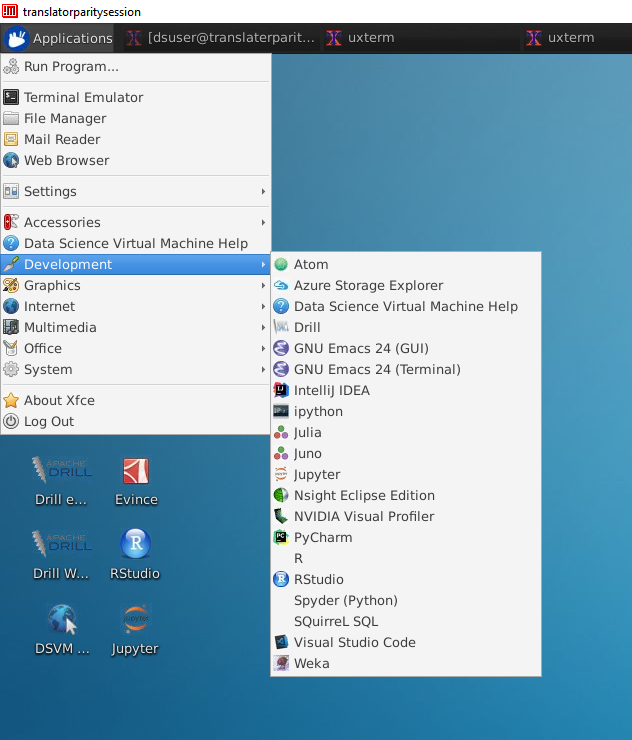
Figure 3 Linux Data Science virtual machine
“I am often asked to share my research data and the public sharing I have done in the past has been popular. Coordinating and cataloging these datasets in one place with Azure will be helpful for both internal and external researchers, giving them easy access, encouraging collaboration, and providing convenient cloud-based access to the wealth of Microsoft Research shared data.”
-John Krumm, Principal Researcher, Microsoft Research AI
Datasets in Microsoft Research Open Data are categorized by their primary research area, as shown in Figure 4. You can find links to research projects or publications with the dataset. You can browse available datasets and download them or copy them directly to an Azure subscription through an automated workflow. To the extent possible, the repository meets the highest standards for data sharing to ensure that datasets are findable, accessible, interoperable and reusable; the entire corpus does not contain personally identifiable information. The site will continue to evolve as we get feedback from users.

Figure 4 – Dataset Categories
Microsoft Research Open Data is an outcome of the Microsoft Research Outreach Data science program and was made possible by a collaboration between many teams at Microsoft, Microsoft researchers, our industry partners, and our academic advisors.
We would love to hear your comments and feedback! Please send us a note via the Feedback feature on the sitehttp://microsoftopendata.com and tell us what you think.
Announcing Microsoft Research Open Data – Datasets by Microsoft Research now available in the cloud的更多相关文章
- 未能加载包“Microsoft SQL Server Data Tools”
直接在vs2013里的App_Data目录创建数据库,在服务器资源管理器中查看时报错: 未能加载包“Microsoft SQL Server Data Tools” 英文: The 'Microsof ...
- Microsoft SQL Server Data Tools - Business Intelligence for Visual Studio 2013 http://www.microsoft.com/en-us/download/details.aspx?id=42313
Microsoft SQL Server Data Tools - Business Intelligence for Visual Studio 2013 http://www.microsoft. ...
- “DataTable”是“System.Data.DataTable”和“Microsoft.Office.Interop.Excel.DataTable”之间的不明确的引用
“DataTable”是“System.Data.DataTable”和“Microsoft.Office.Interop.Excel.DataTable”之间的不明确的引用 造成这个错误的原因是,在 ...
- 解决VS2010在新建实体数据模型出现“在 .NET Framework Data Provider for Microsoft SQL Server Compact 3.5 中发生错误。请与提供程序供应商联系以解决此问题。”的问题
最近想试着学习ASP.NET MVC,在点击 添加--新建项--Visual C#下的数据中的ADO.NET 实体数据模型,到"选择您的数据连接"时,出现错误,"在 .N ...
- 在WebService中使用Microsoft.Practices.EnterpriseLibrary.Data配置数据库
1. 新建WebApplication1项目 1.1 新建—Web—ASP.NET Empty Web Application--WebApplication1 1.2 添加一个WebForm1 2. ...
- Microsoft.Jet.OLEDB.4.0和Microsoft.ACE.OLEDB.12.0的区别
Microsoft.Jet.OLEDB.4.0和Microsoft.ACE.OLEDB.12.0的区别 时间 2012-12-19 20:30:12 CSDN博客原文 http://blog.cs ...
- EF core2.1+MySQL报错'Void Microsoft.EntityFrameworkCore.Storage.Internal.RelationalParameterBuilder..ctor(Microsoft.EntityFrameworkCore.Storage.IRelationalTypeMapper)
一.使用.net core 2.0 EF mysql 运行一直报错如下: An unhandled exception occurred while processing the request. M ...
- win10x64启动vs2010报错:未能加载C:\Windows\Microsoft.NET\Framework\v2.0.50727\microsoft.vsa.tlb
换了新电脑,因为是win10x64系统,可能是兼容性的问题吧. 启动vs2010,在启动画面直接报错:未能加载C:\Windows\Microsoft.NET\Framework\v2.0.50727 ...
- 【Microsoft Azure 的1024种玩法】六、使用Azure Cloud Shell对Linux VirtualMachines 进行生命周期管理
[文章简介] Azure Cloud Shell 是一个用于管理 Azure 资源的.可通过浏览器访问的交互式经验证 shell. 它使用户能够灵活选择最适合自己工作方式的 shell 体验,本篇文章 ...
随机推荐
- 前端入门14-JavaScript进阶之继承
声明 本系列文章内容全部梳理自以下几个来源: <JavaScript权威指南> MDN web docs Github:smyhvae/web Github:goddyZhao/Trans ...
- 博弈论进阶之Multi-SG
Multi-Nim 从最简单的Nim模型开始 它的定义是这样的 有\(n\)堆石子,两个人可以从任意一堆石子中拿任意多个石子(不能不拿)或把一堆数量不少于\(2\)石子分为两堆不为空的石子,没法拿的人 ...
- C++玄学预编译优化
#pragma GCC diagnostic error "-std=c++11" #pragma GCC optimize("-fdelete-null-pointer ...
- CTSC 2018酱油记
Day0 5.5 花了一上午的时间把codechef div2的前四题切了,又在zbq老司机的指导下把第五题切了 中午12:00 gryz电竞组从机房出发,临走的时候看到很多学长挺恋恋不舍的,毕竟可能 ...
- testlib.h从入门到入坟
学了这么久OI连个spj都不会写真是惭愧啊... 趁着没退役赶紧学一波吧 配置 github下载地址 我是直接暴力复制粘贴的.. 然后扔到MingW的目录里 直接引用就好啦 基本语法 引用testli ...
- 【Dojo 1.x】笔记5 使用本地引用
习惯用CDN引用的同学肯定会知道还有一种叫本地引用,这篇笔记测试本地引用. Dojo SDK下载地址:点我 下载中间的Release Package即可,如果希望下载完整包(Full Source), ...
- Prometheus Operator - 每天5分钟玩转 Docker 容器技术(177)
前面我们介绍了 Kubernetes 的两种监控方案 Weave Scope 和 Heapster,它们主要的监控对象是 Node 和 Pod.这些数据对 Kubernetes 运维人员是必须的,但还 ...
- SQL 使用临时表和临时变量完成update表字段---实际案例
-- 使用临时表 -- 创建临时表 --ALTER TABLE TS_ExpenseApplication_Reim_Detail ADD BgCode NVARCHAR() NULL, BgItem ...
- Redis可视化工具 Redis Desktop Manager
1.前言 从接触Redis也有两年,平时就使用它来做缓存层,它给我的印象就是很强大,内置的数据结构很齐全,加上Redis5.0的到来,新增了很多特色功能.而Redis5.0最大的新特性就是多出了一个数 ...
- LeetCode算法题-Repeated String Match(Java实现)
这是悦乐书的第289次更新,第307篇原创 01 看题和准备 今天介绍的是LeetCode算法题中Easy级别的第156题(顺位题号是686).给定两个字符串A和B,找到A必须重复的最小次数,使得B是 ...