
Autolayout Breakpoints
Autolayout Breakpoints
Auto layout has become a crucial tool for iOS and OS X development. It makes creating layout for multiple screen sizes easy peasy. But sometimes it can drive you crazy, with verbose and misleading logs.
1 |
|
That’s a huge log! And I cut off the NSLayoutConstraint part. Yet, the second last line is giving a clue in which direction to go to fix this issue. Symbolic breakpoint at UIViewAlertForUnsatisfiableConstraints.
All right, here’s what Xcode want’s you to do:
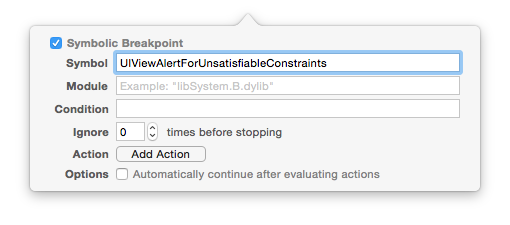
Honestly, that won’t help much, because basically it’ll just stop the execution and leave you up with LLDB, alone in the dark.
But there’s a little trick you can do to enhance the preceding symbolic breakpoint. Adding po [[UIWindow keyWindow] _autolayoutTrace] to it (for Obj-C projects) or expr -l objc++ -O -- [[UIWindow keyWindow] _autolayoutTrace] (for Swift projects).

Now, on console, you’ll see all the UIView hierarchy and exactly where it has ambiguity.
1 |
|
Note that as you hit continue it’ll stop at every ambiguous layout you may have. And if that’s not enough for you to find out your autolayout issue, try changing the view’s color, who knows?
1 |
|
Fear no more young Padawan, make symbolic breakpoints and LLDB work for you!
I would like to thank Porter Hoskins for pointing out the correct LLDB command for Swift.
Autolayout Breakpoints的更多相关文章
- 使用Autolayout实现UITableView的Cell动态布局和高度动态改变
本文翻译自:stackoverflow 有人在stackoverflow上问了一个问题: 1 如何在UITableViewCell中使用Autolayout来实现Cell的内容和子视图自动计算行高,并 ...
- Masonry介绍与使用实践:快速上手Autolayout
1 MagicNumber -> autoresizingMask -> autolayout 以上是纯手写代码所经历的关于页面布局的三个时期 在iphone1-iphone3gs时代 w ...
- 利用代码添加autolayout约束
1.概述 通常我们通过storyboard能够完成的,代码也能够完成,所以这里介绍下代码实现约束的添加,通常我们不这么干(在不使用第三方框架的情况下,使用系统自带的类添加约束特别繁琐),所以这里仅仅简 ...
- 【原】iOS学习之苹果原生代码实现Autolayout和VFL语言
1.添加约束的规则 在创建约束之后,需要将其添加到作用的view上 在添加时要注意目标view需要遵循以下规则: 1)对于 两个同层级view之间 的约束关系,添加到它们的父view上 2)对于 两个 ...
- iOS学习笔记——AutoLayout的约束
iOS学习笔记——AutoLayout约束 之前在开发iOS app时一直以为苹果的布局是绝对布局,在IB中拖拉控件运行或者直接使用代码去调整控件都会发上一些不尽人意的结果,后来发现iOS在引入了Au ...
- iOS AutoLayout的用法
添加约束 代码实现Autolayout的步骤 利用NSLayoutConstraint类创建具体的约束对象 添加约束对象到相应的view上 - (void)addConstraint:(NSLayou ...
- AutoLayout(自动布局)
1. iOS两种自适应布局方式:(修正说明:) -AutoLayout(自动布局) + SizeClasses(尺寸类别) -Autoresizing (自动调整尺寸/弹簧式调整尺寸) 前者 Auto ...
- iOS-自动布局Autolayout(原创)
前言 基础知识 在一定情况下我们需要用到自动布局(autolayout) 这样我们就能使视图与视图之间的位置相互关联起来 横向:距离父视图左侧100 视图本身的宽度最小是100 距离父视图右侧是100 ...
- iOS - XIB之AutoLayout添加约束
XIB--AutoLayout添加约束 仿QQ登录界面: 说明:以下各图背景红色只是方便看清楚: 1.创建工程:创建xib文件 2.打开xib文件: (1).创建头像: 拖控件:uiimageview ...
随机推荐
- vue中$refs的使用
vue中$refs获取组件或元素: 获取的元素就相当于是一个原生获取的元素,可以进行操作 this.$refs.ele.style.color = 'red
- mysql密码遗失
仅以本地数据库测试 本地数据库密码遗失,百度上的方法很麻烦,想着没有用的一个本地库(localhost),就想删库重建,navicat上点击数据库,删除链接.然后在新建库,同名同端口的,此时密码已经制 ...
- work2:贪吃蛇
学号:2017*****7219 姓名:邰嘉琛我的码云贪吃蛇项目仓库:https://gitee.com/tjc666/sesnake/tree/master2) 给出你的各项任务完成时间估算与实际消 ...
- 活代码LINQ——06
一.模块代码 ' Fig. 9.4: LINQWithArrayOfObjects.vb ' LINQ to Objects using an array of Employee objects. M ...
- 活代码LINQ——01
序言 此系列的所有代码都是运行在Win 7 64位 + Visual Basic 2008 Express Edition的环境中 之所以学习List集合类,是因为我们先前学习的数组自身的缺陷: 1. ...
- Python面向对象基础知识
面向对象是一种编程方式,此编程方式的实现是基于对类和对象的使用 类是一个模板,模板中包装了多个“函数”供使用(可以讲多函数中公用的变量封装到对象中) 对象,根据模板创建的实例(即:对象),实例用于调用 ...
- android spf中存list<string>
private void setSpfList() { final SharedPreferences mSharedPreferences = getPreferences(Context.MODE ...
- js中关于声明提前的几个误区
声明提前: 在程序正式执行之前,都会将所有的var声明的变量提前到开始位置,集中创建,而赋值留在原地. 例如这样一段代码 console.log(a) var a = 100; console.log ...
- python笔记18-高阶函数
高阶函数: 如果一个函数的入参是一个函数名的话,那这个函数就是一个高阶函数 函数即变量 # def hello(name):# print(name)# new_hello = hello#hello ...
- 类 Arrays StringBuilder 跟 StringBuffer 的异同 SimpleDateFormat
类 String 同:起连接字符串类型作用 异: StringBuffer //线程安全 效率慢 StringBuilder //线程不安全 效率快 类 Arrays copyOf ( ...