
Entity Framework入门教程(17)---记录和拦截数据库命令
记录和拦截数据库命令
这一节介绍EF6怎么记录和拦截发送给数据库的查询和操作命令。
1.记录EF发送给数据库命令(DbContext.Database.Log)
以前给了查看EF发送给数据库的命令我们需要借助数据库的追踪工具或者第三方追踪工具,现在EF6中提供了DbContext.Database.Log属性(Action<string>类型),使用这个属性我们可以很方便地记录EF发送给数据库的命令。
下边是一个栗子:
        static void Main(string[] args)

        {

            using (EFDbContext context=new EFDbContext())

            {

                context.Database.Log = Console.WriteLine;

                var std1 = context.Students.Find();

                std1.Name = "newName";

                context.SaveChanges();

                Console.ReadKey();

            }

        }
输出如下:
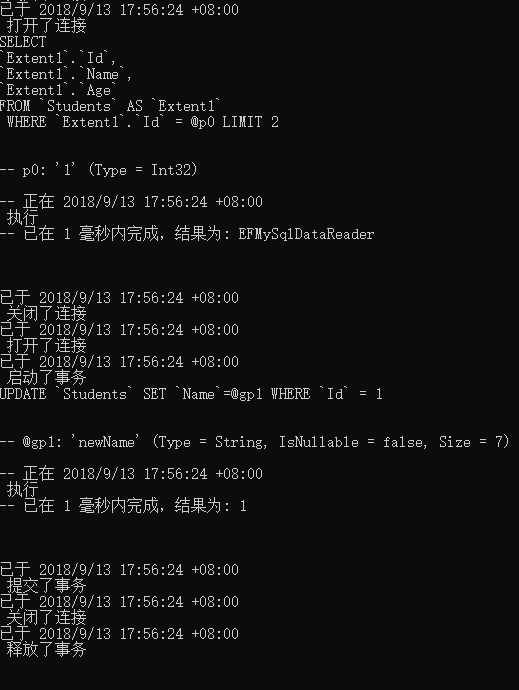
在上边的栗子中,Console.Write()方法属于Action<string>类型,所以可以赋值给Log属性。可以看到EF打开和关闭数据库,执行查询,和使用事务进行CUD都会被记录下来。
我们也可以自定义一个Action<string>委托的实例赋值给Log属性:
public class Logger

{

    public static void Log(string message)

    {

        Console.WriteLine("EF Message: {0} ", message);

    }

}

class EF6Demo

{

    public static void DBCommandLogging()

    {

        using (var context = new SchoolDBEntities())

        {

            context.Database.Log =  Logger.Log;

            var std1 = context.Students.Find();

            std1.Name = "newName";

            context.SaveChanges();

            Console.ReadKey();

        }

    }

}
2.拦截EF生成的数据库命令(IDbCommandIntercepter)
EF6提供了拦截数据库的接口IDbCommandIntercepter,这个接口提供了拦截EF发送给数据库的命令的方法,我们也可以使用这个接口实现在context的操作执行前或执行后去做一些自定义的操作(类似mvc/api中的filter)。因为DbContext执行操作的底层实现是利用ADO.NET进行ExecuteNonQuery, ExecuteScalar, 和ExecuteReader,所以我们可以通过如NonQueryExecuted、NonQueryExecuting等方法进行拦截。
为了实现SQL命令拦截我们首先要定义一个实现IDbCommandIntercepter接口的类:
    class EFCommandInterceptor : IDbCommandInterceptor

    {

        public void NonQueryExecuted(System.Data.Common.DbCommand command, DbCommandInterceptionContext<int> interceptionContext)

        {

            LogInfo("NonQueryExecuted", String.Format(" IsAsync: {0}, Command Text: {1}", interceptionContext.IsAsync, command.CommandText));

        }

        public void NonQueryExecuting(System.Data.Common.DbCommand command, DbCommandInterceptionContext<int> interceptionContext)

        {

            LogInfo("NonQueryExecuting", String.Format(" IsAsync: {0}, Command Text: {1}", interceptionContext.IsAsync, command.CommandText));

        }

        public void ReaderExecuted(System.Data.Common.DbCommand command, DbCommandInterceptionContext<System.Data.Common.DbDataReader> interceptionContext)

        {

            LogInfo("ReaderExecuted", String.Format(" IsAsync: {0}, Command Text: {1}", interceptionContext.IsAsync, command.CommandText));

        }

        public void ReaderExecuting(System.Data.Common.DbCommand command, DbCommandInterceptionContext<System.Data.Common.DbDataReader> interceptionContext)

        {

            LogInfo("ReaderExecuting", String.Format(" IsAsync: {0}, Command Text: {1}", interceptionContext.IsAsync, command.CommandText));

        }

        public void ScalarExecuted(System.Data.Common.DbCommand command, DbCommandInterceptionContext<object> interceptionContext)

        {

            LogInfo("ScalarExecuted", String.Format(" IsAsync: {0}, Command Text: {1}", interceptionContext.IsAsync, command.CommandText));

        }

        public void ScalarExecuting(System.Data.Common.DbCommand command, DbCommandInterceptionContext<object> interceptionContext)

        {

            LogInfo("ScalarExecuting", String.Format(" IsAsync: {0}, Command Text: {1}", interceptionContext.IsAsync, command.CommandText));

        }

        private void LogInfo(string command, string commandText)

        {

            Console.WriteLine("Intercepted on: {0} :- {1} ", command, commandText);

        }

    }
可以看出,IDbCommandInterceptor 接口提供了6个方法,分别用于在ADO.NET执行ExecuteNonQuery(),ExcuteReader(),ExcuteScalar()方法的执行前/后拦截命令。这个栗子目的是:记录context的操作是否是异步和发送到数据库的命令。我们也可以使用这些方法来实现自定义逻辑(和filter简直一模一样有木有)。
接下来把拦截器添加到配置中去,两种实现方式:
① 通过配置文件,在app.config或web.config中添加如下节点
<entityFramework>

    <interceptors>

        <interceptor type="EF6DBFirstTutorials.EFCommandInterceptor, EF6DBFirstTutorials">

        </interceptor>

    </interceptors>

</entityFramework>
②代码配置
public class FE6CodeConfig : DbConfiguration

{

    public FE6CodeConfig()

    {

        this.AddInterceptor(new EFCommandInterceptor());

    }

}
配置完成我们就可以记录EF发送给数据库的命令了,一个栗子:
var newStudent =  new Student() { FirstName = "Bill" };

using (var context = new SchoolDBEntities())

{

    context.Students.Add(newStudent);

    context.SaveChanges();

}
栗子输出为:
Intercepted on: ReaderExecuting :- IsAsync: False, Command Text: INSERT [dbo].[Student]([FirstName], [StandardId], [LastName])

VALUES (@0, NULL, NULL)

SELECT [StudentID], [RowVersion] FROM [dbo].[Student]

WHERE @@ROWCOUNT > 0 AND [StudentID] = scope_identity()

Intercepted on: ReaderExecuted :- IsAsync: False, Command Text: INSERT [dbo].[Student]([FirstName], [StandardId], [LastName])

VALUES (@0, NULL, NULL)

SELECT [StudentID], [RowVersion] FROM [dbo].[Student]

WHERE @@ROWCOUNT > 0 AND [StudentID] = scope_identity()
EF系列目录链接:Entity Franmework系列教程汇总
Entity Framework入门教程(17)---记录和拦截数据库命令的更多相关文章
- Entity Framework入门教程(1)---Entity Framework简介
什么是Entity Framework 学习EF的前提:熟练使用Linq和Ado.net,因为在使用EF框架进行开发时,我们大多数情况使用Linq进行查询和操作,而EF的底层实现用的是Ado.net. ...
- Entity Framework入门教程(3)---EF中的上下文简介
1.DbContext(上下文类) 在DbFirst模式中,我们添加一个EDM(Entity Data Model)后会自动生成一个.edmx文件,这个文件中包含一个继承DbContext类的上下文实 ...
- Entity Framework入门教程(6)--- 在线场景中保存数据
在线场景中保存数据 在线场景中保存实体数据是一项相当容易的任务,因为使用的是同一个context,这个context会自动跟踪所有实体发生的更改. 下图说明了在线场景中的CUD(创建,更新,删除)操作 ...
- Entity Framework入门教程(9)---离线场景附加实体图集到上下文
附加离线实体图集到上下文 这节主要内容是通过不同的方法将离线实体附加到上下文中. 在离线场景中,保存一个实体要略微困难一些.当我们保存一个离线的实体图集或一个单独的离线实体时,我们需要做两件事.首先, ...
- Entity Framework入门教程(10)---离线场景保存和删除实体/实体图集
离线场景保存和删除实体/实体图集 这一节的内容是在离线场景中保存实体和实体图集 在离线场景中,当我们保存一个离线的实体图集或一个单独的离线实体时,我们需要做两件事.首先,我们要把实体附加到新的上下文中 ...
- Entity Framework入门教程(14)---DbFirst下的存储过程
EF6中DbFirst模式下使用存储过程 我们已经知道EF可以将L2E或Entity SQL的查询语句自动转换成SQL命令,也可以根据实体的状态自动生成Insert/update/delete的Sql ...
- ASP .NET MVC 之Entity Framework入门教程及源码
本文主要的目的是 1. 说明Entity Framework Power Tools如何使用. 2. Entity Framework 快速门 实验环境: OS: Windows Server 20 ...
- Entity Framework入门教程:SQLite数据源访问
[环境安装] 可以通过NuGet直接搜索安装SQLite需要用到的组件 或者直接使用程序包管理器控制台 > Install-Package System.Data.SQLite 通过ADO.NE ...
- Entity Framework入门教程: Entity Framework支持的查询方式
Entity Framework支持的查询方式有三种 LINQ to Entities Entity SQL Native SQL [LINQ to Entities] LINQ(语言集成查询)是从V ...
随机推荐
- c/c++ 多线程 std::call_once的应用
多线程 std::call_once的应用 std::call_once的应用:类成员的延迟初始化,并只初始化一次.和static的作用很像,都要求是线程安全的,c++11之前在多线程的环境下,sta ...
- 【转载】FPGA算法映射要点
近期一直在学习利用FPGA完成算法的定点运算,转载些相关的博客方面回顾查找.本博文原文链接为:https://blog.csdn.net/u013989284/article/details/7899 ...
- JavaScript作用域链的理解
前言 作用域是JavaScript一个很重要的概念,想要学好JavaScript就需要理解javascript作用域和作用域链的工作原理.这篇文章对JavaScript作用域链和作用域链做一个简单的介 ...
- Python面试常见的问题
So if you are looking forward to a Python Interview, here are some most probable questions to be ask ...
- HTML5存储技术Storage
前端存储技术localStorage是永久存储sessionStorage是一次会话存储 localStorage只支持string类型的存储 存进去的所有类型, 取出来之后都变成了string. 一 ...
- JS库创建
建立js库模板 (function (){ function $(){ alert("被调用到喽!"); /*alert()是JavaScript脚本语言中窗口window对象的一 ...
- day17-异常处理
今天的内容比较少,只是单独的异常处理 开始今日份整理 1.异常 定义:异常时错误发生的信号,一旦出错,并且程序没有处理这个错误,就会抛出异常,并且程序会运行中止 2.异常的分类 2.1语法错误:pyt ...
- H5网页后在返回到微信公众平台自定义菜单
<p class="success">订阅成功!</p> <div class="btn" @click="finish ...
- 【学习总结】GirlsInAI ML-diary 总
2019-1-7 GirlsInAI第一期: 人工智障工程师养成计划,代号ML-diary 原博github链接:Girls-In-AI 环境:Windows / MacOS 工具:Anaconda ...
- xadmin在Django 1.11中的使用及中英文切换
版权声明:本文为博主原创文章,欢迎转载,并请注明出处.联系方式:460356155@qq.com xadmin是一个强大的替代django admin的管理后台,github地址为:https://g ...