
displaytag如何实现获取到每行的id字段的值。
1、displaytag如何实现获取到每行的id字段的值。
使用封装好的框架,有时候,对于一个知识点不熟悉,可能会浪费你大把的时间,我使用displaytag主要是使用它的分页技术,但是客户提出的需求,是获取到每行的id,然后选择一个用户名称(用户id),将他们关联操作,其实业务很简单,但是获取到你想要的这一行,一开始确实难为着我了,后来才发现,很简单。
代码如下所示:
<%@ page language="java" contentType="text/html; charset=UTF-8" pageEncoding="UTF-8"%>
<%@ taglib prefix="c" uri="http://java.sun.com/jsp/jstl/core"%>
<%@ taglib prefix="display" uri="http://displaytag.sf.net"%>
<%
//获取绝对路径路径
String path = request.getContextPath();
String basePath = request.getScheme() + "://"
+ request.getServerName() + ":" + request.getServerPort()
+ path + "/";
%>
<!DOCTYPE html>
<html>
<head>
<base href="<%=basePath %>" />
<meta charset="UTF-8">
<meta name="viewport" content="width=device-width, initial-scale=1.0" />
<title>图书管理-图书查询</title>
<link href="resource/css/bootstrap.min.css" rel="stylesheet" />
<link rel="stylesheet" href="resource/table/bootstrap-table.min.css">
<link type="text/css" rel="stylesheet" href="resource/select2/css/select2.min.css">
<script type="text/javascript" src="resource/js/jquery.min.js"></script>
<script type="text/javascript" src="resource/js/bootstrap.min.js"></script>
<script src="resource/table/bootstrap-table.min.js"></script>
<script type="text/javascript" src="resource/select2/js/select2.js"></script> <style type="text/css"> tr th{text-align:center;}
tr td{text-align:center;}
</style>
<script type="text/javascript">
$(document).ready(function(){
$("#clickIt").click(function(){
alert("sorry,此类图书数量为0,不可借阅......");
});
}); //启动之前,先查询出地方前置库信息,然后将地方前置库的信息传递到实例数据表中
$(function(){
var url = "system/book/userAjax";
$.ajax({
type : 'POST',
url : url,
dataType : 'json',
//traditional : true,
//async : false,
success : function(data) {
//console.log(data.list);
var result = data.list;
for(var i=;i<result.length;i++){
//console.log(result[i].userAccount);
$("#userNameCategory").append("<option value='"+ result[i].userId +"'>" + result[i].userAccount + "</option>");
}
}
})
}); function borrowBooksFunction(bookIds){
//关键点在于获取到图书的编号
console.log(bookIds);
//关键点,管理员通过借阅这本书给学生,将这本书的bookId给某个学生
$("#setBookId").val(bookIds);
} </script>
</head>
<body>
<div>
<ul class="breadcrumb" style="margin: 0px;">
<li>系统管理</li>
<li>图书管理</li>
<li>图书查询</li>
</ul>
</div>
<form action="${basePath }system/book/select" method="post" class="form-inline">
<div class="row alert alert-info" style="margin: 0px; padding: 5px;">
<div class="form-group">
<label>条件:</label>
<select name="condition" class="form-control">
<option value="bookName" ${condition == 'bookName'?'selected':'' }>图书名称</option>
<option value="bookAuthor" ${condition == 'bookAuthor'?'selected':'' }>图书作者</option>
<option value="bookType" ${condition == 'bookType'?'selected':'' }>图书类别</option>
</select>
<input type="text" name="content" value="${result }" class="form-control" placeholder="请输入查询条件" />
</div>
<input type="submit" class="btn btn-danger" value="查询">
<a href="system/book/insert" class="btn btn-success">
添加图书
</a>
</div>
<div class="row" style="padding: 15px;">
<display:table name="${list }" id="bookIds" pagesize="" requestURI="system/book/select" class="table table-hover table-striped table-bordered">
<display:column property="bookId" title="图书编号"></display:column>
<display:column property="bookName" title="图书名称"></display:column>
<display:column property="bookAuthor" title="图书作者"></display:column>
<display:column property="bookPrice" title="图书价格"></display:column>
<display:column property="bookType" title="图书类型"></display:column>
<display:column property="bookPublish" title="图书出版社"></display:column>
<display:column property="bookSum" title="图书总数"></display:column>
<!-- 如果是管理员,具有借书,还书,修改,删除功能的权限 -->
<c:if test="${userMark == '管理员' }">
<display:column paramId="bookId" paramProperty="bookId" title="借书">
<!-- 按钮触发模态框 -->
<a href="" id="borrowBooks" onclick="borrowBooksFunction(<c:out value='${bookIds.bookId}'></c:out>)" data-toggle="modal" data-target="#myModal"> 借书
</a>
</display:column>
<display:column href="system/book/update" paramId="bookId" paramProperty="bookId" title="修改" value="修改"></display:column>
<display:column href="system/book/delete" paramId="bookId" paramProperty="bookId" title="删除" value="删除"></display:column>
</c:if> </display:table>
</div>
</form> <form action="${basePath }system/book/adminBorrow" method="post" class="form-horizontal setWidth">
<!-- 模态框(Modal) -->
<div class="modal fade" id="myModal" tabindex="-1" role="dialog" aria-labelledby="myModalLabel" aria-hidden="true">
<div class="modal-dialog">
<div class="modal-content">
<div class="modal-header">
<button type="button" class="close" data-dismiss="modal" aria-hidden="true">
×
</button>
<h4 class="modal-title" id="myModalLabel">
用户信息
</h4>
</div>
<div class="modal-body">
<input type="hidden" name="bookId" id="setBookId" value=""/>
<select class="form-control width175" id="userNameCategory" name="userId">
<option value=''>-- 请选择 --</option>
</select>
</div>
<div class="modal-footer">
<button type="button" class="btn btn-default" data-dismiss="modal">关闭
</button>
<!-- <button type="button" class="btn btn-primary">
提交
</button> -->
<input type="submit" class="btn btn-success" value="提交" />
</div>
</div><!-- /.modal-content -->
</div><!-- /.modal -->
</div>
</form> </body>
</html>
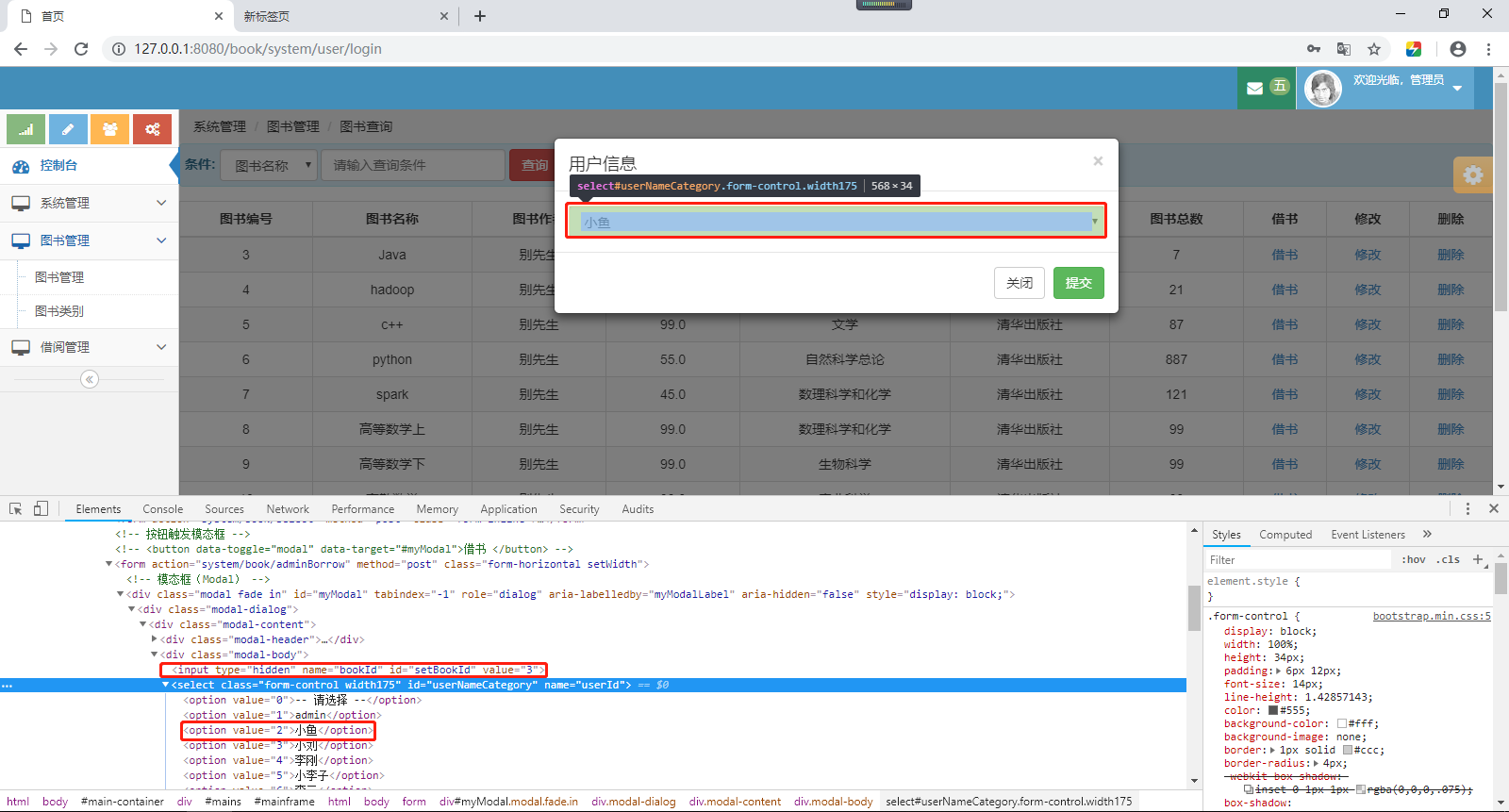
效果如下所示:
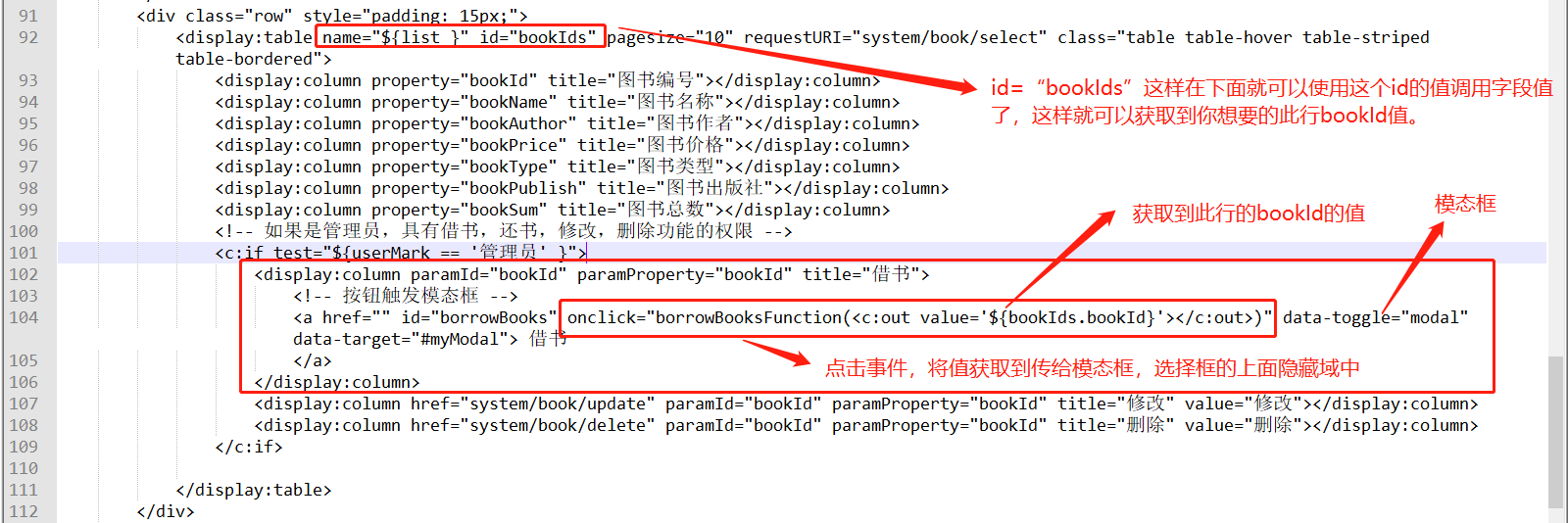
2、关键点操作如下所示:
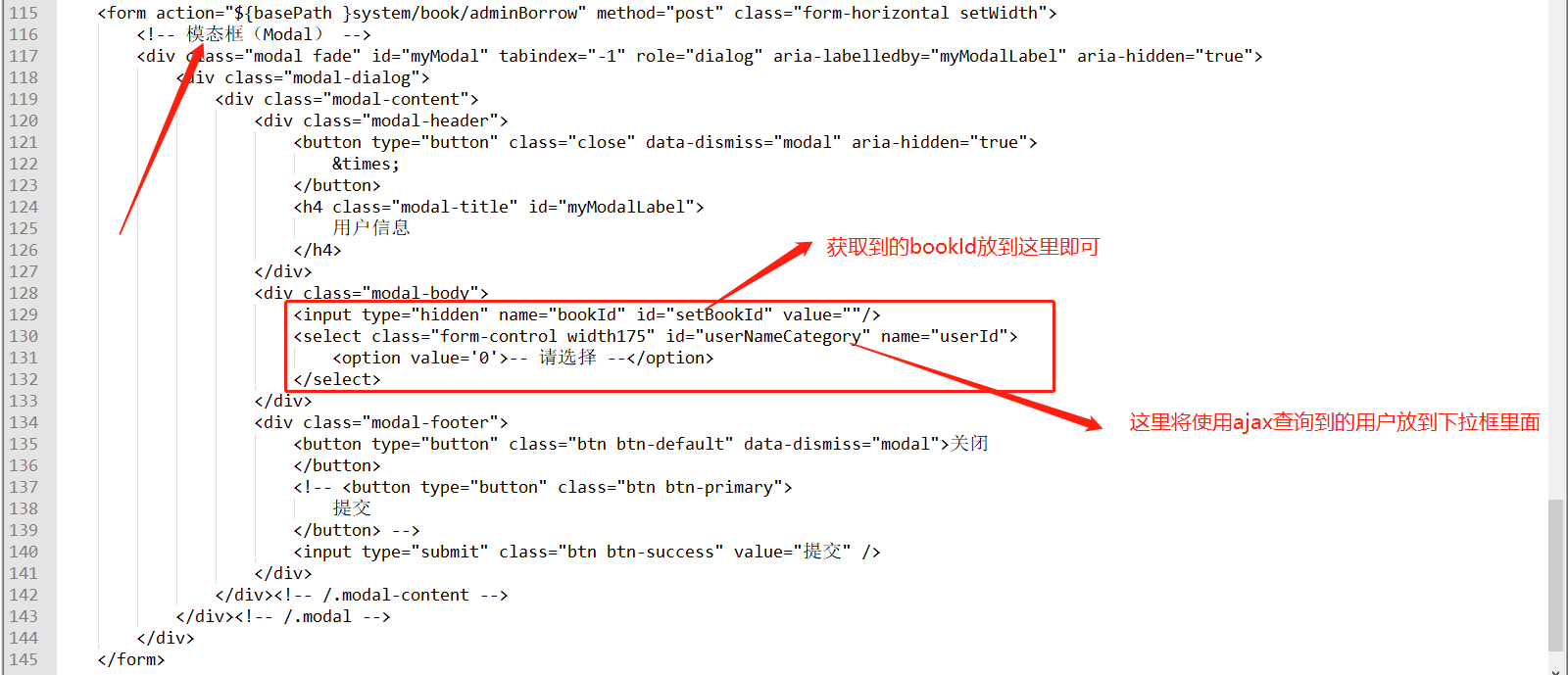
然后如下所示:

然后完成你想要实现的效果:
打完收工
待续......
displaytag如何实现获取到每行的id字段的值。的更多相关文章
- 如何在dapper中获取刚插入行的ID
二话不说: 1.先建立个表 CREATE TABLE [dbo].[UserInfo]( [ID] [int] IDENTITY(1,1) NOT NULL, [UserName] [nc ...
- Jmeter获取数据库查询结果某一字段的值
1.首先进行连接数据库 2.添加JDBC Request 3.添加BeanShell PostProcessor 4.注意点:如果获取的是INT数字类型的,结尾需要添加toString()
- SQL Server 动态行转列(参数化表名、分组列、行转列字段、字段值)
一.本文所涉及的内容(Contents) 本文所涉及的内容(Contents) 背景(Contexts) 实现代码(SQL Codes) 方法一:使用拼接SQL,静态列字段: 方法二:使用拼接SQL, ...
- SharePoint 获取Lookup 字段的值
获取某个List里的Lookup字段的值是很普遍的事,那么我们将它封装起来 获取Lookup字段值的方法: /// <summary> /// To get lookup field Id ...
- android获取textview的行数
最近项目需求,需要获取Textview的行数,通过行数与TextView的maxLines进行比较来确定是否显示TextView下方的展开按钮是否显示,废话少说直接上代码,mTextView.getL ...
- StringGrid 实例2:1、获取 StringGrid 的行数、列数; 2、给单元赋值.
实例2: 本例功能: 1.获取 StringGrid 的行数.列数; 2.给单元赋值. 运行效果图:
- js日期的写法,获取girdviw的行数、提示信息、验证数量信息
//制订日期(js日期的写法) var myDate = new Date(); var theDate = myDate.toLocaleDateString(); //获取今天的日期 //获取控 ...
- jquery easyui datagrid 获取Checked选择行(勾选行)数据
原文:jquery easyui datagrid 获取Checked选择行(勾选行)数据 getSelected:取得第一个选中行数据,如果没有选中行,则返回 null,否则返回记录. getSel ...
- sql 语句 获取某张表某列字段最短的某几行数据
sql 语句 获取某张表某列字段最短的某几行数据 SELECT C_name,C_code FROM Catalog where LEN(C_code)=LEN((SELECT top 1 C_cod ...
随机推荐
- 数据库MySQL——安装
MySQL 安装 Mysql安装: 1.通过二进制的方式安装 二进制安装方式中,包括rpm版本以及glibc版本. rpm版本就是在特定linux版本下编译的,如果你的linux版本匹配,就可以安装; ...
- centos7服务器配置nuxt部署环境
一.安装node(默认安装在根目录下) 1.首先安装wget yum install -y wget 2.下载最新nodejs安装包 wget https://nodejs.org/dist/v10. ...
- axios设置请求拦截和响应拦截
首先我们先创建axios实例 const service = axios.create({ baseURL: url, //是用于请求的服务器 URL timeout: 5000, // 请求超时时间 ...
- Day057--django
1. http协议 请求的格式(request ---浏览器向服务器发送的消息) 请求方式: URL HTTP/1.1\r\n K1:V1\r\n K2:V2\r\n \r\n 请求正文/请求体(ge ...
- easyUI文本框获得焦点,失去焦点
easyUI帮助文档对于文本框的操作没有提供直接获得焦点,或者失去焦点的方法,我们可以采用以下写法来实现. 获得焦点: $('input',$('#文本框Id').next('span')).focu ...
- 在IntelliJ IDEA中,注解@Slf4j找不到log
问题: 解决方法:
- SQL 耗时优化
Ø 简介 在平常的开发中,我们经常会编写各种各样的 SQL 语句,比如:SQL 查询.存储过程.或者视图查询等.当我们编写的 SQL 语句比较复杂,或者表的数据量比较大,导致查询超时!这时,就要去分 ...
- Python编程四大神兽:迭代器、生成器、闭包和装饰器
生成器 生成器是生成一个值的特殊函数,它具有这样一个特点:第一次执行该函数时,先从头按顺序执行,在碰到yield关键字时该函数会暂停执行该函数后续的代码,并且返回一个值:在下一次调用该函数执行时,程序 ...
- Coursera, Big Data 4, Machine Learning With Big Data (week 1/2)
Week 1 Machine Learning with Big Data KNime - GUI based Spark MLlib - inside Spark CRISP-DM Week 2, ...
- 关于URL隐藏index.php方法
在phpstudy上修改了php版本5.6以上后,tp5框架原URL重写模式发生变化.需要在public目录下的.htaccess作出如图修改,原理未知.