
Dynamics 365 Online-Microsoft Flow
自December 2016 update for Dynamics 365 (online)之后的Online版本,Dynamics 365有了个新Feature:Microsoft Flow Connector。这个Feature在V9中得到了进一步的加强。
Microsoft Flow是什么?
官方说明:Microsoft Flow is a cloud-based service that makes it practical and simple for line-of-business users to build workflows that automate time-consuming business tasks and processes across applications and services.
不难看出,MF是用来自定义Workflows的,而且可以跨多个数据源和服务。
一. 创建自定义Flow
1. 登录Microsoft Flow站点,点击My flows -> Create from blank。MF提供了很多通用业务流程的模板,只需要填写必要的数据信息,就可以简单使用。这里我们完全创建个新的Flow来操作。

可以看到,MF支持很多Connectors,不单单是MS本身的产品和服务,还有其他比较流行的第三方应用服务也支持。
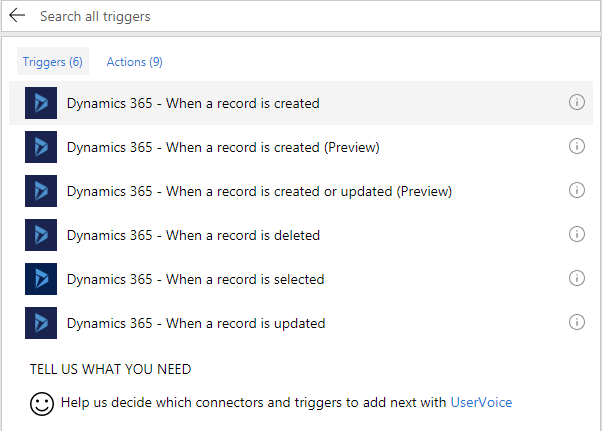
2. 选择Connector:Dynamics 365,Triggers选择“Dynamics 365 - When a record is created”
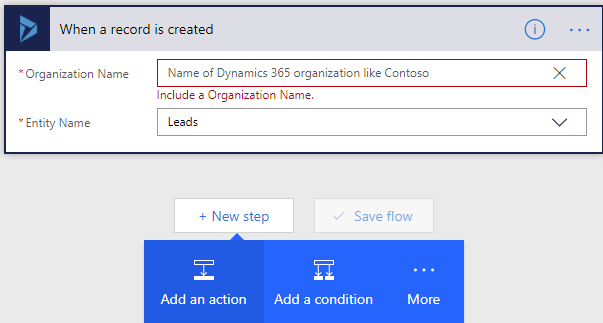
3. 选择CRM Instance和Entity:Lead,然后点击New step -> Add an action
4. 配置Action:当Leads新建的时候,新建一条Task,Task的Subject为Leads的Topic

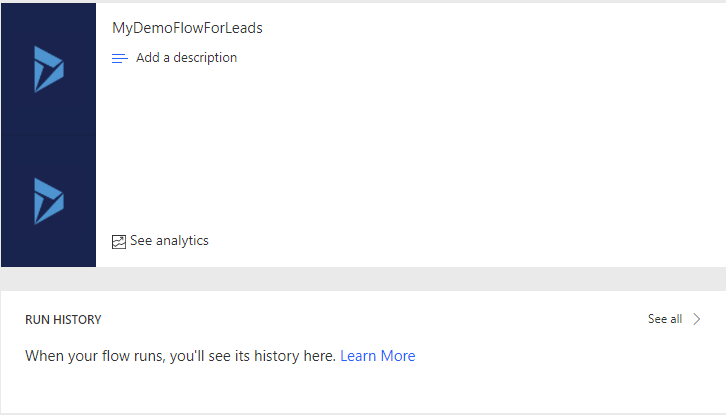
5. 为Flow命名,如果不命名,会默认按照Step名组合的方式命名,然后保存,进入Flow查看
6. 测试:在Dynamics 365中创建一条Leads,Topic填写上“This is a demo data for MyDemoFlowForLeads”

Task也会自动生成

7. 查看MF
首先能看到Run History会有记录
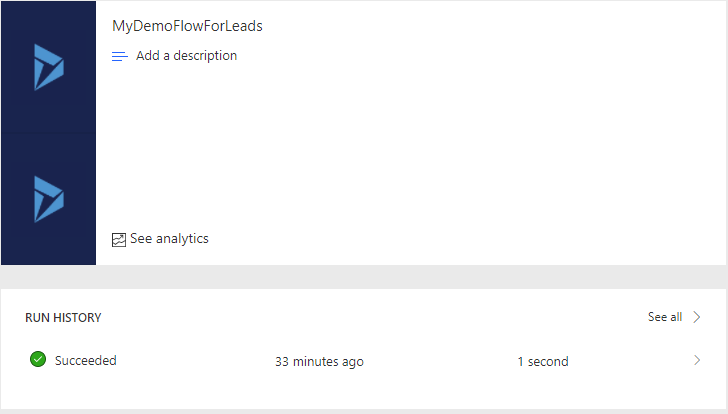
点击记录进去,可以看到每个step具体的执行时间

每个Step都会有更详细的Input/Output信息,比如点击第一个Step
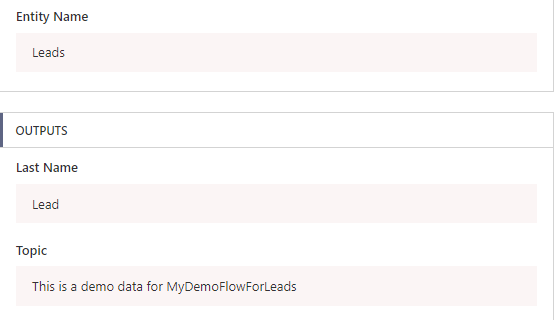
这样就实现了一个简单的MF。
由于MF对多Connector的支持,在现实情况下,你完全可以实现多Connector交互的Flow,比如这样:
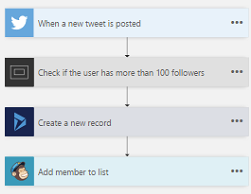
二. 限制
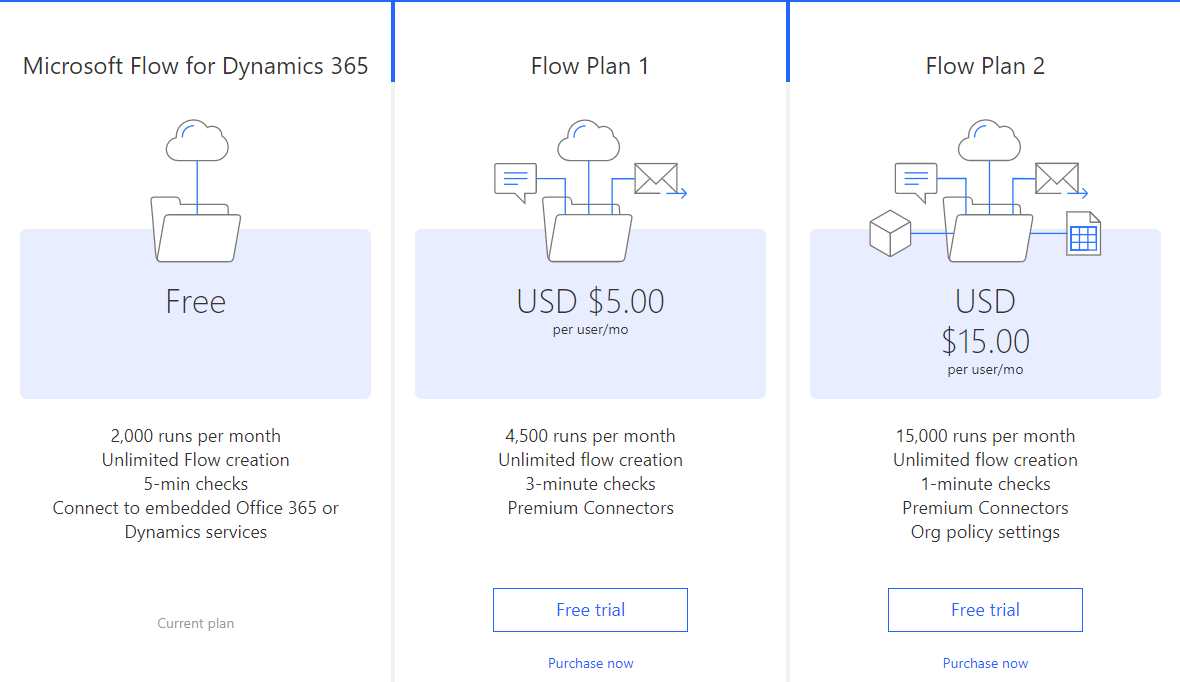
每个Flow,不管是真正的执行,还是测试执行,都算作一次Run,而每个月对Run的次数,不管是免费版还是付费版,都是有限制的。
Dynamics 365 Online-Microsoft Flow的更多相关文章
- Dynamics 365触发Microsoft Flow自动生成PDF并作为附件送邮件
我是微软Dynamics 365 & Power Platform方面的工程师罗勇,也是2015年7月到2018年6月连续三年Dynamics CRM/Business Solutions方面 ...
- Dynamics 365 App for Outlook 与 Dynamics 365 for Outlook(已被弃用)
在最新的版本中Dynamics 365 for Outlook(Outlook 客户端)已被弃用 随 Dynamics CRM 2016(版本 8.0)引入的 Dynamics 365 App for ...
- Introduction to Microsoft Dynamics 365 licensing
Microsoft Dynamics 365 will be released on November 1. In preparation for that, Scott Guthrie hosted ...
- 自定义工作流活动报错:您无法登陆系统。原因可能是您的用户记录或您所属的业务部门在Microsoft Dynamics 365中已被禁用。
本人微信和易信公众号: 微软动态CRM专家罗勇 ,回复265或者20170926可方便获取本文,同时可以在第一间得到我发布的最新的博文信息,follow me!我的网站是 www.luoyong.me ...
- Dynamics 365工作流报错:您无法登陆系统。原因可能是您的用户记录或您所属的业务部门在Microsoft Dynamics 365中已被禁用。
本人微信和易信公众号: 微软动态CRM专家罗勇 ,回复265或者20170926可方便获取本文,同时可以在第一间得到我发布的最新的博文信息,follow me!我的网站是 www.luoyong.me ...
- 解读 --- 基于微软企业商务应用平台 (Microsoft Dynamics 365) 之上的人工智能 (AI) 解决方案
9月25日微软今年一年一度的Ignite 2017在佛罗里达州奥兰多市还是如期开幕了.为啥这么说?因为9月初五级飓风厄玛(Hurricane Irma) 在佛罗里达州登陆,在当地造成了挺大的麻烦.在这 ...
- 在 Microsoft Dynamics 365 Online中如何调试Plugins in
How to debug plugins in Microsoft Dynamics 365 Online 调试方式请查阅https://www.linkedin.com/pulse/how-debu ...
- Dynamics 365 Customer Engagement导入解决方案时出错:Microsoft.Crm.CrmException: Plug-in assembly does not contain the required types or assembly content cannot be updated.
我是微软Dynamics 365 & Power Platform方面的工程师罗勇,也是2015年7月到2018年6月连续三年Dynamics CRM/Business Solutions方面 ...
- MB2-718 Certification: (Microsoft Dynamics 365 Customer Service) – Field Service, Customer Assets
Come from : https://neilparkhurst.com/2018/02/25/mb2-718-certification-microsoft-dynamics-365-custom ...
随机推荐
- Batch入门教程丨第一章:部署与Hello World!(下)
在上期分享的内容中,我们已经掌握了基础理论知识,今天我们将继续了解和学习与Windows Batch有关的知识和编程方法,如何编写和运行Windows Batch程序,脚本语言的入门方式等,从而能够更 ...
- [Swift]LeetCode201. 数字范围按位与 | Bitwise AND of Numbers Range
Given a range [m, n] where 0 <= m <= n <= 2147483647, return the bitwise AND of all numbers ...
- [Swift]LeetCode440. 字典序的第K小数字 | K-th Smallest in Lexicographical Order
Given integers n and k, find the lexicographically k-th smallest integer in the range from 1 to n. N ...
- [Swift]LeetCode993. 二叉树的堂兄弟节点 | Cousins in Binary Tree
In a binary tree, the root node is at depth 0, and children of each depth k node are at depth k+1. T ...
- Mysql、Hbuilder、Idea快捷键
MyEclipse 快捷键 ↑ ↓ ← →多 1.方法抽取,Alt+Shift+M 2.多行注释:Ctrl+Shift+/ 3.对象.方法; Ctrl+2 + ↓+回车 ,自动生成返回类型和变量 (非 ...
- 微信小程序自动化测试实践
由于腾讯系QQ.微信等都是基于腾讯自研X5内核,不是google原生webview(其实就是进行了二次定制).实质上也是混合应用的一种,现在很多app产品也开始流行采用X5内核作为其内嵌web浏览服务 ...
- GenerationType四中类型
https://blog.csdn.net/u011781521/article/details/72210980 JPA提供的四种标准用法为TABLE,SEQUENCE,IDENTITY,AUTO. ...
- Nginx篇--Nginx源码搭建
Nginx安装步骤: 1.依赖 gcc openssl-devel pcre-devel zlib-devel 安装:yum install gcc openssl-devel pcre-dev ...
- Pytorch入门实例:mnist分类训练
#!/usr/bin/env python # -*- coding: utf-8 -*- __author__ = 'denny' __time__ = '2017-9-9 9:03' import ...
- javascript 常见数组操作( 1、数组整体元素修改 2、 数组筛选 3、jquery 元素转数组 4、获取两个数组中相同部分或者不同部分 5、数组去重并倒序排序 6、数组排序 7、数组截取slice 8、数组插入、删除splice(需明确位置) 9、数组遍历 10、jQuery根据元素值删除数组元素的方)
主要内容: 1.数组整体元素修改 2. 数组筛选 3.jquery 元素转数组 4.获取两个数组中相同部分或者不同部分 5.数组去重并倒序排序 6.数组排序 7.数组截取slice 8.数组插入.删除 ...