
Python3中性能测试工具Locust安装使用
Locust安装使用:
安装:
python3中 ---> pip3 install locust
验证是否安装成功---> 终端中输入 locust --help 显示帮助信息表示安装成功
locust官网 ---> https://www.locust.io/
官网帮助文档 ---> https://docs.locust.io/en/latest/installation.html
大并发量测试时,建议在linux系统下进行;
启动:
终端中--->进入到代码目录: locust -f xxxoo.py --host=xxxxx.com
- -f 指定性能测试脚本文件
- -host 被测试应用的URL地址【如果不填写,读取继承(HttpLocust)类中定义的host】
- 通过浏览器访问:http://localhost:8089(Locust启动网络监控器,默认为端口号为:8089)
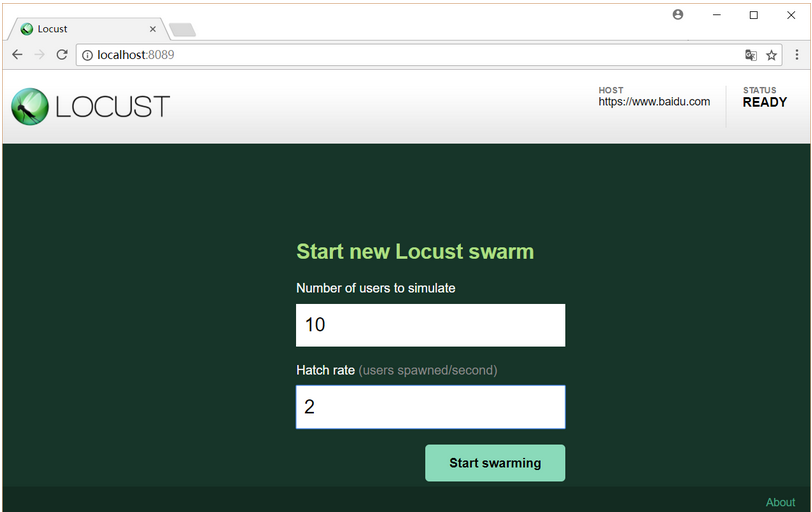
Number of users to simulate 设置虚拟用户数
Hatch rate(users spawned/second)每秒产生(启动)的虚拟用户数 , 点击Start swarming 按钮,开始运行性能测试。
no-web模式运行启动
终端中-->进入代码目录:>> locust -f xxoo.py --no-web -c10 -r2 -t 1m
启动参数:
--no-web 表示不使用web界面运行测试。 -c 设置虚拟用户数 。 -r 设置每秒启动虚拟用户数 。 -t 设置运行时间.。
no-web模式运行将测试结果保存到当前.py目录中:locust -f xxoo.py --csv=起一个名字
例如:
locust -f test3.py --csv=foobar --no-web -c2 -t10s
分布式压测:
主从机中必须运行相同的测试代码(把主机中代码复制一份到多个从机中),主机负责收集测试数据,从机进行施压测试;
在主机终端中-->进入代码目录:>> locust -f xxxoo.py --master
从机中终端中-->进入代码目录:>> locust -f xxxoo.py --slave --master-host=主机ip
分布式压测no-web模式保存结果到主机中当前运行.py的目录中:>>locust -f test2.py --csv=foobartt --no-web -c2 -t10s --master
locust --help 查看帮助信息
概述
Locust寓意蝗虫,蝗虫过境,寸草不生;而Locust工具生成并发请求就和一大群蝗虫一般,向我们的被测系统发起攻击,以此测试系统在高并发压力下是否能正常运转。
Locust测试框架中,采用python进行开发,对常见的http(s)协议的系统,Locust采用request库作为客户端,在发请求时和request库使用方法一样。
在模拟并发时,Locust采用协程、非阻塞IO来实现网络层的并发请求,因此单台压力机也能产生数千并发请求,再加上对分布式运行的支持,Locust能在使用较少压力机的前提下支持极高的并发数测试。
实例脚本
伪代码:
from locust import HttpLocust, TaskSet, task

class WebsiteTasks(TaskSet):

    def on_start(self):   #进行初始化的工作,每个Locust用户开始做的第一件事

        payload = {

            "username": "test_user",

            "password": "123456",

        }

        header = {

            "User-Agent":"Mozilla/5.0 (Windows NT 6.1; WOW64) AppleWebKit/537.36 (KHTML, like Gecko) Chrome/58.0.3029.110 Safari/537.36",

        }

        self.client.post("/login",data=payload,headers=header)#self.client属性使用Python request库的所有方法,调用和使用方法和requests完全一致;

    @task(5)    #通过@task()装饰的方法为一个事务,方法的参数用于指定该行为的执行权重,参数越大每次被虚拟用户执行的概率越高,默认为1

    def index(self):

        self.client.get("/")

    @task(1)

    def about(self):

        self.client.get("/about/")

class WebsiteUser(HttpLocust):

    host     = "https://github.com/" #被测系统的host,在终端中启动locust时没有指定--host参数时才会用到

    task_set = WebsiteTasks          #TaskSet类,该类定义用户任务信息,必填。这里就是:WebsiteTasks类名,因为该类继承TaskSet;

    min_wait = 5000  #每个用户执行两个任务间隔时间的上下限(毫秒),具体数值在上下限中随机取值,若不指定默认间隔时间固定为1秒

    max_wait = 15000
伪代码中对https://github.com/网站的测试场景,先模拟用户登录系统,然后随机访问首页/和/about/,请求比例5:1,并且在测试过程中,两次请求的间隔时间1-5秒的随机值;
on_start方法,在正式执行测试前执行一次,主要用于完成一些初始化的工作,例如登录操作;
WebsiteTasks类中如何去调用 WebsiteUser(HttpLocust)类中定义的字段和方法呢?
通过在WebsiteTasks类中self.locust.xxoo xxoo就是我们在WebsiteUser类中定义的字段或方法;
伪代码:
from locust import HttpLocust, TaskSet, task

import hashlib

import queue

class WebsiteTasks(TaskSet):

    @task(5)

    def index(self):

        data = self.locust.user_data_queue  #获取WebsiteUser里面定义的ser_data_queue队列

        md5_data=self.locust.md5_encryption() #获取WebsiteUser里面定义的md5_encryption()方法

        self.client.get("/")

class WebsiteUser(HttpLocust):

    host     = "https://github.com/"

    task_set = WebsiteTasks

    min_wait = 5000

    max_wait = 15000

    user_data_queue = queue.Queue()

    def md5_encryption(self,star):

         '''md5加密方法'''

         obj    = hashlib.md5()

         obj.update(bytes(star,encoding="utf-8"))

         result = obj.hexdigest()

         return result
伪代码中测试场景如何表达?
代码主要包含两个类:
- WebsiteUser继承(HttpLocust,而HttpLocust继承自Locust)
- WebsiteTasks继承(TaskSet)
在Locust测试脚本中,所有业务测试场景都是在Locust和TaskSet两个类的继承子类中进行描述;
简单说:Locust类就类似一群蝗虫,而每只蝗虫就是一个类的实例。TaskSet类就类似蝗虫的大脑,控制蝗虫的具体行为,即实际业务场景测试对应的任务集;
源码中:class Locust(object)和class HttpLocust(Locust)
class Locust(object):

    """

    Represents a "user" which is to be hatched and attack the system that is to be load tested.

    The behaviour of this user is defined by the task_set attribute, which should point to a

    :py:class:`TaskSet <locust.core.TaskSet>` class.

    This class should usually be subclassed by a class that defines some kind of client. For

    example when load testing an HTTP system, you probably want to use the

    :py:class:`HttpLocust <locust.core.HttpLocust>` class.

    """

    host = None

    """Base hostname to swarm. i.e: http://127.0.0.1:1234"""

    min_wait = 1000

    """Minimum waiting time between the execution of locust tasks"""

    max_wait = 1000

    """Maximum waiting time between the execution of locust tasks"""

    task_set = None

    """TaskSet class that defines the execution behaviour of this locust"""

    stop_timeout = None

    """Number of seconds after which the Locust will die. If None it won't timeout."""

    weight = 10

    """Probability of locust being chosen. The higher the weight, the greater is the chance of it being chosen."""

    client = NoClientWarningRaiser()

    _catch_exceptions = True

    def __init__(self):

        super(Locust, self).__init__()

    def run(self):

        try:

            self.task_set(self).run()

        except StopLocust:

            pass

        except (RescheduleTask, RescheduleTaskImmediately) as e:

class HttpLocust(Locust):

    """

    Represents an HTTP "user" which is to be hatched and attack the system that is to be load tested.

    The behaviour of this user is defined by the task_set attribute, which should point to a

    :py:class:`TaskSet <locust.core.TaskSet>` class.

    This class creates a *client* attribute on instantiation which is an HTTP client with support

    for keeping a user session between requests.

    """

    client = None

    """

    Instance of HttpSession that is created upon instantiation of Locust.

    The client support cookies, and therefore keeps the session between HTTP requests.

    """

    def __init__(self):

           super(HttpLocust, self).__init__()

           if self.host is None:

               raise LocustError("You must specify the base host. Either in the host attribute in the Locust class, or on the command line using the --host option.")

      self.client = HttpSession(base_url=self.host)
在Locust类中,静态字段client即客户端的请求方法,这里的client字段没有绑定客户端请求方法,因此在使用Locust时,需要先继承Locust类class HttpLocust(Locust),然后在self.client = HttpSession(base_url=self.host)绑定客户端请求方法;
对于常见的HTTP(s)协议,Locust已经实现了HttpLocust类,其self.client=HttpSession(base_url=self.host),而HttpSession继承自requests.Session。因此在测试HTTP(s)的Locust脚本中,可以通过client属性来使用Python requests库的所 有方法,调用方式与 reqeusts完全一致。另外,由于requests.Session的使用,client的方法调用之间就自动具有了状态记忆功能。常见的场景就是,在登录系统后可以维持登录状态的Session,从而后续HTTP请求操作都能带上登录状态;
Locust类中,除了client属性,还有几个属性需要关注:
- task_set ---> 指向一个TaskSet类,TaskSet类定义了用户的任务信息,该静态字段为必填;
- max_wait/min_wait ---> 每个用户执行两个任务间隔的上下限(毫秒),具体数值在上下限中随机取值,若不指定则默认间隔时间为1秒;
- host --->被测试系统的host,当在终端中启动locust时没有指定--host参数时才会用到;
- weight--->同时运行多个Locust类时,用于控制不同类型的任务执行权重;
Locust流程,测试开始后,每个虚拟用户(Locust实例)运行逻辑都会遵守如下规律:
- 先执行WebsiteTasks中的on_start(只执行一次),作为初始化;
- 从WebsiteTasks中随机挑选(如果定义了任务间的权重关系,那么就按照权重关系随机挑选)一个任务执行;
- 根据Locust类中min_wait和max_wait定义的间隔时间范围(如果TaskSet类中也定义了min_wait或者max_wait,以TaskSet中的优先),在时间范围中随机取一个值,休眠等待;
- 重复2~3步骤,直到测试任务终止;
class TaskSet
TaskSet类实现了虚拟用户所执行任务的调度算法,包括规划任务执行顺序(schedule_task)、挑选下一个任务(execute_next_task)、执行任务(execute_task)、休眠等待(wait)、中断控制(interrupt)等待。在此基础上,就可以在TaskSet子类中采用非常简洁的方式来描述虚拟用户的业务测试场景,对虚拟用户的所有行为进行组织和描述,并可以对不同任务的权重进行配置。
@task
通过@task()装饰的方法为一个事务。方法的参数用于指定该行为的执行权重。参数越大每次被虚拟用户执行的概率越高。如果不设置默认为1。
TaskSet子类中定义任务信息时,采取两种方式:@task装饰器和tasks属性。
采用@task装饰器定义任务信息时:
from locust import TaskSet, task

class UserBehavior(TaskSet):

    @task(1)

    def test_job1(self):

        self.client.get('/test1')

    @task(3)

    def test_job2(self):

        self.client.get('/test2')
采用tasks属性定义任务信息时
from locust import TaskSet

def test_job1(obj):

    obj.client.get('/test1')

def test_job2(obj):

    obj.client.get('/test2')

class UserBehavior(TaskSet):

    tasks = {test_job1:1, test_job2:3}

    # tasks = [(test_job1,1), (test_job1,3)] # 两种方式等价
上面两种定义任务信息方式中,均设置了权重属性,即执行test_job2的频率是test_job1的两倍。
若不指定,默认比例为1:1。
关联
在某些请求中,需要携带之前response中提取的参数,常见场景就是session_id。Python中可用通过re正则匹配,对于返回的html页面,可用采用lxml库来定位获取需要的参数;
from locust import HttpLocust, TaskSet, task

from lxml import etree

class WebsiteTasks(TaskSet):

    def get_session(self,html): #关联例子

        tages = etree.HTML(html)

        return tages.xpath("//div[@class='btnbox']/input[@name='session']/@value")[0]

    def on_start(self):

        html = self.client.get('/index')

        session = self.get_session(html.text)

        payload = {

            "username": "test_user",

            "password": "123456",

            'session' : session

        }

        header = {

            "User-Agent":"Mozilla/5.0 (Windows NT 6.1; WOW64) AppleWebKit/537.36 (KHTML, like Gecko) Chrome/58.0.3029.110 Safari/537.36",

        }

        self.client.post("/login",data=payload,headers=header)

    @task(5)

    def index(self):

        self.client.get("/")
        assert response['ErrorCode']==0   #断言

    @task(1)

    def about(self):

        self.client.get("/about/")

class WebsiteUser(HttpLocust):

    host     = "https://github.com/"

    task_set = WebsiteTasks

    min_wait = 5000

    max_wait = 15000
参数化
循环取数据,数据可重复使用
例如:模拟3个用户并发请求网页,共有100个URL地址,每个虚拟用户都会依次循环加载100个URL地址

#!/usr/bin/env python

# -*- coding: utf-8 -*-

__author__ = 'tian'

__data__ = '2019/8/9 11:02'

from locust import TaskSet,HttpLocust,task

class UserBehavior(TaskSet):

    '''并发用户可以重复使用数据'''

    def on_start(self):

        self.index = 0

    @task

    def test_visit(self):

        url = self.locust.share_data[self.index]

        print("这里是visit url:{0}".format(url))

        self.index = (self.index +1)%len(self.locust.share_data)

        print("这index是多少啊;",self.index)

        self.client.get(url)

class WebsiteUser(HttpLocust):

     host = 'http://debugtalk.com'

     task_set = UserBehavior

     share_data = ['url1','url2','url3','url4','url5']

     min_wait = 1000

     max_wait = 3000
保证并发测试数据唯一性,不循环取数据;
所有并发虚拟用户共享同一份测试数据,并且保证虚拟用户使用的数据不重复;
例如:模拟3用户并发注册账号,共有9个账号,要求注册账号不重复,注册完毕后结束测试:

采用队列
from locust import TaskSet, task, HttpLocust

import queue

class UserBehavior(TaskSet):

    @task

    def test_register(self):

        try:

            data = self.locust.user_data_queue.get()

        except queue.Empty:

            print('account data run out, test ended.')

            exit(0)

        print('register with user: {}, pwd: {}'\

            .format(data['username'], data['password']))

        payload = {

            'username': data['username'],

            'password': data['password']

        }

        self.client.post('/register', data=payload)

class WebsiteUser(HttpLocust):

    host = 'http://debugtalk.com'

    task_set = UserBehavior

    user_data_queue = queue.Queue()

    for index in range(100):

        data = {

            "username": "test%04d" % index,

            "password": "pwd%04d" % index,

            "email": "test%04d@debugtalk.test" % index,

            "phone": "186%08d" % index,

        }

        user_data_queue.put_nowait(data)

    min_wait = 1000

    max_wait = 3000
保证并发测试数据唯一性,循环取数据;
所有并发虚拟用户共享同一份测试数据,保证并发虚拟用户使用的数据不重复,并且数据可循环重复使用;
例如:模拟3个用户并发登录账号,总共有9个账号,要求并发登录账号不相同,但数据可循环使用;

from locust import TaskSet, task, HttpLocust

import queue

class UserBehavior(TaskSet):

    @task

    def test_register(self):

        try:

            data = self.locust.user_data_queue.get()

        except queue.Empty:

            print('account data run out, test ended')

            exit(0)

        print('register with user: {0}, pwd: {1}' .format(data['username'], data['password']))

        payload = {

            'username': data['username'],

            'password': data['password']

        }

        self.client.post('/register', data=payload)

        self.locust.user_data_queue.put_nowait(data)

class WebsiteUser(HttpLocust):

    host = 'http://debugtalk.com'

    task_set = UserBehavior

    user_data_queue = queue.Queue()

    for index in range(100):

        data = {

            "username": "test%04d" % index,

            "password": "pwd%04d" % index,

            "email": "test%04d@debugtalk.test" % index,

            "phone": "186%08d" % index,

        }

        user_data_queue.put_nowait(data)

    min_wait = 1000

    max_wait = 3000
断言(即检查点)
通过with self.client.get("url地址",catch_response=True) as response的形式;
response.status_code获取http响应码进行判断,失败后会加到统计错误表中;
python自带的断言assert失败后代码就不会向下走,且失败后不会被Locust报表统计进去;
默认不写参数catch_response=False断言无效,将catch_response=True才生效;
下面例子中:
首先使用python断言对接口返回值进行判断(python断言不通过,代码就不向下执行,get请求数为0),通过后对该接口的http响应是否为200进行判断;
@task

def all_interface(self):

     #豆瓣图书api为例子

     with  self.client.get("https://api.douban.com/v2/book/1220562",name="/LhcActivity/GetActConfig",catch_response=True) as response:
      assert response.json()['rating']['max']==10  #python断言对接口返回值中的max字段进行断言

            if response.status_code ==200:  #对http响应码是否200进行判断

                response.success()

            else:

                response.failure("GetActConfig[Failed!]")
Python3中性能测试工具Locust安装使用的更多相关文章
- Python3.6 性能测试框架Locust的搭建与使用
背景 Python3.6 性能测试框架Locust的搭建与使用 基础 python版本:python3.6 方法一: pip install locustio 方法二: 开发工具:pycharm 使用 ...
- Python 3.6 性能测试框架Locust安装及使用
背景 Python3.6 性能测试框架Locust的搭建与使用 基础 python版本:python3.6 开发工具:pycharm Locust的安装与配置 点击“File”→“setting” 点 ...
- 性能测试工具Locust,一个开源性能测试工具
性能测试工具Locust,一个开源性能测试工具使用Python代码来定义用户行为.用它可以模拟百万计的并发用户访问你的系统.1.它与目前主流的LoadRunner和Jmeter玩法都不一样.2.它完全 ...
- Locust性能测试工具的安装及实际应用
一.安装Locust 安装Locust之前先安装的库:gevent库:第三方库,gevent为python提供了比较完善的协程支持.使用gevent,可以获得极高的并发性能. pip install ...
- 性能测试工具Locust的使用
一.写在前面 官网:https://www.locust.io/ 官方使用文档:https://docs.locust.io/en/latest/ 大并发量测试时,建议在linux系统下进行. 二.L ...
- 性能测试工具Locust的介绍和使用
内容来自网络 https://www.w3xue.com/exp/article/20191/16707.html https://blog.csdn.net/qq_36255988/article/ ...
- 性能测试工具Locust
An open source load testing tool. 一个开源性能测试工具. define user behaviour with python code, and swarm your ...
- 基于python的性能测试工具–locust
现在有很多的性能测试工具,比如说我们熟悉的loadrunner.jmeter.ab.webbench等等,这些工具如果对一个没用过的朋友来说,学习起来比较不容易,但是如果你能看懂python代码,会写 ...
- 性能测试进阶:(一)性能测试工具Locust
An open source load testing tool. 一个开源性能测试工具. define user behaviour with python code, and swarm your ...
随机推荐
- Selenium webdriver定位iframe里面元素
在查找元素过程中,直接通过id或者xpath等找不到元素,查看页面源代码发现元素是属于iframe里,例如: <div class="wrap_login"> < ...
- Python bytes数据类型
Python3 中文本是Unicode, 由str类型表示. 二进制数据由bytes类型表示(如视频文件). Python3 不会以任意隐式的方式 滥用str和bytes, 所以不能拼接字符串和字节包 ...
- 关于Flask-Login中session失效时间的处理
最近需要使用Python开发web系统,主要用到的框架就是Flask,前端使用Jinja2模板引擎和Bootstrap,web容器使用Cherrypy,其中关于Login管理的使用了Flask-Log ...
- resteasy简单实例
1.建一个maven web项目 新建一个maven项目,next,第一个框不要勾选 选择maven-archetype-webapp,建一个web项目 键入项目组织id与项目id 一般此时搭建的只是 ...
- Postman----基础使用篇(没有接口文档的情况下如何着手做接口测试)
[备注说明]内文中的图片由于页面的限制,图片显示不清晰,为了能更加的看清图片,请点击"图片",点击"右键"选择"在新标签页中打开图片",可查 ...
- Java SPI机制用法demo
①构建一个maven工程 包含如下目录结构: src/main/java src/main/resources src/test/java src/test/resources ②在src/main/ ...
- ASP.NET Core中使用GraphQL - 最终章 Data Loader
ASP.NET Core中使用GraphQL - 目录 ASP.NET Core中使用GraphQL - 第一章 Hello World ASP.NET Core中使用GraphQL - 第二章 中间 ...
- SpringMVC 中 @ControllerAdvice 注解的三种使用场景!
@ControllerAdvice ,很多初学者可能都没有听说过这个注解,实际上,这是一个非常有用的注解,顾名思义,这是一个增强的 Controller.使用这个 Controller ,可以实现三个 ...
- java数据结构和算法02(栈)
什么叫做栈(Stack)呢?这里的栈和jvm的java栈可不是一个东西... 栈作为一种数据结构,我感觉栈就类似一种接口,实现的话有很多种,比如用数组.集合.链表都可以实现栈的功能,栈最大的特点就是先 ...
- 强化学习(十四) Actor-Critic
在强化学习(十三) 策略梯度(Policy Gradient)中,我们讲到了基于策略(Policy Based)的强化学习方法的基本思路,并讨论了蒙特卡罗策略梯度reinforce算法.但是由于该算法 ...