
Bootstrap实现注册界面
- 样式一
- 例图

- 代码
<head>

    <meta charset="UTF-8">

    <title>用户注册</title>

    <link href="bootstrap-4.3.1-dist/css/bootstrap.min.css" rel="stylesheet">

    <script src="https://code.jquery.com/jquery.js"></script>

    <script src="bootstrap-4.3.1-dist/js/bootstrap.js"></script>

    <style>

        .container {

            margin-top: 15%;

            width: 35%;

        }

        .btn-primary {

            background-color: #337ab7;

            border-color: #337ab7;

        }

        .form-control {

            margin-bottom: 4px;

        }

    </style>

</head>

<body>

<div class="container">

    <form>

        <div class="form-signin">

            <!--<h2 class="form-signin-heading">注册</h2>-->

            <!-- class="sr-only"将label标签隐藏 -->

            <label for="exampleInputUsername" class="sr-only">用户名</label>

            <input type="text" class="form-control" id="exampleInputUsername" placeholder="用户名">

            <label for="exampleInputUsername" class="sr-only">密码</label>

            <input type="password" class="form-control" id="exampleInputPassword" placeholder="密码">

            <label for="exampleInputUsername" class="sr-only">邮箱</label>

            <input type="email" class="form-control" id="exampleInputEmail" placeholder="邮箱">

            <label for="exampleInputUsername" class="sr-only">手机</label>

            <input type="tel" class="form-control" id="exampleInputPhone" placeholder="手机">

            <div class="checkbox">

                <label>

                    <!--<input type="checkbox">

                    记住密码-->

                </label>

            </div>

            <button class="btn btn-lg btn-primary btn-block" type="submit">注册</button>

        </div>

    </form>

</div>

</body>

</html>
- 例图
- 样式二
- 例图
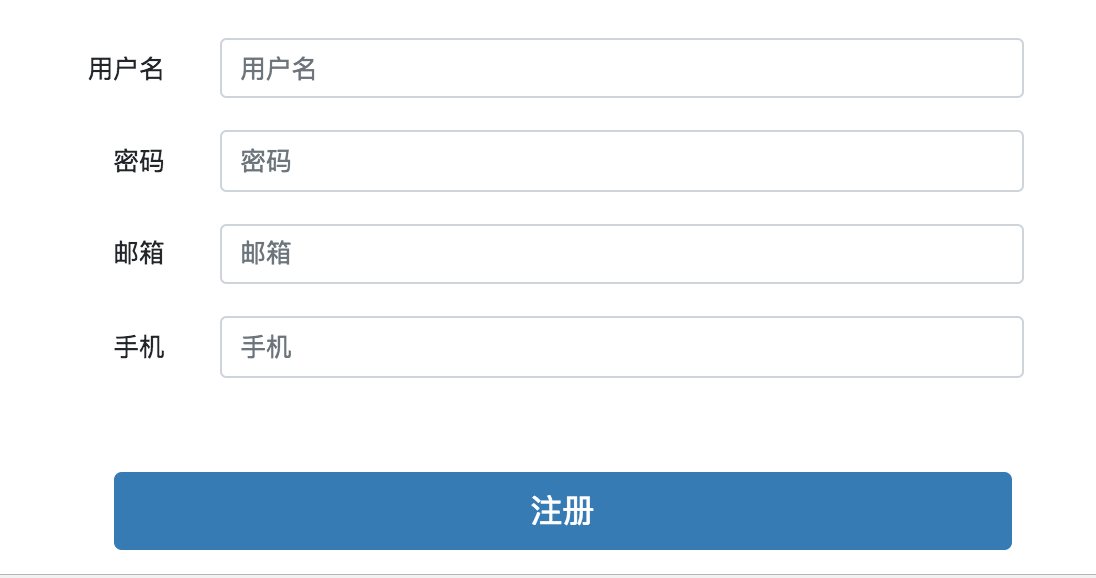
- 代码
<head>

    <meta charset="UTF-8">

    <title>用户注册</title>

    <link href="bootstrap-4.3.1-dist/css/bootstrap.min.css" rel="stylesheet">

    <script src="https://code.jquery.com/jquery.js"></script>

    <script src="bootstrap-4.3.1-dist/js/bootstrap.js"></script>

    <style>

       .container1 {

            margin-top: 70px;

            width: 45%;

            margin-left: 30%;

        }

        /* 需要在一行的元素 */

        .inline-style {

            display: inline-block;

        }

        /* 文字需要靠右 */

        .font-position-right{

            text-align: right;

        }

        /* 注册按钮 */

        .register-btn{

            margin-left: 10%;

        }

    </style>

</head>

<body>

<div class="container1">

    <form class="form-horizontal">

        <div class="form-group">

            <!--<h2 class="form-signin-heading">注册</h2>-->

            <!-- class="sr-only"将label标签隐藏 -->

            <label for="exampleInputUsername1" class="col-sm-2 control-label inline-style font-position-right">用户名</label>

            <div class="col-sm-9 inline-style ">

                <input type="text" class="form-control" id="exampleInputUsername1" placeholder="用户名">

            </div>

        </div>

        <div class="form-group">

            <!--<h2 class="form-signin-heading">注册</h2>-->

            <label for="exampleInputUsername1" class="col-sm-2 control-label  inline-style font-position-right">密码</label>

            <div class="col-sm-9  inline-style">

                <input type="password" class="form-control" id="exampleInputPassword1" placeholder="密码">

            </div>

        </div>

        <div class="form-group">

            <label for="exampleInputUsername1" class="col-sm-2 control-label  inline-style font-position-right">邮箱</label>

            <div class="col-sm-9  inline-style">

                <input type="email" class="form-control" id="exampleInputEmail1" placeholder="邮箱">

            </div>

            <div class="form-group">

            </div>

        </div>

        <div class="form-group">

            <label for="exampleInputUsername1" class="col-sm-2 control-label   inline-style font-position-right">手机</label>

            <div class="col-sm-9  inline-style">

                <input type="tel" class="form-control" id="exampleInputPhone1" placeholder="手机">

            </div>

        </div>

        <div class="form-group">

            <div class="col-sm-offset-2 col-sm-10">

                <div class="checkbox">

                    <label>

                        <!--<input type="checkbox">

                        记住密码-->

                    </label>

                </div>

            </div>

        </div>

        <div class="form-group">

            <div class="col-sm-offset-2 col-sm-10">

                <button class="btn btn-lg btn-primary btn-block register-btn" type="submit">注册</button>

            </div>

        </div>

    </form>

</div>

</body>

</html>
- 例图
Bootstrap实现注册界面的更多相关文章
- 使用Boostrap框架写一个登录\注册界面
Bootstrap是一个Web前端开发框架,使用它提供的css.js文件可以简单.方便地美化HTML控件.一般情况下,对控件的美化需要我们自己编写css代码,并通过标签选择器.类选择器.ID选择器为指 ...
- Web前端-网站首页和注册界面的实现
首页用到的知识如下: 1.bootstrap框架 2.jQuerry实现页面定时弹出广告 注册界面用到的知识: 1.bootstrap框架 2.jQuerry实现省市联动操作 3.jQuerry实现表 ...
- HTML登录注册界面怎么制作?
在没有学习CSS样式的前提下,是如何做一个简单的注册界面的. 一.表单标签(form) 首先我们先写一个<form></form>的标签,form标签属于表单标签,通常我们的登 ...
- 50个令人惊奇的jQuery插件(对话框和表单篇)及免费的响应式bootstrap管理员后台界面主题 - Charisma
http://www.woiweb.net/50-amazing-jquery-plugins.html 多文件文件下载 免费的响应式bootstrap管理员后台界面主题 – Charisma htt ...
- iOS开发——UI进阶篇(八)pickerView简单使用,通过storyboard加载控制器,注册界面,通过xib创建控制器,控制器的view创建,导航控制器的基本使用
一.pickerView简单使用 1.UIPickerViewDataSource 这两个方法必须实现 // 返回有多少列 - (NSInteger)numberOfComponentsInPicke ...
- 免费下载!Twitter Bootstrap V3 矢量界面素材
Bootstrap 3 Vector UI Kit 包含所有矢量格式的 Twitter Bootstrap 3 界面控制元素.Glyphicons 以及额外的一些界面素材,而且基本的图形元素都切好图了 ...
- HTML练习----注册界面
<!DOCTYPE html PUBLIC "-//W3C//DTD XHTML 1.0 Transitional//EN" "http://www.w3.org/ ...
- tkinter 创建登陆注册界面
import tkinter as tk from tkinter import messagebox #设置窗口居中 def window_info(): ws = window.winfo_scr ...
- 实践练习_使用HTML标签制作一个注册界面03
使用HTML标签制作一个注册界面▲▲▲▲★1) 注册界面需要有用户名.密码.性别(单选).爱好(多选).专业(下拉列表)2) 注册界面需要有隐藏域和文件域3) 注册界面需要有提交和重置按钮4) 将上述 ...
随机推荐
- 【转】W3C中国与百度联合组织移动网页加速技术研讨会
2017 年 8 月 30 日,W3C 会员百度在北京中关村软件园国际会议中心主办了 "移动网页加速技术研讨会",W3C 中国以及腾讯.阿里巴巴及 UC.搜狗.小米.傲游.中国移动 ...
- Windows环境下消息中间件RabbitMq的搭建与应用
前言 消息中间件目前已经在很多大型的项目上得到了运用,我们常见的有 RabbitMq, activitymq,kafka,rocketmq,其中rocketmq是阿里自己在kafka的基础上用java ...
- 七牛云免费对象存储,并绑定到cloudreve中
之前开通了腾讯云的对象存储COS并使用中,不过之前主要将它当作云盘使用,这两天再做博客系统时发现也可以将它作为网站的图库,这样对网站的访问效率也会提高. 今天了解到七牛云有免费的对象存储可以使用,于是 ...
- 负载,性能测试工具-Gatling
前言 Gatling Gatling是一款功能强大的负载测试工具,它为易于使用,高可维护性和高性能而设计. 开箱即用,Gatling由于对HTTP协议的出色支持,使其成为负载测试任何HTTP服务器的首 ...
- redis测试实践
最近测试服务端的时候,接触到了redis,之前也看过,但不系统,借着这次实践,记录一下. 一.写在前面 Redis是一个开源的使用ANSI C语言编写.遵守BSD协议.支持网络.可基于内存亦可持久化的 ...
- WebGL three.js学习笔记 阴影与实现物体的动画
实现物体的旋转.跳动以及场景阴影的开启与优化 本程序将创建一个场景,并实现物体的动画效果 运行的结果如图: 完整代码如下: <!DOCTYPE html> <html lang=&q ...
- sun.misc jar包
一直以来Base64算法的加密解密都是使用sun.misc包下的BASE64Encoder及BASE64Decoder来进行的.但是这个类是sun公司的内部方法,并没有在Java API中公开过,不属 ...
- MySQL读取Binlog日志常见的3种错误
1. mysqlbinlog: [ERROR] unknown variable 'default-character-set=utf8mb4' 当我们在my.cnf中添加default-charac ...
- 如何设置织梦cms自定义表单字段为必填项
1.编辑器打开\plus\diy.php2.在40行左右找到此行代码:$dede_fields = empty($dede_fields) ? '' : trim($dede_fields);3.在这 ...
- mysql性能优化之数据库级别优化--优化sql语句
一 优化SELECT语句 1.1 WHERE子句优化 本文暂时只讨论可以处理WHERE子句的优化,下面的一些实例使用SELECT语句,但是相同的优化同样适用DELETE和UPDATE语句中的WHER ...