
Bootstrap实现注册界面
- 样式一
- 例图

- 代码
<head>

    <meta charset="UTF-8">

    <title>用户注册</title>

    <link href="bootstrap-4.3.1-dist/css/bootstrap.min.css" rel="stylesheet">

    <script src="https://code.jquery.com/jquery.js"></script>

    <script src="bootstrap-4.3.1-dist/js/bootstrap.js"></script>

    <style>

        .container {

            margin-top: 15%;

            width: 35%;

        }

        .btn-primary {

            background-color: #337ab7;

            border-color: #337ab7;

        }

        .form-control {

            margin-bottom: 4px;

        }

    </style>

</head>

<body>

<div class="container">

    <form>

        <div class="form-signin">

            <!--<h2 class="form-signin-heading">注册</h2>-->

            <!-- class="sr-only"将label标签隐藏 -->

            <label for="exampleInputUsername" class="sr-only">用户名</label>

            <input type="text" class="form-control" id="exampleInputUsername" placeholder="用户名">

            <label for="exampleInputUsername" class="sr-only">密码</label>

            <input type="password" class="form-control" id="exampleInputPassword" placeholder="密码">

            <label for="exampleInputUsername" class="sr-only">邮箱</label>

            <input type="email" class="form-control" id="exampleInputEmail" placeholder="邮箱">

            <label for="exampleInputUsername" class="sr-only">手机</label>

            <input type="tel" class="form-control" id="exampleInputPhone" placeholder="手机">

            <div class="checkbox">

                <label>

                    <!--<input type="checkbox">

                    记住密码-->

                </label>

            </div>

            <button class="btn btn-lg btn-primary btn-block" type="submit">注册</button>

        </div>

    </form>

</div>

</body>

</html>
- 例图
- 样式二
- 例图
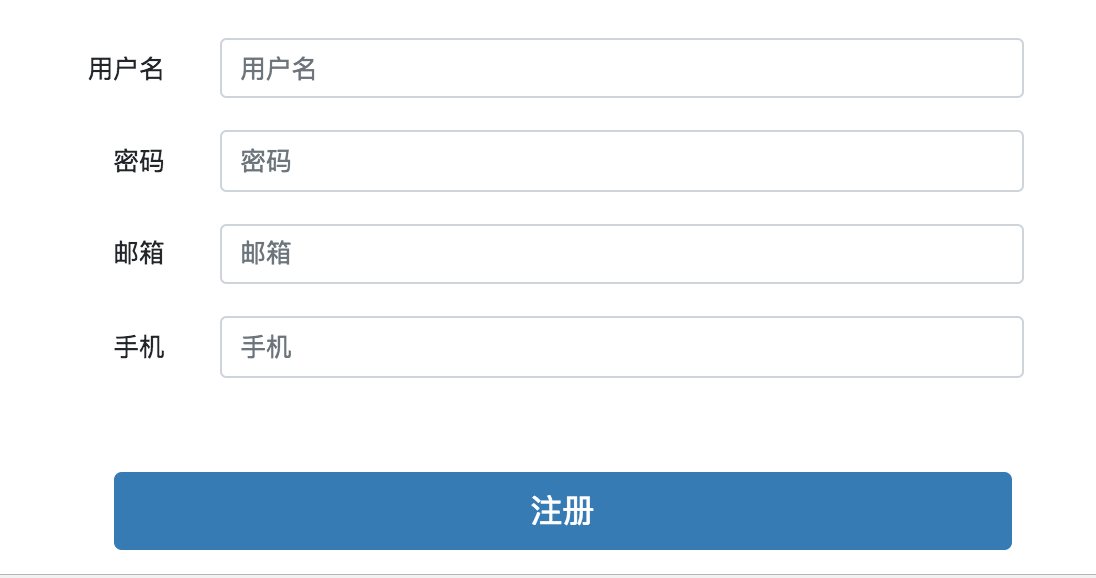
- 代码
<head>

    <meta charset="UTF-8">

    <title>用户注册</title>

    <link href="bootstrap-4.3.1-dist/css/bootstrap.min.css" rel="stylesheet">

    <script src="https://code.jquery.com/jquery.js"></script>

    <script src="bootstrap-4.3.1-dist/js/bootstrap.js"></script>

    <style>

       .container1 {

            margin-top: 70px;

            width: 45%;

            margin-left: 30%;

        }

        /* 需要在一行的元素 */

        .inline-style {

            display: inline-block;

        }

        /* 文字需要靠右 */

        .font-position-right{

            text-align: right;

        }

        /* 注册按钮 */

        .register-btn{

            margin-left: 10%;

        }

    </style>

</head>

<body>

<div class="container1">

    <form class="form-horizontal">

        <div class="form-group">

            <!--<h2 class="form-signin-heading">注册</h2>-->

            <!-- class="sr-only"将label标签隐藏 -->

            <label for="exampleInputUsername1" class="col-sm-2 control-label inline-style font-position-right">用户名</label>

            <div class="col-sm-9 inline-style ">

                <input type="text" class="form-control" id="exampleInputUsername1" placeholder="用户名">

            </div>

        </div>

        <div class="form-group">

            <!--<h2 class="form-signin-heading">注册</h2>-->

            <label for="exampleInputUsername1" class="col-sm-2 control-label  inline-style font-position-right">密码</label>

            <div class="col-sm-9  inline-style">

                <input type="password" class="form-control" id="exampleInputPassword1" placeholder="密码">

            </div>

        </div>

        <div class="form-group">

            <label for="exampleInputUsername1" class="col-sm-2 control-label  inline-style font-position-right">邮箱</label>

            <div class="col-sm-9  inline-style">

                <input type="email" class="form-control" id="exampleInputEmail1" placeholder="邮箱">

            </div>

            <div class="form-group">

            </div>

        </div>

        <div class="form-group">

            <label for="exampleInputUsername1" class="col-sm-2 control-label   inline-style font-position-right">手机</label>

            <div class="col-sm-9  inline-style">

                <input type="tel" class="form-control" id="exampleInputPhone1" placeholder="手机">

            </div>

        </div>

        <div class="form-group">

            <div class="col-sm-offset-2 col-sm-10">

                <div class="checkbox">

                    <label>

                        <!--<input type="checkbox">

                        记住密码-->

                    </label>

                </div>

            </div>

        </div>

        <div class="form-group">

            <div class="col-sm-offset-2 col-sm-10">

                <button class="btn btn-lg btn-primary btn-block register-btn" type="submit">注册</button>

            </div>

        </div>

    </form>

</div>

</body>

</html>
- 例图
Bootstrap实现注册界面的更多相关文章
- 使用Boostrap框架写一个登录\注册界面
Bootstrap是一个Web前端开发框架,使用它提供的css.js文件可以简单.方便地美化HTML控件.一般情况下,对控件的美化需要我们自己编写css代码,并通过标签选择器.类选择器.ID选择器为指 ...
- Web前端-网站首页和注册界面的实现
首页用到的知识如下: 1.bootstrap框架 2.jQuerry实现页面定时弹出广告 注册界面用到的知识: 1.bootstrap框架 2.jQuerry实现省市联动操作 3.jQuerry实现表 ...
- HTML登录注册界面怎么制作?
在没有学习CSS样式的前提下,是如何做一个简单的注册界面的. 一.表单标签(form) 首先我们先写一个<form></form>的标签,form标签属于表单标签,通常我们的登 ...
- 50个令人惊奇的jQuery插件(对话框和表单篇)及免费的响应式bootstrap管理员后台界面主题 - Charisma
http://www.woiweb.net/50-amazing-jquery-plugins.html 多文件文件下载 免费的响应式bootstrap管理员后台界面主题 – Charisma htt ...
- iOS开发——UI进阶篇(八)pickerView简单使用,通过storyboard加载控制器,注册界面,通过xib创建控制器,控制器的view创建,导航控制器的基本使用
一.pickerView简单使用 1.UIPickerViewDataSource 这两个方法必须实现 // 返回有多少列 - (NSInteger)numberOfComponentsInPicke ...
- 免费下载!Twitter Bootstrap V3 矢量界面素材
Bootstrap 3 Vector UI Kit 包含所有矢量格式的 Twitter Bootstrap 3 界面控制元素.Glyphicons 以及额外的一些界面素材,而且基本的图形元素都切好图了 ...
- HTML练习----注册界面
<!DOCTYPE html PUBLIC "-//W3C//DTD XHTML 1.0 Transitional//EN" "http://www.w3.org/ ...
- tkinter 创建登陆注册界面
import tkinter as tk from tkinter import messagebox #设置窗口居中 def window_info(): ws = window.winfo_scr ...
- 实践练习_使用HTML标签制作一个注册界面03
使用HTML标签制作一个注册界面▲▲▲▲★1) 注册界面需要有用户名.密码.性别(单选).爱好(多选).专业(下拉列表)2) 注册界面需要有隐藏域和文件域3) 注册界面需要有提交和重置按钮4) 将上述 ...
随机推荐
- python接口自动化(二十五)--unittest断言——下(详解)
简介 本篇还是回归到我们最初始的话题,想必大家都忘记了,没关系看这里:传送门 没错最初的话题就是登录,由于博客园的登录机制改变了,本篇以我找到的开源免费的登录API为案例,结合 unittest 框 ...
- Spark学习之编程进阶总结(二)
五.基于分区进行操作 基于分区对数据进行操作可以让我们避免为每个数据元素进行重复的配置工作.诸如打开数据库连接或创建随机数生成器等操作,都是我们应当尽量避免为每个元素都配置一次的工作.Spark 提供 ...
- pytest进阶之配置文件
前言 pytest配置文件能够改变pytest框架代码的运行规则.比如修改pytest收集用例的规则,添加命令行参数等等!下面我们来一一讲解常用的一些配置项 Help 通过命令pytest --hel ...
- Node中流的概念
在学习node的过程中,对于流的概念一直不是很理解,通过查阅一些资料,现在将自己对流的一些理解进行总结一下. 一.流的理解 首先我们必须知道什么是流,很多书中只是提到使用流读写文件怎么怎么方便,却不提 ...
- 【重学计算机】操作系统D5章:文件系统
1. 文件系统 文件系统概述 文件的组织: 逻辑结构:流式.记录式 物理结构:顺序.连接.直接.索引 文件的存取:顺序.直接.索引 文件的控制:逻辑控制.物理控制 文件的使用:打开.关闭.读.写.控制 ...
- ab性能测试工具的使用
一.什么是ab ab,即Apache Benchmark,是一种用于测试Apache超文本传输协议(HTTP)服务器的工具. ab命令会创建很多的并发访问线程,模拟多个访问者同时对某一URL地址进行访 ...
- RabbitMq在CentOs7下的完整安装步骤,带你踩坑
1.前言 因为公司项目中用的RabbitMq来做消息处理,自己以前没有接触过,所以想自学一下.然额,光安装就花了6.7个小时才搞定,中间还换过一个版本,综合国内外博客才最终将所有安装中遇到的问题解决掉 ...
- Android版数据结构与算法(三):基于链表的实现LinkedList源码彻底分析
版权声明:本文出自汪磊的博客,未经作者允许禁止转载. LinkedList 是一个双向链表.它可以被当作堆栈.队列或双端队列进行操作.LinkedList相对于ArrayList来说,添加,删除元素效 ...
- javascript语言精粹-笔记
walkDOM function walkTheDOM(node, func) { func(node); node = node.firstChild; while (node) { walkThe ...
- c/c++ open函数的阻塞和非阻塞
调用open函数时,可以指定是以阻塞方式还是以非阻塞方式打开一个文件描述符. 阻塞方式打开: int fd = open("/dev/tty", O_RDWR|O_NONBLOCK ...