
A quike guide teaching you how to use matlab to read netCDF file and plot a figure
2. A brief introduce to netCDF. 4
4.1 Get data from netCDF file. 12
4.2 Get subset data of specified variable. 13
Example 1: get the time series of a specified point (lon(11),lat(10))13
Example 2: get data of every point at time(0)14
1. Preparation
Software: Matlab 2014a;
Used netCDF File: example.nc(containd in Matlab Install files), pres.tropp.2015.nc.
Instruction/Reference:
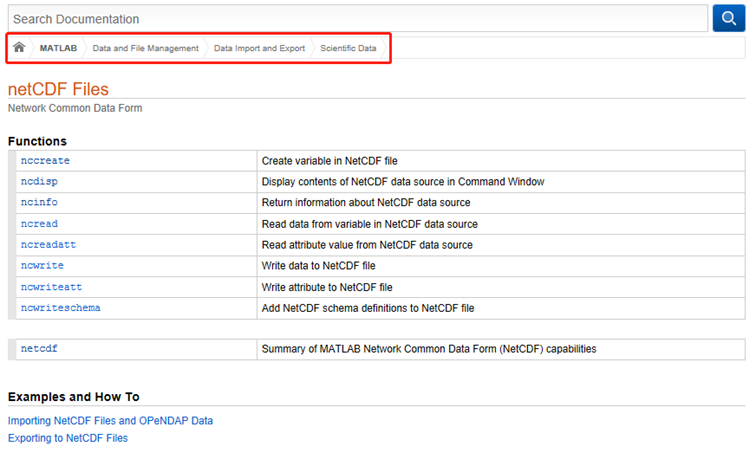
1. Matlab help documention
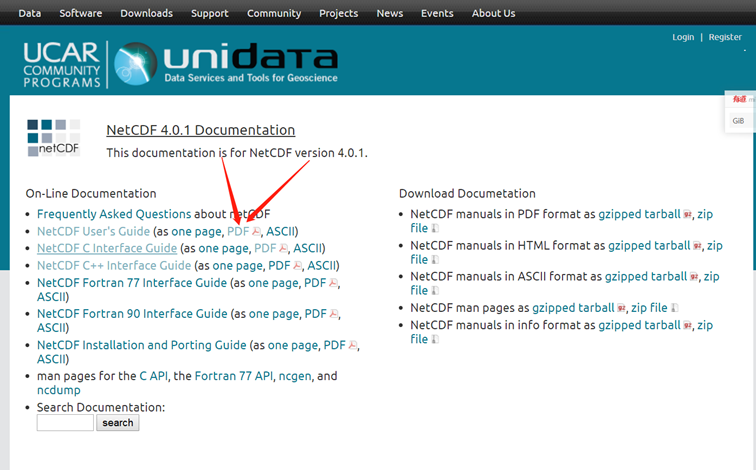
2. NetCDF User's Guide
https://www.unidata.ucar.edu/software/netcdf/old_docs/docs_4_0_1/
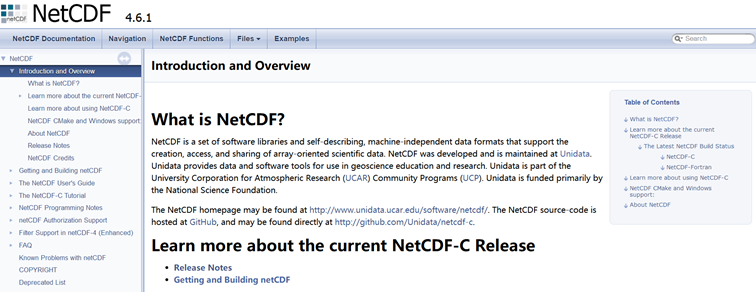
3. NetCDF Documentation
https://www.unidata.ucar.edu/software/netcdf/docs/index.html
2. A brief introduce to netCDF
NetCDF is a set of software libraries and self-describing, machine-independent data formats that support the creation, access, and sharing of array-oriented scientific data. NetCDF was developed and is maintained at Unidata. Unidata provides data and software tools for use in geoscience education and research.
|
Format |
Model |
Version |
Released Year |
|
Classic format |
classic model |
1.0~3.5 |
1989~2000 |
|
64-bit offset format |
3.6 |
2004 |
|
|
netCDF-4 classic model format |
|||
|
enhanced model (netCDF-4 data model) |
4.0 |
2008 |
|
|
netCDF-4 format |
l data represented with the classic model can also be represented using the enhanced model;
l datasets that use features of the enhanced model, such as user-defined nested data types, cannot be represented with the classic model;
l Evolution will continue the commitment to keep the Backwards Compatibility;
n Backwards means the “previous” and Forwards means the “future”;
l Knowledge of format details is not required to read or write netCDF datasets, unless you want to understand the performance issues related to disk or server access.
l The netCDF reference library, developed and supported by Unidata, is written in C,with Fortran77, Fortran90, and C++ interfaces. A number of community and commercially supported interfaces to other languages are also available, including IDL, Matlab, Perl,Python, and Ruby. An independent implementation, also developed and supported by Unidata, is written entirely in Java.
3. Data Structure
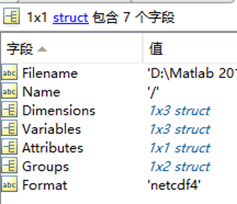
By use of the “ncinfo” we can get the structure information of the data source. This information is store in the Workspace. You can also use “ncdisp” to display the contents of the netCDF file in the Command Window.
|
structure1 = ncinfo('example.nc'); |
structure2 = ncinfo('pres.tropp.2015.nc'); |
 |
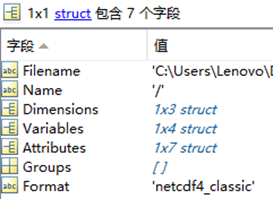 |
If we sort the data, we can get:
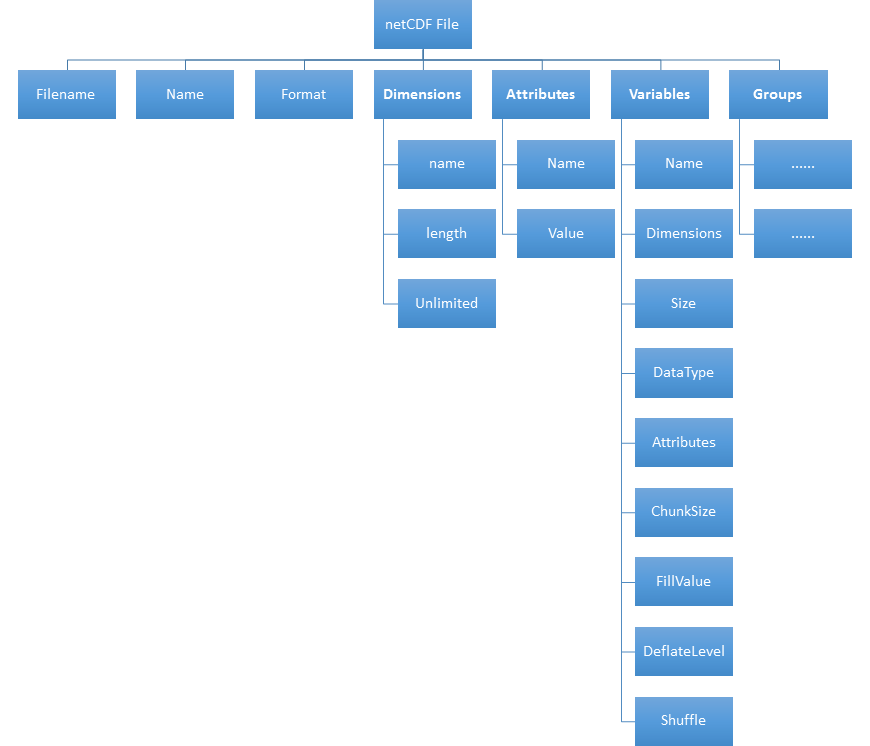
l Filename: netCDF file name or URL.
l Name: “/” indicating the full file
l Format: the format of the netCDF file, see section 2.
l Groups: An empty array([]) for all netCDF file format except netCDF-4 format.
3.1 Attributes
概述:File有attributes,variable有attributes;就近原则,描述自己。
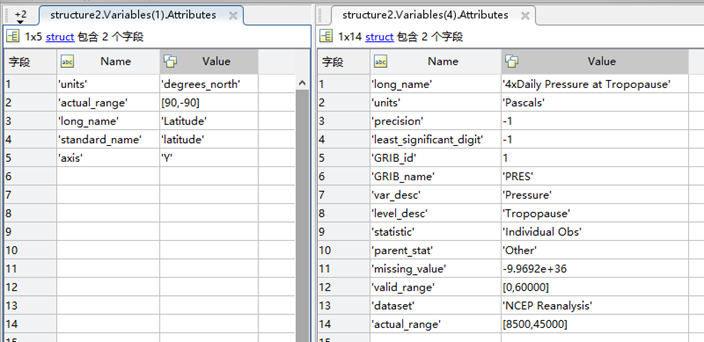
NetCDF attributes are used to store data about the data (ancillary data or metadata(元数据,描述数据的数据)), we can call them Global Attributes.
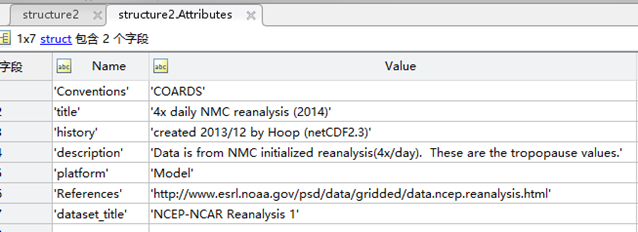
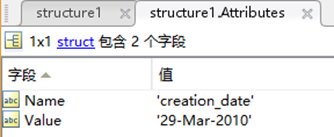
Most attributes provide information about a specific variable. These are identified by the name (or ID) of that variable, together with the name of the attribute.
3.2 Dimensions
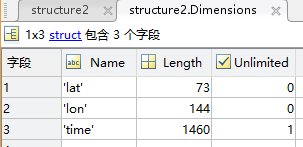
A dimension may be used to represent a real physical dimension, for example, time, latitude, longitude, or height. A dimension might also be used to index other quantities, for example station or People.
l Name: the name of the dimension;
l Length: number(sample) of values;
l Unlimited: Boolean value. Indicates whether this dimension’s length is limited.
In a classic or 64-bit offset format dataset you can have at most one UNLIMITED dimension;
In a netCDF-4 format dataset, multiple UNLIMITED dimensions can be used.
3.3 Variables
When a variable is defined, its shape is specified as a list of dimensions. These dimensions must already exist.
A scalar has no dimension, a vector has one dimension and a matrix has 2 dimensions.

l Dimensions: the same as “independent variables”.

l Size: Like the matlab function “size” if the variable is matrix, like the matlab function “length” if the variable is verctor or scalar.
l Attributes: see section 3.1
l ChunkSize: specifying the size of one chunk. If the storage type specified is CONTIGUOUS it is “[]”.

l Fillvalue:Specifies the value to the variable when no other value is specified and use of fill values has been enabled.
最后这两个参数和数据的压缩有关,若数据是压缩过的,则需要解压后才能够读取。不过这些都是由底层的APIs(interface)实现的,我们可以不用管它。
l DeflateLevel:Scalar value between 0 and 9 specifying the amount of compression, where 0 is no compression and 9 is the most compression
l Shuffle:Boolean value. True indicates the shuffle filter is enabled for this variable. The shuffle filter can assist with the compression of integer data by changing the byte order in the data stream.
Classfication
Class One: Coordinate variables
l A variable with the same name as a dimension.
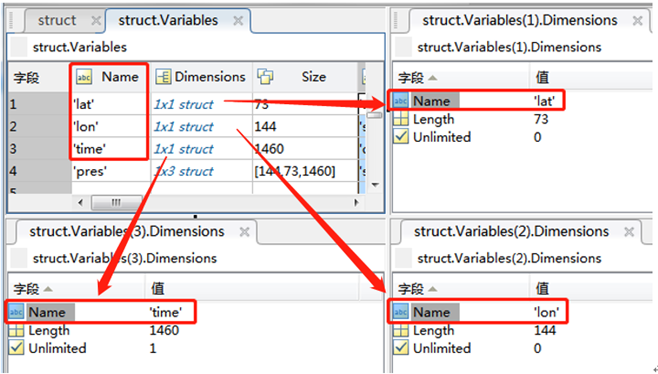
l It typically defines a physical coordinate corresponding to that dimension.
n So that you have alternative means of specifying position along the variable.
|
Index (C convention) |
0 |
1 |
2 |
3 |
4 |
… |
|
Index (Fortran convention) |
1 |
2 |
3 |
4 |
5 |
… |
|
physical coordinate (lat,lon,time etc.) |
0 |
2.5 |
5 |
7.5 |
10 |
… |
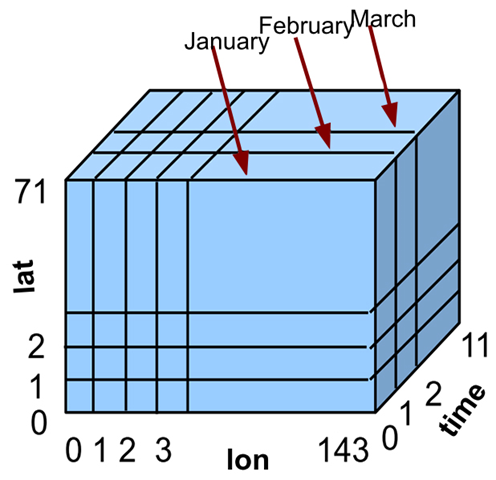
n Matlab netCDF functions adopt C convention such that the counting starts from zero. Diagram below illustrates the actual index that we should use to extract the data using the Matlab functions.
http://www.public.asu.edu/~hhuang38/matlab_netcdf_guide.pdf
Class Two: Primary variables
l This class can also be devied into two class:the Record variables and the others(just call it Fixed variables here)
l Record variables: these variables has the unlimited dimension(like time), their size is variable.
l Fixed variables: have a fixed size (number of data values) given by the product(叉乘、笛卡尔积) of its dimension lengths.
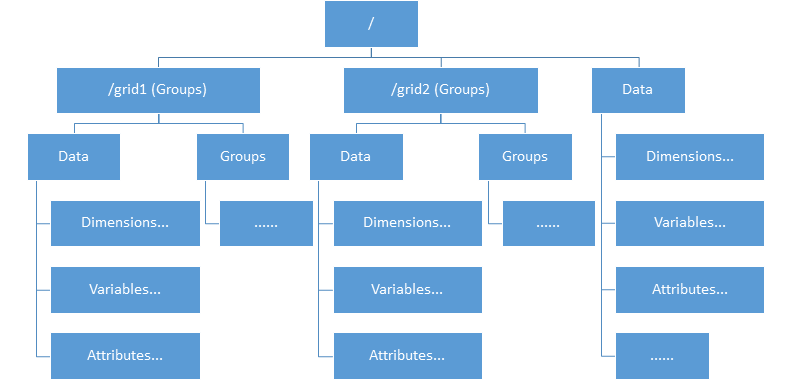
3.4 Groups
l Starting with version 4.0, groups can help organize data within a dataset.
l It’s not a type of data. Like a directory structure on a Unix file-system, the grouping feature allows users to organize variables and dimensions into distinct, named, hierarchical areas, called groups.
l Here we use the file “example.nc” to demonstrate the groups’ structure
4. Source Code
After get know the file structure, we can extract the data of specific “variables”. Here illustrate the step of process.
Step 0: use function “ncinfo” or “ncdisp” to check the structure and information of the netCDF file; (this step is unnecessary if you have got known with the data.)
Step 1: Open the file;
Step 2: Extract data from specific “variables”;
Step 3: close the file;
4.1 Get data from netCDF file
% get information/structure data
struct = ncinfo('pres.tropp.2015.nc');
% open the file(pres.tropp.2015.nc) by Read-only access(NC_NOWRITE)
% ncid is a NetCDF file identifier
ncid = netcdf.open('pres.tropp.2015.nc','NC_NOWRITE');
% get variable ID(varid) by given its name(pres)
varid = netcdf.inqVarID(ncid,'pres');
% get data(pres_data) by specifying the variable ID(varid)
pres_data = netcdf.getVar(ncid,varid);
% clos the file
netcdf.close(ncid);
% clear defunct parameters, leave alone the data(pres_data)
clear ncidvarid

4.2 Get subset data of specified variable
The size of the “pres_data” matrix is 144×73×1460, what if I want to get the sub-matrix of “pres_data”?
Example 1: get the time series of a specified point (lon(11),lat(10))
ncid = netcdf.open('pres.tropp.2015.nc','NC_NOWRITE');
varid = netcdf.inqVarID(ncid,'pres');
series_data = netcdf.getVar(ncid,varid,[10,9,0],[1,1,1460]);
% "[10,9,0]" represent the start point (Again, remember that counting starts from zero.)
% "[1,1,1460]" specifies the amount of the data in each dimension.
% plot the data
% plot(series_data(:));
netcdf.close(ncid);
clear ncidvarid
series_data is still a 3-dimention matrix, and the first two dimentions’ length is 1. The relation between “series_data” and “pres_data” is below:
series_data(1,1,i) = pres_data(11,10,i),i=1,2,…,1460.
Example 2: get data of every point at time(0)
ncid = netcdf.open('pres.tropp.2015.nc','NC_NOWRITE');
varid = netcdf.inqVarID(ncid,'pres');
map_data = netcdf.getVar(ncid,varid,[0,0,0],[144,73,1]);
netcdf.close(ncid);
clear ncidvarid
map_data is a 2-dimention matrix. The relation between “map_data” and “pres_data” is below:
map_data(i,j) = pres_data(i,j,1),i=1,2,…,144;j=1,2,…,73
4.3 Plot a figure
% open the file
ncid = netcdf.open('pres.tropp.2015.nc','NC_NOWRITE');
% get data
map_data = netcdf.getVar(ncid,netcdf.inqVarID(ncid,'pres'),[0,0,0],[144,73,1]);
longitude = netcdf.getVar(ncid,netcdf.inqVarID(ncid,'lon'));
latitude = netcdf.getVar(ncid,netcdf.inqVarID(ncid,'lat'));
% Time = netcdf.getVar(ncid,netcdf.inqVarID(ncid,'time'));
% clos the file
netcdf.close(ncid);
% plot the data
map_data = map_data'; % map_data must be transposed(see below for details)
[x,y]=meshgrid(longitude,latitude);
pcolor(x,y,map_data);
colorbar('location','eastoutside');
shading interp;colormap parula
% clear defunct parameters
clear ncidxy
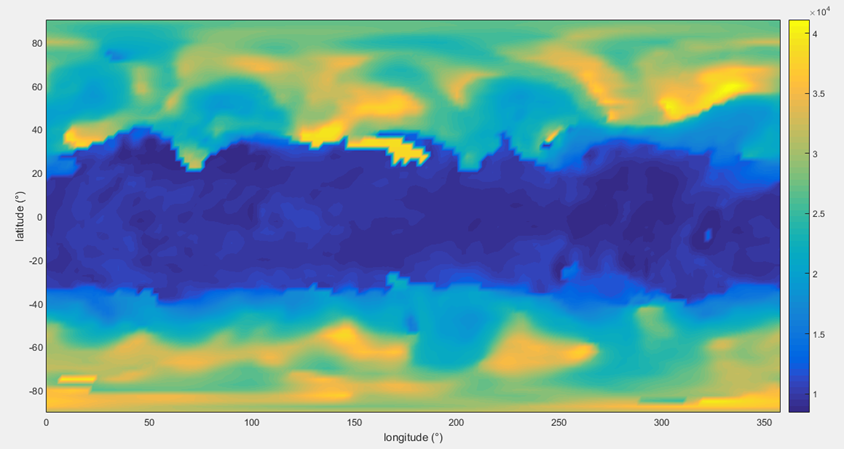
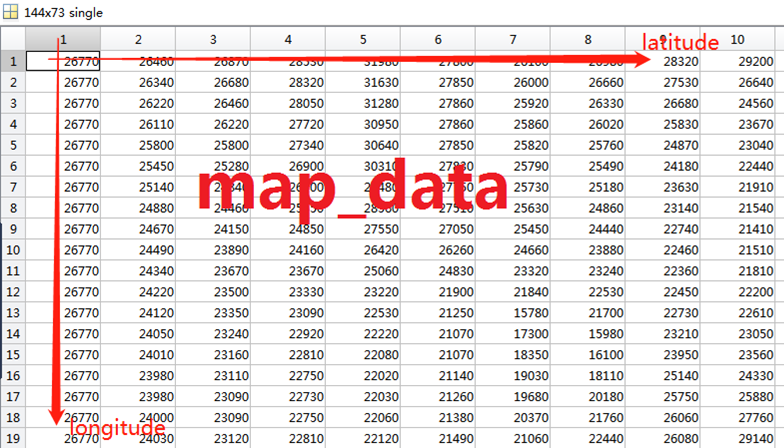
l Be careful when you plot the figure, the 1st dimension of the “map_data” is longitude, same as row of the matrix.
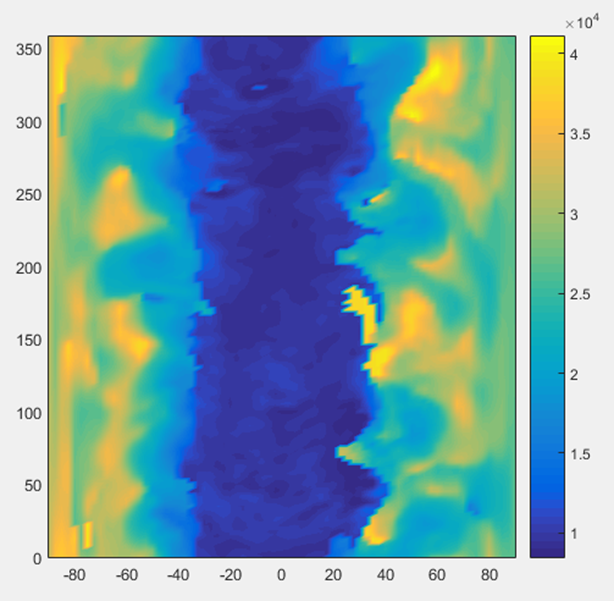
l The y-axis of the figure will be “longitude” if “map_dat” is not transposed.
A quike guide teaching you how to use matlab to read netCDF file and plot a figure的更多相关文章
- ZooKeeper Getting Started Guide
http://zookeeper.apache.org/doc/trunk/zookeeperStarted.html What is ZooKeeper? ZooKeeper is a centra ...
- [C3] Andrew Ng - Neural Networks and Deep Learning
About this Course If you want to break into cutting-edge AI, this course will help you do so. Deep l ...
- GO语言的开源库
Indexes and search engines These sites provide indexes and search engines for Go packages: godoc.org ...
- Android Lint Checks
Android Lint Checks Here are the current list of checks that lint performs as of Android Studio 2.3 ...
- Matlab编程基础
平台:Win7 64 bit,Matlab R2014a(8.3) “Matlab”是“Matrix Laboratory” 的缩写,中文“矩阵实验室”,是强大的数学工具.本文侧重于Matlab的编程 ...
- LaTeX插入图片方法 Inserting Images
Inserting Images Images are essential elements in most of the scientific documents. LATEX provides s ...
- Machine Learning for hackers读书笔记(四)排序:智能收件箱
#数据集来源http://spamassassin.apache.org/publiccorpus/ #加载数据 library(tm)library(ggplot2)data.path<-'F ...
- 对于fmri的设计矩阵构造的一个很直观的解释-by 西南大学xulei教授
本程序意在解释这样几个问题:完整版代码在本文的最后. 1.实验的设计如何转换成设计矩阵? 2.设计矩阵的每列表示一个刺激条件,如何确定它们? 3.如何根据设计矩阵和每个体素的信号求得该体素对刺激的敏感 ...
- Go语言(golang)开源项目大全
转http://www.open-open.com/lib/view/open1396063913278.html内容目录Astronomy构建工具缓存云计算命令行选项解析器命令行工具压缩配置文件解析 ...
随机推荐
- Python之函数的进阶(带参数的装饰器)
函数篇--装饰器二 带参数的装饰器 def outer(flag): def timer(func): def inner(*args,**kwargs): if flag: print('''执行函 ...
- logging的使用方法
logging的使用方法 1,简单使用方法 >>> import logging >>> logging.warning('this is a warning') ...
- 数十种TensorFlow实现案例汇集:代码+笔记(转)
转:https://www.jiqizhixin.com/articles/30dc6dd9-39cd-406b-9f9e-041f5cbf1d14 这是使用 TensorFlow 实现流行的机器学习 ...
- 电力 Web SCADA 工控组态编辑器
前言 SVG 并非仅仅是一种图像格式, 由于它是一种基于 XML 的语言,也就意味着它继承了 XML 的跨平台性和可扩展性,从而在图形可重用性上迈出了一大步.如 SVG 可以内嵌于其他的 XML 文档 ...
- windows汇编环境配置
原文地址 软件下载 需要的软件已经打包,包括dosbox和MASM.如果没有这两个软件可以在下面的地址下载. http://hjwblog.com/game/汇编环境.zip 点击下载 安装dosbo ...
- 我常用的css基础
mkdir 创建文件夹touch 创建文件mode:'history' ----------------------------------------------------------去除# di ...
- java基本数据类型的包装类
基本类型对应的包装类 byte(Byte).short(Short).int(Integer).long(Long).float(Float).double(Double).char(Characte ...
- 获取 Let's Encrypt 免费通配符证书实现Https
说明 3月14日,Let's Encrypt的执行董事Josh Aas对外宣布,他们的通配符证书正式上线,用户可以基于此特性轻松部署/开启所有子域名的HTTPS功能. Let's Encrypt 是国 ...
- [LeetCode] Array Partition I 数组分割之一
Given an array of 2n integers, your task is to group these integers into n pairs of integer, say (a1 ...
- [LeetCode] Minimum Absolute Difference in BST 二叉搜索树的最小绝对差
Given a binary search tree with non-negative values, find the minimum absolute difference between va ...