
Machine Learning for hackers读书笔记(四)排序:智能收件箱
#数据集来源http://spamassassin.apache.org/publiccorpus/
#加载数据
library(tm)
library(ggplot2)
data.path<-'F:\\dataguru\\ML_for_Hackers\\ML_for_Hackers-master\\03-Classification\\data\\'
easyham.path<-paste(data.path,'easy_ham\\',sep='')
#读取文件的函数msg.full,返回一个向量,每一个元素都是邮件中的一行
msg.full <- function(path)
{
con <- file(path, open = "rt", encoding = "latin1")
msg <- readLines(con)
close(con)
return(msg)
}
#用正则表达式提取发件人地址,总是在From:后面,有些用<括起来>,有些没有
#参数是一封邮件向量,每一个元素就是邮件的一行
get.from <- function(msg.vec)
{
#查找所有有From:的行
from <- msg.vec[grepl("From: ", msg.vec)]
#按[":等符号进行拆分
from <- strsplit(from, '[":<> ]')[[1]]
#忽略空元素
from <- from[which(from != "" & from != " ")]
#取出带@的邮件地址的那一部分并返回
return(from[grepl("@", from)][1])
}
#提取主题
get.subject <- function(msg.vec)
{
subj <- msg.vec[grepl("Subject: ", msg.vec)]
if(length(subj) > 0)
{
return(strsplit(subj, "Subject: ")[[1]][2])
}
else
{
return("")
}
}
#读取正文,正文总是在第一个空行后面
get.msg <- function(msg.vec)
{
msg <- msg.vec[seq(which(msg.vec == "")[1] + 1, length(msg.vec), 1)]
return(paste(msg, collapse = "\n"))
}
#读取日期
get.date <- function(msg.vec)
{
#只保留以Date:开头的,也有其他开头的日期并不是我们要的
date.grep <- grepl("^Date: ", msg.vec)
date.grep <- which(date.grep == TRUE)
#邮件中的某一行也可能以Date:开头,因此只返回邮件第一行以Date:开头的
date <- msg.vec[date.grep[1]]
#冒号和+,冒号和-之间是我们要的日期
date <- strsplit(date, "\\+|\\-|: ")[[1]][2]
#以下gsub是把开头和结尾的空白字符去掉
date <- gsub("^\\s+|\\s+$", "", date)
#语料库中的标准日期格式只有25个字符,后面的可以全部不要
return(strtrim(date, 25))
}
#抽取4个特征,发件人地址,接收日期,主题,邮件正文
parse.email <- function(path)
{
full.msg <- msg.full(path)
date <- get.date(full.msg)
from <- get.from(full.msg)
subj <- get.subject(full.msg)
msg <- get.msg(full.msg)
return(c(date, from, subj, msg, path))
}
#开始处理文档吧
easyham.docs <- dir(easyham.path)
easyham.docs <- easyham.docs[which(easyham.docs != "cmds")]
#一个LIST,共2500个元素,每一个元素是一封邮件,分别包含时间,发件人,主题,正文,路径
easyham.parse <- lapply(easyham.docs,
function(p) parse.email(file.path(easyham.path, p)))
# Convert raw data from list to data frame
ehparse.matrix <- do.call(rbind, easyham.parse)
allparse.df <- data.frame(ehparse.matrix, stringsAsFactors = FALSE)
names(allparse.df) <- c("Date", "From.EMail", "Subject", "Message", "Path")
#allparse.df数据框,共2500行,每行一个邮件
#把日期处理成统一格式
#有两种格式
#Web,04 Dec 2002 11:36:32
#04 Dec 2002 11:36:32
#strptime的返回结果,能转则返回datetime类型,不能则返回NA
date.converter <- function(dates, pattern1, pattern2)
{
pattern1.convert <- strptime(dates, pattern1)
pattern2.convert <- strptime(dates, pattern2)
pattern1.convert[is.na(pattern1.convert)] <- pattern2.convert[is.na(pattern1.convert)]
return(pattern1.convert)
}
pattern1 <- "%a, %d %b %Y %H:%M:%S"
pattern2 <- "%d %b %Y %H:%M:%S"
#以下一句是我补充的,可能是操作系统问题,导致strptime返回值永远是NA,加上以下一句就不会
Sys.setlocale("LC_TIME", "C");
allparse.df$Date <- date.converter(allparse.df$Date, pattern1, pattern2)
allparse.df$Subject <- tolower(allparse.df$Subject)
allparse.df$From.EMail <- tolower(allparse.df$From.EMail)
#按时间顺序排,存入priority.df
#with将操作限制在数据框
priority.df <- allparse.df[with(allparse.df, order(Date)), ]
#分成两半,一半作训练集,剩下的作测试集,共1250条数据,包括日期,发件人,主题,正文,路径
priority.train <- priority.df[1:(round(nrow(priority.df) / 2)), ]
#以下注释掉的是书上的,不可用会出错,不知道怎么改
#from.weight<-ddply(priority.train,.(From.EMail),summarise,Freq=length(Subject))
#melt要加载reshape2包,计算每个发件人的次数
#with(priority.train, table(From.EMail))可以统计priority.train中From.EMail的频数
#melt转化为数据框并为频数加了列名
#from.weight就是发件人的发件频数
from.weight <- melt(with(priority.train, table(From.EMail)), value.name="Freq")
#排个序
from.weight <- from.weight[with(from.weight, order(Freq)), ]
#画个图,只取频数>6的画图,共52条,纵轴是X,横轴是Y
from.ex <- subset(from.weight, Freq > 6)
from.scales <- ggplot(from.ex) +
geom_rect(aes(xmin = 1:nrow(from.ex) - 0.5,
xmax = 1:nrow(from.ex) + 0.5,
ymin = 0,
ymax = Freq,
fill = "lightgrey",
color = "darkblue")) +
scale_x_continuous(breaks = 1:nrow(from.ex), labels = from.ex$From.EMail) +
coord_flip() +
scale_fill_manual(values = c("lightgrey" = "lightgrey"), guide = "none") +
scale_color_manual(values = c("darkblue" = "darkblue"), guide = "none") +
ylab("Number of Emails Received (truncated at 6)") +
xlab("Sender Address") +
theme_bw() +
theme(axis.text.y = element_text(size = 5, hjust = 1))
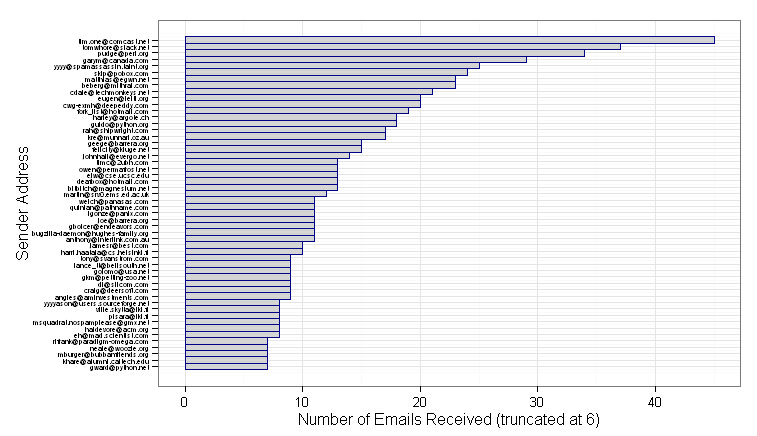
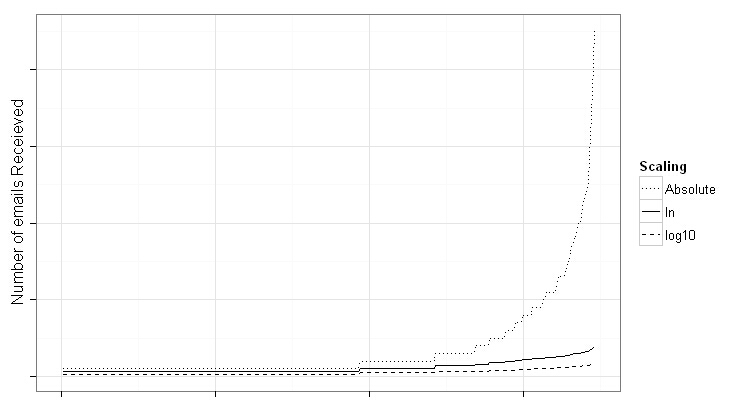
#如上图排名第一那位发太多了,会导致权重产生偏移,需要用Log加权策略,让特征数值关系不那么极端
#有自然对数,以e为底
#有常用对数,以10为底
#画个图对比一下
from.weight <- transform(from.weight,Weight = log(Freq + 1),log10Weight = log10(Freq + 1))
#from.weight共346行,数据框,两列,发件人,频数
from.rescaled <- ggplot(from.weight, aes(x = 1:nrow(from.weight))) +
geom_line(aes(y = Weight, linetype = "ln")) +
geom_line(aes(y = log10Weight, linetype = "log10")) +
geom_line(aes(y = Freq, linetype = "Absolute")) +
scale_linetype_manual(values = c("ln" = 1,
"log10" = 2,
"Absolute" = 3),
name = "Scaling") +
xlab("") +
ylab("Number of emails Receieved") +
theme_bw() +
theme(axis.text.y = element_blank(), axis.text.x = element_blank())
#变换后,曲线平缓了,常用对数变换程度更大,而自然对数变换还是保留了一些差异性,因此采用自然对数
#线程,用户和发件方来回回复邮件称为一个线程,以下函数用于查找线程,结果两列,是发件人及主题
find.threads <- function(email.df)
{
response.threads <- strsplit(email.df$Subject, "re: ")
#如果用re:分割后什么都没有,说明是初始线程,不是回复的邮件
is.thread <- sapply(response.threads,
function(subj) ifelse(subj[1] == "", TRUE, FALSE))
threads <- response.threads[is.thread]
senders <- email.df$From.EMail[is.thread]
#下面一句,万一主题中还有re:被分割了,那么再把它连起来拼回去
threads <- sapply(threads,function(t) paste(t[2:length(t)], collapse = "re: "))
return(cbind(senders,threads))
}
#threads.matrix共755行,这是初始线程,共两列,发件人,主题
threads.matrix <- find.threads(priority.train)
#给初始线程发件人赋权重,结果是数据框共三列发件Email,频次及权重,参数第一列是发件人,第二列是主题
email.thread <- function(threads.matrix)
{
#threads.matrix初始线程矩阵,只有两列,列1是发件人,列2是主题
senders <- threads.matrix[, 1]
#table,计算发件人频数,结果是一个table
senders.freq <- table(senders)
#结果转矩阵,矩阵有三个列,分别是发件人,频数及权重。这个矩阵每一行都有名字,就是发件人
senders.matrix <- cbind(names(senders.freq),
senders.freq,
log(senders.freq + 1))
senders.df <- data.frame(senders.matrix, stringsAsFactors=FALSE)
#将矩阵的行名字换成行号
row.names(senders.df) <- 1:nrow(senders.df)
names(senders.df) <- c("From.EMail", "Freq", "Weight")
senders.df$Freq <- as.numeric(senders.df$Freq)
senders.df$Weight <- as.numeric(senders.df$Weight)
return(senders.df)
}
#计算线程活跃度,参数thread是一个初始线程,email.df是所有电子邮件,包含了5个特征
#返回线程的活跃度,时间间隔及权重,意思在活跃度相同的情况下,来回时间短的信件更重要
#只要初始线程同名就全部一起计算,不管发件人是谁
thread.counts <- function(thread, email.df)
{
#获取该初始线程连接所有回复的所有时间
thread.times <- email.df$Date[which(email.df$Subject == thread |email.df$Subject == paste("re:", thread))]
#freq表明该线程活跃度
freq <- length(thread.times)
min.time <- min(thread.times)
max.time <- max(thread.times)
#计算最早和最晚时间来往的间隔
time.span <- as.numeric(difftime(max.time, min.time, units = "secs"))
#活跃度是1
if(freq < 2)
{
return(c(NA, NA, NA))
}
else
{
#活跃度>=2
trans.weight <- freq / time.span
#为了保证值是正的,所以加了10保证肯定能得到正值
log.trans.weight <- 10 + log(trans.weight, base = 10)
return(c(freq, time.span, log.trans.weight))
}
}
#senders.df共233条记录,是初始线程中的发件人权重,包括发件人,活跃度及权重
#from.weight共346条记录,是所有发件人权重,包括发件人,活跃度及权重,还有一个试验用的常用对数权重(讲解常用对数和自然对数用的,后面代码实验并不用这个列)
senders.df <- email.thread(threads.matrix)
#参数一是线程矩阵(发件人,主题),参数2是Email权重(发件人,权重),返回矩阵,线程名,频次,间隔及权重
get.threads <- function(threads.matrix, email.df)
{
#unique好像是去重,按主题去重,不管发件人是谁
#语料库中,有好几个不同的邮箱发来主题一模一样的邮件
threads <- unique(threads.matrix[, 2])
thread.counts <- lapply(threads,function(t) thread.counts(t, email.df))
thread.matrix <- do.call(rbind, thread.counts)
return(cbind(threads, thread.matrix))
}
#thread.weights是线程,频次,时间间隔及权重
thread.weights <- get.threads(threads.matrix, priority.train)
thread.weights <- data.frame(thread.weights, stringsAsFactors = FALSE)
names(thread.weights) <- c("Thread", "Freq", "Response", "Weight")
thread.weights$Freq <- as.numeric(thread.weights$Freq)
thread.weights$Response <- as.numeric(thread.weights$Response)
thread.weights$Weight <- as.numeric(thread.weights$Weight)
#以下,频次不是空的,完全没回复过,频次为空,有回复过频次不为空
#从254条降到176条
thread.weights <- subset(thread.weights, is.na(thread.weights$Freq) == FALSE)
#term.counts算词频
term.counts <- function(term.vec, control)
{
vec.corpus <- Corpus(VectorSource(term.vec))
vec.tdm <- TermDocumentMatrix(vec.corpus, control = control)
return(rowSums(as.matrix(vec.tdm)))
}
thread.terms <- term.counts(thread.weights$Thread,
control = list(stopwords = TRUE))
#只留下词项
thread.terms <- names(thread.terms)
#计算包含了该词所有主题的权重均值,作为词频权重
term.weights <- sapply(thread.terms,
function(t) mean(thread.weights$Weight[grepl(t, thread.weights$Thread, fixed = TRUE)]))
#转数据框,把行名改成行号,因此得到一个词频权重矩阵,472条记录
term.weights <- data.frame(list(Term = names(term.weights),
Weight = term.weights),
stringsAsFactors = FALSE,
row.names = 1:length(term.weights))
# Finally, create weighting based on frequency of terms in email.
# Will be similar to SPAM detection, but in this case weighting
# high words that are particularly HAMMMY.
#正文算权重,19479条记录
msg.terms <- term.counts(priority.train$Message,
control = list(stopwords = TRUE,
removePunctuation = TRUE,
removeNumbers = TRUE))
msg.weights <- data.frame(list(Term = names(msg.terms),
Weight = log(msg.terms, base = 10)),
stringsAsFactors = FALSE,
row.names = 1:length(msg.terms))
#只留下权重大于0的,剩下11400条记录
msg.weights <- subset(msg.weights, Weight > 0)
#查询词项权重,True取正文权重,FALSE取主题权重?
get.weights <- function(search.term, weight.df, term = TRUE)
{
if(length(search.term) > 0)
{
if(term)
{
term.match <- match(names(search.term), weight.df$Term)
}
else
{
term.match <- match(search.term, weight.df$Thread)
}
match.weights <- weight.df$Weight[which(!is.na(term.match))]
#这里书上写>1,是书上写错了,给的代码是没错的
if(length(match.weights) < 1)
{
return(1)
}
else
{
return(mean(match.weights))
}
}
else
{
return(1)
}
}
#rank.message函数,在特征还未映射为一个权重值时执行权重查找,即主题和正文词项
#对目录path下的所有文件得出日期,发件人,主题,得分
rank.message <- function(path)
{
#抽取4个特征
msg <- parse.email(path)
#msg1是日期,msg2是发件人,msg3是主题,msg4是正文
# Weighting based on message author
#判断抽取特征是否出现在某个用于排序的权重数据框中,并赋上相应的权重
# First is just on the total frequency
#from.weight权重在0.69和3.82间
from <- ifelse(length(which(from.weight$From.EMail == msg[2])) > 0,
from.weight$Weight[which(from.weight$From.EMail == msg[2])],
1)
#senders.df权重在0.69和3.4之间
# Second is based on senders in threads, and threads themselves
thread.from <- ifelse(length(which(senders.df$From.EMail == msg[2])) > 0,
senders.df$Weight[which(senders.df$From.EMail == msg[2])],
1)
#下面是查一下是不是初始线程
subj <- strsplit(tolower(msg[3]), "re: ")
is.thread <- ifelse(subj[[1]][1] == "", TRUE, FALSE)
if(is.thread)
{
#如果是初始线程,去查询线程权重thread.weights,该权重值在4.4和8.5之间
activity <- get.weights(subj[[1]][2], thread.weights, term = FALSE)
}
else
{
activity <- 1
}
# Next, weight based on terms
# Weight based on terms in threads
thread.terms <- term.counts(msg[3], control = list(stopwords = TRUE))
thread.terms.weights <- get.weights(thread.terms, term.weights)
# Weight based terms in all messages
msg.terms <- term.counts(msg[4],
control = list(stopwords = TRUE,
removePunctuation = TRUE,
removeNumbers = TRUE))
msg.weights <- get.weights(msg.terms, msg.weights)
# Calculate rank by interacting all weights
#所有权重全部相乘
rank <- prod(from,
thread.from,
activity,
thread.terms.weights,
msg.weights)
#返回日期,发件人,主题,权重结果
return(c(msg[1], msg[2], msg[3], rank))
}
#训练集路径和测试集路径
train.paths <- priority.df$Path[1:(round(nrow(priority.df) / 2))]
test.paths <- priority.df$Path[((round(nrow(priority.df) / 2)) + 1):nrow(priority.df)]
# Now, create a full-featured training set.
#去训练
train.ranks <- suppressWarnings(lapply(train.paths, rank.message))
train.ranks.matrix <- do.call(rbind, train.ranks)
train.ranks.matrix <- cbind(train.paths, train.ranks.matrix, "TRAINING")
train.ranks.df <- data.frame(train.ranks.matrix, stringsAsFactors = FALSE)
names(train.ranks.df) <- c("Message", "Date", "From", "Subj", "Rank", "Type")
train.ranks.df$Rank <- as.numeric(train.ranks.df$Rank)
# Set the priority threshold to the median of all ranks weights
#训练结果中取个中位数作为阈值
priority.threshold <- median(train.ranks.df$Rank)
# Visualize the results to locate threshold
threshold.plot <- ggplot(train.ranks.df, aes(x = Rank)) +
stat_density(aes(fill="darkred")) +
geom_vline(xintercept = priority.threshold, linetype = 2) +
scale_fill_manual(values = c("darkred" = "darkred"), guide = "none") +
theme_bw()
print(threshold.plot)
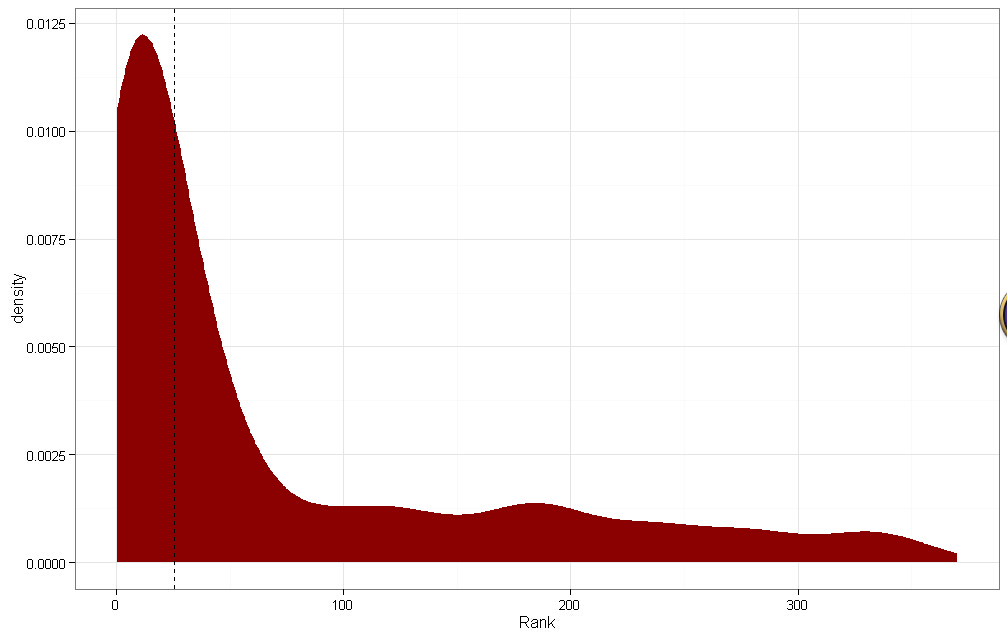
#下图,虚线是阈值,排序结果是明显的重尾分布,表示算法不错,左边是低于阈值的,右边是高于阈值的
#斜率向下倾斜的都优先推荐了,表示结果不错
# Classify as priority, or not,以中位数分类,1表示优先
train.ranks.df$Priority <- ifelse(train.ranks.df$Rank >= priority.threshold, 1, 0)
#去测试集运行一下,使用训练集得出来的阈值来划分
test.ranks <- suppressWarnings(lapply(test.paths,rank.message))
test.ranks.matrix <- do.call(rbind, test.ranks)
test.ranks.matrix <- cbind(test.paths, test.ranks.matrix, "TESTING")
test.ranks.df <- data.frame(test.ranks.matrix, stringsAsFactors = FALSE)
names(test.ranks.df) <- c("Message","Date","From","Subj","Rank","Type")
test.ranks.df$Rank <- as.numeric(test.ranks.df$Rank)
test.ranks.df$Priority <- ifelse(test.ranks.df$Rank >= priority.threshold, 1, 0)
# Finally, we combine the data sets.
#把训练集和测试集合并一下
final.df <- rbind(train.ranks.df, test.ranks.df)
#日期统一一下
final.df$Date <- date.converter(final.df$Date, pattern1, pattern2)
#rev是反转,本来是时间升序,倒过来时间降序
final.df <- final.df[rev(with(final.df, order(Date))), ]
# Save final data set and plot results.
write.csv(final.df, file.path("data", "final_df.csv"), row.names = FALSE)
#最终结果画图
testing.plot <- ggplot(subset(final.df, Type == "TRAINING"), aes(x = Rank)) +
stat_density(aes(fill = Type, alpha = 0.65)) +
stat_density(data = subset(final.df, Type == "TESTING"),
aes(fill = Type, alpha = 0.65)) +
geom_vline(xintercept = priority.threshold, linetype = 2) +
scale_alpha(guide = "none") +
scale_fill_manual(values = c("TRAINING" = "darkred", "TESTING" = "darkblue")) +
theme_bw()
print(testing.plot)
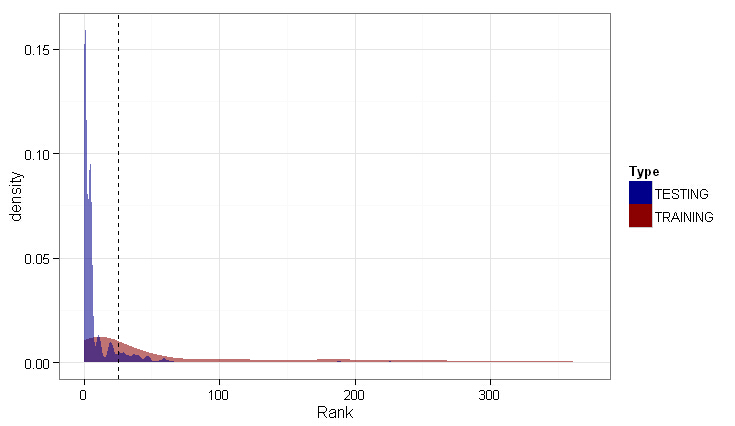
#测试数据分布尾部密度更高,说明更多邮件的优先级排序值不高。
#测试数据没训练数据平滑,说明测试数据包含了很多没出现在训练数据中的特征,这些特征没得到匹配,就被忽略了
#结果不算太糟,测试数据中处于阈值右侧的密度数量还比较合理,说明还能找到重要的邮件推荐。
#这个结果是无法评估量化,不可能去问收件人效果如何。
#书上列出的表表明效果不错,测试集中有些邮件被推荐到了前40位
Machine Learning for hackers读书笔记(四)排序:智能收件箱的更多相关文章
- Machine Learning for hackers读书笔记(十)KNN:推荐系统
#一,自己写KNN df<-read.csv('G:\\dataguru\\ML_for_Hackers\\ML_for_Hackers-master\\10-Recommendations\\ ...
- Machine Learning for hackers读书笔记(七)优化:密码破译
#凯撒密码:将每一个字母替换为字母表中下一位字母,比如a变成b. english.letters <- c('a', 'b', 'c', 'd', 'e', 'f', 'g', 'h', 'i' ...
- Machine Learning for hackers读书笔记(六)正则化:文本回归
data<-'F:\\learning\\ML_for_Hackers\\ML_for_Hackers-master\\06-Regularization\\data\\' ranks < ...
- Machine Learning for hackers读书笔记(二)数据分析
#均值:总和/长度 mean() #中位数:将数列排序,若个数为奇数,取排好序数列中间的值.若个数为偶数,取排好序数列中间两个数的平均值 median() #R语言中没有众数函数 #分位数 quant ...
- Machine Learning for hackers读书笔记(三)分类:垃圾邮件过滤
#定义函数,打开每一个文件,找到空行,将空行后的文本返回为一个字符串向量,该向量只有一个元素,就是空行之后的所有文本拼接之后的字符串 #很多邮件都包含了非ASCII字符,因此设为latin1就可以读取 ...
- Machine Learning for hackers读书笔记_一句很重要的话
为了培养一个机器学习领域专家那样的直觉,最好的办法就是,对你遇到的每一个机器学习问题,把所有的算法试个遍,直到有一天,你凭直觉就知道某些算法行不通.
- Machine Learning for hackers读书笔记(十二)模型比较
library('ggplot2')df <- read.csv('G:\\dataguru\\ML_for_Hackers\\ML_for_Hackers-master\\12-Model_C ...
- Machine Learning for hackers读书笔记(九)MDS:可视化地研究参议员相似性
library('foreign') library('ggplot2') data.dir <- file.path('G:\\dataguru\\ML_for_Hackers\\ML_for ...
- Machine Learning for hackers读书笔记(八)PCA:构建股票市场指数
library('ggplot2') prices <- read.csv('G:\\dataguru\\ML_for_Hackers\\ML_for_Hackers-master\\08-PC ...
随机推荐
- Best Practices for Web Apps
Mobile Web Best Practices Exceptional Performance Let's make the web faster
- HTML5 Cheat sheet PNG帮助手册(标签、事件、兼容)
HTML5 Cheat sheet PNG帮助手册(标签.事件.兼容) 1.HTML5标签 2.HTML5事件 3.HTML5兼容 最新HTML5手册资料请参考:http://www.inmotion ...
- 如何做到尽可能不使用庞大的jQuery
jQuery 是现在最流行的 JavaScript 工具库. 据统计,目前全世界 57.3% 的网站使用它.也就是说,10 个网站里面,有 6 个使用 jQuery.如果只考察使用工具库的网站,这个比 ...
- CSS自定义文件上传按钮
今天一同事问我文件上传按钮的问题,情况是这样的,他页面上有3个按钮,分为左中右三个,左边的位按钮甲,右边的位按钮乙,而中间的就是个文件选择按钮,情况大概是这个样子的: 两边的按钮都有了样式,但中间的选 ...
- mysql死锁,等待资源,事务锁,Lock wait timeout exceeded; try restarting transaction解决
前面已经了解了InnoDB关于在出现锁等待的时候,会根据参数innodb_lock_wait_timeout的配置,判断是否需要进行timeout的操作,本文档介绍在出现锁等待时候的查看及分析处理: ...
- VMware workstation 的虚拟机中再安装workstation
在VMware workstation 10中运行的虚拟机中再安装workstation软件时,启动时会出现不断重启的故障, 解决办法: 在宿主虚拟机的.vmx文件中添加一行 monitor_cont ...
- WCF Service的Restfull风格
怎样构建? •您需要什么样的资源? •将使用哪些 URI 表示这些资源? •每个 URI 将支持统一接口的哪些部件(HTTP 动词)? URI的处理 •UriTemplate –System ...
- HDU4836 The Query on the Tree(树状数组&&LCA)
由于智力的问题,百度之星完全lu不动..开场看第一题根据题目给的条件我觉得一定是可以构造出来的,题目给的意思颇有鸽巢原理的感觉,于是觉得开场第一题应该就是智力构造题了,想了半个小时,发现完全想不动,于 ...
- POJ 2081
#include <iostream> #define MAXN 500005 using namespace std; //unsigned _m[MAXN]; ]; int main( ...
- DB2学习
1.为了使用ORG_ID,由于OCRM_F_MM_MKT_PLAN a 没有ORG_ID,但是OCRM_F_MM_EXECUTE_INST_DESC d 表里面有,可以使a表连接b表,创建临时表t. ...