
shiro的SecurityUtis
接着上一篇来继续分析shiro源码
这篇主要讲解shiro里面的SecurityUtils
首先我们看该类供我们在业务中用的仅有两个get方法,那么这两个get方法获取的subject和sercurityManager怎么来的,我们具体分析
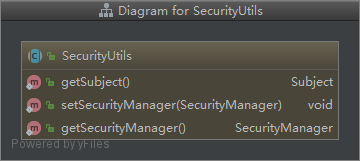
首先我们已经知道每次请求在被拦截后都会走AbstractShiroFilter里的doFilterInternal方法,如果不清楚请先看我的《spring集成shiro登陆流程》的上下篇。
AbstractShiroFilter
其中有这么段代码
//调用DelegatingSubject的execute(Callable<V> callable)方法
subject.execute(new Callable() {

  public Object call() throws Exception {

    updateSessionLastAccessTime(request, response);

    executeChain(request, response, chain);

    return null;

   }

});
这里调用了DelegatingSubject的execute(Callable<V> callable)方法
DelegatingSubject
进来看
public <V> V execute(Callable<V> callable) throws ExecutionException {
    //这里创建了一个Callable对象,进去看

        Callable<V> associated = associateWith(callable);

        try {

            return associated.call();

        } catch (Throwable t) {

            throw new ExecutionException(t);

        }

    }
//继续
public <V> Callable<V> associateWith(Callable<V> callable) {
  //这里将subject对象传递到SubjectCallable
  return new SubjectCallable<V>(this, callable);
}
SubjectCallable
注意看这里创建了一个SubjectThreadState对象
public SubjectCallable(Subject subject, Callable<V> delegate) {

        this(new SubjectThreadState(subject), delegate);

    }

//这个方法主要是将subject对象和securityManager 放在SubjectThreadState上下文
public SubjectThreadState(Subject subject) {
    this.subject = subject;

    SecurityManager securityManager = null;
  //从subject中获取securityManager对象,每次请求都会将securityManager对象放到subject上下文, (DefaultSecurityManager#createSubject的ensureSecurityManager)
    if ( subject instanceof DelegatingSubject) {
        securityManager = ((DelegatingSubject)subject).getSecurityManager();
    }
    if ( securityManager == null) {
        securityManager = ThreadContext.getSecurityManager();
    }
    this.securityManager = securityManager;
}
那么到这儿,在SubjectThreadState中就有了subject和securityManager对象
继续看到DelegatingSubject的execute方法
执行associated.call()
我们点进去看 SubjectCallable#call
SubjectCallable
//首先我们注意到doCall方法就是调用了Callable的call方法,也就是异步执行了executeChain(request, response, chain);方法,简单说就是调用验证等流水账然后进入我们的业务代码
//我们调用SecurityUtis.getSubject就是在doCall异步执行里用的
public V call() throws Exception {

        try {
        //我们发现执行目标业务之前有个bind方法

            threadState.bind();

            return doCall(this.callable);

        } finally {
       //执行完后会清空bind的数据

            threadState.restore();

        }

    }
protected V doCall(Callable<V> target) throws Exception {
    return target.call();
}
很有必要再进SubjectThreadState方法看看bind这个方法
SubjectThreadState
public void bind() {

        SecurityManager securityManager = this.securityManager;this.originalResources = ThreadContext.getResources();
    //清空ThreadContext里的数据

        ThreadContext.remove();

    //将subject和securityManager绑定到ThreadContext

        ThreadContext.bind(this.subject);

        if (securityManager != null) {

            ThreadContext.bind(securityManager);

        }

    }
走到这儿我们发现把subject和securityManager绑定到ThreadContext
那么这个ThreadContext就很重要了,必须看看
ThreadContext
//定义了个跟线程绑定的ThreadLocal
private static final ThreadLocal<Map<Object, Object>> resources = new InheritableThreadLocalMap<Map<Object, Object>>();


//将subject和当前线程绑定

public static void bind(Subject subject) {

        if (subject != null) {

            put(SUBJECT_KEY, subject);

        }

    }

//将securityManager和当前线程绑定
public static void bind(SecurityManager securityManager) {

        if (securityManager != null) {

            put(SECURITY_MANAGER_KEY, securityManager);

        }

    }
那么我们应该再看看SecurityUtils的两个get方法
//从ThreadContext中获取,没有就创建一个并绑定
public static Subject getSubject() {

        Subject subject = ThreadContext.getSubject();

        if (subject == null) {

            subject = (new Subject.Builder()).buildSubject();

            ThreadContext.bind(subject);

        }

        return subject;

    }

//先从ThreadContext中获取,如果没有则从SecurityUtils中获取,如果没有就直接从SubjceUtils中获取(如果是spring项目,那么在spirng的配置文件长会配置)

public static SecurityManager getSecurityManager() throws UnavailableSecurityManagerException {

        SecurityManager securityManager = ThreadContext.getSecurityManager();

        if (securityManager == null) {

            securityManager = SecurityUtils.securityManager;

        }return securityManager;

    }
看到这儿我们了解到了为什么我们在程序中调用SecurityUtils的getSubject会有值了
小结:
当我们登陆后,每次请求都会将Subject对象和SecurityManager对象与当前线程绑定,在执行完业务逻辑后,会将这些数据与当前线程解绑
那么我们得到了SecurityManager对象后,那么它依赖的数据就轻而易举的可以愉快的拿到了
注:有不好或者错误的地方还请看官在评论区给指出,意见宝贵。
shiro的SecurityUtis的更多相关文章
- Shiro learning - 入门案例(2)
Shiro小案例 在上篇Shiro入门学习中说到了Shiro可以完成认证,授权等流程.在学习认证流程之前,我们应该先入门一个Shiro小案例. 创建一个java maven项目 <?xml ve ...
- shiro权限管理框架与springmvc整合
shiro是apache下的一个项目,和spring security类似,用于用户权限的管理‘ 但从易用性和学习成本上考虑,shiro更具优势,同时shiro支持和很多接口集成 用户及权限管理是众多 ...
- springmvc 多数据源 SSM java redis shiro ehcache 头像裁剪
获取下载地址 QQ 313596790 A 调用摄像头拍照,自定义裁剪编辑头像 B 集成代码生成器 [正反双向](单表.主表.明细表.树形表,开发利器)+快速构建表单; 技术:31359679 ...
- java springMVC SSM 操作日志 4级别联动 文件管理 头像编辑 shiro redis
A 调用摄像头拍照,自定义裁剪编辑头像 B 集成代码生成器 [正反双向](单表.主表.明细表.树形表,开发利器)+快速构建表单; 技术:313596790freemaker模版技术 ,0个代码不用写 ...
- springmvc SSM shiro redis 后台框架 多数据源 代码生成器
A集成代码生成器 [正反双向(单表.主表.明细表.树形表,开发利器)+快速构建表单 下载地址 ; freemaker模版技术 ,0个代码不用写,生成完整的一个模块,带页面.建表sql脚本,处理类 ...
- springmvc SSM 多数据源 shiro redis 后台框架 整合
A集成代码生成器 [正反双向(单表.主表.明细表.树形表,开发利器)+快速构建表单 下载地址 ; freemaker模版技术 ,0个代码不用写,生成完整的一个模块,带页面.建表sql脚本,处理类 ...
- SpringMVC+Shiro权限管理【转】
1.权限的简单描述 2.实例表结构及内容及POJO 3.Shiro-pom.xml 4.Shiro-web.xml 5.Shiro-MyShiro-权限认证,登录认证层 6.Shiro-applica ...
- shiro的使用2 灵活使用shiro的密码服务模块
shiro最闪亮的四大特征是认证,授权,加密,会话管理. 上一篇已经演示了如何使用shiro的授权模块,有了shiro这个利器,可以以统一的编码方式对用户的登入,登出,认证进行管理,相当的优雅. 为了 ...
- shiro的使用1 简单的认证
最近在重构,有空学了一个简单的安全框架shiro,资料比较少,在百度和google上能搜到的中文我看过了,剩下的时间有空会研究下官网的文章和查看下源码, 简单的分享一些学习过程: 1,简单的一些概念上 ...
随机推荐
- Android Studio布局等XML文件怎么改都恢复原状的问题
编译时,XML布局文件报错,点击链接进去改,怎么改,一编译就恢复原状,这是什么原因,问题出在点击错误链接进的是中间生成XML文件,这个文件改动是没用的,需要改动原始layout文件才会生效.
- Socket.io文字直播聊天室的简单代码
直接上代码吧,被注释掉的主要是调试代码,和技术选型的测试代码 var app = require('express')(); var server = require('http').Server(a ...
- Django Channels 入门指南
http://www.oschina.NET/translate/in_deep_with_django_channels_the_future_of_real_time_apps_in_django ...
- Triangle (第8届山东省赛的某题)
triangle(第8届山东省赛的某题) 传送门 题意:喵了个呜,这题意真是峰回路转啊.懒死了,不想描述. 做法:我们拿set或线段树维护exp的最小值,每次取出exp值最小的边,删除之.并更新这条边 ...
- React+ANTD项目使用后的一些关于生命周期比较实用的心得
1. constructor() constructor(props){ super(props) this.state=({ }) } 一定先写super 可以接收从父组件传来的值 父组件往子组件 ...
- java线程之线程通信控制
在上篇我们看到,A线程往公共资源库(对象)提供了一条数据,然后B线程从库中提取了数据并打印出来. 实际项目中,我们不可能只往库中提供一条数据,而且库的大小也不会是无穷大的,那么我们就会有这样一 个需求 ...
- 从有值的ID到汉字编码
前些日子漫无目的地刷着朋友圈,突然一个ID从字丛中闯入我的眼睛--"某&字"(为保护当事人隐私,此处用'某''字'代替),浸淫于计算机而产生的直觉告诉我,这是一个有值的表达 ...
- 老司机告诉你高质量的Java代码是怎么练成的?
一提起程序员,首先想到的一定是"码农",对,我们是高产量的优质"码农",我们拥有超跃常人的逻辑思维以及不走寻常路的分析.判别能力,当然,我们也有良好的编码规范, ...
- 源码分析Session的台前幕后(Asp .Net MVC5)
在这篇文章里,我们从源代码的角度重点分析Session的创建.缓存.销毁.管理. 通常我们说的Session指的是在控制器中使用的Session字段,该字段的类型是HttpSessionState.可 ...
- SVN 使用方法
svn co http://路径(目录或文件的全路径) [本地目录全路径] --username 用户名 --password 密码svn co svn://路径(目录或文件的全路径) [本地目录全路 ...