
3d xna fbx winfrom 读取
本文通过参考网上资源做的一个例子。
本程序的功能就是通过xna 将3d 图像显示到winfrom 对他进行旋转操作。
首先我们先准备好两个文件夹
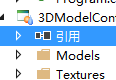
model 文件夹放fbx文件,textures 放渲染文件,操作步骤都是添加现有项,准备好资源文件后,先检查下是否有以下引用
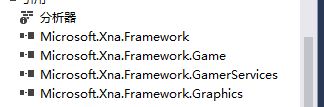
下面将定义Game类的实现方法
//本代码以网上参考稍作修改,使用请注明非本人原创,因未知是谁原创特此声明非本人原创

using System;

using Microsoft.Xna.Framework;

using Microsoft.Xna.Framework.Graphics;

using Microsoft.Xna.Framework.Input;

using System.Runtime.Remoting.Messaging;

namespace _3DModel

{

    /// <summary>

    /// This is the main type for your game

    /// </summary>

    public class Game1 : Microsoft.Xna.Framework.Game

    {

        #region 变量

        GraphicsDeviceManager graphics;    //声明一个图形设备管理器//define a graphics manage

        SpriteBatch spriteBatch;           //声明一个精灵集群.可以以相同的设置操纵(draw)一组精灵//define a SpriteBatch

        Model myModel;                     //定义一个Model//define a model

        float aspectRatio;                 //屏幕高宽比,控制3D世界的视图怎样转换成屏幕上的2D图象(投射)用到//control the screen,make the 3d model show in 2d sreen

        Vector3 modelPosition = Vector3.Zero;        //模型在屏幕上的位置(世界坐标系),屏幕中心为坐标原点//define a world coordinate,the origin is the center of screen

        //float modelRotationY = 0.0f;                  //模型旋转角度 //rotate the angle

        //float modelRotationX = 0.0f;                  //模型旋转角度 //rotate the angle

        /*******************************************************************************

         *                       +Y

         *                       |    -Z

         *                       |    /

         *                       |   /

         *                       |  /

         *                       | /

         *                (0,0,0) ------------+X

        /*******************************************************************************/

        Vector3 cameraPosition = new Vector3(1000.0f, 0.0f, 5000.0f);       //摄像机(眼睛)的位置和方向//vidicon location

        #endregion 变量

        System.Windows.Forms.Form xnaWindow;  //保存原始的窗体对象

        MainForm mainform;

        public Game1(MainForm form)

        {

            graphics = new GraphicsDeviceManager(this);

            graphics.PreferredBackBufferHeight = 760;

            graphics.PreferredBackBufferWidth = 1200;

            Content.RootDirectory = "Content";

            //窗体对换

            this.mainform  = form;

            graphics.PreparingDeviceSettings += new EventHandler<PreparingDeviceSettingsEventArgs>(graphics_PreparingDeviceSettings);

            xnaWindow = (System.Windows.Forms.Form)System.Windows.Forms.Control.FromHandle((this.Window.Handle));

            xnaWindow.GotFocus += new EventHandler(delegate(object sender, EventArgs e)

            {

                ((System.Windows.Forms.Form)sender).Visible = false;

                form.TopMost = false;

            });

        }

        public Game1()

        {

        }

        private void graphics_PreparingDeviceSettings(object sender, PreparingDeviceSettingsEventArgs e)

        {

            e.GraphicsDeviceInformation.PresentationParameters.DeviceWindowHandle = mainform.Panel.Handle;

        }

        SpriteBatch sprites;

        protected override void Initialize()

        {

         //   backgroundTexture = Content.Load<Texture2D>("akqm");

            sprites = new SpriteBatch(graphics.GraphicsDevice);

            base.Initialize();

        }

      protected override void LoadContent()

        {

            //spriteBatch = new SpriteBatch(GraphicsDevice);

            //myModel = Content.Load<Model>("Models\\"+mainform.filename);         //素材管道载入3D模型//download the 3d model

            //aspectRatio = (float)graphics.GraphicsDevice.Viewport.Width /(float)graphics.GraphicsDevice.Viewport.Height;

            loade();

            // TODO: use this.Content to load your game content here

        }

        public void loade()

        {

            spriteBatch = new SpriteBatch(GraphicsDevice);

            myModel = Content.Load<Model>("Models\\" + mainform.filename);         //素材管道载入3D模型//download the 3d model

            aspectRatio = (float)graphics.GraphicsDevice.Viewport.Width / (float)graphics.GraphicsDevice.Viewport.Height;

        }

        protected override void UnloadContent()

        {

            // TODO: Unload any non ContentManager content here

        }

       /// <summary>

       ///

       /// </summary>

       /// <param name="gameTime"></param>

        protected override void Update(GameTime gameTime)

        {

            // Allows the game to exi

            GamePadState gamePad = GamePad.GetState(PlayerIndex.One);

            KeyboardState keyboard = Keyboard.GetState();

            if (GamePad.GetState(PlayerIndex.One).Buttons.Back == ButtonState.Pressed || keyboard.IsKeyDown(Keys.Escape))

                     this.Exit();

            if (keyboard.IsKeyDown (Keys.Right ))

                Program.modelRotationY += (float)gameTime.ElapsedGameTime.TotalMilliseconds * MathHelper.ToRadians(0.1f);

             else if (keyboard.IsKeyDown (Keys.Left  ))

                Program.modelRotationY -= (float)gameTime.ElapsedGameTime.TotalMilliseconds * MathHelper.ToRadians(0.1f);

            else if (keyboard.IsKeyDown(Keys.Up ))

               Program.modelRotationX -= (float)gameTime.ElapsedGameTime.TotalMilliseconds * MathHelper.ToRadians(0.1f);

            else if (keyboard.IsKeyDown(Keys.Down ))

                Program.modelRotationX += (float)gameTime.ElapsedGameTime.TotalMilliseconds * MathHelper.ToRadians(0.1f);

            //if (mainform.filename != mainform.filename)

            //{

            //    base.Update(gameTime);

            //}

            base.Update(gameTime);

        }

       /// <summary>

       /// /

       /// </summary>

       /// <param name="gameTime"></param>

        protected override void Draw(GameTime gameTime)

        {

            GraphicsDevice.Clear(Color.Black);

            Matrix[] transforms = new Matrix[myModel.Bones.Count];

            myModel.CopyAbsoluteBoneTransformsTo(transforms);

            // 绘制模型

            foreach (ModelMesh mesh in myModel.Meshes)   //遍历模型mesh// for() all the mesh

            {

                //BasicEffect类可以简单的通过设置属性,包含光照、纹理等等就可以在“五分钟”内实现对一个物体的呈现。

                string aaa = mesh.Name;

                //if (aaa.ToString().IndexOf("矩形")>0 ) {

                    foreach (BasicEffect effect in mesh.Effects)

                    {

                    effect.EnableDefaultLighting();        //光照 //light

                    effect.World = transforms[mesh.ParentBone.Index] * Matrix.CreateRotationY(Program.modelRotationY) * Matrix.CreateRotationX(Program.modelRotationX) * Matrix.CreateTranslation(modelPosition);     //使用World矩阵来改变模型在世界坐标系中的位置//use the World Matrix change the world coordinate

                        effect.View = Matrix.CreateLookAt(cameraPosition, Vector3.Zero, Vector3.Up);

                        effect.Projection = Matrix.CreatePerspectiveFieldOfView(MathHelper.ToRadians(60.0f), aspectRatio, 1.0f, 10000.0f);

                    //Color[] colors = new Color[3];

                    //for (int i = 0; i < 3; i++)

                    //{

                    //    colors.SetValue(new Color(0, 1, 0), i);

                    //}

                }

                    mesh.Draw();

                //}

            }

            //sprites.Begin();

            //sprites.Draw(backgroundTexture, Vector2.Zero, Color.White);

            //sprites.End();

            base.Draw(gameTime);

        }

    }

}
然后进行 winfrom 的编写
using System;

using System.Collections.Generic;

using System.ComponentModel;

using System.Data;

using System.Drawing;

using System.IO;

using System.Linq;

using System.Reflection;

using System.Text;

using System.Threading;

using System.Windows.Forms;

namespace _3DModel

{

    public partial class MainForm : Form

    {

        public MainForm()

        {

            InitializeComponent();

        }

//xna form 接入

        public Control Panel

        {

            get { return XnaPanel; }

        }

        public string  strRotate="";

        private void bt_Up_MouseDown(object sender, MouseEventArgs e)

        {

            Button bt = (Button)sender;

            strRotate = bt.Text;

            timer1.Enabled = true;

        }

        private void bt_Up_MouseUp(object sender, MouseEventArgs e)

        {

            strRotate = "";

            timer1.Enabled = false ;

        }

        private void timer1_Tick(object sender, EventArgs e)

        {if(strRotate =="Up")

            Program.modelRotationX += (float)(-0.03);

            else if(strRotate =="Down")

            Program.modelRotationX -= (float)(-0.03);

          else if (strRotate == "Left")

            Program.modelRotationY -= (float)(-0.03);

          else if (strRotate == "Right")

            Program.modelRotationY += (float)(-0.03);

        }

        private void bt_Left_Click(object sender, EventArgs e)

        {

        }

        public static MainForm form;

        static Game1 game=new Game1(form);

        public void button1_Click(object sender, EventArgs e)

        {

            OpenFileDialog fileDialog = new OpenFileDialog();

            game.Exit();

            fileDialog.Title = "Load Model";

            fileDialog.Filter = "Model Files (*.fbx;*.x)|*.fbx;*.x|" +

                                "FBX Files (*.fbx)|*.fbx|" +

                                "X Files (*.x)|*.x|" +

                                "All Files (*.*)|*.*";

            if (fileDialog.ShowDialog() == DialogResult.OK)

            {

                string[] strName = fileDialog.SafeFileName.Split('.');

                filename = strName[0];

                game.loade();

            }

        }

        public string filename = "1";

    }

}
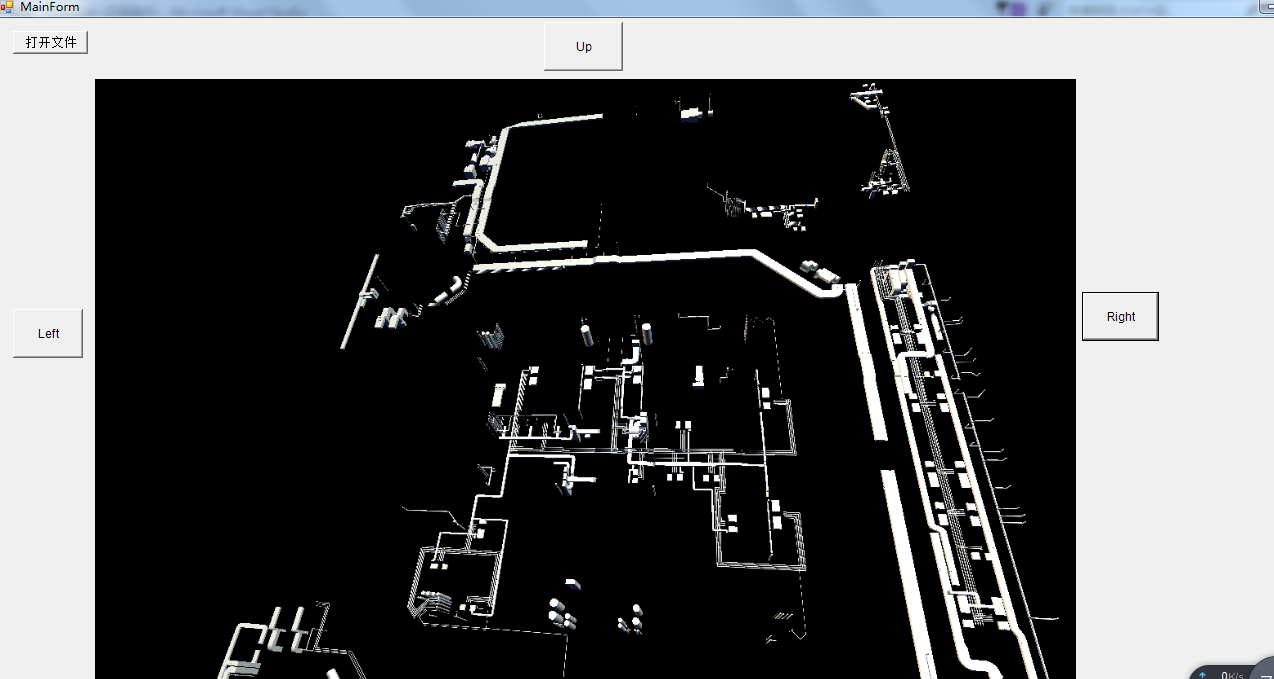
效果如下
注:本文代码只做学习参考不得用作商业用途。违反引起的法律责任将由违反本声明的承担
3d xna fbx winfrom 读取的更多相关文章
- 【学习笔记】tensorflow图片读取
目录 图像基本概念 图像基本操作 图像基本操作API 图像读取API 狗图片读取 CIFAR-10二进制数据读取 TFRecords TFRecords存储 TFRecords读取方法 图像基本概念 ...
- 基于FBX SDK的FBX模型解析与加载 -(三)
http://blog.csdn.net/bugrunner/article/details/7229416 6. 加载Camera和Light 在FBX模型中除了几何数据外较为常用的信息可能就是Ca ...
- Python之TensorFlow的数据的读取与存储-2
一.我们都知道Python由于GIL的原因导致多线程并不是真正意义上的多线程.但是TensorFlow在做多线程使用的时候是吧GIL锁放开了的.所以TensorFlow是真正意义上的多线程.这里我们主 ...
- 3D打印如何重组制造格局?
全球化的竞争正变得毫无底线,国与国之间只有利益,没有同情,也就是说美国品牌想把自己的工厂移回本土,是不会考虑中国工人的生存现状的,更不会顾及这里的GDP和环境问题,甚至还会依靠经济能力去奴役其他国家 ...
- OpenSCAD:一款用于创建实体3D CAD对象的软件
推荐:使用 NSDT场景设计器 快速搭建 3D场景. 原文链接:https://www.mvrlink.com/openscad/ OpenSCAD是一个用于创建实体3D CAD对象的软件.它是免费软 ...
- [Unity3D]Unity资料大全免费分享
都是网上找的连七八糟的资料了,整理好分享的,有学习资料,视频,源码,插件……等等 东西比较多,不是所有的都是你需要的,可以按 ctrl+F 来搜索你要的东西,如果有广告,不用理会,关掉就可以了,如 ...
- Windows phone 8 学习笔记(1) 触控输入(转)
Windows phone 8 的应用 与一般的Pc应用在输入方式上最大的不同就是:Windows phone 8主要依靠触控操作.因此在输入方式上引入一套全新的触控操作方式,我们需要重新定义相关的事 ...
- Windows phone 8 学习笔记(1) 触控输入
原文:Windows phone 8 学习笔记(1) 触控输入 Windows phone 8 的应用 与一般的Pc应用在输入方式上最大的不同就是:Windows phone 8主要依靠触控操作.因此 ...
- WPS客户端更新日志留着备用
WPS Office (10.1.0.7520)==========================================新增功能列表------------WPS文字1 拼写检查:新增“中 ...
- 16个富有创意的HTML5 Canvas动画特效集合
HTML5技术正在不断的发展和更新,越来越多的开发者也正在加入HTML5阵营,甚至在移动开发上HTML5的地位也是越来越重要了.HTML5中的大部分动画都是通过Canvas实现,因为Canvas就像一 ...
随机推荐
- [记录点滴]Redis实现简单消息队列
[记录点滴]Redis实现简单消息队列 目录 [记录点滴]Redis实现简单消息队列 0x00 摘要 0x01 缘由 0x02 背景概念 2.1 Redis是否适合做消息队列 2.1.1 Redis的 ...
- mac安装php单点调试环境
页面预览和抓包方式 sudo php-fpm sudo killall php-fpm 开启/usr/local/etc/nginx/ nginx nginx -s quit 运行Charles就行 ...
- RabbitMQ(八)——消息确认
RabbitMQ系列 RabbitMQ(一)--简介 RabbitMQ(二)--模式类型 RabbitMQ(三)--简单模式 RabbitMQ(四)--工作队列模式 RabbitMQ(五)--发布订阅 ...
- WPF Expander style
<!--ExpanderStyle--> <Style x:Key="ExpanderStyleOne" TargetType="{x:Type Exp ...
- 百万架构师第四十二课:Nginx:Nginx 的初步认识|JavaGuide
百万架构师系列文章阅读体验感更佳 原文链接:https://javaguide.net 公众号:不止极客 Nginx 的初步认识及配置 课程目标 Nginx 在分布式架构中的应用分析 常用的 Web ...
- autMan奥特曼机器人-narkPro对接autMan内置容器
前言 这里以NarkPro为例,其他登陆工具自测.下面是以vc1为例展开说明 一.创建autMan虚拟容器vc1 理论上来说autMan可以创建无数个虚拟容器,即相当于你创建无数个青龙容器 二.创建系 ...
- 2024年最新iOS 17屏蔽系统更新方法,iPhone、iPad通用!
到Safari浏览器打开,描述文件会自动安装进手机里. 这时候我们在设置里,找到设备管理,点击刚刚下载好的描述文件,进行安装.要注意看,有苹果的签名,才说明是官方出品,千万要注意哦!安装完成后,重启手 ...
- 基于 Trae Claude-3.7 从0到1 打造加密货币钱包Dompet-App
从0到1:用Trae Claude-3.7打造加密货币钱包Dompet-App 项目介绍 大家好!今天我要分享如何使用强大的AI助手Trae Claude-3.7,从零开始构建一款功能丰富的加密货币钱 ...
- Windows Api如何创建一个快捷方式并且在开始菜单搜索到自己的应用
原文链接:http://cshelloworld.com/home/detail/1804473083243925504 当我们点击win10系统搜索框的时候,输入名称 ,win10会帮助我们匹配到对 ...
- Selenium KPI接口 时间等待
常见的时间等待有三种: 固定.显示.隐士. 应用场景: 主要用于模拟真实的用户操作,有时时间过于短,页面响应不过来,从而造成元素定位不到. 使用格式: sleep(3):一般用于调试 implicit ...