
微信小程序 - dialog
实现了 标题,内容和按钮设置,可动态设置按钮,以及按钮点击事件的回调
可作为component 使用
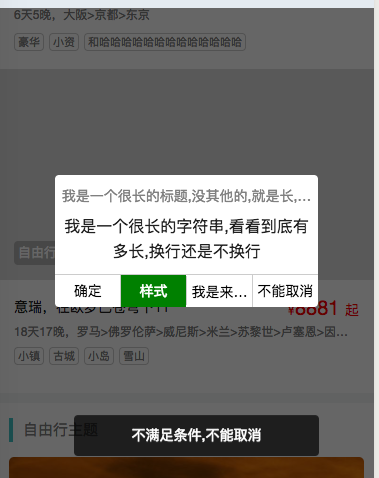
直接上代码
//遮罩的代码
//dialog的代码
<view wx:if="{{uiComponent.dialog.show}}" class="uiComponent uiComponent-dialog uiComponent-dialog_{{ uiComponent.dialog.show &&'active' }}"

style="{{uiComponent.dialog.style}}"

 >

  <view class='uiComponent-dialog-title txt-nowrap' wx:if="{{ uiComponent.dialog.title }}">{{ uiComponent.dialog.title }}</view>

   <view class='uiComponent-dialog-content' wx:if="{{ uiComponent.dialog.content }}">{{ uiComponent.dialog.content }}</view>

   <view class='uiComponent-dialog-btns' wx:if="{{ uiComponent.dialog.btns.length>0 }}">

      <view bindtap='uiComponent_dialog_btnclick' class='uiComponent-dialog-btn  txt-nowrap' wx:for="{{uiComponent.dialog.btns}}" wx:key="{{index}}" data-index="{{index}}" style="width:{{1/uiComponent.dialog.btns.length*99.99999}}%;{{item.style}}"><view>{{item.text}}</view></view>

   </view>

 </view>
/**显示或隐藏mask */

UIComponent.mask = function (show=false,style='') {

  var self = this;

  self.setData({

    'uiComponent.mask.show': show,

    'uiComponent.mask.style': style

  });

}

/** dialog

 *  按照界面,这里可排布的大概也就3个左右

 * btns:[

 *        {

 *          text: "确定",

 *          style: "",

 *          click: function(e, idx, btn){

 *

 *        }

 *    }

 * ]

 *

 *

 * 调用例子

  self.dialog({ show: true, title: "111", content: "2222", btns: [

      {

        text: "确定" ,

        click: function (e, idx, btn){

          self.toast(`选中了第${idx}个按钮`)

        }

      },

      {

        text: "样式",

        style:"color:white;background-color:green;"

      } ,

      {

        text: "不能取消",

        click:function(e,idx,btn){

            self.toast("不满足条件,不能取消")

            return false;

        }

      }

    ]

  })

 * self.dialog({show:false})

 */

UIComponent.dialog = function (opt={}) {

  var self = this;

  let app = getApp();

  opt = app.util.extend({},{

    //默认有遮罩

    mask:true,

    show:false ,

    //按钮组

    btns:[

    ],

    title:"",

    content:""

  },opt);

  if (opt.mask){

        self.mask(opt.show)

  }

  if(opt.show){

    if (!opt.btns || opt.btns.length==0){

      opt.btns=[

        {

          text:"确定"

        }

      ];

    }

  }

  self.setData({

    'uiComponent.dialog.show': opt.show,

    'uiComponent.dialog.style': opt.style,

    'uiComponent.dialog.btns': opt.btns,

    'uiComponent.dialog.title': opt.title,

    'uiComponent.dialog.content': opt.content

  });

}

/**

 * 所有的按钮touch事件都关注到这里

 */

UIComponent.uiComponent_dialog_btnclick=function(e){

  var self = this;

  var index = e.currentTarget.dataset.index;

  var btns = self.data.uiComponent.dialog.btns;

  var btn = btns[index];

  var func = btn.click;

  if (typeof func=="function"){

    var ret= func.apply(self, [e, index, btn]);

    if(ret!==false){ //click事件可返false禁止关闭dialog

      self.dialog({

        show: false

      });

    }

  }else{

    self.dialog({

      show:false

    });

  }

}
/**截断为1行文字,超出...*/

.txt-nowrap {

  text-overflow: -o-ellipsis-lastline;

  overflow: hidden;

  text-overflow: ellipsis;

  display: -webkit-box;

  -webkit-line-clamp:;

  -webkit-box-orient: vertical;

}

/* 遮罩层 */

.uiComponent_mask{

    height:;width:;transform:translateZ(0) translateY(-1);

    transition: all .1s ;

}

.uiComponent_mask_active{

    height:100vh;width:100%;display:block;position:fixed;top:;left:;z-index:;

    background-color: rgba(0,0,0,.6);transform:translateZ(0) translateY(0); transition: all .01s ;

}

/** dialog */

.uiComponent-dialog{

  display:none;

}

.uiComponent-dialog_active{

  display:block;background-color: white;border-radius:8rpx;

  width:70%;position:fixed;top:30%;left:15%;min-height:50px;

}

.uiComponent-dialog-title{

  text-align: center;font-size: 14px;color:#808080;

  padding:10px 5rpx 0 5rpx;

}

.uiComponent-dialog-content{

  text-align: center;font-size: 16px;color:#202020;

  padding:10px 5rpx;

}

.uiComponent-dialog-btns{

  display:flex;align-items: center;text-align: center;justify-content: space-around;border-top: 1px solid #ccc;

}

.uiComponent-dialog-btn:first-child{

   border-left:;

}

.uiComponent-dialog-btn{

   font-size: 14px;padding:10rpx 0; border-left: 1px solid #ccc;

}
微信小程序 - dialog的更多相关文章
- 微信小程序-实战巩固(二)
刚刚写了小程序入门没几天,小程序就开放个人开发者资格,感觉为我而来啊 \(≧▽≦)/.迫不及待的去注册,准备将之前的处女作传上去体验一把,结果卡在了服务器配置上:免费的果然不靠谱/(ㄒoㄒ)/~~,后 ...
- 小程序开发过程中常见问题[微信小程序、支付宝小程序]
目录 一.样式中如何使用background-image呢? 二.使用自适应单位rpx类似于rem,布局尽量使用flex布局 三.万能的{{双大括号,用于在模版中输出变量 四.你想要的基础组件和API ...
- 微信小程序自定义组件
要做自定义组件,我们先定一个小目标,比如说我们在小程序中实现一下 WEUI 中的弹窗组件,基本效果图如下. Step1 我们初始化一个小程序(本示例基础版本库为 1.7 ),删掉里面的示例代码,并新建 ...
- 微信小程序中的组件
前言 之前做小程序开发的时候,对于开发来说比较头疼的莫过于自定义组件了,当时官方对这方面的文档也只是寥寥几句,一笔带过而已,所以写起来真的是非常非常痛苦!! 好在微信小程序的库从 1.6.3 开始,官 ...
- 5个最优秀的微信小程序UI组件库
开发微信小程序的过程中,选择一款好用的组件库,可以达到事半功倍的效果.自从微信小程序面世以来,不断有一些开源组件库出来,下面5款就是排名比较靠前,用户使用量与关注度比较高的小程序UI组件库.还没用到它 ...
- 微信小程序--成语猜猜看
原文链接:https://mp.weixin.qq.com/s/p6OMCbTHOYGJsjGOINpYvQ 1 概述 微信最近有很多火爆的小程序.成语猜猜看算得上前十火爆的了.今天我们就分享这样的小 ...
- 从微信小程序开发者工具源码看实现原理(二)- - 小程序技术实现
wxml与wxss的转换 1.wxml使用wcc转换 2.wxss使用wcsc转换 开发者工具主入口 视图层页面的实现 视图层页面实现技术细节 视图层快速打开原理 视图层新打开页面流程 业务逻辑层页面 ...
- 6个最优秀的微信小程序UI组件库
开发微信小程序的过程中,选择一款好用的组件库,可以达到事半功倍的效果.自从微信小程序面世以来,不断有一些开源组件库出来,下面6款就是排名比较靠前,用户使用量与关注度比较高的小程序UI组件库.还没用到它 ...
- 微信小程序自定义组件,提示组件
微信小程序自定义组件,这里列举了一个常用的提示自定义组件,调用自定义组件中的方法和字段.仅供参考和学习. 编写组件: 在根目录下添加“components”目录,然后像添加Page页面一样添加自定义组 ...
随机推荐
- 用php编写我的第一段代码:hello world
一.php环境的搭建 在编写php前,先搭建php环境,我选择了一站式安装软件WampServer,WampServer的下载地址:http://www.wampserver.com/ WampSer ...
- HTML5 本地存储形式
1.sessionStorage 2.localStorage 3.Database Storage 4.globalStorage 5.兼容性 参考文献 本地持久化存储一直是本地客户端程序优于 we ...
- Linux回环接口-----(loop-back/loopback)
回环接口(loop-back/loopback) Moakap整理 Loopback接口是一个虚拟网络接口,在不同的领域,其含义也大不一样. 1. TCP/IP协议栈中的loopback接口 在TCP ...
- QtGui.QInputDialog
The QtGui.QInputDialog provides a simple convenience dialog to get a single value from the user. The ...
- TCP/IP 工具Ping
TCP/IP 工具Ping 在网络中Ping 是一个十分好用的TCP/IP工具.它主要的功能是用来检测网络的连通情况和分析网络速度. C:\Users\gechong>ping /? 用法: p ...
- 有关WINDOWS XP登录密码的几种方法
网上关于破解WINDOWS XP登录密码的几种方法很多,但许多根本不行.我现在总结自己试过几种,这几种方法其实均比较菜的,但可行的.WINDOWS XP登录是由SAM 文件管理的,总体来说“山姆大叔” ...
- ORA-16014 与 ORA-00312
场景: SQL> alter system archive log current; alter system archive log current * 第 1 行出现错误: ORA-1601 ...
- 基于Python Tornado的在线问答系统
概述 本项目使用最新的Tornado开发.实现了在线提问,回答,评论等功能.使用到Tornado的generator,长轮询等等技术, 支持MySQL的异步连接. 详细 代码下载:http://www ...
- ASP.NET MVC 自定义Razor视图WorkContext
概述 1.在ASP.NET MVC项目开发的过程中,我们经常需要在cshtml的视图层输出一些公用信息 比如:页面Title.服务器日期时间.页面关键字.关键字描述.系统版本号.资源版本号等 2.普通 ...
- Dao泛型设计和反射反型
(1)DAO泛型设计:当二哥或多个类中有类似的方法时,可以将这些累死的方法提出到类中,形式一个泛型父类 (2)反射反型:在泛型父类中获取子类的具体类型的过程,叫反射反型 package cn.itca ...