
Sound.loadCompressedDataFromByteArray
前不久Adobe发布了Flash Player 11的release版本, Flash Player 11 带来了很多新特性, 最最红火的就是Stage3D了,但是这里讲的是这个版本的另一个新特性, 直接播放MP3数据 Sound.loadCompressedDataFromByteArray.
以往我们要播放一个mp3,必须要有一个路径才能播放, 每次想要将声音文件缓存起来,就不方便.现在Flash 提供了直接播放bytearray的API,那么就方便多了。
Sound.loadCompressedDataFromByteArray带来的便利
- 直接播放bytearray,而不再需要url地址.
- 可以方便的播放音频片段,而不必加载完整的mp3文件.
- 结合URLStream类,可以方便的实现边听边存功能.
- 可以对保存的音乐进行加密,从而保护版权. 目前只想到以上几点,不过结合这个API肯定能做更多的事。
使用FlahsPlayer11的新特性注意事项
一定要在编译器选项里添加 -swf-version=13 . 否则会运行时报错,找不到相关的API。
在FlashDevelop里设置:
Project菜单 => Properties..子菜单, 打开 Properties面板。
Compiler Options选项卡 => Additional Compiler Options。
输入 -swf-version=13 , 一路确定着出来就行了。
FlashDevelop里设置Flashplayer11编译器选项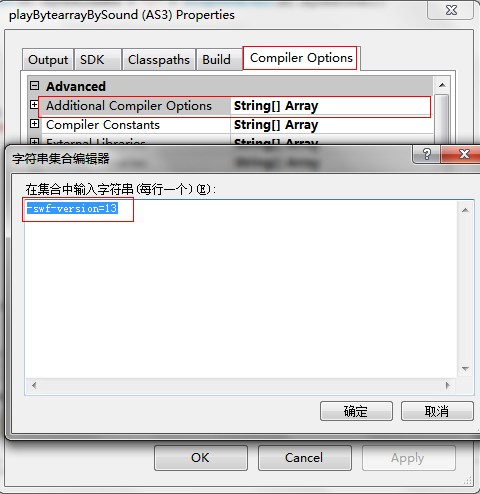
在FlashBuilder里设置:
Project菜单 => Properties..子菜单, 打开 Properties面板。
Flex编译器选项 => 附加的编译器参数。
添加 -swf-version=13 ,一路确定着出来就行了。
FlashBuilder里设置Flashplayer11编译器选项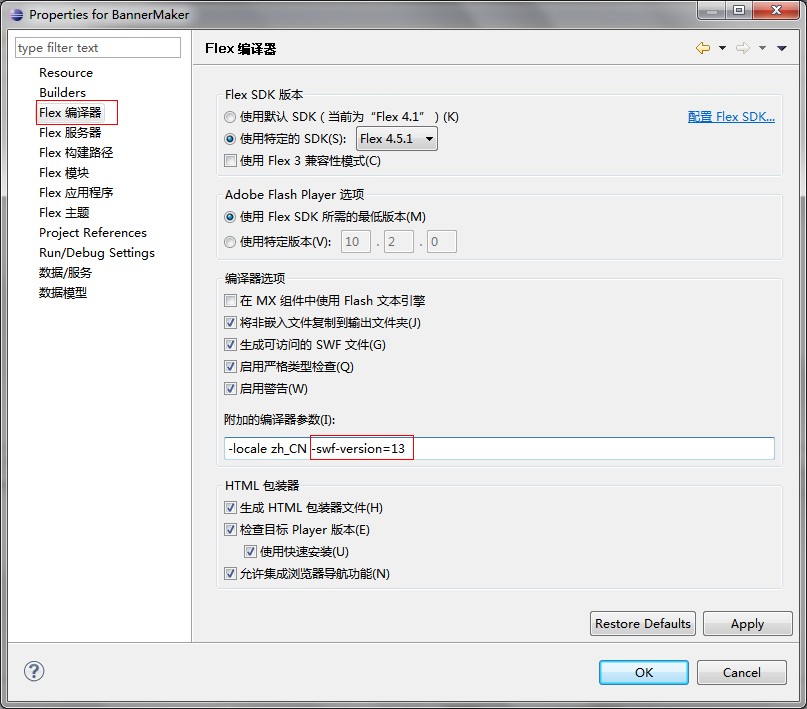
示例
请确保声卡驱动已经安装好,并且能播放声音。

源代码
package

{

    import fl.controls.TextInput;

    import fl.events.ComponentEvent;

    import flash.display.Sprite;

    import flash.events.Event;

    import flash.events.IOErrorEvent;

    import flash.events.ProgressEvent;

    import flash.events.SecurityErrorEvent;

    import flash.media.Sound;

    import flash.media.SoundChannel;

    import flash.net.URLRequest;

    import flash.net.URLStream;

    import flash.text.TextField;

    import flash.utils.ByteArray;

    import flash.utils.setTimeout;

    /**

     * Sound.loadCompressedDataFromByteArray

     * @author lite3

     * @link http://www.litefeel.com

     */

    [SWF(width = 600, height = 170)]

    public class Main extends Sprite

    {

        private const SOUND_URL:String = "http://www.sqcbbs.net/data/attachment/forum/music/suyan.mp3";

        private var sound:Sound;

        private var stream:URLStream;

        private var isPlaying:Boolean;

        private var sc:SoundChannel;

        private var txt:TextField;

        private var input:TextInput;

        public function Main():void

        {

            initUI();

            sound = new Sound();

            stream = new URLStream();

            stream.addEventListener(Event.COMPLETE, streamHandler);

            stream.addEventListener(ProgressEvent.PROGRESS, streamHandler);

            stream.addEventListener(IOErrorEvent.IO_ERROR, streamHandler);

            stream.addEventListener(SecurityErrorEvent.SECURITY_ERROR, streamHandler);

            var url:String = loaderInfo.parameters.soundURL ? loaderInfo.parameters.soundURL : SOUND_URL;

            input.text = url;

            loadSound(null);

            input.addEventListener(ComponentEvent.ENTER, loadSound);

        }

        private function loadSound(e:ComponentEvent):void

        {

            if (!input.text) return;

            if (sc != null)

            {

                sc.removeEventListener(Event.SOUND_COMPLETE, soundCompleteHandler);

                sc.stop();

                sc = null;

            }

            try {

                stream.close();

            }catch (e:Error) { }

            stream.load(new URLRequest(input.text));

            showText("开始加载");

        }

        private function streamHandler(e:Event):void

        {

            switch(e.type)

            {

                case Event.COMPLETE :

                    showText("加载完成,播放中...");

                    var byte:ByteArray = new ByteArray();

                    stream.readBytes(byte, 4000, stream.bytesAvailable/10);

                    sound.loadCompressedDataFromByteArray(byte, byte.length/2);

                    playSound();

                    break;

                case ProgressEvent.PROGRESS :

                    showText("加载进度:" + ProgressEvent(e).bytesLoaded + "/" + ProgressEvent(e).bytesTotal);

                    break;

                case IOErrorEvent.IO_ERROR :

                    showText("加载失败");

                    break;

                case SecurityErrorEvent.SECURITY_ERROR :

                    showText("安全沙箱限制,不能从目标网站加载数据");

                    break;

            }

        }

        private function playSound():void

        {

            isPlaying = true;

            showText("isPlaying: " +isPlaying);

            sc = sound.play();

            sc.addEventListener(Event.SOUND_COMPLETE, soundCompleteHandler);

        }

        private function soundCompleteHandler(e:Event):void

        {

            isPlaying = false;

            showText("isPlaying: " +isPlaying);

            setTimeout(playSound, 1000);

        }

        private function showText(text:String):void

        {

            txt.text = text;

        }

        private function initUI():void

        {

            txt = new TextField();

            txt.mouseEnabled = false;

            txt.text = "Sound.loadCompressedDataFromByteArray For Flash Player 11";

            txt.width = 600;

            txt.height = txt.textHeight + 4;

            txt.mouseEnabled = false;

            txt.autoSize = "center";

            txt.y = 10;

            addChild(txt);

            txt = new TextField();

            txt.text = "请输入MP3地址并回车,以更换MP3.";

            txt.mouseEnabled = false;

            txt.width = txt.textWidth + 4;

            txt.height = txt.textHeight + 4;

            txt.x = 10;

            txt.y = 100;

            addChild(txt);

            input = new TextInput();

            input.width = 550;

            input.x = 10;

            input.y = 120;

            addChild(input);

            txt = new TextField();

            txt.mouseEnabled = false;

            txt.width = 300;

            txt.height = 40;

            txt.x = 100;

            txt.y = 50;

            addChild(txt);

        }

    }

}
Sound.loadCompressedDataFromByteArray的更多相关文章
- java sound初探
网上关于java sound的正规资源讲解的非常好,本文不再给出示例,主要提供一些好的资源,并说说我的一些理解,用于形成对java sound的整体认识. 一.几个词汇 TTS:text-to-spe ...
- TeamViewer 12.0.71503 Patch By.Sound
TeamViewer - the All-In-One Software for Remote Support and Online Meetings - Remote control any com ...
- Principles of measurement of sound intensity
Introduction In accordance with the definition of instantaneous sound intensity as the product of th ...
- ASM:《X86汇编语言-从实模式到保护模式》越计卷:实模式下对DMA和Sound Blaster声卡的控制
说实话越计卷作者用了16页(我还是删过的),来讲怎么控制声卡,其实真正归纳起来就那么几点. ★PART1:直接存储访问 1. 总线控制设备(bus master) 在硬件技术不发达的早期,处理器是最重 ...
- System Sounds: Alerts and Sound Effects
#include <AudioToolbox/AudioToolbox.h> #include <CoreFoundation/CoreFoundation.h> // Def ...
- Sound Generator 原理
Sound Generator 原理 旨在简单的阐述声音如何通过单片机模块来产生. 声音 声音的种类有千千万,但归根到底还是属于波.在对声音进行模拟转数字的时候,采样越高, 声音被还原的越逼真. 声音 ...
- Opensuse enable sound and mic card
Install application pavucontrol Run pavucontrol You will see the configuration about sound card and ...
- I2S (Inter—IC Sound) 总线
I2S I2S(Inter—IC Sound)总线, 又称 集成电路内置音频总线,是飞利浦公司为数字音频设备之间的音频数据传输而制定的一种总线标准,该总线专责于音频设备之间的数据传输,广泛应用于各种多 ...
- 微软Hololens学院教程-Hologram 220-空间声音(Spatial sound )【本文是老版本,与最新的微软教程有出入】
这是老版本的教程,为了不耽误大家的时间,请直接看原文,本文仅供参考哦! 原文链接https://developer.microsoft.com/EN-US/WINDOWS/HOLOGRAPHIC/ho ...
随机推荐
- Educational Codeforces Round 25 D - Suitable Replacement(贪心)
题目大意:给你字符串s,和t,字符串s中的'?'可以用字符串t中的字符代替,要求使得最后得到的字符串s(可以将s中的字符位置两两交换,任意位置任意次数)中含有的子串t最多. 解题思路: 因为知道s中的 ...
- Python股票信息抓取(二)
在一的基础上,想着把所有的折线图放在一个图中,然后图的结果如图所示: 不是略丑,是很丑~ 依然的单进程,只是将图标结果放在了一张图里 代码如下: #-*-coding:utf-8 -*- import ...
- Linux命令之dig命令实例讲解
1.查看域名的A记录 # dig yahoo.com; <<>> DiG 9.8.2rc1-RedHat-9.8.2-0.10.rc1.el6_3.2 <<> ...
- [转]Java中堆和栈创建对象的区别
转载自http://blog.csdn.net/hbhhww/article/details/8152838 栈与堆都是Java用来在Ram中存放数据的地方.与C++不同,Java自动管理栈和堆,程序 ...
- 在go中连接mysql
5.访问数据库 5.1 database/sql接口 5.2 使用MySQL数据库 5.3 使用SQLite数据库 5.4 使用PostgreSQL数据库 5.5 使用Beego orm库进行ORM开 ...
- 【转】EventBus 3.0使用详解
原文:https://www.jianshu.com/p/f9ae5691e1bb 01 前言 当我们进行项目开发的时候,往往是需要应用程序的各组件.组件与后台线程间进行通信,比如在子线程中进行请求数 ...
- Git & GitHub 学习
学习资料: Git版本控制软件结合GitHub从入门到精通常用命令学习手册:http://www.ihref.com/read-16369.html 官方中文手册:http://git-scm.com ...
- LR参数和变量
一.参数: 1. 在LR函数中可以直接使用参数.参数必须在双引号“”中才能应用.大部分情况下,可以直接用参数代替函数中双引号内的数据.如下使用方法: lr_save_string("http ...
- 使用注解配置SQL映射器
在上一章,我们看到了我们是怎样在映射器Mapper XML配置文件中配置映射语句的.MyBatis也支持使用注解来配置映射语句.当我们使用基于注解的映射器接口时,我们不再需要在XML配置文件中配置了. ...
- learn_requests
# -*- coding: utf-8 -*- import requests URL_IP = 'http://localhost:8000/ip' URL_GET = 'http://localh ...