
GIT使用—提交的查找与变更
一、查找提交
(1)git bisect(二分搜索法)
基于任意搜索条件查找特定的错误提交。在排查某个提交版本导致的错误时非常有用。
[root@localhost public_html]# git bisect start   开始搜索

[root@localhost public_html]# git bisect bad   告知GIT那个提交时“坏”的,通常是当前版本

[root@localhost public_html]# git bisect good v2.6.27  告知那个版本提交是“好”的,通常是测试通过版本

之后Git会在范围内将每个修订版本搜索出来,之后你要做的就是缩小排查范围。

最后要告诉Git已经完成

[root@localhost public_html]# git git bisect reset

[root@localhost public_html]# git branch

* master
(2)git blame
此命令告诉你一个文件中的每一行最后是谁修改的和哪次提交做出了变更。
[root@localhost public_html]# git blame -L 1, index.html

0a307160 (tong 2018-02-27 11:52:29 +0800 1) <html>

0a307160 (tong 2018-02-27 11:52:29 +0800 2) <body>

^b4e2a14 (tong 2018-02-27 11:45:23 +0800 3) My website is alive!

0a307160 (tong 2018-02-27 11:52:29 +0800 4) </body>

0a307160 (tong 2018-02-27 11:52:29 +0800 5) </html>
(3)Pickaxe
git log -Sstring根据给定的条件沿着文件的差异历史搜索。通过搜索修订版本间的实际差异,这条命令可以找到那些执行改变的提交。
[root@localhost public_html]# git log -Shtml --pretty=oneline --abbrev-commit index.html

0a30716 This is new html!
二、查看提交历史
[root@localhost public_html]# git log

commit aa431d938e85445f6c22c7389a37349f587d5b01

Author: tong <tongxiaoda@anzhi.com>

Date:   Tue Feb 27 13:06:21 2018 +0800

    mv bar to foo

commit 1ed9a862e62bd5513021838cb435cf8170e2173d

Author: tong <tongxiaoda@anzhi.com>

Date:   Tue Feb 27 13:04:37 2018 +0800

    new bar

commit 19a473c2e935efa59b8edea19d2d12be96987a97

Author: tong <tongxiaoda@anzhi.com>

Date:   Tue Feb 27 12:00:03 2018 +0800

    Remove a poem

commit 5be473e1ed6d04ed9e96b7fa3e9e2860607cbd31

Author: tong <tongxiaoda@anzhi.com>

Date:   Tue Feb 27 11:59:16 2018 +0800

    add poem.html

commit 0a3071601cc10777e271a952ead46cffba233e24

Author: tong <tongxiaoda@anzhi.com>

Date:   Tue Feb 27 11:52:29 2018 +0800

    This is new html!

commit b4e2a14de84d29ea8890a2e19f039eb08bc2fc7d

Author: tong <tongxiaoda@anzhi.com>

Date:   Tue Feb 27 11:45:23 2018 +0800

    Initial contents of public_html
可以用 --graph 选项,查看历史中什么时候出现了分支、合并。
[root@localhost public_html]# git log --oneline --graph

* aa431d9 mv bar to foo

* 1ed9a86 new bar

* 19a473c Remove a poem

* 5be473e add poem.html

* 0a30716 This is new html!

* b4e2a14 Initial contents of public_html
可以用 '--reverse'参数来逆向显示所有日志。
[root@localhost public_html]# git log --reverse --oneline

b4e2a14 Initial contents of public_html

0a30716 This is new html!

5be473e add poem.html

19a473c Remove a poem

1ed9a86 new bar

aa431d9 mv bar to foo
如果只想查找指定用户的提交日志可以使用命令:git log --author
[root@localhost public_html]# git log --author=tong --oneline -3

aa431d9 mv bar to foo

1ed9a86 new bar

19a473c Remove a poem
如果你要指定日期,可以执行几个选项:--since 和 --before,但是你也可以用 --until 和 --after。
--no-merges 选项以隐藏合并提交
[root@localhost public_html]# git log --oneline --before={3.weeks.ago} --after={2018-01-01} --no-merges
三、更改提交
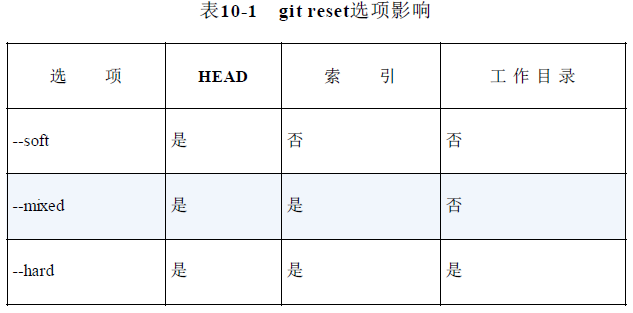
git reset命令会把版本库和工作目录改变为已知状态,其调整HEAD引用指向给定的提交,默认情况下还会更新搜索引以匹配该提交。
git reset-soft
将HEAD引用指向给定提交,索引和工作目录内容保持不变。
git reset--mixed(默认模式)
将HEAD指向给定提交,索引内容也跟着改变以符合给定提交的树结构,但工作目录中的内容保持不变。
git reset-hard
将HEAD指向给定提交,索引内容也跟着改变以符合给定提交的树结构,工作目录内容也随之改变以反映给定提交表示的树的状态。
简单地重做或清除分支上的最近提交
[root@localhost ~]# cd test

[root@localhost test]# git init

Initialized empty Git repository in /root/test/.git/

[root@localhost test]# echo foo >> master_file

[root@localhost test]# git add master_file

[root@localhost test]# git commit

[master (root-commit) 96a97fb] This is test!

 1 files changed, 1 insertions(+), 0 deletions(-)

 create mode 100644 master_file

[root@localhost test]# echo "more foo" >> master_file

[root@localhost test]# git commit master_file

[master 8b6ce36] Change master_file

 1 files changed, 1 insertions(+), 0 deletions(-)

[root@localhost test]# git show-branch --more=5

[master] Change master_file

[master^] This is test!

假设第二次提交是错的,需要改变一下

[root@localhost test]# git reset HEAD^

Unstaged changes after reset:

M	master_file

[root@localhost test]# git show-branch --more=5

[master] This is test!

[root@localhost test]# cat master_file

foo

more foo

执行后Git离开了master_file的新状态,因为重置了索引,所以必须重新暂存你想要提交的修改

[root@localhost test]# echo "even more foo" >> master_file

[root@localhost test]# git commit master_file

[master eaf3fca] new change master_file

 1 files changed, 2 insertions(+), 0 deletions(-)

[root@localhost test]# git show-branch --more=5

[master] new change master_file

[master^] This is test!

查看版本库中引用变化的历史记录

[root@localhost test]# git reflog

eaf3fca HEAD@{0}: commit: new change master_file

96a97fb HEAD@{1}: HEAD^: updating HEAD

8b6ce36 HEAD@{2}: commit: Change master_file
使用git cherry-pick提交命令会在当前分支上应用给定提交引入的变更。这并不改变版本库中的现有历史记录,而是添加历史记录。
通常用于版本库中一个分支的特定提交引入不同的分支中,即把维护分支的提交移植到开发分支。
git checkout rel_2.3

git cherry-pick dev~2
使用git revert将引入一个新提交来抵消给定提交的影响。
git revert master~3
修改最新提交
git commit --amend --author "Bob <Bob@test.com>"
GIT使用—提交的查找与变更的更多相关文章
- Git撤销提交和修改相关操作
团队开发中经常遇到错误删除文件,错误提交等情况,那么使用Git该如何正确的进行撤销和恢复呢? 一.增补提交 git commit –C HEAD –a --amend -C表示复用指定提交的提交留言, ...
- git操作提交方式
git代码提交 第一次提交代码 在本地建立一个文件夹用来存储代码,相当于一个仓库进入文件夹目录输入下面命令 echo "# xxx" >> README.md (添加一 ...
- Git-Runoob:Git 查看提交历史
ylbtech-Git-Runoob:Git 查看提交历史 1.返回顶部 1. Git 查看提交历史 在使用 Git 提交了若干更新之后,又或者克隆了某个项目,想回顾下提交历史,我们可以使用 git ...
- 【第八篇】- Git 查看提交历史之Spring Cloud直播商城 b2b2c电子商务技术总结
Git 查看提交历史 Git 提交历史一般常用两个命令: git log 在使用 Git 提交了若干更新之后,又或者克隆了某个项目,想回顾下提交历史,我们可以使用 git log 命令查看. 针对 ...
- 如何避免git每次提交都输入密码
在ubuntu系统中,如何避免git每次提交都输入用户名和密码?操作步聚如下:1: cd 回车: 进入当前用户目录下:2: vim .git-credentials (如果没有安装vim 用其它编辑器 ...
- 如何利用git shell提交代码到github
在很早之前我根据找到的一些资料以及自己的实践总结了一篇如何将VS2015上的代码上传到GitHub上,后来我发现有小伙伴私信我,说跟我上面写的不一样,但是那段时间也比较忙,当我发现有人私信的时候差不过 ...
- GIT入门笔记(20)- git 开发提交代码过程梳理
git开发提交流程新项目开发,可以直接往master上提交老项目维护,可以在分支上修改提交,多次add和commit之后,也可以用pull合并主干和本地master,解决冲突后再push 1.检出代码 ...
- git 本地提交代码到 github 远程库,没有弹框 github login
git 本地提交代码到 github 远程库,没有弹框 github login: 原因: win10 有个凭据管理器,给保存了历史登陆用户名密码,导致无法切换用户. 解决办法: 删除历史登陆用户 ...
- git 命令提交项目到github
git 命令提交项目到github步骤如下: 1.使用git 命令客户端进入项目根路径,输入 git init 命令,创建github本地根目录 2.把文件加入到本地项目 git add . ,如 ...
随机推荐
- Http协议原理解析第一篇
一:http的由来: OSI模型把网络通信分成七层:物理层.数据链路层.网络层.传输层.会话层.表示层和应用层,对于开发网络应用人员来说,一般把网络分成五层,这样比较容易理解.这五层为:物理层.数据链 ...
- Maven开发系统
Maven的优点: 自动从互联网中获取jar包,并实现了一步构建. pom.xml的配置 依赖管理(导入对应的jar包) 通过坐标(定位到仓库中的包的位置,并将jar包导入到项目中,如果版本升级,只需 ...
- MySQL5.7压缩包安装图文教程
MySQL5.7压缩包安装图文教程 一.下载网址:https://dev.mysql.com/downloads/ 选择5.7版本 二.解压 下载完成后解压,解压后如下(zip是免安装的,解压后配置成 ...
- 160412、DWR使用笔记
DWR是一个框架,简单的说就是能够在javascript直接调用java方法,而不必去写一大堆的javascript代码.它的实现是基于ajax的,可以实现无刷新效果. 网上有不少DWR的例子,但大都 ...
- CH5E01 乌龟棋【线性DP】
5E01 乌龟棋 0x5E「动态规划」练习 描述 小明过生日的时候,爸爸送给他一副乌龟棋当作礼物.乌龟棋的棋盘是一行N 个格子,每个格子上一个分数(非负整数).棋盘第1 格是唯一的起点,第N 格是终点 ...
- maven POM —— maven权威指南学习笔记(五)
1. 简介 Archetype插件通过 pom.xml 文件创建了一个项目.这就是项目对象模型 (POM),一个项目的声明性描述. 当Maven运行一个目标的时候,每个目标都会访问定 义在项目POM里 ...
- 查看嵌入式设备的CPU频率
对于有多个核心的CPU,查看CPU 频率的方法是: cat /sys/devices/system/cpu/cpu0/cpufreq/cpuinfo_max_freq 上面的这个是查看核心0的cpu的 ...
- 在nginx启动后,如果我们要操作nginx,要怎么做呢 别增加无谓的上下文切换 异步非阻塞的方式来处理请求 worker的个数为cpu的核数 红黑树
nginx平台初探(100%) — Nginx开发从入门到精通 http://ten 众所周知,nginx性能高,而nginx的高性能与其架构是分不开的.那么nginx究竟是怎么样的呢?这一节我们先来 ...
- Allocation-Free Collections(在堆栈上使用内存)
假设你有一个方法,通过创建临时的List来收集某些数据,并根据这些数据来统计信息,然后销毁这个临时列表.这个方法被经常调用,导致大量内存分配和释放以及增加的内存碎片.此外,所有这些内存管理都需要时间, ...
- mytest3.py-api接入平台获取数据
mytest3.py-api接入平台获取数据 import base64 import datetime import hashlib import urllib import urllib.pars ...