
【Unity|C#】基础篇(13)——特性(Attribute)
【学习资料】
《C#图解教程》(第24章):https://www.cnblogs.com/moonache/p/7687551.html
电子书下载:https://pan.baidu.com/s/1mhOmBG0
- 参考文章
C# 特性(Attribute)(建议看一看嗷):https://www.cnblogs.com/zhaoyl9/p/12027938.html
【内容】
- 特性的用途
- 特性与注释的区别
- 内置特性
- Obsolete(废弃特性)
- Conditional(条件编译特性)
- 调试者信息特性(CallerFilePath、CallerLineNumber、CallerMemberName)
- DebuggerStepThrough(跳过调试特性)
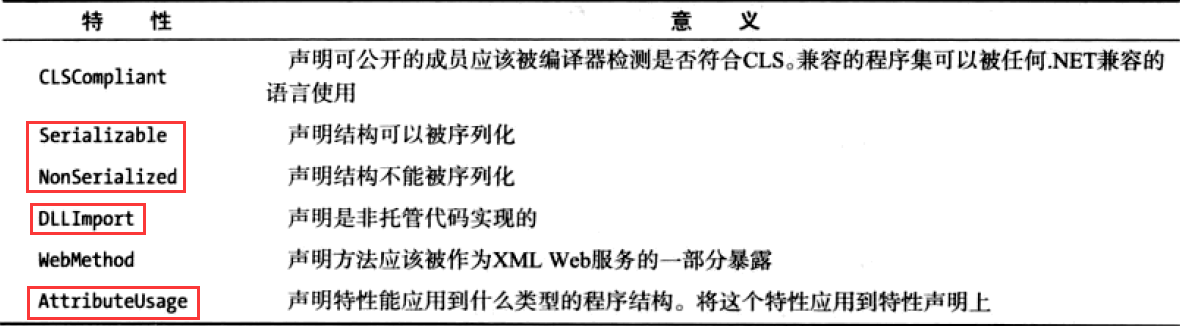
- 更多内置特性
- 全局特性
- 自定义特性
- 命名规范
- 使用反射访问特性
- 限制特性的使用(AttributeUsage)
【笔记】
- 用途
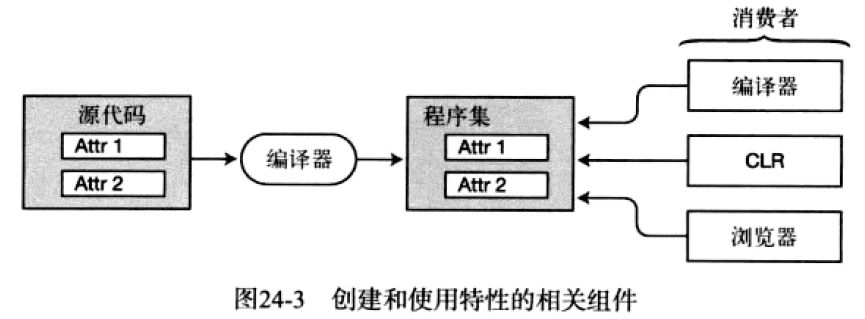
- 允许我们向程序集的元数据中的成员上 声明一些特殊的信息(附加信息),是用于保存程序结构信息的 某种特殊类型的类(特性也是类)
- 主要消费者为:编译器、CLR(反射)、浏览器(编辑器里的dll对象信息查看器)
- 特性的作用
- 告诉编译器如何编译
- 序列化
- 程序的安全特征(如数据验证)
- 防止即时编译器对程序代码进行优化从而代码容易调试
- 等等
- 注:在程序运行前,特性就已经存在了
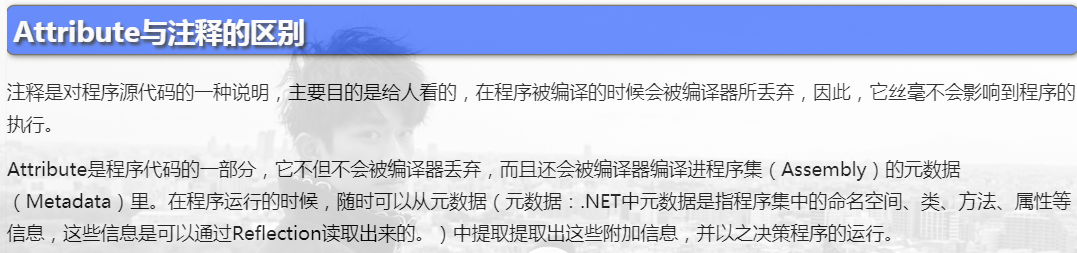
- 与注释的区别
图片来源:https://www.cnblogs.com/zhaoyl9/p/12027938.html
- 内置特性
- Obsolete(废弃特性)
- 语法: Obsolete(string message, bool error=false) ,其中error传入true,则编译器显示报错
- 定义在 程序结构(类、结构、成员等等)前
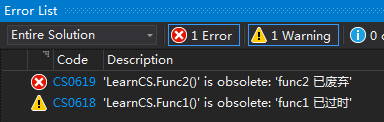
- 将其标记为过期;在编译器的错误列表中,会显示警告、或错误
[Obsolete("func1 已过时")]

public void Func1() { }

[Obsolete("func2 已废弃", true)]

public void Func2() { }

void Start()

{

    Func1();

    Func2();

}- 查看错误列表
- Conditional(条件编译特性)
- 语法: Conditional(string conditionString) ,参数为 编译符号 名称
- 定义在 方法 前
- 如果编译符号未定义,那么编译器会移除该方法的所有调用
#define HELLO // 定义符号 HELLO

using UnityEngine;

public class LearnCS : MonoBehaviour

{

    [System.Diagnostics.Conditional("HELLO")]

    public void Func1() { Debug.Log("Func1"); }

    [System.Diagnostics.Conditional("WORLD")]

    public void Func2() { Debug.Log("Func2"); }

    void Start()

    {

        Func1();

        Func2(); // 编译时会被移除

    }

}- 输出结果:只输出 Fun1

- 调试者信息特性(CallerFilePath、CallerLineNumber、CallerMemberName)
- 定义在 方法参数 前
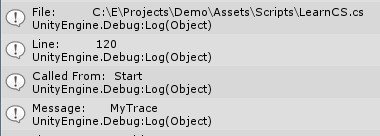
- 编译器会自动给参数赋值:调用方法的文件路径、调用方法的行号、调用方法的方法名
public static void MyTrace(string message,

                        [CallerFilePath] string fileName = "",

                        [CallerLineNumber] int lineNumber = ,

                        [CallerMemberName] string callingMember = "")

{

    Debug.Log(string.Format("File:         {0}", fileName));

    Debug.Log(string.Format("Line:         {0}", lineNumber));

    Debug.Log(string.Format("Called From:  {0}", callingMember));

    Debug.Log(string.Format("Message:      {0}", message));

}- 输出结果
- 调试者信息特性(CallerFilePath、CallerLineNumber、CallerMemberName)
- DebuggerStepThrough(跳过调试特性)
- 定义在 类、结构、构造函数、方法 前
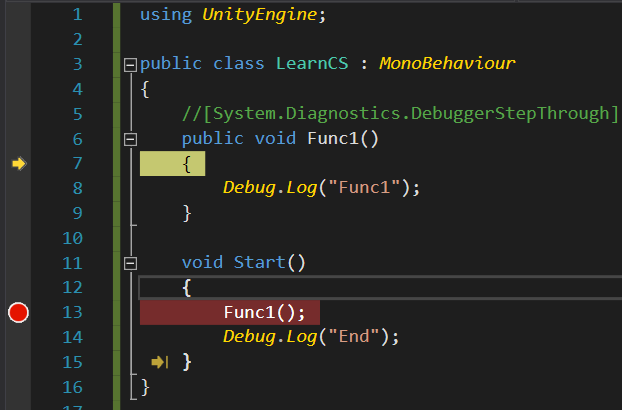
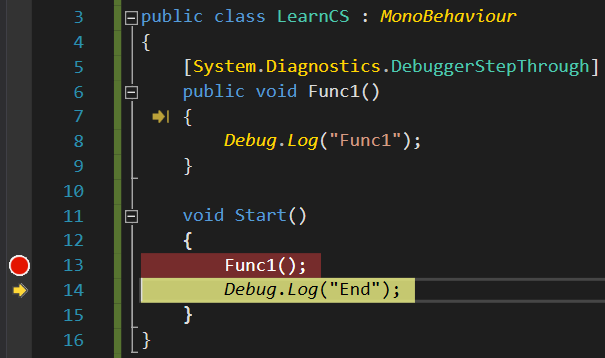
- 在单步调试时(Step Into),不会进入方法体内,而是直接跳过
- 例1:断点在13行,进行单步调试(Step Into,VS的快捷键为F11),可以进入Func1方法体内
例2: 断点在13行,进行单步调试(Step Info,VS快捷键为F11),直接会跳到14行
- DebuggerStepThrough(跳过调试特性)
- 更多内置特性
- 全局特性
传送门:https://www.cnblogs.com/liqingwen/p/5944391.html
- 自定义特性
- 继承基类: System.Attribute
- 命名规范
- 以 Attribute 结尾,使用时不需要加这个后缀
- 如:MyAttributeAttribute,使用为 [MyAttribute]
- 像类一样声明一个特性,并通过反射获取特性的属性
using UnityEngine;

using System;

public class MyAttributeAttribute : System.Attribute

{

    public string name { get; } // 名字

    public string date { get; } // 日期

    public MyAttributeAttribute(string name, string date)

    {

        this.name = name;

        this.date = date;

    }

}

public class LearnCS : MonoBehaviour

{

    [Obsolete("MyTest 已过时")]

    [MyAttribute("heihei", "2020-2-2")]

    public class MyTest

    { }

    void Start()

    {

        // 通过Type的 GetCustomAttributes

        Type t = typeof(MyTest);

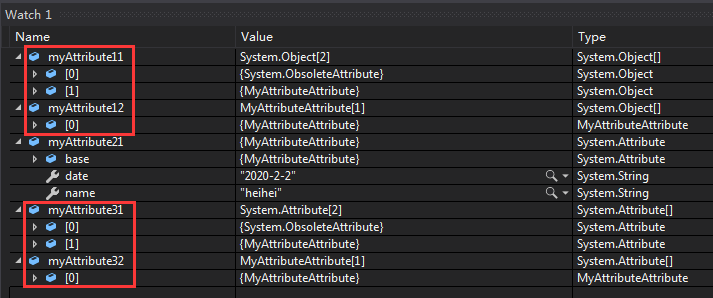
        var myAttribute11 = t.GetCustomAttributes(true);

        var myAttribute12 = t.GetCustomAttributes(typeof(MyAttributeAttribute), true);

        // 通过Attribute的 GetCustomAttribute

        var myAttribute21 = Attribute.GetCustomAttribute(typeof(MyTest), typeof(MyAttributeAttribute));

        // 通过Attribute的 GetCustomAttributes

        var myAttribute31 = Attribute.GetCustomAttributes(typeof(MyTest));

        var myAttribute32 = Attribute.GetCustomAttributes(typeof(MyTest), typeof(MyAttributeAttribute));

        //

        foreach(var att in myAttribute11)

        {

            //将特性对象转化为动物特性对象

            MyAttributeAttribute myAtt = att as MyAttributeAttribute;

            if (myAtt != null)

            {

                Debug.Log("name=" + myAtt.name + " , date=" + myAtt.date);

            }

        }

        Debug.Log("End");

    }

}- 运行结果
- 限制特性的使用(AttributeUsage)
- 定义在特性类型前,用来限制特性的使用目标
- 例如:只允许类使用,属性方法都不能使用该特性
[AttributeUsage(AttributeTargets.Class, AllowMultiple = true, Inherited =true)]

public class MyAttributeAttribute : System.Attribute

{

    public string name { get; } // 名字

    public string date { get; } // 日期

    public MyAttributeAttribute(string name, string date)

    {

        this.name = name;

        this.date = date;

    }

}
- 公共属性
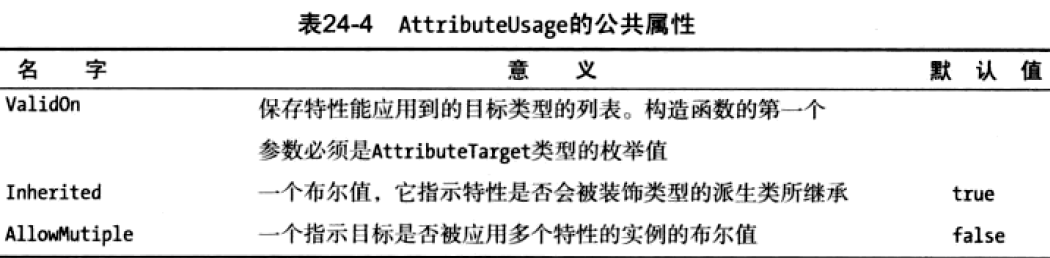
- 构造函数的 AttributeTargets枚举限制

【Unity|C#】基础篇(13)——特性(Attribute)的更多相关文章
- python 基础篇 13 迭代器与生成器
13. 前⽅⾼能-迭代器和⽣成器本节主要内容:1. 迭代器2. ⽣成器 ⼀. 迭代器我们之前⼀直在⽤可迭代对象进⾏迭代操作. 那么到底什么是可迭代对象. 本⼩节主要讨论可迭代对象. ⾸先我们先回顾⼀下 ...
- cocos2dx基础篇(13) 编辑框之二CCEditBox
[3.x] (1)去掉"CC" (2)设置虚拟键盘的编辑类型 > EditBoxInputMode 变为强枚举 EditBox::EditBoxInputMode // SI ...
- 诱人的 react 视频教程-基础篇(14 个视频)
诱人的 react 视频教程-基础篇(14 个视频) 诱人的 react 视频教程 - 基础篇 #1 介绍「07:25」 诱人的 react 视频教程 - 基础篇 #2 create-react-ap ...
- mootools常用特性和示例(基础篇2)
接着上一篇:mootools常用特性和示例(基础篇1) 1.表单操作 html: <form id="myForm" action="submit.php" ...
- mootools常用特性和示例(基础篇1)
网上关于mootools这个库的信息很少. 公司一些老的项目用到了mootools库,因为要维护,所以接触到了mootools. mootools(文档)官网:http://www.chinamoot ...
- 夯实Java基础系列1:Java面向对象三大特性(基础篇)
本系列文章将整理到我在GitHub上的<Java面试指南>仓库,更多精彩内容请到我的仓库里查看 [https://github.com/h2pl/Java-Tutorial](https: ...
- C# 篇基础知识9——特性、程序集和反射
特性(Attribute)是用于为程序元素添加额外信息的一种机制.比如记录文件修改时间或代码作者.提示某方法已经过期.描述如何序列化数据等等.方法.变量.属性.类.接口.结构体以及程序集等都是程序元素 ...
- python面试题库——1Python基础篇
第一部分 Python基础篇(80题) 为什么学习Python? 语言本身简洁,优美,功能超级强大,跨平台,从桌面应用,web开发,自动化测试运维,爬虫,人工智能,大数据处理都能做 Python和Ja ...
- 深度学习入门者的Python快速教程 - 基础篇
5.1 Python简介 本章将介绍Python的最基本语法,以及一些和深度学习还有计算机视觉最相关的基本使用. 5.1.1 Python简史 Python是一门解释型的高级编程语言,特点是简单明 ...
随机推荐
- PWA(Progressive web apps),渐进式 Web 应用
学习博客:https://www.jianshu.com/p/098af61bbe04 学习博客:https://www.zhihu.com/question/59108831 官方文档:https: ...
- Redis的“假事务”与分布式锁
关注公众号:CoderBuff,回复"redis"获取<Redis5.x入门教程>完整版PDF. <Redis5.x入门教程>目录 第一章 · 准备工作 第 ...
- 8.python内置模块之random模块简介
Python中的random模块用于生成随机数. 常用的7个函数: 1.random.random():返回一个[0,1)之间的随机浮点值(双精度) 2.random.uniform(a,b):返回[ ...
- Oracle v$session视图显示客户端IP地址
在Oracle数据库中,我们使用session相关视图(v$session.v$active_session_history,dba_hist_active_session_history等)查找问题 ...
- 解决Python3.7安装pygame报错You are using pip version 10.0.1, however version 19.1 is available.
背景: 学习python开发中,需要用到pygame插件,因此按照参考书<Python编程实践,从入门到实践>指引安装Pygame包. 但是利用pip 命令安装 .whl 文件时,报错(如 ...
- iMacros 入门教程-基础函数介绍(2)
imacros 的 pos 参数是什么意思 position的缩写,如果有 2 个以上的元素共用完全相同的属性(比方说同一个小区的同一栋楼),这个 POS 的参数可以借由不同位置来帮助明确定位(也就是 ...
- Map的底层实现原理
一,前言 1.1,概述 现实生活中,我们常会看到这样的一种集合:IP地址与主机名,身份证号与个人,系统用户名与系统用户对象等,这种一一对应的关系,就叫做映射(K-V).Java提供了专门的集合类用 ...
- Java模拟客户端向服务器上传文件
先来了解一下客户端与服务器Tcp通信的基本步骤: 服务器端先启动,然后启动客户端向服务器端发送数据. 服务器端收到客户端发送的数据,服务器端会响应应客户端,向客户端发送响应结果. 客户端读取服务器发送 ...
- Linux 文件(持续更新)
一.文件类型 Linux操作系统把所有内容(文件.图片.视频.设备)都当作文件看待.处理,即一切皆文件. Linux系统把所有文件分为七种类型: 文件类型 文件类型标识 说明 使用ls -l命令查看文 ...
- CVE-2019-1388 Windows UAC提权
漏洞简述 该漏洞位于Windows的UAC(User Account Control,用户账户控制)机制中.默认情况下,Windows会在一个单独的桌面上显示所有的UAC提示——Secure Desk ...