
Spring Boot与监控管理
概念:
通过引入spring-boot-starter-actuator,可以使用Spring Boot为我们提供的准生产环境下的应用监控和管理功能。我们可以通过HTTP,JMX,SSH协议来进行操作,自动得到审计、健康及指标信息等。
步骤:
- 引入spring-boot-starter-actuator
- 通过http方式访问监控端点
- 可进行shutdown(POST 提交,此端点默认关闭)
监控和管理端点中文对照
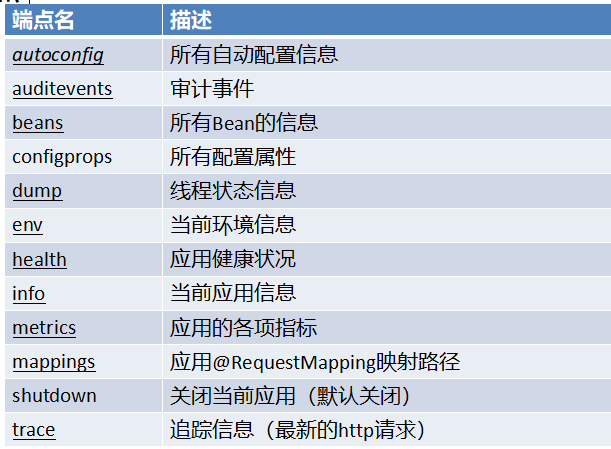
常用定制端点信息方法:
1.定制端点一般通过endpoints+端点名+属性名来设置。
2.修改端点id(endpoints.beans.id=mybeans)
3.开启远程应用关闭功能(endpoints.shutdown.enabled=true)
4.关闭端点(endpoints.beans.enabled=false)
5.开启所需端点
endpoints.enabled=false endpoints.beans.enabled=true
6.定制端点访问根路径
management.context-path=/manage
7.关闭http端点
management.port=-1
springboot版本:1.5.12
http://localhost:8080/info 可以查看git的配置信息
git.properties:
git.branch=master

git.commit.id=xjkd33s

git.commit.time=2017-12-12 12:12:56
application.properties:
#设置监控端点可见

management.security.enabled=false

#测试redis的health

spring.redis.host=192.168.0.113

#设置localhost:8080/info的值

info.app.id=hello

info.app.version=1.0.0

#设置metrics端点不可见

#endpoints.metrics.enabled=false

endpoints.shutdown.enabled=true

#设置beans的名字,改后访问路径为:localhost:8080/mybean

#endpoints.beans.id=mybean

#设置beans的访问路径,改后访问路径为:localhost:8080/bean

#endpoints.beans.path=/bean

#endpoints.beans.enabled=false

#

#endpoints.dump.path=/du

# 关闭所有端点访问

#endpoints.enabled=false

# 打开beans端点的访问

#endpoints.beans.enabled=true

#设置访问端点前缀

management.context-path=/manage

#设置访问端口号

management.port=8181
自定义HealthIndicator:
/*

* 自定义健康状态指示器

* 1.编写一个指示器  实现healthIndicator 接口

* 2.指示器名字 xxxxHealthIndicator

* 3.加入容器中

* */

@Component

public class MyAppHealthIndicator implements HealthIndicator {

    @Override

    public Health health() {

        //自定义的检查方法

        //return  Health.up().build();//代表健康

        return  Health.down().withDetail("msg","服务异常").build();

    }

}
Spring Boot与监控管理的更多相关文章
- spring Boot(十九):使用Spring Boot Actuator监控应用
spring Boot(十九):使用Spring Boot Actuator监控应用 微服务的特点决定了功能模块的部署是分布式的,大部分功能模块都是运行在不同的机器上,彼此通过服务调用进行交互,前后台 ...
- (39.4) Spring Boot Shiro权限管理【从零开始学Spring Boot】
在读此文章之前您还可能需要先了解: (39.1) Spring Boot Shiro权限管理[从零开始学Spring Boot] http://412887952-qq-com.iteye.com/b ...
- (39.3) Spring Boot Shiro权限管理【从零开始学Spring Boot】
在学习此小节之前您可能还需要学习: (39.1) Spring Boot Shiro权限管理[从零开始学Spring Boot] http://412887952-qq-com.iteye.com/b ...
- (39.2). Spring Boot Shiro权限管理【从零开始学Spring Boot】
(本节提供源代码,在最下面可以下载) (4). 集成Shiro 进行用户授权 在看此小节前,您可能需要先看: http://412887952-qq-com.iteye.com/blog/229973 ...
- (39.1) Spring Boot Shiro权限管理【从零开始学Spring Boot】
(本节提供源代码,在最下面可以下载)距上一个章节过了二个星期了,最近时间也是比较紧,一直没有时间可以写博客,今天难得有点时间,就说说Spring Boot如何集成Shiro吧.这个章节会比较复杂,牵涉 ...
- Spring Boot (十): Spring Boot Admin 监控 Spring Boot 应用
Spring Boot (十): Spring Boot Admin 监控 Spring Boot 应用 1. 引言 在上一篇文章<Spring Boot (九): 微服务应用监控 Spring ...
- Spring Boot Actuator监控使用详解
在企业级应用中,学习了如何进行SpringBoot应用的功能开发,以及如何写单元测试.集成测试等还是不够的.在实际的软件开发中还需要:应用程序的监控和管理.SpringBoot的Actuator模块实 ...
- Springboot 系列(十七)迅速使用 Spring Boot Admin 监控你的 Spring Boot 程序,支持异常邮件通知
1. Spring Boot Admin 是什么 Spring Boot Admin 是由 codecentric 组织开发的开源项目,使用 Spring Boot Admin 可以管理和监控你的 S ...
- 使用 Spring Boot Admin 监控应用状态
程序员优雅哥 SpringBoot 2.7 实战基础 - 11 - 使用 Spring Boot Admin 监控应用状态 1 Spring Boot Actuator Spring Boot Act ...
随机推荐
- 【POJ】1502 MPI Maelstrom
题目链接:http://poj.org/problem?id=1502 题意:一个处理器给n-1个处理器发送广播,问最短时间.广播时并发,也就是各个路径就大的一方.输入如果是x的话说明两个处理器不能相 ...
- 【校OJ】选网线
暑假学校OJ上的题目. 一道很有意思的二分. 题意:三个数组,每个数组各选一个数出来看是否能组成目标数. 题解:前两个数组两两的和组合一下,二分第三个数组,找是否能组成目标数. 代码: #includ ...
- Spring核心接口之InitializingBean
一.InitializingBean接口说明 InitializingBean接口为bean提供了属性初始化后的处理方法,它只包括afterPropertiesSet方法,凡是继承该接口的类,在bea ...
- tp5.0x代码执行
1.拿到站首先平复一下心情 看了一下robots.txt结构像dedecms,网站还存在CDN,日了狗看到这里其实都想放弃来着,懒癌晚期,然后接着使用云悉平台走了一波,看了一下得到真实IP,看来只给w ...
- android 自定义shape 带阴影边框效果
在drawable 里面 建立一个 xml 直接复制 看效果 自己调试就可以 <?xml version="1.0" encoding="utf-8"?& ...
- Windows exit
退出 CMD.EXE 程序(命令解释器)或当前批处理脚本. EXIT [/B] [exitCode] /B 指定要退出当前批处理脚本而不是 CMD.EXE.如果从一个 ...
- 常用Oracle操作语句
--常用的字段类型有:varchar2,char,nchar,date,long,number,float,BLOB,CLOB --添加表字段 ); --修改表字段 ); --删除表字段 alter ...
- 0908CSP-S模拟测试赛后总结
我早就料到昨天会考两场2333 话说老师终于给模拟赛改名了啊. 距离NOIP祭日还有60天hhh. 以上是废话. %%%DeepinC无敌神 -rank1 zkt神.kx神.动动神 -rank2 有钱 ...
- js 中继承方式小谈
题外话 前段时间面试中笔试题有这道题目: 请实现一个继承链,要求如下: 构造函数A():构造函数中有consoleA方法,可以实现console.log("a") 实例对象 a:a ...
- JAVA 设计模式之 原型模式详解
原型模式(Prototype Pattern)是指原型实例指定创建对象的种类,并且通过拷贝这些原型创建新的对象. 原型模式利用的是克隆的原理,创建新的对象,JDK提供的Cloneable 和JSON. ...