
add characteristic to color
Problem: add a new Char. name D_COI6 that the description is Injected coloration #7 (COI6) in the D_BUSINESS class in PLM and SAP.
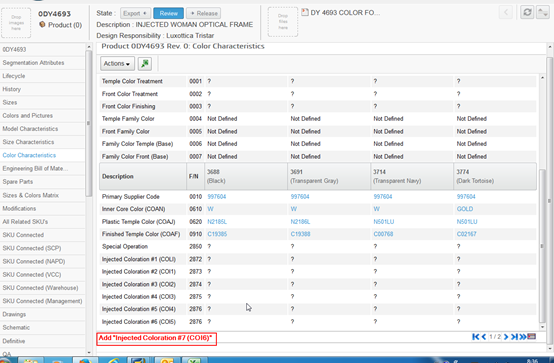
Step1: to attain attribute name on business model.
The result of following command tell you all attributes of Color
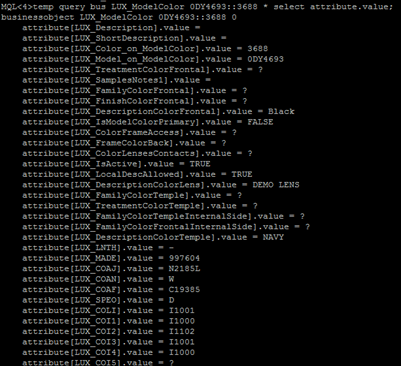
Because some of attributes were not selected to be displayed on the Color Characteristic Tab page, then we can infer what name we should assign to new attribute.
New attribute name: ‘LUX_COI6’
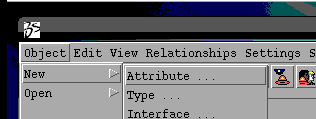
Step 2: create a new attribute named “LUX_COI6” in Business Model
It is better for assigning value to fields to compare with another similar attribute.
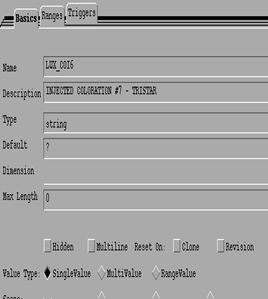
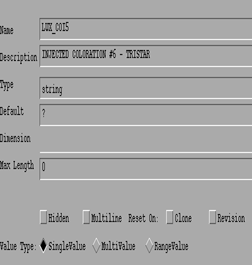
Step 3: add some properties to new attribute.
Compare the properties between LUX_COI5 and LUX_COI6,
There are so many properties that LUX_COI6 doesn’t include.
So that we need to add the properties to the new attribute in my own.
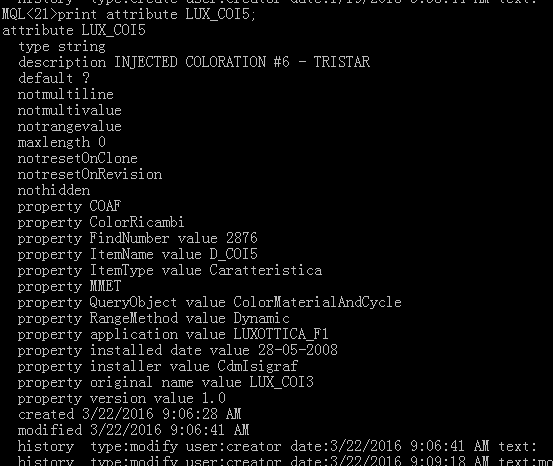
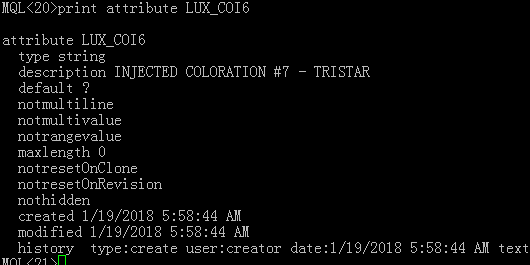
So execute the following command to add properties to LUX_COI6
modify attribute LUX_COI6
property COAF
property ColorRicambi
property FindNumber value 2878
property ItemName value D_COI6
property ItemType value Caratteristica
property MMET
property QueryObject value ColorMaterialAndCycle
property RangeMethod value Dynamic
property application value LUXOTTICA_F1
property 'installed date' value 28-05-2008
property installer value CdmIsigraf
property 'original name' value LUX_COI3
property version value 1.0;
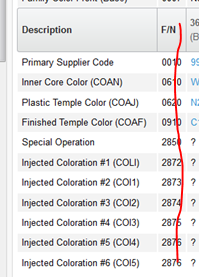
FindNumber and ItemName are vital, other fields are not very helpful.
FindNumber will be showed as F/N at front-end page.
: create a new interface named “LUX_COI6” in business model
Of course, comparing with similar interface will help you.
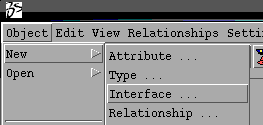
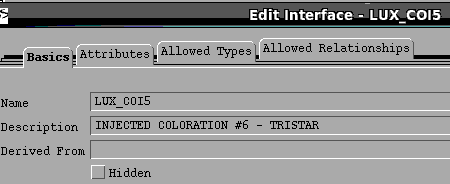
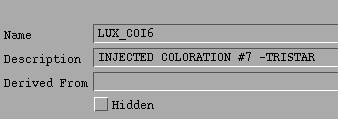
Add new attribute named “LUX_COI6”to the new interface
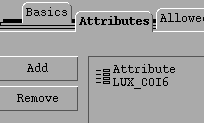
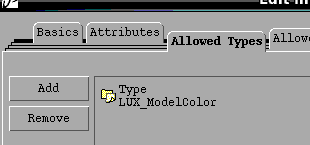
Add ‘LUX_ModelColor’ to the Allowed Types List of the interface.
Step5: create a new class Configuration Item
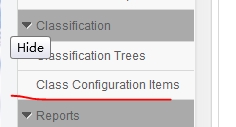
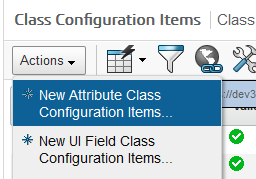
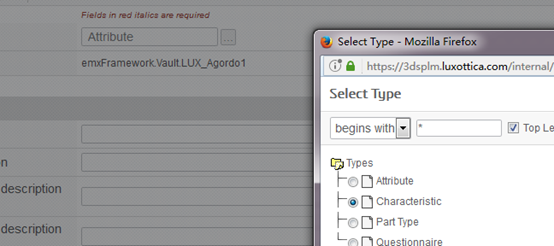
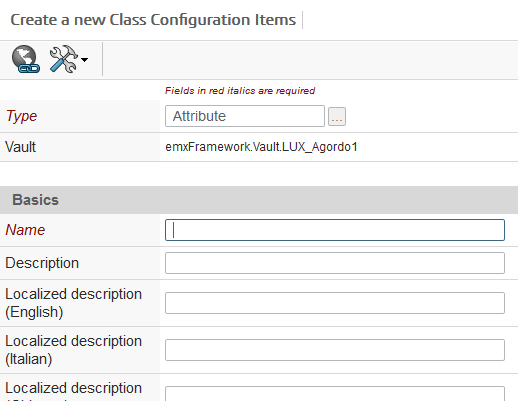
Then, how to define these field?
Look for other Configuration Items for reference.
- Analyze the page URL
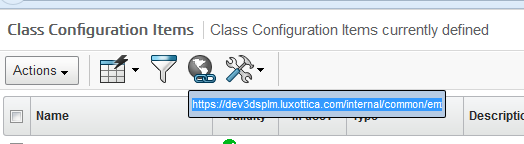

To see the Inquery with Business Model
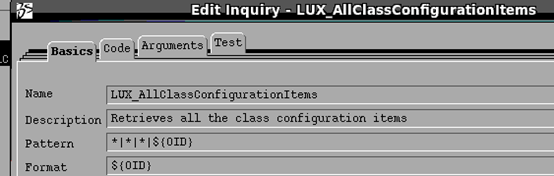
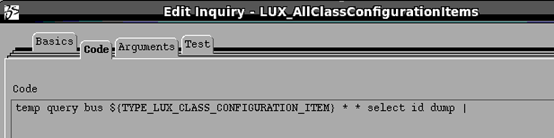
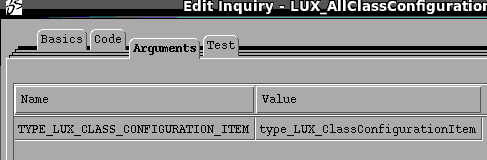
It says what mql command the Inquery employs.
The mql command we can know is :
temp query bus LUX_ClassConfigurationItem * * select id dump |
the command will query all objects of LUX_ClassConfigurationItem,
the amount of the result is too large, we need to filter useless objects out in accordance with our real situation.
So ,please use the following handled command:
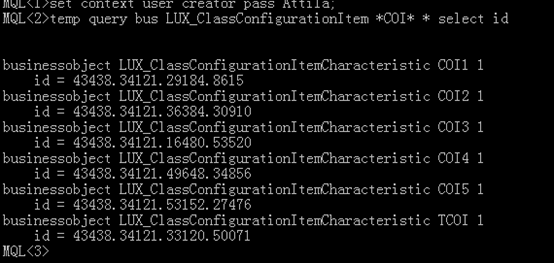
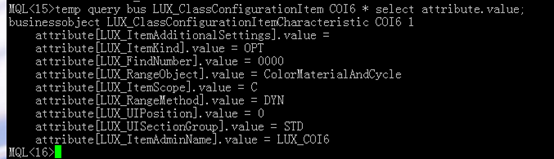
Print the detail of one of objects
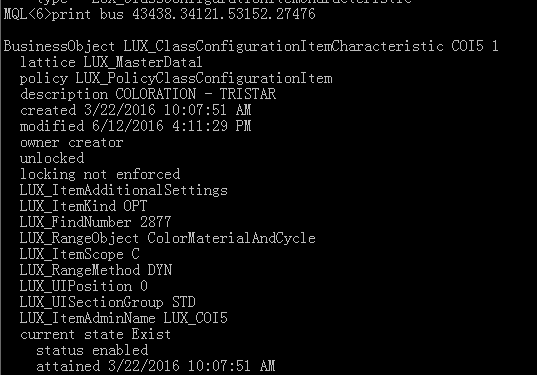
Then, as you can see from the above result , please refer to the result to set up a new Class Configuration Item.
Attention please: Admin name is the attribute name which you have already created in Business Model,
And the LUX_FindNumber is the same as FindNumber which is the property of attribute LUX_COI6 that you created before.
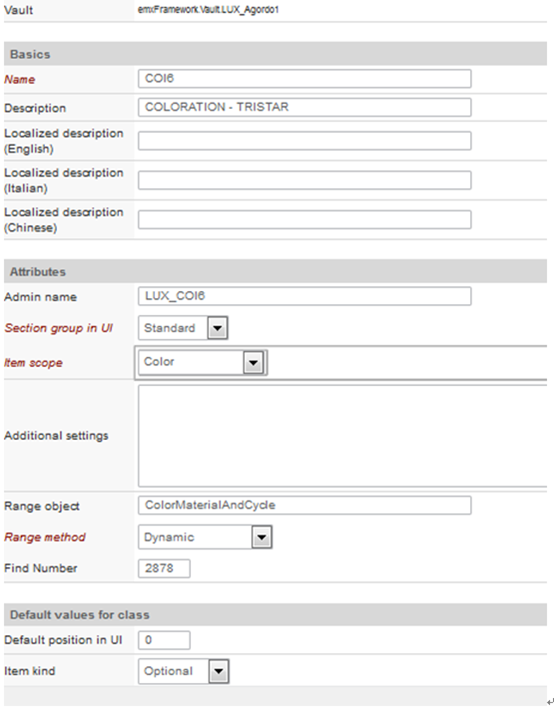
Then ,the new Configuration Item has been created

We can query the object in mql.
Step6: modify relationships of the new characteristic.
As you can see from the following result, the relationships of COI6 and COI5 are absolutely different.
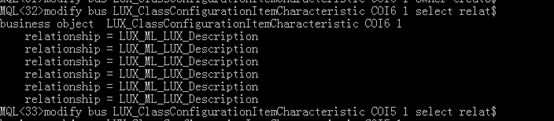
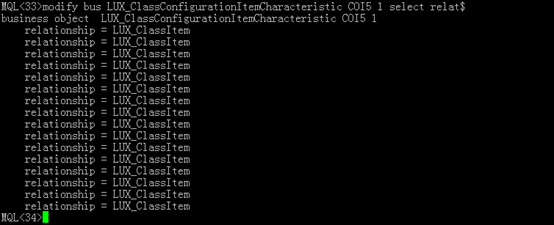
Why? I don’t know
Delete all relationships of COI6,
Execute the sub command in three times
disconnect bus LUX_ClassConfigurationItemCharacteristic COI6 1 relationship LUX_ML_LUX_Description
from LUX_ClassConfigurationItemCharacteristic COI6 1


Add new relationships to COI6 in compliance with COI5
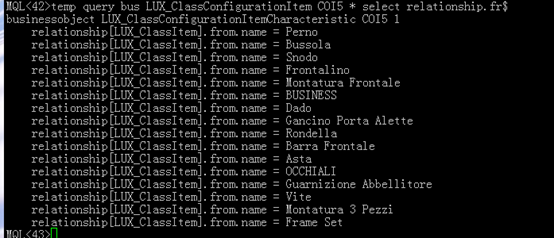
Execute the following command respectively
connect bus LUX_ClassConfigurationItemCharacteristic COI6 1 relationship LUX_ClassItem from LUX_ClassMaster Perno 1;
connect bus LUX_ClassConfigurationItemCharacteristic COI6 1 relationship LUX_ClassItem from LUX_ClassMaster Bussola 1;
connect bus LUX_ClassConfigurationItemCharacteristic COI6 1 relationship LUX_ClassItem from LUX_ClassMaster Snodo 1;
connect bus LUX_ClassConfigurationItemCharacteristic COI6 1 relationship LUX_ClassItem from LUX_ClassMaster Frontalino 1;
connect bus LUX_ClassConfigurationItemCharacteristic COI6 1 relationship LUX_ClassItem from LUX_ClassMaster Montatura Frontale 1;
connect bus LUX_ClassConfigurationItemCharacteristic COI6 1 relationship LUX_ClassItem from LUX_ClassMaster BUSINESS 1;
connect bus LUX_ClassConfigurationItemCharacteristic COI6 1 relationship LUX_ClassItem from LUX_ClassMaster Dado 1;
connect bus LUX_ClassConfigurationItemCharacteristic COI6 1 relationship LUX_ClassItem from LUX_ClassMaster Gancino Porta Alette 1;
connect bus LUX_ClassConfigurationItemCharacteristic COI6 1 relationship LUX_ClassItem from LUX_ClassMaster Rondella 1;
connect bus LUX_ClassConfigurationItemCharacteristic COI6 1 relationship LUX_ClassItem from LUX_ClassMaster Barra Frontale 1;
connect bus LUX_ClassConfigurationItemCharacteristic COI6 1 relationship LUX_ClassItem from LUX_ClassMaster Asta 1;
connect bus LUX_ClassConfigurationItemCharacteristic COI6 1 relationship LUX_ClassItem from LUX_ClassMaster OCCHIALI 1;
connect bus LUX_ClassConfigurationItemCharacteristic COI6 1 relationship LUX_ClassItem from LUX_ClassMaster Guarnizione Abbellitore 1;
connect bus LUX_ClassConfigurationItemCharacteristic COI6 1 relationship LUX_ClassItem from LUX_ClassMaster Vite 1;
connect bus LUX_ClassConfigurationItemCharacteristic COI6 1 relationship LUX_ClassItem from LUX_ClassMaster Montatura 3 Pezzi 1;
connect bus LUX_ClassConfigurationItemCharacteristic COI6 1 relationship LUX_ClassItem from LUX_ClassMaster Frame Set 1;
Step 7 :modify LuxotticaStringResource.properties
vim /opt/plm/webapp/internal/WEB-INF/classes/LuxotticaStringResource.properties
vim /opt/plm/webapp/3dspace/WEB-INF/classes/LuxotticaStringResource.properties

Then
Restart tomcat
Step7: add a characteristic to Color
now , it is the time to add a characteristic to Color
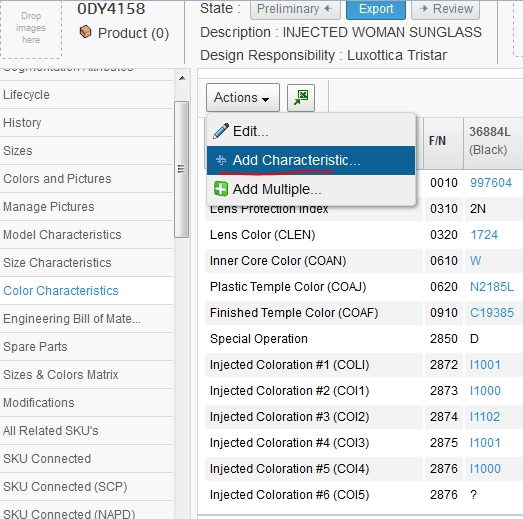
Unfortunately, we can’t find out COI6 ,why?
Because the vault of object of LUX_ClassConfigurationItem isn’t ‘LUX_MasterData1’
And the owner of LUX_ClassConfigurationItem isn’t creator




Execute the command below to modify the vault.
modify bus LUX_ClassConfigurationItemCharacteristic COI6 1 vault LUX_MasterData1

Then reloadcache, redirect to the page again.
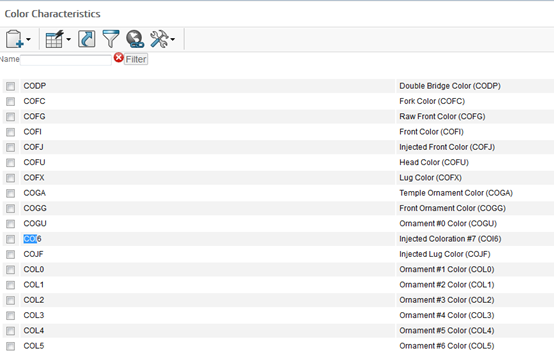
add characteristic to color的更多相关文章
- enovia PLM: add characteristic to both prototype and product
Issue: add new mandatory attribute named LUX_HazardousMaterial to protoype and product, and export t ...
- add a characteristic in enovia PLM
Problem: add a new Char. name D_COI6 that the description is Injected coloration #7 (COI6) in the D_ ...
- [wordpress]后台自定义菜单字段和使用wordpress color picker
Wordpress Version 4.4.2 参考链接 插件使用wordpress color picker:Add A New Color Picker To WordPress 后台菜单自定义字 ...
- CSS COLOR
CSS COLOR Color Review We've completed our extensive tour of the colors in CSS! Let's review the key ...
- 【基于WinForm+Access局域网共享数据库的项目总结】之篇二:WinForm开发扇形图统计和Excel数据导出
篇一:WinForm开发总体概述与技术实现 篇二:WinForm开发扇形图统计和Excel数据导出 篇三:Access远程连接数据库和窗体打包部署 [小记]:最近基于WinForm+Access数据库 ...
- View and Data API Tips: Constrain Viewer Within a div Container
By Daniel Du When working with View and Data API, you probably want to contain viewer into a <div ...
- WPF 自定义标题栏 自定义菜单栏
自定义标题栏 自定义列表,可以直接修改WPF中的ListBox模板,也用这样类似的效果.但是ListBox是不能设置默认选中状态的. 而我们需要一些复杂的UI效果,还是直接自定义控件来的快 GitHu ...
- Hibernate中Criteria的完整用法
1,CriteriaHibernate 设计了 CriteriaSpecification 作为 Criteria 的父接口,下面提供了 Criteria和DetachedCriteria .2,De ...
- iOS homekit使用说明
本文由CocoaChina翻译组成员iBenjamin_Go和浅夏@旧时光翻译自苹果开发文档:HomeKit Developer Guide,敬请勘误. 本文档内容包括 第一部分:简介 第二部分:启用 ...
随机推荐
- struts2之ModelDriven
在Struts 2中,提供了另外一种直接使用领域对象的方式,就是让action实现com.opensymphony. xwork2.ModelDriven接口.ModelDriven让你可以直接操作应 ...
- “CreateRiaClientFilesTask”任务意外失败。 未能加载文件程序集“System.ComponentModel.DataAnnot...
错误 77 “CreateRiaClientFilesTask”任务意外失败. System.Web.HttpException (0x80004005): 未能加载文件或程序集“System. ...
- Android No static field XXX of type I in class Lcom/XXX/R$id错
问题复现: 问题原因: 出现这样的情况,你先检查你的依赖工程(module)的对应布局layout/xxx.xml是否跟主项目的layout重名,你点开R文件的时候,你会发现你的布局发生了错乱,导致你 ...
- 一、@Html.DropDownList
一.Html.DropDownList 通过linq 将datatable转换下拉列表 //查询城市 string CityId = WebCommon.Public.GetAdminCityId() ...
- vue 项目中使用阿里巴巴矢量图标库iconfont
原文:https://www.jianshu.com/p/38262f18eee2 1.打开iconfont阿里巴巴官网https://www.iconfont.cn 2.新建项目(这样方便后期维护图 ...
- 理解Java的Class类、"this."关键字、Constructor构造器(一)
import java.util.*; public class BookTest { public static void main(String[] args) { //Book book = n ...
- 在 IntelliJ IDEA 中这样使用 Git,效率提升2倍以上
1.Git简介 Git是目前流行的分布式版本管理系统.它拥有两套版本库,本地库和远程库,在不进行合并和删除之类的操作时这两套版本库互不影响.也因此其近乎所有的操作都是本地执行,所以在断网的情况下任然可 ...
- Delphi ini文件操作 TIniFile、TMemIniFile
1.使用TIniFile unit Unit1; interface uses Windows, Messages, SysUtils, Variants, Classes, Graphics, Co ...
- css float 浮动
CSS Float(浮动) 什么是 CSS Float(浮动)?大理石平台价格 CSS 的 Float(浮动),会使元素向左或向右移动,其周围的元素也会重新排列. Float(浮动),往往是用于图像, ...
- The Second Scrum Meeting!
第七周会议 情况简述 会议概要:汇报已完成的任务,讨论并解决遇到的问题 参与人员:詹晓宇 谢赛金 熊紫仁 徐翠萍 周娟 孙尚煜 会议地点:六区研讨性教室 具体内容 小组成员 已完成任务 计划 ...