
springboot +fastdfs 上传文件到到云服务器
fastdfs在云服务器的搭建和配置:https://blog.csdn.net/qq_41592652/article/details/104006289
springboot结构如下:
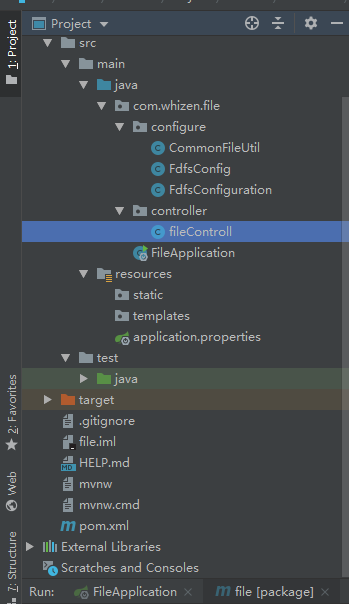
application.properties配置如下:
server.port=

#单个文件最大尺寸(设置100)

spring.servlet.multipart.max-file-size=100MB

#一个请求文件的最大尺寸

spring.servlet.multipart.max-request-size=100MB

#设置一个文件上传的临时文件目录

spring.servlet.multipart.location=/root/temp

#读取inputsream阻塞时间

fdfs.connect-timeout=

fdfs.so-timeout=

#tracker地址

fdfs.trackerList=106.12.120.191:

#缩略图配置

fdfs.thumbImage.height=

fdfs.thumbImage.width=

spring.jmx.enabled=false

#通过nginx 访问地址

fdfs.resHost=106.12.120.191

#storage对应的端口

fdfs.storagePort=

#获取连接池最大数量

fdfs.pool.max-total=
pom.xml配置如下:
<?xml version="1.0" encoding="UTF-8"?>

<project xmlns="http://maven.apache.org/POM/4.0.0" xmlns:xsi="http://www.w3.org/2001/XMLSchema-instance"

         xsi:schemaLocation="http://maven.apache.org/POM/4.0.0 https://maven.apache.org/xsd/maven-4.0.0.xsd">

    <modelVersion>4.0.</modelVersion>

    <parent>

        <groupId>org.springframework.boot</groupId>

        <artifactId>spring-boot-starter-parent</artifactId>

        <version>2.2..BUILD-SNAPSHOT</version>

        <relativePath/> <!-- lookup parent from repository -->

    </parent>

    <groupId>com.whizen</groupId>

    <artifactId>file</artifactId>

    <version>0.0.-SNAPSHOT</version>

    <name>file</name>

    <description>Demo project for Spring Boot</description>

    <packaging>war</packaging>

    <properties>

        <java.version>1.8</java.version>

    </properties>

    <dependencies>

        <dependency>

            <groupId>org.springframework.boot</groupId>

            <artifactId>spring-boot-starter-jdbc</artifactId>

        </dependency>

        <dependency>

            <groupId>org.springframework.boot</groupId>

            <artifactId>spring-boot-starter-web</artifactId>

        </dependency>

        <dependency>

            <groupId>org.springframework.boot</groupId>

            <artifactId>spring-boot-devtools</artifactId>

            <scope>runtime</scope>

            <optional>true</optional>

        </dependency>

        <dependency>

            <groupId>log4j</groupId>

            <artifactId>log4j</artifactId>

            <version>1.2.</version>

        </dependency>

        <dependency>

            <groupId>com.github.tobato</groupId>

            <artifactId>fastdfs-client</artifactId>

            <version>1.26.-RELEASE</version>

        </dependency>

        <dependency>

            <groupId>org.springframework.boot</groupId>

            <artifactId>spring-boot-starter-test</artifactId>

            <scope>test</scope>

            <exclusions>

                <exclusion>

                    <groupId>org.junit.vintage</groupId>

                    <artifactId>junit-vintage-engine</artifactId>

                </exclusion>

            </exclusions>

        </dependency>

    </dependencies>

    <build>

        <plugins>

            <plugin>

                <groupId>org.springframework.boot</groupId>

                <artifactId>spring-boot-maven-plugin</artifactId>

            </plugin>

        </plugins>

        <finalName>root</finalName>

    </build>

</project>
FdfsConfig类如下:
package com.whizen.file.configure;

import org.springframework.beans.factory.annotation.Value;

import org.springframework.stereotype.Component;

/**

 * FdfsConfig主要用以连接fastdfs,FdfsConfiguration使配置生效

 */

@Component

public class FdfsConfig {

    @Value("${fdfs.resHost}")

    private String resHost;

    @Value("${fdfs.storagePort}")

    private String storagePort;

    public String getResHost() {

        return resHost;

    }

    public void setResHost(String resHost) {

        this.resHost = resHost;

    }

    public String getStoragePort() {

        return storagePort;

    }

    public void setStoragePort(String storagePort) {

        this.storagePort = storagePort;

    }

}
FdfsConfiguration类如下:
package com.whizen.file.configure;

import org.springframework.context.annotation.Configuration;

import org.springframework.context.annotation.EnableMBeanExport;

import org.springframework.jmx.support.RegistrationPolicy;

@Configuration

@EnableMBeanExport(registration= RegistrationPolicy.IGNORE_EXISTING)

public class FdfsConfiguration {

}
ComonFileUtil类如下:
package com.whizen.file.configure;

import com.github.tobato.fastdfs.domain.MateData;

import com.github.tobato.fastdfs.domain.StorePath;

import com.github.tobato.fastdfs.exception.FdfsUnsupportStorePathException;

import com.github.tobato.fastdfs.service.FastFileStorageClient;

import org.apache.commons.io.FilenameUtils;

import org.apache.commons.lang3.StringUtils;

import org.slf4j.Logger;

import org.slf4j.LoggerFactory;

import org.springframework.beans.factory.annotation.Autowired;

import org.springframework.stereotype.Component;

import org.springframework.web.multipart.MultipartFile;

import java.io.*;

import java.nio.charset.Charset;

import java.util.Set;

@Component

public class CommonFileUtil {

    private final Logger logger = LoggerFactory.getLogger(FdfsConfig.class);

    @Autowired

    private FastFileStorageClient storageClient;

    /**

     *    MultipartFile类型的文件上传ַ

     * @param file

     * @return

     * @throws IOException

     */

    public String uploadFile(MultipartFile file) throws IOException {

        StorePath storePath = storageClient.uploadFile(file.getInputStream(), file.getSize(),

                FilenameUtils.getExtension(file.getOriginalFilename()), null);

        return getResAccessUrl(storePath);

    }

    /**

     * 普通的文件上传

     *

     * @param file

     * @return

     * @throws IOException

     */

    public String uploadFile(File file) throws IOException {

        FileInputStream inputStream = new FileInputStream(file);

        StorePath path = storageClient.uploadFile(inputStream, file.length(),

                FilenameUtils.getExtension(file.getName()), null);

        return getResAccessUrl(path);

    }

    /**

     * 带输入流形式的文件上传

     *

     * @param is

     * @param size

     * @param fileName

     * @return

     */

    public String uploadFileStream(InputStream is, long size, String fileName) {

        StorePath path = storageClient.uploadFile(is, size, fileName, null);

        return getResAccessUrl(path);

    }

    /**

     * 将一段文本文件写到fastdfs的服务器上

     *

     * @param content

     * @param fileExtension

     * @return

     */

    public String uploadFile(String content, String fileExtension) {

        byte[] buff = content.getBytes(Charset.forName("UTF-8"));

        ByteArrayInputStream stream = new ByteArrayInputStream(buff);

        StorePath path = storageClient.uploadFile(stream, buff.length, fileExtension, null);

        return getResAccessUrl(path);

    }

    /**

     * 返回文件上传成功后的地址名称ַ

     * @param storePath

     * @return

     */

    private String getResAccessUrl(StorePath storePath) {

        String fileUrl = storePath.getFullPath();

        return fileUrl;

    }

    /**

     * 删除文件

     * @param fileUrl

     */

    public void deleteFile(String fileUrl) {

        if (StringUtils.isEmpty(fileUrl)) {

            return;

        }

        try {

            StorePath storePath = StorePath.praseFromUrl(fileUrl);

            storageClient.deleteFile(storePath.getGroup(), storePath.getPath());

        } catch (FdfsUnsupportStorePathException e) {

            logger.warn(e.getMessage());

        }

    }

    public String upfileImage(InputStream is, long size, String fileExtName, Set<MateData> metaData) {

        StorePath path = storageClient.uploadImageAndCrtThumbImage(is, size, fileExtName, metaData);

        return getResAccessUrl(path);

    }

}
fileControll控制类如下:
package com.whizen.file.controller;

import com.whizen.file.configure.CommonFileUtil;

import org.slf4j.Logger;

import org.slf4j.LoggerFactory;

import org.springframework.beans.factory.annotation.Autowired;

import org.springframework.stereotype.Controller;

import org.springframework.web.bind.annotation.CrossOrigin;

import org.springframework.web.bind.annotation.RequestMapping;

import org.springframework.web.bind.annotation.RequestParam;

import org.springframework.web.bind.annotation.ResponseBody;

import org.springframework.web.multipart.MultipartFile;

import java.io.IOException;

@Controller

public class fileControll {

    private final static Logger logger = LoggerFactory.getLogger(fileControll.class);

    @Autowired

    private CommonFileUtil fileUtil;

    @CrossOrigin

    @ResponseBody

    @RequestMapping("/fileup")

    public String uoloadFileToFast(@RequestParam("file") MultipartFile file) throws IOException {

        if(file.isEmpty()){

            System.out.println("文件不存在");

        }

        String path = fileUtil.uploadFile(file);

        System.out.println(path);

        return "success";

    }

}
启动类配置:
package com.whizen.file;

import com.github.tobato.fastdfs.FdfsClientConfig;

import org.springframework.boot.SpringApplication;

import org.springframework.boot.autoconfigure.SpringBootApplication;

import org.springframework.boot.autoconfigure.jdbc.DataSourceAutoConfiguration;

import org.springframework.boot.builder.SpringApplicationBuilder;

import org.springframework.boot.web.servlet.support.SpringBootServletInitializer;

import org.springframework.context.annotation.Import;

@SpringBootApplication(exclude={DataSourceAutoConfiguration.class})

@Import(FdfsClientConfig.class)

public class FileApplication extends SpringBootServletInitializer {

    @Override

    protected SpringApplicationBuilder configure(SpringApplicationBuilder builder) {

        return builder.sources(FileApplication.class);

    }

    public static void main(String[] args) {

        SpringApplication.run(FileApplication.class, args);

    }

}
然后发布到服务器:
ok。
springboot +fastdfs 上传文件到到云服务器的更多相关文章
- windows上传文件到linux云服务器上
安装putty,将pscp.exe移到 C:\Windows\System32 目录下. 在cmd 中执行,pscp -l rot -pw [password] -ls [ip]:/opt 查看目录 ...
- OSS上传文件到阿里云
最近做项目,需要上传文件,因为上传到项目路径下,感觉有时候也挺不方便的,就试了一下上传文件到阿里云oss上去了, oss的使用网上有很多介绍,都是去配置一下需要的数据,然后直接调用他的api就可以了. ...
- 关于富文本编辑器ueditor(jsp版)上传文件到阿里云OSS的简单实例,适合新手
关于富文本编辑器ueditor(jsp版)上传文件到阿里云OSS的简单实例,适合新手 本人菜鸟一枚,最近公司有需求要用到富文本编辑器,我选择的是百度的ueditor富文本编辑器,闲话不多说,进入正 ...
- .NET CORE上传文件到码云仓库【搭建自己的图床】
.NET CORE上传文件到码云仓库[搭建自己的图床] 先建一个公共仓库(随意提交一个README文件或者.gitignore文件保证master分支的存在),然后到gitee的个人设置页面找到[私人 ...
- Mac/Linux/Centos终端中上传文件到Linux云服务器
1.mac上传文件到Linux服务器 scp 文件名 用户名@服务器ip:目标路径 如:scp /Users/test/testFile test@www.linuxidc.com:/test/ ...
- c++使用http协议上传文件到七牛云服务器
使用c++ http协议上传文件到七牛服务器时,比较搞的一点就是header的设置: "Content-Type:multipart/form-data;boundary=xxx" ...
- angulaijs中的ng-upload-file与阿里云oss服务的结合,实现在浏览器端上传文件到阿里云(速度可以达到1.5M)
2015-10-26 angularjs结合aliyun浏览器端oos文件上传加临时身份验证例子 在服务端获取sts 源码: public class StsServiceSample { // 目前 ...
- vue + elementUi + upLoadIamge组件 上传文件到阿里云oss
<template> <div class="upLoadIamge"> <el-upload action="https://jsonpl ...
- SpringBoot初探(上传文件)
学了Spring,SpringMVC,Mybatis这一套再来看SpringBoot,心里只有一句握草,好方便 这里对今天做的东西做个总结,然后在这之间先安利一个热部署的工具,叫spring-DevT ...
随机推荐
- Gora是一个类似Hibernate的ORM框架
Gora是一个类似Hibernate的ORM框架,但是不只是支持关系数据库,更重要支持NoSQL之类大数据的存储. 支持NoSQL之类大数据的存储 Apache Gora是一个开源的ORM(Objec ...
- [转]UEditor编辑器两个版本任意文件上传漏洞分析
0x01 前言 UEditor是由百度WEB前端研发部开发的所见即所得的开源富文本编辑器,具有轻量.可定制.用户体验优秀等特点 ,被广大WEB应用程序所使用:本次爆出的高危漏洞属于.NET版本,其它的 ...
- Cookie内不能直接存入中文,cookie转码以及解码
如果在cookie中存入中文,极易出现问题. js在存入cookie时,利用escape() 函数可对字符串进行编码, 用unescape()进行解码 顺序是先把cookie用escape()函数编码 ...
- 2019-8-30-C#-反射调用私有事件
title author date CreateTime categories C# 反射调用私有事件 lindexi 2019-08-30 08:52:57 +0800 2018-09-19 20: ...
- UPC个人训练赛第十五场(AtCoder Grand Contest 031)
传送门: [1]:AtCoder [2]:UPC比赛场 [3]:UPC补题场 参考资料 [1]:https://www.cnblogs.com/QLU-ACM/p/11191644.html B.Re ...
- SELECT command denied to user ''@'%' for column 'xxx_id' in table 'users_xxx' 权限问题
问题的原因是:最主要是权限的问题. 大概说下 ,我导数据库时提示错误:SELECT command denied to user ''@'%' for column 'xxx_id' in table ...
- P1012 鸡兔同笼问题
题目描述 笼子里有鸡和兔若干,一直它们共有头 \(n\) 个,有脚 \(m\) 只,问笼中的鸡和兔共有多少只? 输入格式 输入包含两个整数 \(n,m(1 \le n \le 100, 2n \le ...
- 负margin的原理及应用
在很多布局中我们经常能够见到类似于margin:-10px;的用法,我们对正值的用法早已熟悉的不能再熟悉了,可是这负值到底有何用呢?听我给你吹. 负margin——普通文档流 普通文档流元素(不浮动, ...
- vue+element-ui实现分页
我使用得是el-table+el-pagination来实现的, 话不多说,直接上代码 html代码部分 <!-- table --> <el-table :data="s ...
- spring boot 实践总结(转)
pring Boot是最流行的用于开发微服务的Java框架.在本文主要分享的是在专业开发中使用Spring Boot所采用的最佳实践.这些内容是基于个人经验和一些熟知的Spring Boot专家的文章 ...