
机器学习作业(八)异常检测与推荐系统——Matlab实现
题目下载【传送门】
第1题
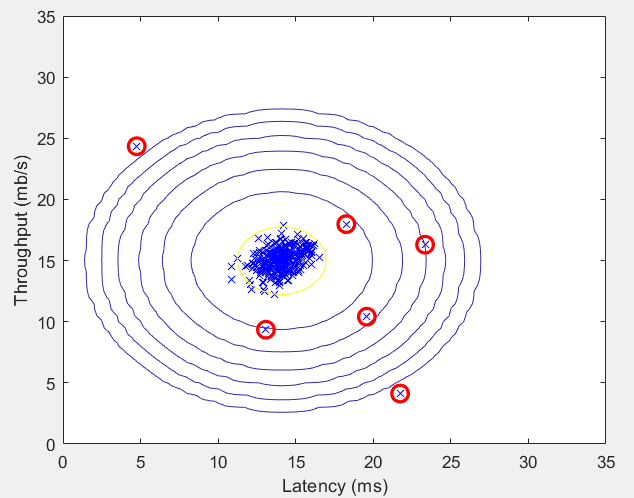
简述:对于一组网络数据进行异常检测.
第1步:读取数据文件,使用高斯分布计算 μ 和 σ²:
%  The following command loads the dataset. You should now have the

%  variables X, Xval, yval in your environment

load('ex8data1.mat');

%  Estimate my and sigma2

[mu sigma2] = estimateGaussian(X);
其中高斯分布计算函数estimateGaussian:
function [mu sigma2] = estimateGaussian(X)

% Useful variables

[m, n] = size(X);

% You should return these values correctly

mu = zeros(n, 1);

sigma2 = zeros(n, 1);

mu = mean(X);

sigma2 = var(X, 1);

% mu = mu';

% sigma2 = sigma2';

end
第2步:计算概率p(x):
%  Returns the density of the multivariate normal at each data point (row)

%  of X

p = multivariateGaussian(X, mu, sigma2);
其中概率计算函数
function p = multivariateGaussian(X, mu, Sigma2)

k = length(mu);

if (size(Sigma2, 2) == 1) || (size(Sigma2, 1) == 1)

    Sigma2 = diag(Sigma2);

end

X = bsxfun(@minus, X, mu(:)');

p = (2 * pi) ^ (- k / 2) * det(Sigma2) ^ (-0.5) * ...

    exp(-0.5 * sum(bsxfun(@times, X * pinv(Sigma2), X), 2));

end
第3步:可视化数据,并绘制概率等高线:
%  Visualize the fit

visualizeFit(X,  mu, sigma2);

xlabel('Latency (ms)');

ylabel('Throughput (mb/s)');
其中visualizeFit函数:
function visualizeFit(X, mu, sigma2)

[X1,X2] = meshgrid(0:.5:35);

Z = multivariateGaussian([X1(:) X2(:)],mu,sigma2);

Z = reshape(Z,size(X1));

plot(X(:, 1), X(:, 2),'bx');

hold on;

% Do not plot if there are infinities

if (sum(isinf(Z)) == 0)

    contour(X1, X2, Z, 10.^(-20:3:0)');

end

hold off;

end
运行结果:

第4步:使用交叉验证集选出最佳参数 ε:
pval = multivariateGaussian(Xval, mu, sigma2);

[epsilon F1] = selectThreshold(yval, pval);

fprintf('Best epsilon found using cross-validation: %e\n', epsilon);

fprintf('Best F1 on Cross Validation Set:  %f\n', F1);
其中selectThreshold函数:
function [bestEpsilon bestF1] = selectThreshold(yval, pval)

bestEpsilon = 0;

bestF1 = 0;

F1 = 0;

stepsize = (max(pval) - min(pval)) / 1000;

for epsilon = min(pval):stepsize:max(pval)

    predictions = pval < epsilon;

    tp = sum(predictions .* yval);

    prec = tp / sum(predictions);

    rec = tp / sum(yval);

    F1 = 2 * prec * rec / (prec + rec);

    if F1 > bestF1

       bestF1 = F1;

       bestEpsilon = epsilon;

    end

end

end
运行结果:

第5步:找出异常点,并可视化标记:
%  Find the outliers in the training set and plot the

outliers = find(p < epsilon);

%  Draw a red circle around those outliers

hold on

plot(X(outliers, 1), X(outliers, 2), 'ro', 'LineWidth', 2, 'MarkerSize', 10);

hold off
运行结果:
第2题
简述:实现电影推荐系统
第1步:读取数据文件(截取较少的数据):
%  Load data

load ('ex8_movies.mat');

%  Y is a 1682x943 matrix, containing ratings (1-5) of 1682 movies on

%  943 users

%

%  R is a 1682x943 matrix, where R(i,j) = 1 if and only if user j gave a

%  rating to movie i

%  Load pre-trained weights (X, Theta, num_users, num_movies, num_features)

load ('ex8_movieParams.mat');

%  Reduce the data set size so that this runs faster

num_users = 4; num_movies = 5; num_features = 3;

X = X(1:num_movies, 1:num_features);

Theta = Theta(1:num_users, 1:num_features);

Y = Y(1:num_movies, 1:num_users);

R = R(1:num_movies, 1:num_users);
第2步:计算代价函数和梯度:
J = cofiCostFunc([X(:) ; Theta(:)], Y, R, num_users, num_movies, ...

               num_features, 1.5);
其中cofiCostFunc函数:
function [J, grad] = cofiCostFunc(params, Y, R, num_users, num_movies, ...

                                  num_features, lambda)

% Unfold the U and W matrices from params

X = reshape(params(1:num_movies*num_features), num_movies, num_features);

Theta = reshape(params(num_movies*num_features+1:end), ...

                num_users, num_features);

% You need to return the following values correctly

J = 0;

X_grad = zeros(size(X));

Theta_grad = zeros(size(Theta));

cost = (X * Theta' - Y) .* R;

J = 1 / 2 * sum(sum(cost .^ 2));

J = J + lambda / 2 * (sum(sum(Theta .^ 2)) + sum(sum(X .^ 2)));

X_grad = cost * Theta;

X_grad = X_grad + lambda * X;

Theta_grad = X' * cost;

Theta_grad = Theta_grad' + lambda * Theta;

grad = [X_grad(:); Theta_grad(:)];

end
第3步:进行梯度检测:
%  Check gradients by running checkNNGradients

checkCostFunction(1.5);
其中checkCostFunction函数:
function checkCostFunction(lambda)

% Set lambda

if ~exist('lambda', 'var') || isempty(lambda)

    lambda = 0;

end

%% Create small problem

X_t = rand(4, 3);

Theta_t = rand(5, 3);

% Zap out most entries

Y = X_t * Theta_t';

Y(rand(size(Y)) > 0.5) = 0;

R = zeros(size(Y));

R(Y ~= 0) = 1;

%% Run Gradient Checking

X = randn(size(X_t));

Theta = randn(size(Theta_t));

num_users = size(Y, 2);

num_movies = size(Y, 1);

num_features = size(Theta_t, 2);

numgrad = computeNumericalGradient( ...

                @(t) cofiCostFunc(t, Y, R, num_users, num_movies, ...

                                num_features, lambda), [X(:); Theta(:)]);

[cost, grad] = cofiCostFunc([X(:); Theta(:)],  Y, R, num_users, ...

                          num_movies, num_features, lambda);

disp([numgrad grad]);

fprintf(['The above two columns you get should be very similar.\n' ...

         '(Left-Your Numerical Gradient, Right-Analytical Gradient)\n\n']);

diff = norm(numgrad-grad)/norm(numgrad+grad);

fprintf(['If your cost function implementation is correct, then \n' ...

         'the relative difference will be small (less than 1e-9). \n' ...

         '\nRelative Difference: %g\n'], diff);

end
其中computeNumericalGradient函数:
function numgrad = computeNumericalGradient(J, theta)

numgrad = zeros(size(theta));

perturb = zeros(size(theta));

e = 1e-4;

for p = 1:numel(theta)

    % Set perturbation vector

    perturb(p) = e;

    loss1 = J(theta - perturb);

    loss2 = J(theta + perturb);

    % Compute Numerical Gradient

    numgrad(p) = (loss2 - loss1) / (2*e);

    perturb(p) = 0;

end

end
第4步:对某一用户进行预测,初始化用户的信息:
movieList = loadMovieList();

%  Initialize my ratings

my_ratings = zeros(1682, 1);

my_ratings(1) = 4;

my_ratings(98) = 2;

my_ratings(7) = 3;

my_ratings(12)= 5;

my_ratings(54) = 4;

my_ratings(64)= 5;

my_ratings(66)= 3;

my_ratings(69) = 5;

my_ratings(183) = 4;

my_ratings(226) = 5;

my_ratings(355)= 5;
其中loadMovieList函数:
function movieList = loadMovieList()

%% Read the fixed movieulary list

fid = fopen('movie_ids.txt');

% Store all movies in cell array movie{}

n = 1682;  % Total number of movies

movieList = cell(n, 1);

for i = 1:n

    % Read line

    line = fgets(fid);

    % Word Index (can ignore since it will be = i)

    [idx, movieName] = strtok(line, ' ');

    % Actual Word

    movieList{i} = strtrim(movieName);

end

fclose(fid);

end
第5步:将新用户增加到数据集中:
%  Load data

load('ex8_movies.mat');

%  Y is a 1682x943 matrix, containing ratings (1-5) of 1682 movies by

%  943 users

%

%  R is a 1682x943 matrix, where R(i,j) = 1 if and only if user j gave a

%  rating to movie i

%  Add our own ratings to the data matrix

Y = [my_ratings Y];

R = [(my_ratings ~= 0) R];
第6步:均值归一化:
%  Normalize Ratings

[Ynorm, Ymean] = normalizeRatings(Y, R);
其中normalizeRatings函数:
function [Ynorm, Ymean] = normalizeRatings(Y, R)

[m, n] = size(Y);

Ymean = zeros(m, 1);

Ynorm = zeros(size(Y));

for i = 1:m

    idx = find(R(i, :) == 1);

    Ymean(i) = mean(Y(i, idx));

    Ynorm(i, idx) = Y(i, idx) - Ymean(i);

end

end
第7步:实现梯度下降,训练模型:
%  Useful Values

num_users = size(Y, 2);

num_movies = size(Y, 1);

num_features = 10;

% Set Initial Parameters (Theta, X)

X = randn(num_movies, num_features);

Theta = randn(num_users, num_features);

initial_parameters = [X(:); Theta(:)];

% Set options for fmincg

options = optimset('GradObj', 'on', 'MaxIter', 100);

% Set Regularization

lambda = 10;

theta = fmincg (@(t)(cofiCostFunc(t, Ynorm, R, num_users, num_movies, ...

                                num_features, lambda)), ...

                initial_parameters, options);

% Unfold the returned theta back into U and W

X = reshape(theta(1:num_movies*num_features), num_movies, num_features);

Theta = reshape(theta(num_movies*num_features+1:end), ...

                num_users, num_features);
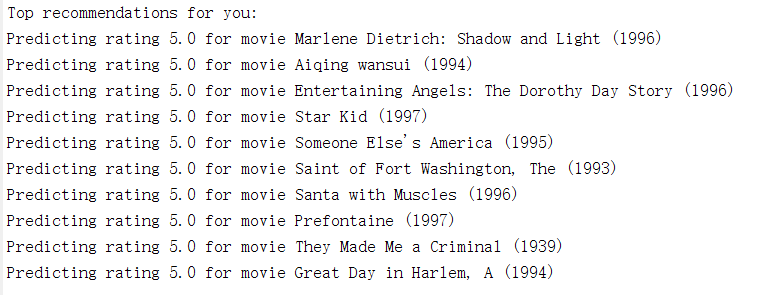
第8步:实现推荐功能:
p = X * Theta';

my_predictions = p(:,1) + Ymean;

movieList = loadMovieList();

[r, ix] = sort(my_predictions, 'descend');

fprintf('\nTop recommendations for you:\n');

for i=1:10

    j = ix(i);

    fprintf('Predicting rating %.1f for movie %s\n', my_predictions(j), ...

            movieList{j});

end
运行结果:
机器学习作业(八)异常检测与推荐系统——Matlab实现的更多相关文章
- 基于机器学习的web异常检测
基于机器学习的web异常检测 Web防火墙是信息安全的第一道防线.随着网络技术的快速更新,新的黑客技术也层出不穷,为传统规则防火墙带来了挑战.传统web入侵检测技术通过维护规则集对入侵访问进行拦截.一 ...
- 基于机器学习的web异常检测——基于HMM的状态序列建模,将原始数据转化为状态机表示,然后求解概率判断异常与否
基于机器学习的web异常检测 from: https://jaq.alibaba.com/community/art/show?articleid=746 Web防火墙是信息安全的第一道防线.随着网络 ...
- 机器学习作业(七)非监督学习——Matlab实现
题目下载[传送门] 第1题 简述:实现K-means聚类,并应用到图像压缩上. 第1步:实现kMeansInitCentroids函数,初始化聚类中心: function centroids = kM ...
- 机器学习作业(二)逻辑回归——Matlab实现
题目太长啦!文档下载[传送门] 第1题 简述:实现逻辑回归. 第1步:加载数据文件: data = load('ex2data1.txt'); X = data(:, [1, 2]); y = dat ...
- Andrew Ng机器学习课程笔记--week9(上)(异常检测&推荐系统)
本周内容较多,故分为上下两篇文章. 一.内容概要 1. Anomaly Detection Density Estimation Problem Motivation Gaussian Distrib ...
- 【原】Coursera—Andrew Ng机器学习—课程笔记 Lecture 15—Anomaly Detection异常检测
Lecture 15 Anomaly Detection 异常检测 15.1 异常检测问题的动机 Problem Motivation 异常检测(Anomaly detection)问题是机器学习算法 ...
- Stanford机器学习---第十一讲.异常检测
之前一直在看Standford公开课machine learning中Andrew老师的视频讲解https://class.coursera.org/ml/class/index 同时配合csdn知名 ...
- 【原】Coursera—Andrew Ng机器学习—Week 9 习题—异常检测
[1]异常检测 [2]高斯分布 [3]高斯分布 [4] 异常检测 [5]特征选择 [6] [7]多变量高斯分布 Answer: ACD B 错误.需要矩阵Σ可逆,则要求m>n 测验1 Answ ...
- 斯坦福机器学习视频笔记 Week9 异常检测和高斯混合模型 Anomaly Detection
异常检测,广泛用于欺诈检测(例如“此信用卡被盗?”). 给定大量的数据点,我们有时可能想要找出哪些与平均值有显着差异. 例如,在制造中,我们可能想要检测缺陷或异常. 我们展示了如何使用高斯分布来建模数 ...
随机推荐
- Python面试(网编+数据库)
第一部分 必答题 简述 OSI 7层模型及其作用?(2分) 应用层:与用户直接交互,软件.网站等 表示层:使用软件.网站可以查看的数据,图片等 会话层:保持登录状态,电脑中为cookie 传输层:选择 ...
- Android Studio无法下载sdk的问题
参考自:解决Android Studio无法下载sdk的问题 国内网站无法登进google,android sdk无法下载. 尝试使用FQ,重装软件都没有成功. 最后找到了解决办法:http://pi ...
- SecureCRT的下载、安装( 过程非常详细!!值得查看)
SecureCRT的下载.安装( 过程非常详细!!值得查看) 简单介绍下SecureCRT 一.SecureCRT的下载 二.SecureCRT的安装 简单介绍下SecureCRT SecureCRT ...
- rpm | 升级软件包
rpm | 升级软件包 检查已安装包 rpm -qa | grep samba samba-common-3.6.9-164.el6.x86_64 samba-3.6.9-164.el6.x86_64 ...
- Hadoop之HDFS扩容方法
HDFS就是用来存取数据的,那么当数据太多的时候存不下,我们必需扩充硬盘容量,或者换个更大的硬盘. 由于它是分布式文件系统,有两种扩充HDFS集群容量的方法:横向扩容和纵向扩容 横向扩容 横向扩容就是 ...
- 消息总线:Spring Cloud Stream
最近在学习Spring Cloud的知识,现将消息总线:Spring Cloud Stream 的相关知识笔记整理如下.[采用 oneNote格式排版]
- Java源码系列2——HashMap
HashMap 的源码很多也很复杂,本文只是摘取简单常用的部分代码进行分析.能力有限,欢迎指正. HASH 值的计算 前置知识--位运算 按位异或操作符^:1^1=0, 0^0=0, 1^0=0, 值 ...
- css基础-float浮动
float实现文字环绕图片效果: <!DOCTYPE html> <html lang="en"> <head> <meta charse ...
- if、counf、countif、countifs、sumif、sumifs
评分等级:=IF(C3>=90,"优秀",IF(C3>=80,"良好",IF(C3>=60,"及格","不及格& ...
- Kali linux中安装字体的一种方法
有人说,lucida sans typewriter字体是一种非常适合的编程字体,所以想试试.经过一番折腾,终于在Clion中用上了.步骤如下: 第一步:先下载这个字体. http://www.dow ...