
vue下canvas绘制矩形
起因:根据项目需求本人写了一个绘制矩形的组件。
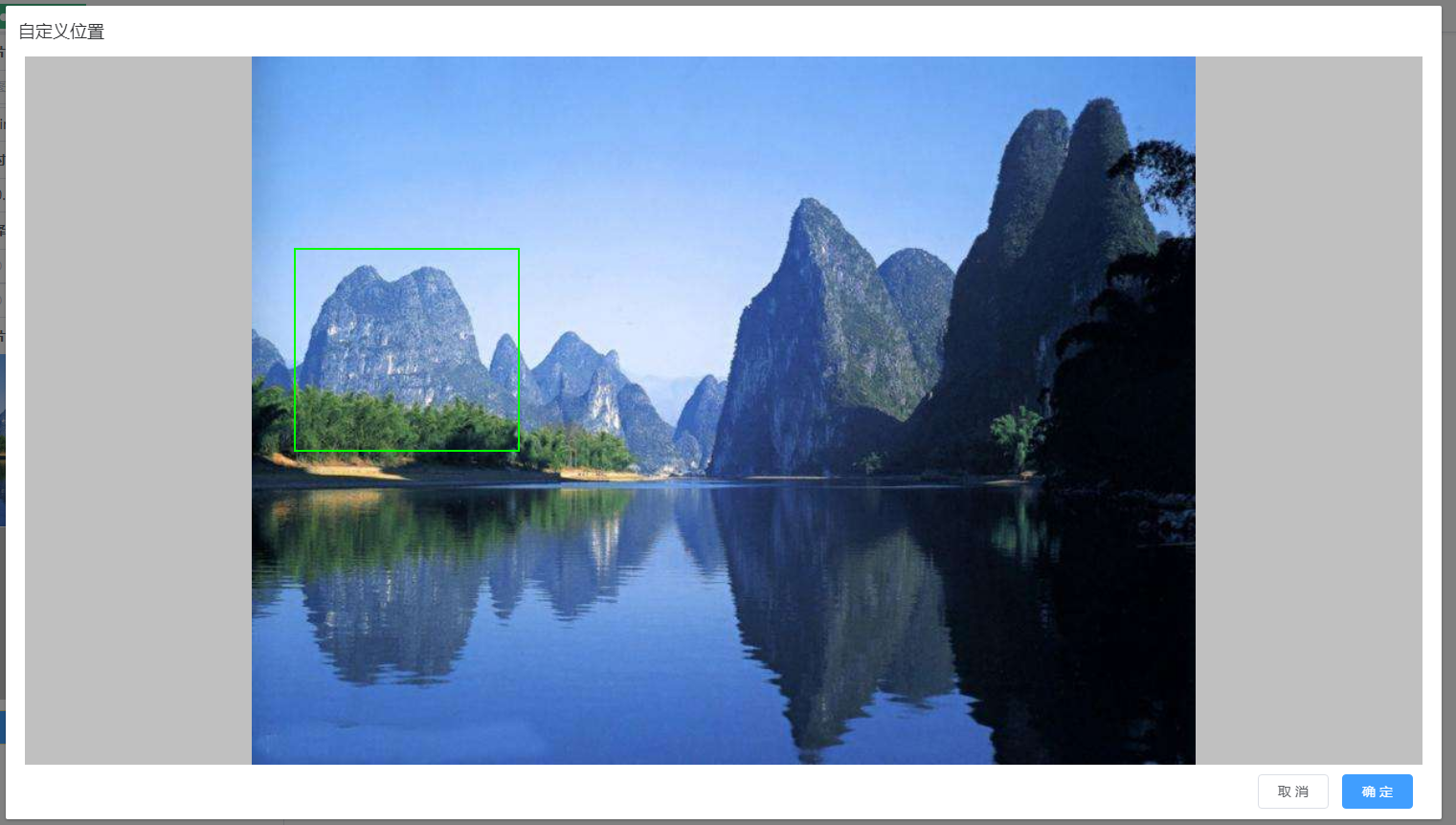
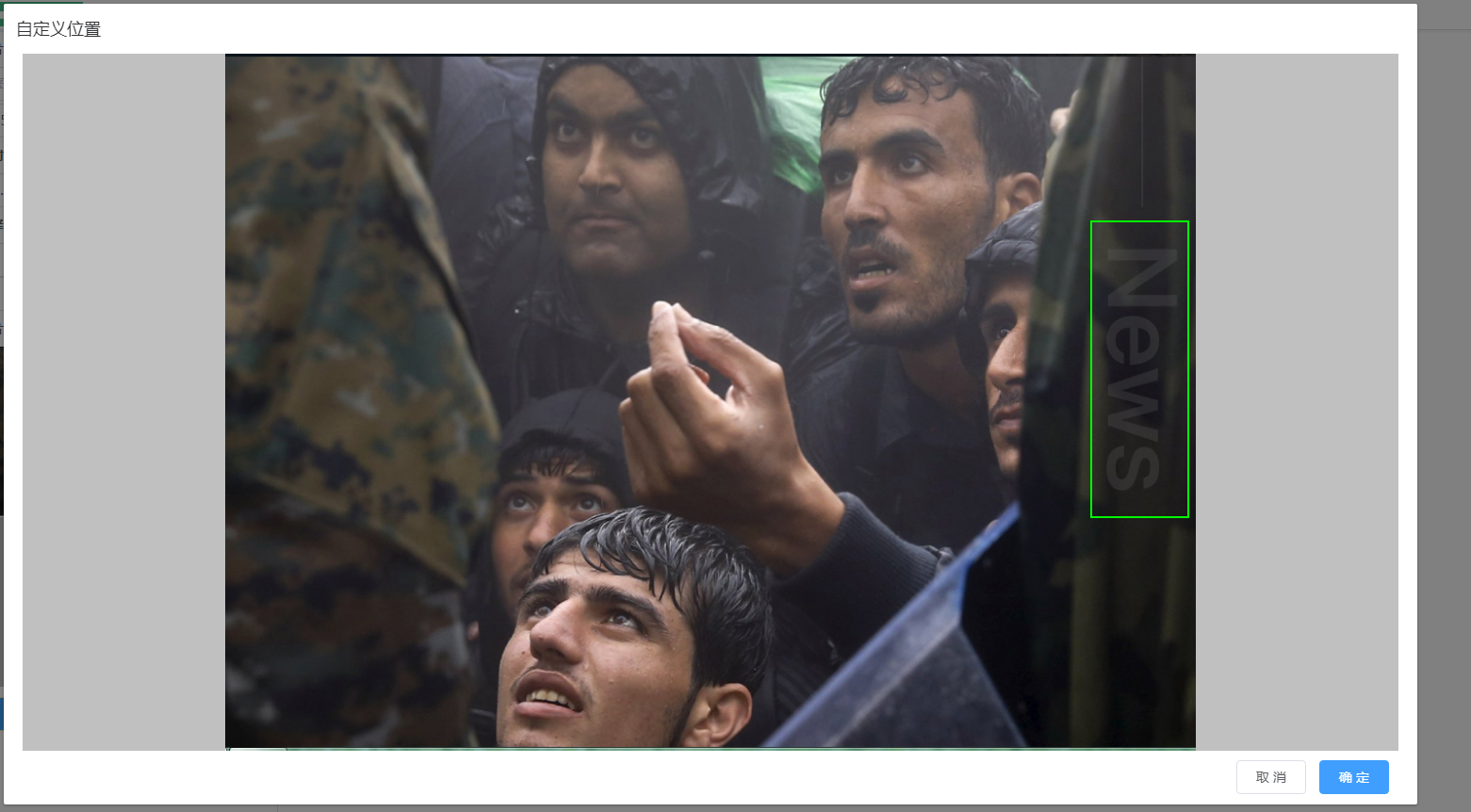
功能:在图片中绘制矩形,根据图片大小进行自适应展示,获取图片矩形坐标。
思路:首先定义一个固定大小的DIV,DIV标签中有监测鼠标变化的四个事件mousedown,mousemove,mouseup,mouseleave。
第二在DIV标签内有img,canvas两个标签,一个负责图片展示,一个负责绘制矩形。
其中img与DIV标签的大小相当,canvas是根据DIV标签position定位的以保证鼠标事件在图片上绘制矩形不会有偏差。
以下就是组件的全部代码和实现效果展示
<template>

    <div id="customPositionDiv">

        <div style="width: 1460px; height:740px;  background-color: #c0c0c0;

                    margin:0 auto ; display:-webkit-box;

                    -webkit-box-align:center; -webkit-box-pack:center; ">

            <div @mousedown="mousedown" @mousemove="mousemove"

                 @mouseup="mouseup" @Mouseleave="Mouseleave" :style="imgstyle">

                <img :src="imgSrc" :style="imgstyle">

                <canvas ref="table" :width="canvasWidth" :height="canvasHeight" :style="canvasstyle"></canvas>

            </div>

        </div>

        <div style="width: 1450px;z-index: inherit;text-align: right ;margin:10px 0 0 0">

            <span slot="footer" class="dialog-footer">

                <el-button @click="customClose">取 消</el-button>

                <el-button type="primary" @click="customQuery">确 定</el-button>

            </span>

        </div>

    </div>

</template>

<style lang="scss">

</style>

<script>

    import vue from 'vue';

    export default {

        name: 'canvasDraw',

        props: ['imgSrc'],

        data() {

            return {

                //  customPositionShow:false, //自定义位置

                //   showclose:false,

                startX: '',  //画画开始的X坐标

                startY: '',  //画画开始的Y坐标

                endX: '',    //画画结束的X坐标

                endY: '',    //画画结束的Y坐标

                isMouseDownInCanvas: '', //鼠标是否按下

                customcxt: '',      // cxt

                customRwidth: '',    //原图与展示图片的宽度比

                customRheight: '',   //原图与展示图片的高度比

                imgstyle: '',        //根据图片大小自适应样式

                canvasstyle: '',     //根据图片大小canvas自适应样式 居中显示

                canvasWidth: '',     //根据图片大小自适应canvas宽

                canvasHeight: '',    //根据图片大小自适应canvas高

                DivWidth: 1460,      //最大宽度

                DivHeight: 740,      //最大高度

            };

        },

        watch: {

            'imgSrc': function () {

                this.show();

            },

        },

        mounted() {

            this.show();

        },

        methods: {

            //取消时返回组件调用处所需的数据

            customClose() {

                this.customcxt.clearRect(0, 0, this.DivWidth, this.DivHeight);

                this.$emit('custom', { 'type': 1, 'data': '' });

            },

            //确定时返回组件调用处所需的数据

            customQuery() {

                this.customcxt.clearRect(0, 0, this.DivWidth, this.DivHeight);

                //根据绘制进行图片裁剪

                //获取矩形框Left,Width'

                let cLeft = 0;

                let cWidth = 0;

                if (this.startX > this.endX) {

                    cLeft = this.endX;

                    cWidth = this.startX - this.endX;

                } else {

                    cLeft = this.startX;

                    cWidth = this.endX - this.startX;

                }

                //获取矩形框Top,Height

                let cTop = 0;

                let cHeight = 0;

                if (this.startY > this.endY) {

                    cTop = this.endY;

                    cHeight = this.startY - this.endY;

                } else {

                    cTop = this.startY;

                    cHeight = this.endY - this.startY;

                }

                var oMark = [];

                oMark['offsetLeft'] = parseInt(cLeft / this.customRwidth);

                oMark['offsetTop'] = parseInt(cTop / this.customRheight);

                oMark['offsetWidth'] = parseInt(cWidth / this.customRwidth);

                oMark['offsetHeight'] = parseInt(cHeight / this.customRheight);

                this.$emit('custom', { 'type': 2, 'data': oMark });

            },

            // dialog展示自定义矩形框画板,

            // 计算img与canvas标签自适应图片的大小

            show() {

                vue.nextTick(_ => {

                    let customCanvas = this.$refs.table;// canvas显示层

                    this.customcxt = customCanvas.getContext("2d");

                    let img = new Image();

                    img.src = this.imgSrc;

                    let that = this;

                    img.onload = function () {

                        let canvasleft = 0;

                        let canvastop = 0;

                        let WrH = img.width / img.height;             //图片宽高比

                        let RWrH = that.DivWidth / that.DivHeight;    //放置图片DIV的宽高比

                        let aa = 0;

                        // 根据宽高比大小判断确定自适应的宽和高

                        if (RWrH > WrH) {

                            aa = that.DivHeight / img.height;

                            that.canvasHeight = that.DivHeight;

                            that.canvasWidth = img.width * aa;

                            canvasleft = (that.DivWidth - that.canvasWidth) / 2

                        } else {

                            aa = that.DivWidth / img.width;

                            that.canvasHeight = img.height * aa;

                            that.canvasWidth = that.DivWidth;

                            canvastop = (that.DivHeight - that.canvasHeight) / 2

                        }

                        that.imgstyle = ' position: relative;  width:' + that.canvasWidth

                                      + ' px; height:' + that.canvasHeight + 'px'; //img浮动定位居中显示

                        that.customRwidth = that.canvasWidth / img.width; //原图与展示图片的宽高比

                        that.customRheight = that.canvasHeight / img.height;

                        that.canvasstyle = 'position: absolute;left: ' + canvasleft

                                        + '; top: ' + canvastop + ';' //canvas浮动定位

                    };

                })

            },

            //鼠标按下时执行

            mousedown(e) {

                this.isMouseDownInCanvas = true;

                // 鼠标按下时开始位置与结束位置相同

                // 防止鼠标在画完矩形后 点击图画形成第二个图形

                this.endX = e.offsetX;

                this.endY = e.offsetY;

                this.startX = e.offsetX;

                this.startY = e.offsetY;

                this.mousemove(e)

            },

            //鼠标移动式时执行

            mousemove(e) {

                if (this.isMouseDownInCanvas) { // 当鼠标有按下操作时执行

                    this.endX = e.offsetX;

                    this.endY = e.offsetY;

                    let wwidth = this.endX - this.startX;

                    let wheigth = this.endY - this.startY;

                    // 清除指定区域的所有像素

                    this.customcxt.clearRect(0, 0, this.DivWidth, this.DivHeight);

                    this.customcxt.strokeStyle = " #00ff00"; //矩形框颜色

                    this.customcxt.lineWidth = "2";  //矩形框宽度

                    this.customcxt.strokeRect(this.startX, this.startY, wwidth, wheigth);  //绘制矩形

                }

            },

            //鼠标松开时执行

            mouseup(e) {

                this.isMouseDownInCanvas = false;

            },

            Mouseleave(e) {

                this.isMouseDownInCanvas = false

            },

        },

    }

</script>
vue下canvas绘制矩形的更多相关文章
- canvas绘制矩形
canvas绘制矩形 方法 fillRect(x, y, width, height) 画一个实心的矩形 clearRect(x, y, width, height) 清除一块儿矩形区域 stroke ...
- h5学习-canvas绘制矩形、圆形、文字、动画
绘制矩形<!DOCTYPE html> <html lang="en"> <head> <meta charset="UTF-8 ...
- canvas 绘制 矩形 圆形
<!DOCTYPE html><html xmlns="http://www.w3.org/1999/xhtml"><head> <tit ...
- canvas 绘制矩形和圆形
canvas绘制有两神方法:1).填充(fill)填充是将图形内部填满. 2).绘制边框 (stroke)绘制边框是不把图形内部填满,只是绘制图形的外框. 当我们在绘制图形的时候,首先要设定好绘制的样 ...
- canvas 绘制矩形
XXX(x,y,width,height) x矩形左上角x坐标 y矩形左上角y坐标 ...
- Canvas 绘制矩形,圆形,不规则图形(线条),渐变等图像效果
绘制矩形: getContext("2d") 对象是内建的 HTML5 对象,拥有多种绘制路径.矩形.圆形.字符以及添加图像的方法. fillStyle 方法将其染成红色,fill ...
- html5 canvas绘制矩形和圆形
<!DOCTYPE html> <html> <head> <meta charset="UTF-8"> <title> ...
- canvas绘制线和矩形
###canvas绘制矩形 HTML中的元素canvas只支持一种原生的图形绘制:矩形.所有其他的图形的绘制都至少需要生成一条路径 1.绘制矩形 canvas提供了三种方法绘制矩形: ----> ...
- Canvas学习:封装Canvas绘制基本图形API
Canvas学习:封装Canvas绘制基本图形API Canvas Canvas学习 从前面的文章中我们了解到,通过Canvas中的CanvasRenderingContext2D对象中的属性和方 ...
随机推荐
- java 中使用logback日志,并实现日志按天分类压缩保存。
以maven项目作为构建工具为例,首先引入使用logback需要的3个依赖,需要注意使用logback是需要引入slf4j-api的,因为logback是基于slf4j的 <!--logback ...
- bistoury建库建表(一)
bistoury DROP TABLE IF EXISTS bistoury_app; CREATE TABLE bistoury_app( id INT UNSIGNED auto_incremen ...
- Object的rest和spread方法
//将多个对象合并到一个对象里 const input = { a: 1, b: 2 } const test = { d: 5 } const output = { ...input, ...tes ...
- splay2(区间修改+内存回收)
poj3580 要求写一种数据结构: 对一个序列进行 区间增减(add): 区间翻转(reverse): 区间移动(revolve): 插入(insert): 删除(delete): ...
- Multisim 如何添加文本 如何编辑文本字体
1.在Multisim中如何添加文本 方法1)Place -> Text 方法2)Ctrl+T 2.如何修改字体的大小及颜色
- opencv:形态学操作-开闭操作
#include <opencv2/opencv.hpp> #include <iostream> using namespace cv; using namespace st ...
- opencv:全局阈值
图像的二值化分割,最重要的就是计算阈值 阈值的计算方法很多,基本分为两类,全局阈值与自适应阈值 OTSU.Triangle #include <opencv2/opencv.hpp> #i ...
- AcWing 854. Floyd求最短路 多源 邻接矩阵
//不存在负权回路 //边权可能为负数 #include <cstring> #include <iostream> #include <algorithm> us ...
- 2.1 【配置环境】 JDK + eclipse + selenium
1.jdk以及eclipse的具体安装详见 http://www.cnblogs.com/ericazy/p/6082194.html 安装1.7 jdk即可 2.selenium 旧版本安装: s ...
- 快递查询API
https://market.aliyun.com/products/56928004/cmapi014394.html#sku=yuncode839400000