
用Python写简单的爬虫
准备:
1.扒网页,根据URL来获取网页信息
import urllib.parse

import urllib.request

response = urllib.request.urlopen("https://www.cnblogs.com")

print(response.read())
urlopen方法
urlopen(url, data, timeout)
url即为URL,data是访问URL时要传送的数据,timeout是设置超时时间
返回response对象
response对象的read方法,可以返回获取到的网页内容
POST方式
import urllib.parse

import urllib.request

values = {"username":"XXX","password":"XXX"}

data = urllib.parse.urlencode(values)

data = data.encode('utf-8')

url = "https://passport.cnblogs.com/user/signin?ReturnUrl=https://home.cnblogs.com/&AspxAutoDetectCookieSupport=1"

response = urllib.request.urlopen(url,data)

print(response.read())
GET方式
import urllib.parse

import urllib.request

values = {"itemCount":30}

data = urllib.parse.urlencode(values)

data = data.encode('utf-8')

url = "https://news.cnblogs.com/CommentAjax/GetSideComments"

data = urllib.parse.urlencode(values)

response = urllib.request.urlopen(url+'?'+data)

print(response.read())
2.正则表达式re模块
Python 自带了re模块,提供了对正则表达式的支持
#返回pattern对象

re.compile(string[,flag])

#以下为匹配所用函数

re.match(pattern, string[, flags]) #在字符串中查找,是否能匹配正则表达式

re.search(pattern, string[, flags]) #字符串的开头是否能匹配正则表达式

re.split(pattern, string[, maxsplit]) #通过正则表达式将字符串分离

re.findall(pattern, string[, flags]) #找到 RE 匹配的所有子串,并把它们作为一个列表返回

re.finditer(pattern, string[, flags]) #找到 RE 匹配的所有子串,并把它们作为一个迭代器返回

re.sub(pattern, repl, string[, count]) #找到 RE 匹配的所有子串,并将其用一个不同的字符串替换

re.subn(pattern, repl, string[, count])#返回 (sub(repl, string[, count]), 替换次数)
3.Beautiful Soup,是从网页抓取数据的库,使用时需要导入 bs4 库
4.MongoDB
使用的MongoEngine库
示例:
抓取博客园前20页数据,保存到MongoDB中
1.获取博客园的数据
request.py
import urllib.parse

import urllib.request

def getHtml(url,values):

    data = urllib.parse.urlencode(values)

    response_result = urllib.request.urlopen(url+'?'+data).read()

    html = response_result.decode('utf-8')

    return html

def requestCnblogs(num):

    print('请求数据page:',num)

    url = 'https://www.cnblogs.com/mvc/AggSite/PostList.aspx'

    values= {

        'CategoryId':808,

        'CategoryType' : 'SiteHome',

        'ItemListActionName' :'PostList',

        'PageIndex' : num,

        'ParentCategoryId' : 0,

        'TotalPostCount' : 4000

    }

    result = getHtml(url,values)

    return result
注:
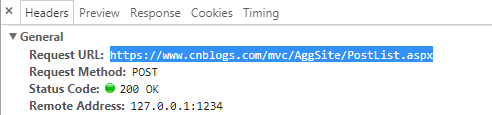
打开第二页,f12,找到https://www.cnblogs.com/mvc/AggSite/PostList.aspx

2.解析获取来的数据
deal.py
from bs4 import BeautifulSoup

import request

import re

def blogParser(index):

  cnblogs = request.requestCnblogs(index)

  soup = BeautifulSoup(cnblogs, 'html.parser')

  all_div = soup.find_all('div', attrs={'class': 'post_item_body'}, limit=20)

  blogs = []

  #循环div获取详细信息

  for item in all_div:

      blog = analyzeBlog(item)

      blogs.append(blog)

  return blogs

def analyzeBlog(item):

    result = {}

    a_title = find_all(item,'a','titlelnk')

    if a_title is not None:

        result["title"] = a_title[0].string

        result["link"] = a_title[0]['href']

    p_summary = find_all(item,'p','post_item_summary')

    if p_summary is not None:

        result["summary"] = p_summary[0].text

    footers = find_all(item,'div','post_item_foot')

    footer = footers[0]

    result["author"] = footer.a.string

    str = footer.text

    time = re.findall(r"发布于 .+? .+? ", str)

    result["create_time"] = time[0].replace('发布于 ','')

    return result

def find_all(item,attr,c):

    return item.find_all(attr,attrs={'class':c},limit=1)
注:
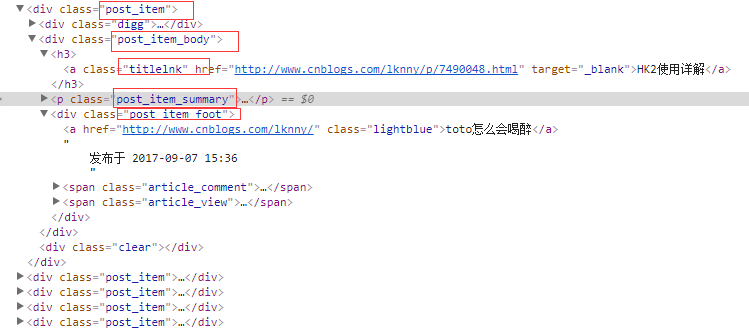
分析html结构
3.将处理好的数据保存到MongoDB
db.py
from mongoengine import *

connect('test', host='localhost', port=27017)

import datetime

class Blogs(Document):

    title = StringField(required=True, max_length=200)

    link = StringField(required=True)

    author = StringField(required=True)

    summary = StringField(required=True)

    create_time = StringField(required=True)

def savetomongo(contents):

    for content in contents:

        blog = Blogs(

            title=content['title'],

            link= content['link'],

            author=content['author'],

            summary=content['summary'],

            create_time=content['create_time']

        )

        blog.save()

    return "ok"

def haveBlogs():

    blogs = Blogs.objects.all()

    return len(blogs)
4.开始抓取数据
test.py
import db

import deal

print("start.......")

for i in range(1, 21):

    contents = deal.blogParser(i)

    db.savetomongo(contents)

    print('page',i,' OK.')

counts = db.haveBlogs()

print("have ",counts," blogs")

print("end.......")

注:
当前使用的Python版本是3.6.1
可以在可视化工具中查看(可是化工具 介绍 )

用Python写简单的爬虫的更多相关文章
- 【Python开发】【神经网络与深度学习】如何利用Python写简单网络爬虫
平时没事喜欢看看freebuf的文章,今天在看文章的时候,无线网总是时断时续,于是自己心血来潮就动手写了这个网络爬虫,将页面保存下来方便查看 先分析网站内容,红色部分即是网站文章内容div,可以看 ...
- Python 利用Python编写简单网络爬虫实例3
利用Python编写简单网络爬虫实例3 by:授客 QQ:1033553122 实验环境 python版本:3.3.5(2.7下报错 实验目的 获取目标网站“http://bbs.51testing. ...
- Python 利用Python编写简单网络爬虫实例2
利用Python编写简单网络爬虫实例2 by:授客 QQ:1033553122 实验环境 python版本:3.3.5(2.7下报错 实验目的 获取目标网站“http://www.51testing. ...
- 爬虫入门-使用python写简单爬虫
从第一章到上一章为止,基本把python所有的基础点都已经包括了,我们有控制逻辑的关键字,有内置数据结构,有用于工程需要的函数和模块,又有了标准库和第三方库,可以写正规的程序了. python可以做非 ...
- [Python学习] 简单网络爬虫抓取博客文章及思想介绍
前面一直强调Python运用到网络爬虫方面很有效,这篇文章也是结合学习的Python视频知识及我研究生数据挖掘方向的知识.从而简介下Python是怎样爬去网络数据的,文章知识很easy ...
- 使用Python编写简单网络爬虫抓取视频下载资源
我第一次接触爬虫这东西是在今年的5月份,当时写了一个博客搜索引擎.所用到的爬虫也挺智能的,起码比电影来了这个站用到的爬虫水平高多了! 回到用Python写爬虫的话题. Python一直是我主要使用的脚 ...
- 使用python实现简单的爬虫
python爬虫的简单实现 开发环境的配置 python环境的安装 编辑器的安装 爬虫的实现 包的安装 简单爬虫的初步实现 将数据写入到数据库-简单的数据清洗-数据库的连接-数据写入到数据库 开发环境 ...
- Python实现简单的爬虫获取某刀网的更新数据
昨天晚上无聊时,想着练习一下Python所以写了一个小爬虫获取小刀娱乐网里的更新数据 #!/usr/bin/python # coding: utf-8 import urllib.request i ...
- 用Python写一个小爬虫吧!
学习了一段时间的web前端,感觉有点看不清前进的方向,于是就写了一个小爬虫,爬了51job上前端相关的岗位,看看招聘方对技术方面的需求,再有针对性的学习. 我在此之前接触过Python,也写过一些小脚 ...
随机推荐
- java中unicode和中文相互转换
package test.com.gjob.services; import java.util.Properties; public class Test { public static void ...
- git push报错:error: RPC failed; result=22, HTTP code = 413
新项目推送到服务器时报错: error: RPC failed; result=22, HTTP code = 413| 7.66 MiB/s fatal: The remote end hun ...
- WebRTC 源码分析(二):安卓预览
有过一定相机开发经验的朋友可能会疑惑,预览还有什么好分析的,不是直接 camera.setPreviewDisplay 或者 camera.setPreviewTexture 就能在 SurfaceV ...
- ClassNotFoundException和NoClassDefFoundError的解决办法
程序在其他手机都没有问题,但在刷到版本稍微较低的平板或手机上时就会直接闪退,并报出以下异常: java.lang.RuntimeException: Unable to instantiate act ...
- Java虚拟机(JVM)体系结构概述及各种性能参数优化总结
转自:http://blog.csdn.net/zhongwen7710/article/details/39213377 第一部分:相关的概念 数据类型 Java虚拟机中,数据类型可以分为两类:基本 ...
- hashMap 根据已有知识知道的
public V put(K key, V value) { //假如table为空 if (table == EMPTY_TABLE) { inflateTable(threshold); } // ...
- C艹 指针和const的关系和注意事项(非常有意思)
有两种不同的形式将const关键字指向指针. 第一种:让指针指向一个常量对象 const float g_moon = 1.63; float * pm = &g_moon; // 不允许 n ...
- linux下硬盘的分区:
提到硬盘的分区,以前就是很乱,有什么主分区/扩展分区/逻辑分区等;它们有什么区别呢?现在简单的了解一下: 由于在MBR的主引导记录中的分区表里面最多只能记录4个分区记录,这个不够用啊,为了解决这个问题 ...
- SpringBoot系列九:SpringBoot服务整合(整合邮件服务、定时调度、Actuator监控)
声明:本文来源于MLDN培训视频的课堂笔记,写在这里只是为了方便查阅. 1.概念:SpringBoot 服务整合 2.背景 在进行项目开发的时候经常会遇见以下的几个问题:需要进行邮件发送.定时的任务调 ...
- 嵌入式开发之zynq---Zynq PS侧I2C驱动架构
http://blog.chinaunix.net/uid-24148050-id-120532.html http://bbs.csdn.net/topics/390538368?page=1 ht ...