
jquery 阻止冒泡事件和阻止默认事件
jQuery 冒泡和默认事件:
<!DOCTYPE html>

<html lang="en">

<head>

    <meta charset="UTF-8">

    <title>Document</title>

    <script src="http://apps.bdimg.com/libs/jquery/1.7.2/jquery.js"></script>

    <style>

        div{

            padding:20px;

            border:1px solid gray;

        }

        .box1{

            position:relative;

            width:200px;

            margin:50px auto;

            background: red;

        }

        .box2{

             background: green;

        }

        .box3{

             background: blue;

        }

        .source{

            color:white;

        }

    </style>

    <script>

        $(function(){

            $('.box1').on('click',function(){

                alert(1);

            });

             $('.box2').on('click',function(){

                alert(2);

            });

             $('.box3').on('click',function(){

                alert(3);

            });

             $('.source').on('click',function(){

                alert("Hello,huanying2015!");

            });

        });

    </script>

</head>

<body>

    <div class="box1">

        <div class="box2">

            <div class="box3">

                <a href="http://www.baidu.com" class="source" target="_blank">触发源</a>

            </div>

        </div>

    </div>

</body>

</html>
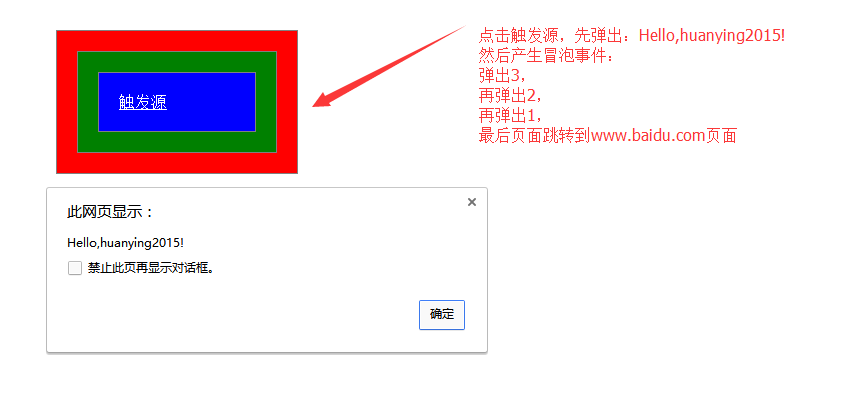
运行结果:
在这里:
弹出3,弹出2,弹出1 这三个事件是冒泡事件;
页面跳转到 www.baidu.com 为默认事件
分别可以使用不同的方法来阻止这两种事件的发生
1.阻止冒泡事件,使用 stopPropagation() 函数来执行
 <!DOCTYPE html>

 <html lang="en">

 <head>

     <meta charset="UTF-8">

     <title>Document</title>

     <script src="http://apps.bdimg.com/libs/jquery/1.7.2/jquery.js"></script>

     <style>

         div{

             padding:20px;

             border:1px solid gray;

         }

         .box1{

             position:relative;

             width:200px;

             margin:50px auto;

             background: red;

         }

         .box2{

              background: green;

         }

         .box3{

              background: blue;

         }

         .source{

             color:white;

         }

     </style>

     <script>

         $(function(){

             $('.box1').on('click',function(){

                 alert(1);

             });

              $('.box2').on('click',function(){

                 alert(2);

             });

              $('.box3').on('click',function(){

                 alert(3);

             });

              $('.source').on('click',function( event ){

                 alert("Hello,huanying2015!");

                 event.stopPropagation();

             });

         });

     </script>

 </head>

 <body>

     <div class="box1">

         <div class="box2">

             <div class="box3">

                 <a href="http://www.baidu.com" class="source" target="_blank">触发源</a>

             </div>

         </div>

     </div>

 </body>

 </html>
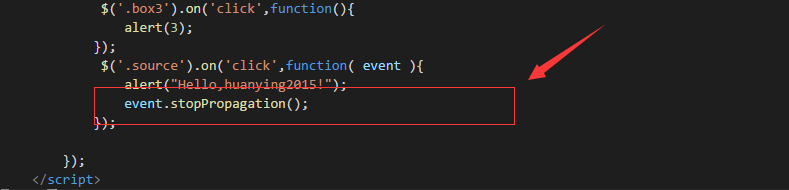
运行结果:不会产生冒泡事件
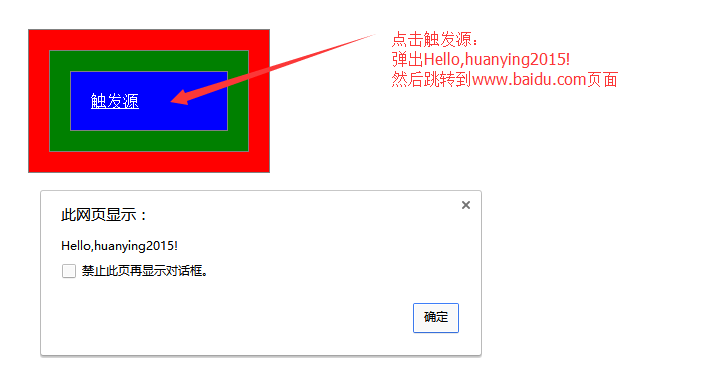
2.阻止默认事件:
使用 preventDefault() 来执行;
 <!DOCTYPE html>

 <html lang="en">

 <head>

     <meta charset="UTF-8">

     <title>Document</title>

     <script src="http://apps.bdimg.com/libs/jquery/1.7.2/jquery.js"></script>

     <style>

         div{

             padding:20px;

             border:1px solid gray;

         }

         .box1{

             position:relative;

             width:200px;

             margin:50px auto;

             background: red;

         }

         .box2{

              background: green;

         }

         .box3{

              background: blue;

         }

         .source{

             color:white;

         }

     </style>

     <script>

         $(function(){

             $('.box1').on('click',function(){

                 alert(1);

             });

              $('.box2').on('click',function(){

                 alert(2);

             });

              $('.box3').on('click',function(){

                 alert(3);

             });

              $('.source').on('click',function(event){

                 alert("Hello,huanying2015!");

                 event.preventDefault();

             });

         });

     </script>

 </head>

 <body>

     <div class="box1">

         <div class="box2">

             <div class="box3">

                 <a href="http://www.baidu.com" class="source" target="_blank">触发源</a>

             </div>

         </div>

     </div>

 </body>

 </html>
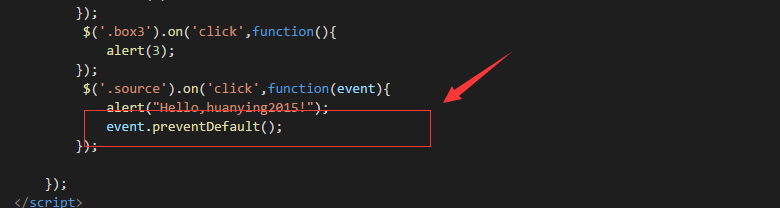
运行结果:只会产生冒泡事件,不会执行默认跳转
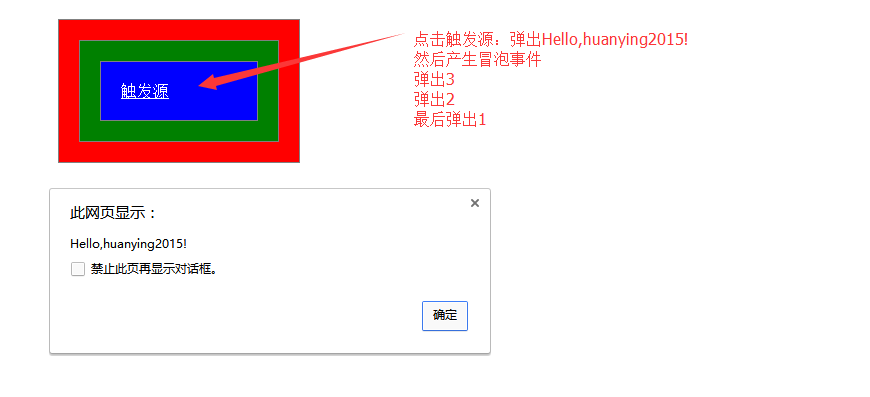
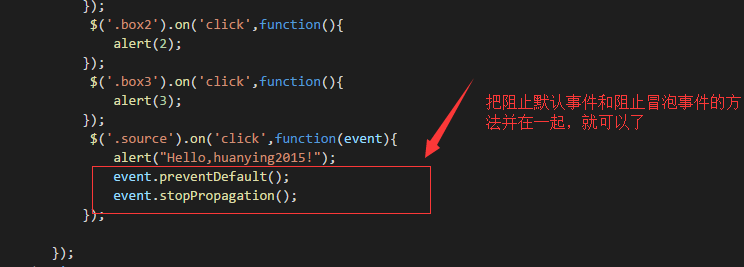
3. 如果既要阻止冒泡事件,又要阻止默认事件,改怎么做呢?
3.1 把阻止默认事件和冒泡事件合并起来,即如下:
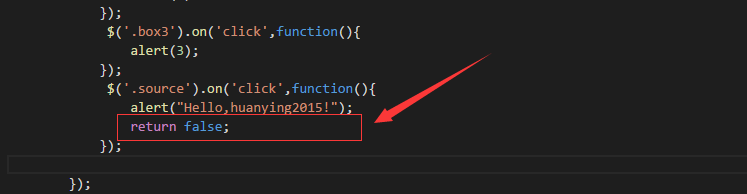
3.2 使用 return false 来阻止
 <!DOCTYPE html>

 <html lang="en">

 <head>

     <meta charset="UTF-8">

     <title>Document</title>

     <script src="http://apps.bdimg.com/libs/jquery/1.7.2/jquery.js"></script>

     <style>

         div{

             padding:20px;

             border:1px solid gray;

         }

         .box1{

             position:relative;

             width:200px;

             margin:50px auto;

             background: red;

         }

         .box2{

              background: green;

         }

         .box3{

              background: blue;

         }

         .source{

             color:white;

         }

     </style>

     <script>

         $(function(){

             $('.box1').on('click',function(){

                 alert(1);

             });

              $('.box2').on('click',function(){

                 alert(2);

             });

              $('.box3').on('click',function(){

                 alert(3);

             });

              $('.source').on('click',function(){

                 alert("Hello,huanying2015!");

                 return false;

             });

         });

     </script>

 </head>

 <body>

     <div class="box1">

         <div class="box2">

             <div class="box3">

                 <a href="http://www.baidu.com" class="source" target="_blank">触发源</a>

             </div>

         </div>

     </div>

 </body>

 </html>
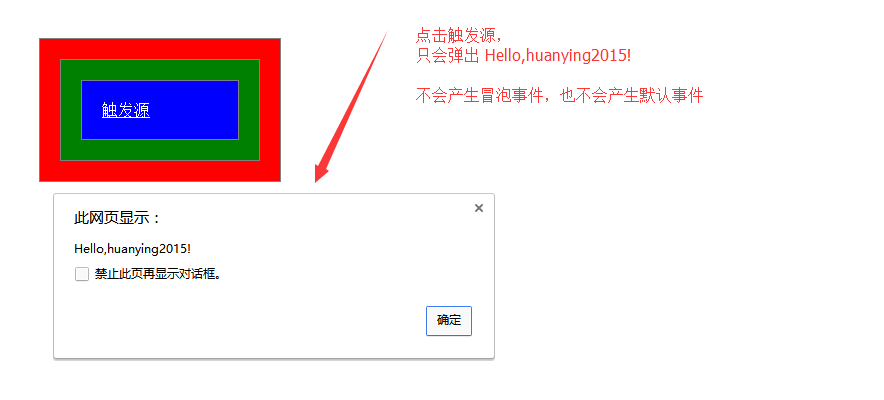
运行结果:不会产生冒泡事件,也不会产生默认事件
jquery 阻止冒泡事件和阻止默认事件的更多相关文章
- js阻止浏览器、元素的默认事件与js阻止事件冒泡、阻止事件流
嵌套的div元素,如果父级和子元素都绑定了一些事件,那么在点击最内层子元素时可能会触发父级元素的事件,下面介绍一下js阻止默认事件与js阻止事件冒泡示例,大家参考使用吧 1. event.prev ...
- Javascript和jquery事件--阻止事件冒泡和阻止默认事件
阻止冒泡和阻止默认事件—js和jq相同,jq的event是一个全局的变量 我们写代码的时候常用的都是事件冒泡,但是有的时候我们并不需要触发父元素的事件,而浏览器也有自己的默认行为(表单提交.超链接跳转 ...
- jquery阻止冒泡事件行为发生
<div onclick="a()"> <p onclick="b()"></p> </div> div和p元素 ...
- jQuery中事件对象e的事件冒泡用法示例(事件冒泡与阻止冒泡)
<!DOCTYPE html> <html lang="en"> <head> <meta charset="UTF-8&quo ...
- JavaScript事件冒泡机制和阻止事件冒泡及默认事件
一.阻止事件冒泡: 1.html中加return false 2.js中加return false 3.IE下:window.event.cancelBubble = true: FF下:event ...
- angular 点击事件阻止冒泡及默认行为
经常遇到场景:多层级元素绑定ng-click 事件,则底层元素的点击事件存在冒泡现象,怎么解决? 类似原生JS ,只是语法稍有不同,如下: 阻止冒泡 $event.stopPropagation() ...
- jQuery阻止默认行为和阻止冒泡
1.阻止默认行为:通常是值一个标签的默认行为,如button的提交表单,a标签的跳转等. 那如何阻止标签的默认行为? 1)return false 2) e.preventDefault(); < ...
- [oldboy-django][1初识django]阻止默认事件发生 + ajax + 模态编辑对话框
阻止默认事件发生 a 阻止a标签默认事件发生方法 <a href="http://www.baidu.com" onclick="modalEdit();" ...
- JS事件——禁止事件冒泡和禁止默认事件
Event 对象 Event 对象代表事件的状态,比如事件在其中发生的元素.键盘按键的状态.鼠标的位置.鼠标按钮的状态. 事件通常与函数结合使用,函数不会在事件发生前被执行! 一.什么是事件冒泡 在一 ...
- Javascript和jquery事件--滚动条事件和自定义滚动条事件样式
很想把滚动条事件跟鼠标滚轮事件放在一起,那就直接写在这一篇了.除了事件以外,对滚动条样式的调整也记在这里吧. 滚动条是浏览器的默认事件,使用overflow:auto/scroll都有可能出现,它的默 ...
随机推荐
- hadoop之 参数调优
一. hdfs-site.xml 配置文件 1. dfs.blocksize 参数:hadoop文件块大小描述:新文件的默认块大小,以字节为单位,默认 134217728 字节.可以使用以下后缀(大小 ...
- Connection: keep-alive,Content-Length,Transfer-Encoding: chunked,Content-Encoding: gzip等
Transfer-Encoding,是一个 HTTP 头部字段,字面意思是「传输编码」. 用来改变报文格式,它不但不会减少实体内容传输大小,甚至还会使传输变大,那它的作用是什么呢?下面进行介绍. HT ...
- windows server 2008 修改域的密码策略
1.一般情况下,进入本地安全策略修改密码策略时,,密码策略已经被锁定,无法更改,若要修改域服务器上的密码策略,请按照步骤2--6进行修改 2.在此情况下要改密码策略的过程如下, 进入组策略管理: 3. ...
- Eclipse更改皮肤
今天在网上看到别人的Eclipse皮肤很漂亮,所以也就查了一下如何更改. 其实很简单,现在一起来: Help -> Install New Software -> add -> n ...
- Linux基本操作命令及作用
文件和目录操作命令 命令 作用 cd change directory,切换目录 cp copy,其功能为复制文件或目录 find 用于查找目录或文件 mv move ,移动或重命名文件或目录 pwd ...
- JAVA面向对象编程课程设计——网络版单机斗地主
一.团队介绍 成员姓名 任务分配 成员课程设计博客链接 兰泽祥(组长) 数据库,斗地主规则的实现,人机自动出牌的算法,实体类的设计 JAVA面向对象编程课程设计--web版斗地主 吴修恩 JSP界面的 ...
- Celery 异步定时周期任务
1/什么是Celery Celery 是基于Python实现的模块,用于执行异步定时周期任务的 其结构的组成是由 1.用户任务app 2.管道 broker 用于存储任务 官方推荐 redis rab ...
- python使用smtplib发送邮件
python要实现发送邮件的功能,需要使用smtplib库. 1. 过程大致如下: 1. 建立和SMTP邮件服务器的连接 # 默认端口25 smtp = smtplib.SMTP(host, port ...
- pycharm中配置pep8
Pycharm本身是有pep8风格检测的,当你敲得代码中不符合规范时,会有下划波浪线提示.如何让代码修改为符合规范,去掉这些难看的波浪线呢? 1.安装autopep8 pip install aut ...
- 2018-2019 20165226 Exp6 信息搜集与漏洞扫描
2018-2019 20165226 Exp6 信息搜集与漏洞扫描 目录 一.实验内容说明及基础问题回答 二.实验过程 Task1 各种搜索技巧的应用 检测特定类型的文件 搜索网址目录结构 trace ...