
ES(6): access elasticsearch via curl
curl是一个非常实用的、用来与服务器之间传输数据的工具;支持的协议包括 (DICT, FILE, FTP, FTPS, GOPHER, HTTP, HTTPS, IMAP, IMAPS, LDAP, LDAPS, POP3, POP3S, RTMP, RTSP, SCP, SFTP, SMTP, SMTPS, TELNET and TFTP),curl设计为无用户交互下完成工作,linux curl功能十分强大,命令参数十分多, 可运行“man curl”命令查看
目录:
- 访问ES:_cat系列
- 访问ES:_cluster系列
- 访问ES:_nodes系列
- 访问ES:{index}系列
访问ES:_cat系列
- /_cat/allocation
- /_cat/shards
- /_cat/master
- /_cat/nodes
- /_cat/indices
- /_cat/segments
- /_cat/count
- /_cat/recovery
- /_cat/health
- /_cat/pending_tasks
- /_cat/aliases
- /_cat/thread_pool
- /_cat/plugins
- /_cat/fielddata
- /_cat/XXXX/{index}
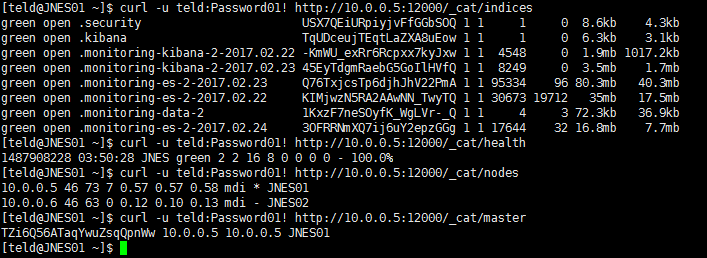
- 示例如下图:
访问ES:_cluster系列
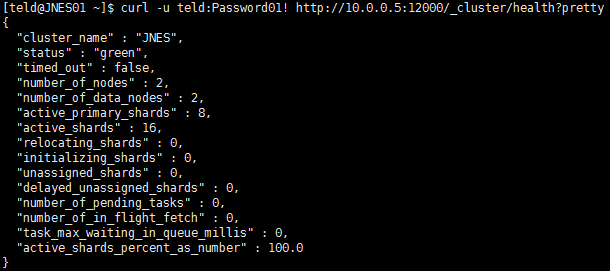
- /_cluster/health?pretty (查询设置集群状态, pretty=true表示格式化输出)
- /_cluster/stats?pretty (显示集群系统信息,包括CPU JVM等等)
- /_cluster/state?pretty (集群的详细信息。包括节点、分片等)
- /_cluster/pending_tasks?pretty (获取集群堆积的任务)
- /_cluster/nodes/192.168.1.1/_shutdown (关闭指定节点)
- /_cluster/nodes/_master/_shutdown (关闭主节点)
- /_shutdown?delay=10s (delay=10s表示延迟10秒关闭所有节点)
- /_cluster/nodes/_shutdown 或 /_cluster/nodes/_all/_shutdown (关闭所有节点)
- 修改集群配置, transient 表示临时的,persistent表示永久的, 如下代码
/_cluster/settings -d '{

    "persistent" : {

        "discovery.zen.minimum_master_nodes" : 2

    }

}' 
访问ES:_nodes系列
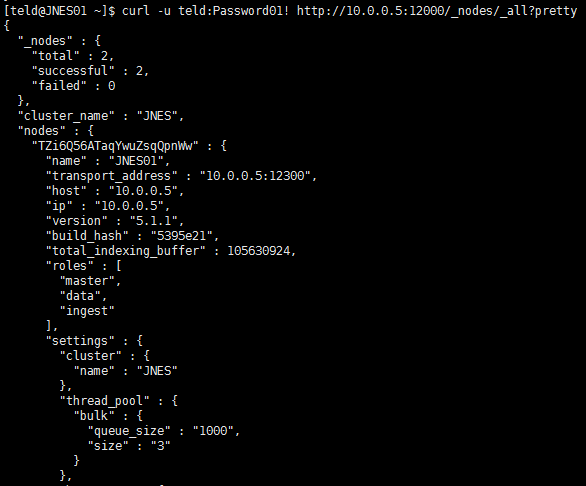
- /_nodes/stats?pretty=true
- /_nodes/192.168.1.2/stats?pretty=true
- /_nodes/process
- /_nodes/_all/process
- /_nodes/192.168.1.2,192.168.1.3/jvm,process
- /_nodes/192.168.1.2,192.168.1.3/info/jvm,process
- /_nodes/192.168.1.2,192.168.1.3/_all
- /_nodes/hot_threads
访问ES:{index}系列
- 简单创建索引: curl -XPUT 'http://10.0.0.5:12000/test/'
- 删除索引: curl -XDELETE 'http://10.0.0.5:12000/test/'
- 设置mapping,如下示例
curl -XPUT 'http://10.0.0.5:12000/etlstasday' -d '

{

  "settings": {

    "number_of_shards": 5,

    "number_of_replicas": 1

  },

  "mappings": {

    "etlstasday": {

      "properties": {

        "电站名称": {

          "type": "text",

          "fields": {

            "keyword": {

              "ignore_above": 256,

              "type": "keyword"

            }

          }

        },

        "业务日期": {

          "format": "yyyyMMddZ",

          "type": "date"

        },

        "总电量": {

          "type": "double"

        },

        "总收入(元)": {

          "type": "double"

        }

      }

    }

  }

}' - mapping 字段类型参见:https://www.elastic.co/guide/en/elasticsearch/reference/current/mapping-types.html
- 插入数据,如下
curl -XPUT 'http://10.0.0.5:12000/etlstasday/etlstasday/1' -d '

{

        "电站名称": "测试数据1",

        "业务日期": "20160101+08:00",

        "总电量": "",

        "总收入(元)": ""

}' - 查询数据:curl -XGET 'http://10.0.0.5:12000/etlstasday/etlstasday/1'

- 查询某个索引下某个类型的所有记录: curl -XGET 'http://10.0.0.5:12000/etlstasday/etlstasday/_search?pretty'
- 查询某个索引下所有数据: curl -XGET 'http://10.0.0.5:12000/etlstasday/_search?pretty'
- 查询所有索引数据: curl -XGET 'http://10.0.0.5:12000/_search?pretty'
- 使用JSON参数的查询: (注意 query 和 term 关键字): $ curl localhost:9200/film/_search -d '{"query" : { "term": { "tag":"bad"}}}'
日常总结:
- 修改索引最大返回记录
PUT /索引名/_settings

{

    "index" : {

        "max_result_window" : 20000

    }

}- 创建索引
ES(6): access elasticsearch via curl的更多相关文章
- ElasticSearch之CURL操作(有空再去整理)
https://www.cnblogs.com/jing1617/p/8060421.html ElasticSearch之CURL操作 CURL的操作 curl是利用URL语法在命令行方式下工 ...
- ES之四、Elasticsearch集群和索引常用命令
REST API用途 elasticsearch支持多种通讯,其中包括http请求响应服务,因此通过curl命令,可以发送http请求,并得到json返回内容. ES提供了很多全面的API,常用的RE ...
- Elasticsearch之curl创建索引库
关于curl的介绍,请移步 Elasticsearch学习概念之curl 启动es,请移步 Elasticsearch的前后台运行与停止(tar包方式) Elasticsearch的前后台运行与停止( ...
- Elasticsearch之CURL命令的DELETE
也可以看我写的下面的博客 Elasticsearch之curl删除 Elasticsearch之curl删除索引库 删除,某一条数据,如下 [hadoop@master elasticsearch-] ...
- Elasticsearch之CURL命令的UPDATE
对于,Elasticsearch之CURL命令的UPDATE包括局部更新和全部更新.可以去看我写的另一篇博客. Elasticsearch之更新(全部更新和局部更新) 总结: ES全部更新,使用PUT ...
- Elasticsearch之CURL命令的GET
这是个查询命令. 前期博客 Elasticsearch之CURL命令的PUT和POST对比 1. 以上是根据员工id查询. 即在任意的查询字符串中添加pretty参数,es可以得到易于我们识别的jso ...
- Elasticsearch之curl删除
扩展下, Elasticsearch之curl删除索引库 [hadoop@djt002 elasticsearch-2.4.3]$ curl -XDELETE 'http://192.168.80.2 ...
- Elasticsearch之curl创建索引库和索引时注意事项
前提, Elasticsearch之curl创建索引库 Elasticsearch之curl创建索引 注意事项 1.索引库名称必须要全部小写,不能以下划线开头,也不能包含逗号 2.如果没有明确指定索引 ...
- Elasticsearch之curl创建索引
前提,是 Elasticsearch之curl创建索引库 [hadoop@djt002 elasticsearch-2.4.3]$ curl -XPUT 'http://192.168.80.200: ...
随机推荐
- javascript的逼格
1.解释性脚本语言,无需编译,逐行解释运行 2.跨平台性,不依赖操作系统,只需要浏览器支持 javascript引擎:单线程
- js运动例子1
<!doctype html> <html> <head> <meta charset="utf-8"> <meta name ...
- 快速切题 acdream手速赛(6)A-C
Sudoku Checker Time Limit: 2000/1000MS (Java/Others)Memory Limit: 128000/64000KB (Java/Others) Submi ...
- Flash Player离线安装包下载指南
在机房里装软件,没网是正常现象,有些老师要装Firefox/Chrome浏览器要有Flash,网上搜来搜去都是在线安装包一日在V2EX闲逛时发现了一位大神给出了Flash的离线安装包下载方式,在此立个 ...
- poj2892
题解: 答案=后缀-前缀-1 如果被轰了,那么就时0 在一开始加入0,n+1,保证有前缀后缀 代码: #include<cstdio> #include<cmath> #inc ...
- 玩转X-CTR100 l STM32F4 l CAN通信
我造轮子,你造车,创客一起造起来!塔克创新资讯[塔克社区 www.xtark.cn ][塔克博客 www.cnblogs.com/xtark/ ] X-CTR100控制器STM32F4处理器内置CAN ...
- DevExpress v18.1新版亮点——WinForms篇(三)
用户界面套包DevExpress v18.1日前终于正式发布,本站将以连载的形式为大家介绍各版本新增内容.本文将介绍了DevExpress WinForms v18.1 的新功能,快来下载试用新版本! ...
- <NET CLR via c# 第4版> 读书笔记--目录
<NET CLR via c# 第4版>个别章节虽读过多次,但始终没有完整读过这本书.即使看过的那些,时间一长,也忘记了大部分.趁着最近不忙,想把这本书好好读一遍,顺便记下笔记,方便随时查 ...
- 使用API接口在zabbix系统中登陆、创建、删除agent
一.API的介绍 API(Application Programming Interface,应用程序编程接口)是一些预先定义的函数,目的是提供应用程序与开发人员基于某软件或硬件得以访问一组例程的能力 ...
- jsx介绍
jsx与传统的html的区别: 1. jsx:使用的“元素”不局限与html中的元素,可以是任何一个React组件,传统的html是做不到的 (区分是否是组件的原则:看第一个字母是否是大写) 2.js ...