
python关于时间的计算,time模块
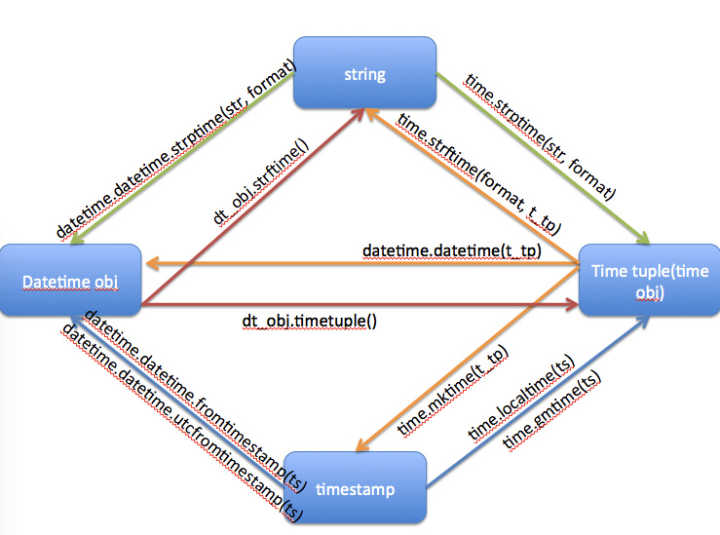
import time, datetime

# 时间的几种格式:

# 一:时间戳(timestamp),1970年1月1日0点开始,到现在的秒数(以格林尼治时间为准)。

# 数据类型为'float',浮点数,小数

print('时间戳')

print('当前时间')

print(time.time())

print(type(time.time()))

print('=========================================')

# 二:时间元组(Time tuple(time obj)),这是把年月日时分秒周日……作为一个元组

# 数据类型为‘time.struct_time’,元组

print('时间元组')

print('当前时间')

print(time.localtime())

print(type(time.localtime()))

print('年是0位:' + str(time.localtime()[0]))

print('月是1位:' + str(time.localtime()[1]))

print('日是2位:' + str(time.localtime()[2]))

print('时是3位:' + str(time.localtime()[3]))

print('分是4位:' + str(time.localtime()[4]))

print('秒是5位:' + str(time.localtime()[5]))

print('周几是6位:' + str(time.localtime()[6]))

print('第几天是7位:' + str(time.localtime()[7]))

print('夏令时是8位,但是没用:' + str(time.localtime()[8]))

print('-----')

print('年是0位:' + str(time.localtime().tm_year))

print('月是1位:' + str(time.localtime().tm_mon))

print('日是2位:' + str(time.localtime().tm_mday))

print('时是3位:' + str(time.localtime().tm_hour))

print('分是4位:' + str(time.localtime().tm_min))

print('秒是5位:' + str(time.localtime().tm_sec))

print('周几是6位:' + str(time.localtime().tm_wday))

print('第几天是7位:' + str(time.localtime().tm_yday))

print('夏令时是8位,但是没用:' + str(time.localtime().tm_isdst))

print('=========================================')

# 三:时间格式(Datetime obj),最准确的时间格式,还带毫秒

# 类型为'datetime.datetime'

print('时间格式')

print('当前时间')

print(datetime.datetime.now())

print(type(datetime.datetime.now()))

print('=========================================')

# 四:时间字符串(string),就是字符串而已

# 数据类型为‘str’,字符串

print('字符串格式')

print('当前时间')

now = time.strftime('%Y%m%d%H%M%S')

# % y 两位数的年份表示(00 - 99)

# % Y 四位数的年份表示(000 - 9999)

# % m 月份(01 - 12)

# % d 月内中的一天(0 - 31)

# % H 24小时制小时数(0 - 23)

# % I 12小时制小时数(01 - 12)

# % M 分钟数(00 = 59)

# % S 秒(00 - 59)

# % a 本地简化星期名称

# % A 本地完整星期名称

# % b 本地简化的月份名称

# % B 本地完整的月份名称

# % c 本地相应的日期表示和时间表示

# % j 年内的一天(001 - 366)

# % p 本地A.M.或P.M.的等价符

# % U 一年中的星期数(00 - 53)星期天为星期的开始

# % w 星期(0 - 6),星期天为星期的开始

# % W 一年中的星期数(00 - 53)星期一为星期的开始

# % x 本地相应的日期表示

# % X 本地相应的时间表示

# % Z 当前时区的名称

# % % % 号本身

print(now)

print('=========================================')

# 时间字符串,就是一个字符串,不方便进行计算,首先弃用。

# 时间戳,是个浮点数,也不方便进行计算,也弃用。

# 时间元组,是个元组,不能直接存入数据库,还是弃用。

# 时间格式,这是最基本的格式,优先选用。

# time模块,是以时间戳为基础的。

# datetime模块,是以时间格式为基础的。

# 首先讲定制时间

# 指定时间

# 其实看置顶图,左右是时间格式,上面是字符串,下面是时间戳

# 想指定时间,就需要从字符串或时间戳转换过去,时间戳还要计算,我们一般用字符串转换为时间格式。

print('指定时间')

print('datetime指定时间,datetime格式,图上datetime.datetime.strptime(str,format)')

# 可以设置7个参数来指定时间

S_datetime = datetime.datetime(2019, 10, 29, 21, 39, 2, 21111)

print(S_datetime)

# 可以精简为3个参数

S_datetime = datetime.datetime(2019, 10, 28)

print(S_datetime)

print(type(S_datetime))

print('time指定时间,time时间格式(元组),图上time.strptime(str,format)')

S_time = time.strptime('', '%Y%m%d%H%M%S')

print(S_time)

S_time = time.strptime('', '%Y%m%d')

print(S_time)

# 甚至可以精简到2个参数

S_time = time.strptime('', '%Y%m')

print(S_time)

S_time = time.strptime('2019年10月29日21时39分2秒', '%Y年%m月%d日%H时%M分%S秒')

print(S_time)

print(type(S_time))

print('=========================================')

# 再转换回去

# datetime转换为字符串,图上dt_obj.strftime()

print('时间格式转换为字符串')

print('datetime时间格式转换为字符串,图上dt_obj.strftime()')

print(S_datetime)

print(type(S_datetime))

D_str = S_datetime.strftime('%Y-%m-%d %H:%M:%S %f')

print(D_str)

D_str = S_datetime.strftime('%Y%m%d%H%M%S%f')

print(D_str)

print(type(D_str))

print('time时间格式转换为字符串,图上time.strftime(format,t_tp)')

print(S_time)

print(type(S_time))

T_str = time.strftime('%Y%m%d%H%M%S', S_time)

print(T_str)

T_str = time.strftime('%Y-%m-%d %H:%M:%S', S_time)

print(T_str)

print('=========================================')

# 时间元组和时间格式互转

print('时间格式和时间元组互转')

print(S_time)

print(type(S_time))

print(S_datetime)

print(type(S_datetime))

print('时间格式转时间元组,图上dt_obj.timetuple()')

T_D = S_datetime.timetuple()

print(T_D)

print('++++++++')

print('时间元组转时间格式,图上datetime.datetime(t_tp)')#待更新

D_T=datetime.datetime(S_time.tm_year,S_time.tm_mon,S_time.tm_mday)

print(D_T)

print('=========================================')

#时间戳待更新,暂时用的不多。

print('字符串转时间戳,分两步')

string_2_struct = time.strptime("2016/05/22", "%Y/%m/%d")  # 将 日期字符串 转成 struct时间对象格式

print(string_2_struct)

struct_2_stamp = time.mktime(string_2_struct)  # 将struct时间对象转成时间戳

print(struct_2_stamp)

print('--------')

# # time.clock用于计算执行时间

# t0 = time.clock()  # 第一次调用time.clock,标记一个时间为0.0

# time.sleep(2)

# t1 = time.clock()  # 第二次调用,从第一个time.clock开始到现在的时间

# time.sleep(2)

# t2 = time.clock()  # 第三次调用,从第一个time.clock开始到现在的时间

# print(t0)

# print(t1)

# print(t2)

# print(t1 - t0)

# print(t2 - t1)

# print(t2 - t0)

# time.sleep(5)#以秒为单位暂停

# 以下字符串方便用来存记录,

now_time = time.strftime('%Y-%m-%d %H:%M:%S')  # 20171123093804  当前时间

print(now_time)

print(type(now_time))  # 格式是字符串

print('----------')

now = str(datetime.datetime.now())

print(now)

print(type(now))  # 格式是字符串 带毫秒的

print('----------')

today = time.strftime('%Y%m%d')  # 20171123 当前日期

print(today)

print(type(today))  # 格式是字符串

print('----------')
python关于时间的计算,time模块的更多相关文章
- Python之时间(time)模块
在Python中,通常有这几种方式来表示时间: 时间戳(timestamp):通常来说,时间戳表示的是从1970年1月1日00:00:00开始按秒计算的偏移量.我们运行“type(time.time( ...
- 【转载】Python日期时间模块datetime详解与Python 日期时间的比较,计算实例代码
本文转载自脚本之家,源网址为:https://www.jb51.net/article/147429.htm 一.Python中日期时间模块datetime介绍 (一).datetime模块中包含如下 ...
- Python科学计算—numpy模块总结(1)
作为一个本科学数学专业,目前研究非线性物理领域的研究僧.用什么软件进行纯科学计算好,Fortran永远是第一位的:matlab虽然很强大,可以很容易的处理大量的大矩阵,但是求解我们的模型(有时可能是几 ...
- Python 日期时间处理模块学习笔记
来自:标点符的<Python 日期时间处理模块学习笔记> Python的时间处理模块在日常的使用中用的不是非常的多,但是使用的时候基本上都是要查资料,还是有些麻烦的,梳理下,便于以后方便的 ...
- python(时间模块,序列化模块等)
一.time模块 表示时间的三种方式: 时间戳:数字(计算机能认识的) 时间字符串:t='2012-12-12' 结构化时间:time.struct_time(tm_year=2017, tm_mon ...
- python的N个小功能(文本字段对应数值,经纬度计算距离,两个时间点计算时间间隔)
案例1 >>> import pandas as pd >>> df=pd.DataFrame({'A':[1,2,3],'B':[1,2,3],'C':[1,2, ...
- python中时间的基本使用
格式化日期 我们可以使用 time 模块的 strftime 方法来格式化日期,: time.strftime(format[, t]) #!/usr/bin/python # -*- coding: ...
- Python日期时间函数处理
所有日期.时间的 api 都在datetime模块内. 1 日期的格式化输出 datetime => string import datetime now = datetime.datetime ...
- python 日期 & 时间
1. Python 提供了一个 time 和 calendar 模块可以用于格式化日期和时间. 2. 时间间隔是以秒为单位的浮点小数. 3. 每个时间戳都以自从1970年1月1日午夜(历元)经过了多长 ...
随机推荐
- Large Division(大数)题解
Given two integers, a and b, you should check whether a is divisible by b or not. We know that an in ...
- js与jquery对象的互转
//dom对象 var odiv = document.getElementById('box'); //dom对象转化成JQ对象, 在通过原生的方法获取到元素后,给它加上$() //$(odiv). ...
- .Net Core集成Office Web Apps(一)
最近开始学习.Net Core,并使用Visual Studio Code工具来开发.感觉开发起来特别的方便,但是有个头疼的地方:许多的类库被修改了,一时半会儿还熟悉不了,需要查阅官方API... M ...
- Linux——进程管理简单学习笔记(二)
计划任务: 为什么要设置计划任务 : 实现数据库备份,发送系统通知神马的..... 计划任务的命令: 一: at : 安排作业在某一时刻执行一次 nbatch 安排作业在系统负载不重时执 行一 ...
- P2865 【[USACO06NOV]路障Roadblocks】(次短路)
传送门 算法Dijkstra要求次短路 那么在不考虑重复走一条边的情况下 肯定是把最短路中的一段改成另一段 至少要换另一条边到路径里所以可以枚举所有不属于最短路的每条边(a,b) 那么dis(1,a) ...
- java 从List中随机取出一个元素
java 从List中随机取出一个元素 List<Integer> list = new ArrayList<>(); Random random = new Random() ...
- python 删除元组元素
#create a tuple tuplex = "w", "j" ,"c", "e" print(tuplex) #t ...
- np.linspace
来自:有一种宿命叫无能为力 在指定的间隔内返回均匀间隔的数字.(返回num个样本数据,在[start, stop]). 函数形式: linspace(start, stop, num = 50, en ...
- 常用 书签 mark
1.框架 jquery bootstrap 2.网站 w3cschool old 站长之家 ( site:www.zgacjx.com 直接看百度收录数 ) 博客园
- Java注解的使用,类似于C#的Attribute
1.定义注解,代码如下: import java.lang.annotation.*; /** * 定义注解类,用于注解某个类或方法 * * @author Administrator * */ @T ...