
在笛卡尔坐标系上描绘函数2*x+Math.sqrt(5-x*x)及其共轭函数2*x-Math.sqrt(5-x*x)曲线
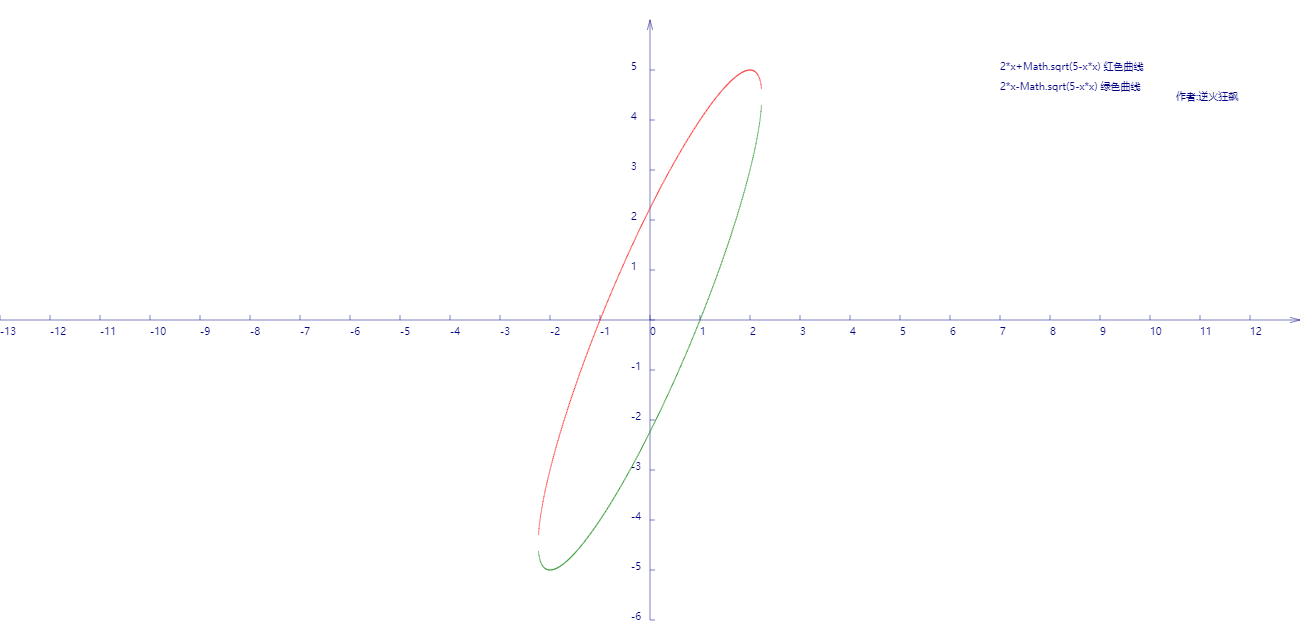
代码如下:
<!DOCTYPE html>
<html lang="utf-8">
<meta http-equiv="Content-Type" content="text/html; charset=utf-8"/>
<head>
     <title>函数2*x+Math.sqrt(5-x*x)及其共轭函数2*x-Math.sqrt(5-x*x)曲线勾画</title>
    </head>

     <body onload="draw()">
        <canvas id="myCanvus" width="1300px" height="640px" style="border:1px dashed black;">
            出现文字表示你的浏览器不支持HTML5
        </canvas>
     </body>
</html>
<script type="text/javascript">
<!--
    function draw(){
        var canvas=document.getElementById("myCanvus");
        var canvasWidth=1300;
        var canvasHeight=640;

        var context=canvas.getContext("2d");

        context.fillStyle = "white";
        context.fillRect(0, 0, canvasWidth, canvasHeight);

        context.strokeStyle = "black";
        context.fillStyle = "black";

        // 进行坐标变换:把原点放在左下角,东方为X轴正向,北方为Y轴正向
        var offsetY=320;// Y向偏移值,正值向上偏,用来画坐标轴
        var offsetX=650;// X向偏移值,正值向右偏,用来画坐标轴

        context.save();
        context.translate(0+offsetX,canvasHeight-offsetY);

        drawAxisXText(context);// 文字和线分开画比较好处理
        drawAxisYText(context);
        drawTitleText(context);

        context.rotate(getRad(180));
        context.scale(-1,1);

        drawAxisX(context);
        drawAxisY(context);
        drawCurve(context);

        context.restore();
    }

    function drawTitleText(ctx){
        ctx.lineWidth=0.5;
        ctx.strokeStyle='navy';
        ctx.fillStyle='navy';

        var x=350;
        var y=-250;

        // 写文字
        ctx.fillText("2*x+Math.sqrt(5-x*x) 红色曲线",x,y);

        ctx.fillText("2*x-Math.sqrt(5-x*x) 绿色曲线",x,y+20);

        ctx.fillText("  作者:逆火狂飙",x+170,y+30);
    }

    function drawCurve(ctx){
        var SU=50;// Scale Unit

        var cds=[{}];
        var cds1=[{}];

        var x,y;
        for(x=-13;x<=13;x+=0.01){
            if(5-x*x>0){
                y=2*x+Math.sqrt(5-x*x);// 函数式在此
                var arr={"x":x,"y":y};
                cds.push(arr);

                y=2*x-Math.sqrt(5-x*x);// 与上面函数互为共轭函数
                var arr={"x":x,"y":y};
                cds1.push(arr);
            }
        }

        // 2*x+Math.sqrt(5-x*x)
        ctx.strokeStyle = "red";
        ctx.beginPath();

        for(var i=0; i<cds.length; i++){
            ctx.lineTo(cds[i].x*SU,cds[i].y*SU);
        }

        ctx.stroke();
        ctx.closePath();

        // 2*x-Math.sqrt(5-x*x);
        ctx.strokeStyle = "green";
        ctx.beginPath();

        for(var i=0; i<cds1.length; i++){
            ctx.lineTo(cds1[i].x*SU,cds1[i].y*SU);
        }

        ctx.stroke();
        ctx.closePath();

    }

    function drawAxisX(ctx){
        ctx.save();

        ctx.lineWidth=0.5;
        ctx.strokeStyle='navy';
        ctx.fillStyle='navy';

        var start=-650;
        var end=650;

        // 画轴
        ctx.beginPath();
        ctx.moveTo(start, 0);
        ctx.lineTo(end, 0);
        ctx.stroke();
        ctx.closePath();

        // 画箭头
        ctx.beginPath();
        ctx.moveTo(end-Math.cos(getRad(15))*10, Math.sin(getRad(15))*10);
        ctx.lineTo(end, 0);
        ctx.lineTo(end-Math.cos(getRad(15))*10, -Math.sin(getRad(15))*10);
        ctx.stroke();
        ctx.closePath();

        // 画刻度
        var x,y;
        y=5;
        for(x=start;x<end;x+=50){
            ctx.beginPath();
            ctx.moveTo(x, 0);
            ctx.lineTo(x, y);

            ctx.stroke();
            ctx.closePath();
        }

        ctx.restore();
    }

    function drawAxisXText(ctx){
        ctx.lineWidth=0.5;
        ctx.strokeStyle='navy';
        ctx.fillStyle='navy';

        var start=-650;
        var end=650;

        // 写文字
        var x,y=5;
        for(x=start;x<end;x+=50){
            ctx.fillText(x/50,x,y+10);
        }
    }

    function drawAxisY(ctx){
        ctx.save();

        ctx.lineWidth=0.5;
        ctx.strokeStyle='navy';
        ctx.fillStyle='navy';

        var start=-300;
        var end=300;

        // 画轴
        ctx.beginPath();
        ctx.moveTo(0, start);
        ctx.lineTo(0, end);
        ctx.stroke();
        ctx.closePath();

        // 画箭头
        ctx.beginPath();
        ctx.moveTo(Math.sin(getRad(15))*10, end-Math.cos(getRad(15))*10);
        ctx.lineTo(0, end);
        ctx.lineTo(-Math.sin(getRad(15))*10, end-Math.cos(getRad(15))*10);
        ctx.stroke();
        ctx.closePath();

        // 画刻度
        var x,y;
        x=5;
        for(y=start;y<end;y+=50){
            ctx.beginPath();
            ctx.moveTo(x, y);
            ctx.lineTo(0, y);

            ctx.stroke();
            ctx.closePath();
        }
    }

    function drawAxisYText(ctx){
        ctx.lineWidth=0.5;
        ctx.strokeStyle='navy';
        ctx.fillStyle='navy';

        var start=-250;
        var end=350;

        // 写文字
        var x=-19,y=5;
        for(y=start;y<end;y+=50){

            if(y!=0){
                ctx.fillText(-y/50,x,y);
            }
        }
    }

    function getRad(degree){
        return degree/180*Math.PI;
    }

    function cutShort(str,length){
        if(str.length>length){
            str=str.substr(0,length)+"...";
        }

        return str;
    }
//-->
</script>
在笛卡尔坐标系上描绘函数2*x+Math.sqrt(5-x*x)及其共轭函数2*x-Math.sqrt(5-x*x)曲线的更多相关文章
- 在笛卡尔坐标系上描绘函数(x*x+1)/(x*x-1)曲线
代码: <!DOCTYPE html> <html lang="utf-8"> <meta http-equiv="Content-Type ...
- 在笛卡尔坐标系上描绘函数 y=4x^2-2/4x-3
代码: <!DOCTYPE html> <html lang="utf-8"> <meta http-equiv="Content-Type ...
- 在笛卡尔坐标系上描绘y=x^2-4/x^2-2x-3曲线
<!DOCTYPE html> <html lang="utf-8"> <meta http-equiv="Content-Type&quo ...
- AcWing:112. 雷达设备(贪心 + 笛卡尔坐标系化区间)
假设海岸是一条无限长的直线,陆地位于海岸的一侧,海洋位于另外一侧. 每个小岛都位于海洋一侧的某个点上. 雷达装置均位于海岸线上,且雷达的监测范围为d,当小岛与某雷达的距离不超过d时,该小岛可以被雷达覆 ...
- 如果是在有master上开启了该参数,记得在slave端也要开启这个参数(salve需要stop后再重新start),否则在master上创建函数会导致replaction中断。
如果是在有master上开启了该参数,记得在slave端也要开启这个参数(salve需要stop后再重新start),否则在master上创建函数会导致replaction中断.
- 自学Linux Shell16.4-在命令行上使用函数
点击返回 自学Linux命令行与Shell脚本之路 16.4-在命令行上使用函数 脚本函数不仅可以用作shell脚本命令,也可以用作命令行界面的命令.一旦在shell中定义了函数,可以从系统的任意目录 ...
- HTML5 Canvas 笛卡尔坐标系转换尝试
<!DOCTYPE html> <html lang="utf-8"> <meta http-equiv="Content-Type&quo ...
- Javascript作业—数组去重(要求:原型链上添加函数)
数组去重(要求:原型链上添加函数) <script> //数组去重,要求:在原型链上添加函数 //存储不重复的--仅循环一次 if(!Array.prototype.unique1){ A ...
- js进阶 12-8 如何知道上一个函数的返回值是什么(如何判断上一个函数是否执行成功)
js进阶 12-8 如何知道上一个函数的返回值是什么(如何判断上一个函数是否执行成功) 一.总结 一句话总结:event的result属性即可. 1.event的result属性的实际应用场景是什么? ...
随机推荐
- es6中对象的一些操坐
变量的赋值 key值得构建 对象的严格检测 对象的合并 1.变量的赋值: let name='宋宇',age='17岁': let obj={name,age} //快速的将变量引入到对象中去. 2. ...
- Codeforces 补题记录
首先总结一下前段时间遇到过的一些有意思的题. Round #474 (Div. 1 + Div. 2, combined) Problem G 其实关键就是n这个数在排列中的位置. 这样对于一个排 ...
- ZOJ 2967 Colorful Rainbows
暴力. 先删掉一些边,平行的线只保留$b$最大的.然后暴力,每次放入第$i$条边,和还没有被完全覆盖的边都算一遍,更新一下. #pragma comment(linker, "/STACK: ...
- React Hooks useState为什么顺序很重要
一个Function Component的state状态整体是作为memoizedState存在FIber中的. function执行时,首先取memoizedState第一个base state,作 ...
- 在Spring Controller中将数据缓存到session
Servlet方案 在Controller的方法的参数列表中,添加一个javax.servlet.http.HttpSession类型的形参.spring mvc会 自动把当前session对象注入这 ...
- Codeforces Round #424 (Div. 2, rated, based on VK Cup Finals) Cards Sorting(树状数组)
Cards Sorting time limit per test 1 second memory limit per test 256 megabytes input standard input ...
- Linux命令之chgrp
chgrp [选项] … GROUP FILE … chgrp [选项] … --reference=RFILE FILE … chgrp命令是用来改变文件的组所有权.将改变每一个FILE的所属组为G ...
- noip 1999 回文数
题目描述 若一个数(首位不为零)从左向右读与从右向左读都一样,我们就将其称之为回文数. 例如:给定一个10进制数56,将56加65(即把56从右向左读),得到121是一个回文数. 又如:对于10进制数 ...
- BZOJ 2395 [Balkan 2011]Timeismoney(最小乘积生成树)
[题目链接] http://www.lydsy.com/JudgeOnline/problem.php?id=2395 [题目大意] 给出一张无向图,每条边上有a,b两个值,求生成树, 使得suma* ...
- BZOJ 4884 [Lydsy2017年5月月赛]太空猫(单调DP)
[题目链接] http://www.lydsy.com/JudgeOnline/problem.php?id=4884 [题目大意] 太空猫(SpaceCat)是一款画面精致.玩法有趣的休闲游戏, 你 ...