
在笛卡尔坐标系上描绘函数2*x+Math.sqrt(5-x*x)及其共轭函数2*x-Math.sqrt(5-x*x)曲线
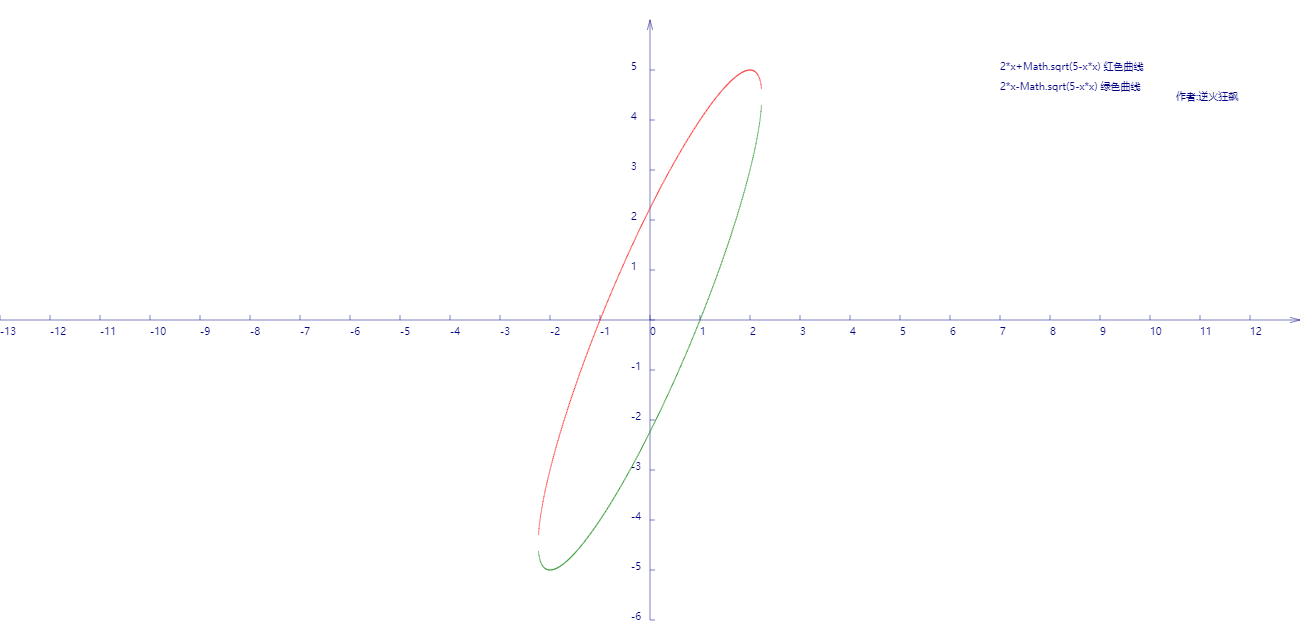
代码如下:
<!DOCTYPE html>
<html lang="utf-8">
<meta http-equiv="Content-Type" content="text/html; charset=utf-8"/>
<head>
     <title>函数2*x+Math.sqrt(5-x*x)及其共轭函数2*x-Math.sqrt(5-x*x)曲线勾画</title>
    </head>

     <body onload="draw()">
        <canvas id="myCanvus" width="1300px" height="640px" style="border:1px dashed black;">
            出现文字表示你的浏览器不支持HTML5
        </canvas>
     </body>
</html>
<script type="text/javascript">
<!--
    function draw(){
        var canvas=document.getElementById("myCanvus");
        var canvasWidth=1300;
        var canvasHeight=640;

        var context=canvas.getContext("2d");

        context.fillStyle = "white";
        context.fillRect(0, 0, canvasWidth, canvasHeight);

        context.strokeStyle = "black";
        context.fillStyle = "black";

        // 进行坐标变换:把原点放在左下角,东方为X轴正向,北方为Y轴正向
        var offsetY=320;// Y向偏移值,正值向上偏,用来画坐标轴
        var offsetX=650;// X向偏移值,正值向右偏,用来画坐标轴

        context.save();
        context.translate(0+offsetX,canvasHeight-offsetY);

        drawAxisXText(context);// 文字和线分开画比较好处理
        drawAxisYText(context);
        drawTitleText(context);

        context.rotate(getRad(180));
        context.scale(-1,1);

        drawAxisX(context);
        drawAxisY(context);
        drawCurve(context);

        context.restore();
    }

    function drawTitleText(ctx){
        ctx.lineWidth=0.5;
        ctx.strokeStyle='navy';
        ctx.fillStyle='navy';

        var x=350;
        var y=-250;

        // 写文字
        ctx.fillText("2*x+Math.sqrt(5-x*x) 红色曲线",x,y);

        ctx.fillText("2*x-Math.sqrt(5-x*x) 绿色曲线",x,y+20);

        ctx.fillText("  作者:逆火狂飙",x+170,y+30);
    }

    function drawCurve(ctx){
        var SU=50;// Scale Unit

        var cds=[{}];
        var cds1=[{}];

        var x,y;
        for(x=-13;x<=13;x+=0.01){
            if(5-x*x>0){
                y=2*x+Math.sqrt(5-x*x);// 函数式在此
                var arr={"x":x,"y":y};
                cds.push(arr);

                y=2*x-Math.sqrt(5-x*x);// 与上面函数互为共轭函数
                var arr={"x":x,"y":y};
                cds1.push(arr);
            }
        }

        // 2*x+Math.sqrt(5-x*x)
        ctx.strokeStyle = "red";
        ctx.beginPath();

        for(var i=0; i<cds.length; i++){
            ctx.lineTo(cds[i].x*SU,cds[i].y*SU);
        }

        ctx.stroke();
        ctx.closePath();

        // 2*x-Math.sqrt(5-x*x);
        ctx.strokeStyle = "green";
        ctx.beginPath();

        for(var i=0; i<cds1.length; i++){
            ctx.lineTo(cds1[i].x*SU,cds1[i].y*SU);
        }

        ctx.stroke();
        ctx.closePath();

    }

    function drawAxisX(ctx){
        ctx.save();

        ctx.lineWidth=0.5;
        ctx.strokeStyle='navy';
        ctx.fillStyle='navy';

        var start=-650;
        var end=650;

        // 画轴
        ctx.beginPath();
        ctx.moveTo(start, 0);
        ctx.lineTo(end, 0);
        ctx.stroke();
        ctx.closePath();

        // 画箭头
        ctx.beginPath();
        ctx.moveTo(end-Math.cos(getRad(15))*10, Math.sin(getRad(15))*10);
        ctx.lineTo(end, 0);
        ctx.lineTo(end-Math.cos(getRad(15))*10, -Math.sin(getRad(15))*10);
        ctx.stroke();
        ctx.closePath();

        // 画刻度
        var x,y;
        y=5;
        for(x=start;x<end;x+=50){
            ctx.beginPath();
            ctx.moveTo(x, 0);
            ctx.lineTo(x, y);

            ctx.stroke();
            ctx.closePath();
        }

        ctx.restore();
    }

    function drawAxisXText(ctx){
        ctx.lineWidth=0.5;
        ctx.strokeStyle='navy';
        ctx.fillStyle='navy';

        var start=-650;
        var end=650;

        // 写文字
        var x,y=5;
        for(x=start;x<end;x+=50){
            ctx.fillText(x/50,x,y+10);
        }
    }

    function drawAxisY(ctx){
        ctx.save();

        ctx.lineWidth=0.5;
        ctx.strokeStyle='navy';
        ctx.fillStyle='navy';

        var start=-300;
        var end=300;

        // 画轴
        ctx.beginPath();
        ctx.moveTo(0, start);
        ctx.lineTo(0, end);
        ctx.stroke();
        ctx.closePath();

        // 画箭头
        ctx.beginPath();
        ctx.moveTo(Math.sin(getRad(15))*10, end-Math.cos(getRad(15))*10);
        ctx.lineTo(0, end);
        ctx.lineTo(-Math.sin(getRad(15))*10, end-Math.cos(getRad(15))*10);
        ctx.stroke();
        ctx.closePath();

        // 画刻度
        var x,y;
        x=5;
        for(y=start;y<end;y+=50){
            ctx.beginPath();
            ctx.moveTo(x, y);
            ctx.lineTo(0, y);

            ctx.stroke();
            ctx.closePath();
        }
    }

    function drawAxisYText(ctx){
        ctx.lineWidth=0.5;
        ctx.strokeStyle='navy';
        ctx.fillStyle='navy';

        var start=-250;
        var end=350;

        // 写文字
        var x=-19,y=5;
        for(y=start;y<end;y+=50){

            if(y!=0){
                ctx.fillText(-y/50,x,y);
            }
        }
    }

    function getRad(degree){
        return degree/180*Math.PI;
    }

    function cutShort(str,length){
        if(str.length>length){
            str=str.substr(0,length)+"...";
        }

        return str;
    }
//-->
</script>
在笛卡尔坐标系上描绘函数2*x+Math.sqrt(5-x*x)及其共轭函数2*x-Math.sqrt(5-x*x)曲线的更多相关文章
- 在笛卡尔坐标系上描绘函数(x*x+1)/(x*x-1)曲线
代码: <!DOCTYPE html> <html lang="utf-8"> <meta http-equiv="Content-Type ...
- 在笛卡尔坐标系上描绘函数 y=4x^2-2/4x-3
代码: <!DOCTYPE html> <html lang="utf-8"> <meta http-equiv="Content-Type ...
- 在笛卡尔坐标系上描绘y=x^2-4/x^2-2x-3曲线
<!DOCTYPE html> <html lang="utf-8"> <meta http-equiv="Content-Type&quo ...
- AcWing:112. 雷达设备(贪心 + 笛卡尔坐标系化区间)
假设海岸是一条无限长的直线,陆地位于海岸的一侧,海洋位于另外一侧. 每个小岛都位于海洋一侧的某个点上. 雷达装置均位于海岸线上,且雷达的监测范围为d,当小岛与某雷达的距离不超过d时,该小岛可以被雷达覆 ...
- 如果是在有master上开启了该参数,记得在slave端也要开启这个参数(salve需要stop后再重新start),否则在master上创建函数会导致replaction中断。
如果是在有master上开启了该参数,记得在slave端也要开启这个参数(salve需要stop后再重新start),否则在master上创建函数会导致replaction中断.
- 自学Linux Shell16.4-在命令行上使用函数
点击返回 自学Linux命令行与Shell脚本之路 16.4-在命令行上使用函数 脚本函数不仅可以用作shell脚本命令,也可以用作命令行界面的命令.一旦在shell中定义了函数,可以从系统的任意目录 ...
- HTML5 Canvas 笛卡尔坐标系转换尝试
<!DOCTYPE html> <html lang="utf-8"> <meta http-equiv="Content-Type&quo ...
- Javascript作业—数组去重(要求:原型链上添加函数)
数组去重(要求:原型链上添加函数) <script> //数组去重,要求:在原型链上添加函数 //存储不重复的--仅循环一次 if(!Array.prototype.unique1){ A ...
- js进阶 12-8 如何知道上一个函数的返回值是什么(如何判断上一个函数是否执行成功)
js进阶 12-8 如何知道上一个函数的返回值是什么(如何判断上一个函数是否执行成功) 一.总结 一句话总结:event的result属性即可. 1.event的result属性的实际应用场景是什么? ...
随机推荐
- gulp-connect插件浏览器实时同步刷新
1.在站点路径里打开cmd控制台. 输入:cnpm install gulp-connect --save-dev 2.编辑gulpfile.js 3.控制台执行gulp任务 输入gulp serve ...
- CentOS 6.7下配置 yum 安装 Nginx
CentOS 6.7下配置 yum 安装 Nginx. 转载:http://www.linuxidc.com/Linux/2016-07/133283.htm 第一步,在/etc/yum.repos. ...
- 【剑指offer】面试题 49. 丑数
面试题 49. 丑数 题目描述 题目:把只包含因子2.3和5的数称作丑数(Ugly Number).例如6.8都是丑数,但14不是,因为它包含因子7. 习惯上我们把1当做是第一个丑数.求按从小到大的顺 ...
- GraphQL学习
视频地址:https://www.youtube.com/watch?v=Y0lDGjwRYKw&list=PL4cUxeGkcC9iK6Qhn-QLcXCXPQUov1U7f GraphQL ...
- C++ 单例模式的几种实现研究
都是从网上学得,整理下自己的理解. 单例模式有两种实现模式: 1)懒汉模式: 就是说当你第一次使用时才创建一个唯一的实例对象,从而实现延迟加载的效果. 2)饿汉模式: 就是说不管你将来用不用,程序启动 ...
- 洛谷P4145 上帝造题的七分钟2/花神游历各国 [树状数组,并查集]
题目传送门 题目背景 XLk觉得<上帝造题的七分钟>不太过瘾,于是有了第二部. 题目描述 "第一分钟,X说,要有数列,于是便给定了一个正整数数列. 第二分钟,L说,要能修改,于是 ...
- Python安装scrapy提示 error: Microsoft Visual C++ 14.0 is required. Get it with "Microsoft Visual C++
error: Microsoft Visual C++ 14.0 is required. Get it with "Microsoft Visual C++ Build Tools&quo ...
- ES5 方法学习
Object 1. Object.getPrototypeOf(o)获取对象的prototype对象.等价于以前的o.__proto__ var o = {}; Object.getPrototype ...
- 【BZOJ 1004】 1004: [HNOI2008]Cards (置换、burnside引理)
1004: [HNOI2008]Cards Description 小春现在很清闲,面对书桌上的N张牌,他决定给每张染色,目前小春只有3种颜色:红色,蓝色,绿色.他询问Sun有多少种染色方案,Sun很 ...
- 安卓 内存泄漏 MemoryAnalyzer
韩梦飞沙 yue31313 韩亚飞 han_meng_fei_sha 313134555@qq.com 需要 获取 root 权限 步骤: 1,使用eclipse 自带的 DDMS 工具分析各线程的内 ...