
chromium之histogram.h
histogram不知道是干啥的
// Histogram is an object that aggregates statistics, and can summarize them in

// various forms, including ASCII graphical, HTML, and numerically (as a

// vector of numbers corresponding to each of the aggregating buckets).
google翻译
//直方图是汇总统计信息的对象,可以将它们汇总

//各种形式,包括ASCII图形,HTML和数字(如

//每个聚合桶对应的数字向量)。
直方图——不就是统计用的,PPT还有饼图什么的
不管了,看看怎么实现的,就知道是干嘛用的了。
瞄一下,有没有引用不认识的头文件
histogram.cc
#include "base/histogram.h"

#include <math.h>

#include <string>

#include "base/logging.h"

#include "base/pickle.h"

#include "base/string_util.h"
有一个!
#include "base/pickle.h"
参见分析chromium之pickle,我们知道该类提供基本的二进制打包、解包的功能。这样代码就能继续看下去了
这个pickle在头文件里有用到
    bool Serialize(Pickle* pickle) const;

    bool Deserialize(void** iter, const Pickle& pickle);
序列化一般是进程间通讯传递数据用的
序列化在什么时候用:
当你想把的内存中的对象状态保存到一个文件中或者数据库中时候;
当你想用套接字在网络上传送对象的时候;
当你想通过RMI传输对象的时候;
一个类,有没有掌握——给你头文件,你会不会使用里面的函数——会了,这个类你就懂了。
class Pickle;

class Histogram {

 public:

//----------------------------------------------------------------------------

  // Statistic values, developed over the life of the histogram.

  class SampleSet {

   public:

    explicit SampleSet();

    // Adjust size of counts_ for use with given histogram.

    void Resize(const Histogram& histogram);

    void CheckSize(const Histogram& histogram) const;

    // Accessor for histogram to make routine additions.

    void Accumulate(Sample value, Count count, size_t index);

    // Accessor methods.

    Count counts(size_t i) const { return counts_[i]; }

    Count TotalCount() const;

    int64 sum() const { return sum_; }

    int64 square_sum() const { return square_sum_; }

    // Arithmetic manipulation of corresponding elements of the set.

    void Add(const SampleSet& other);

    void Subtract(const SampleSet& other);

    bool Serialize(Pickle* pickle) const;

    bool Deserialize(void** iter, const Pickle& pickle);

   protected:

    // Actual histogram data is stored in buckets, showing the count of values

    // that fit into each bucket.

    Counts counts_;

    // Save simple stats locally.  Note that this MIGHT get done in base class

    // without shared memory at some point.

    int64 sum_;         // sum of samples.

    int64 square_sum_;  // sum of squares of samples.

  };

  //----------------------------------------------------------------------------

  Histogram(const char* name, Sample minimum,

            Sample maximum, size_t bucket_count);

  Histogram(const char* name, base::TimeDelta minimum,

            base::TimeDelta maximum, size_t bucket_count);

  virtual ~Histogram();

  void Add(int value);

  // Accept a TimeDelta to increment.

  void AddTime(base::TimeDelta time) {

    Add(static_cast<int>(time.InMilliseconds()));

  }

  void AddSampleSet(const SampleSet& sample);

  // The following methods provide graphical histogram displays.

  void WriteHTMLGraph(std::string* output) const;

  void WriteAscii(bool graph_it, const std::string& newline,

                  std::string* output) const;

  // Support generic flagging of Histograms.

  // 0x1 Currently used to mark this histogram to be recorded by UMA..

  // 0x8000 means print ranges in hex.

  void SetFlags(int flags) { flags_ |= flags; }

  void ClearFlags(int flags) { flags_ &= ~flags; }

  int flags() const { return flags_; }

  virtual BucketLayout histogram_type() const { return EXPONENTIAL; }

  // Convenience methods for serializing/deserializing the histograms.

  // Histograms from Renderer process are serialized and sent to the browser.

  // Browser process reconstructs the histogram from the pickled version

  // accumulates the browser-side shadow copy of histograms (that mirror

  // histograms created in the renderer).

  // Serialize the given snapshot of a Histogram into a String. Uses

  // Pickle class to flatten the object.

  static std::string SerializeHistogramInfo(const Histogram& histogram,

                                            const SampleSet& snapshot);

  // The following method accepts a list of pickled histograms and

  // builds a histogram and updates shadow copy of histogram data in the

  // browser process.

  static bool DeserializeHistogramInfo(const std::string& histogram_info);

  //----------------------------------------------------------------------------

  // Accessors for serialization and testing.

  //----------------------------------------------------------------------------

  const std::string histogram_name() const { return histogram_name_; }

  Sample declared_min() const { return declared_min_; }

  Sample declared_max() const { return declared_max_; }

  virtual Sample ranges(size_t i) const { return ranges_[i];}

  virtual size_t bucket_count() const { return bucket_count_; }

  // Snapshot the current complete set of sample data.

  // Override with atomic/locked snapshot if needed.

  virtual void SnapshotSample(SampleSet* sample) const;

  // ...

}
看一下测试用例
// Check for basic syntax and use.

TEST(HistogramTest, StartupShutdownTest) {

  // Try basic construction

  Histogram histogram("TestHistogram", , , );

  Histogram histogram1("Test1Histogram", , , );

  LinearHistogram linear_histogram("TestLinearHistogram", , , );

  LinearHistogram linear_histogram1("Test1LinearHistogram", , , );

  // Use standard macros (but with fixed samples)

  HISTOGRAM_TIMES("Test2Histogram", TimeDelta::FromDays());

  HISTOGRAM_COUNTS("Test3Histogram", );

  DHISTOGRAM_TIMES("Test4Histogram", TimeDelta::FromDays());

  DHISTOGRAM_COUNTS("Test5Histogram", );

  ASSET_HISTOGRAM_COUNTS("Test6Histogram", );

  // Try to construct samples.

  Histogram::SampleSet sample1;

  Histogram::SampleSet sample2;

  // Use copy constructor of SampleSet

  sample1 = sample2;

  Histogram::SampleSet sample3(sample1);

  // Finally test a statistics recorder, without really using it.

  StatisticsRecorder recorder;

}
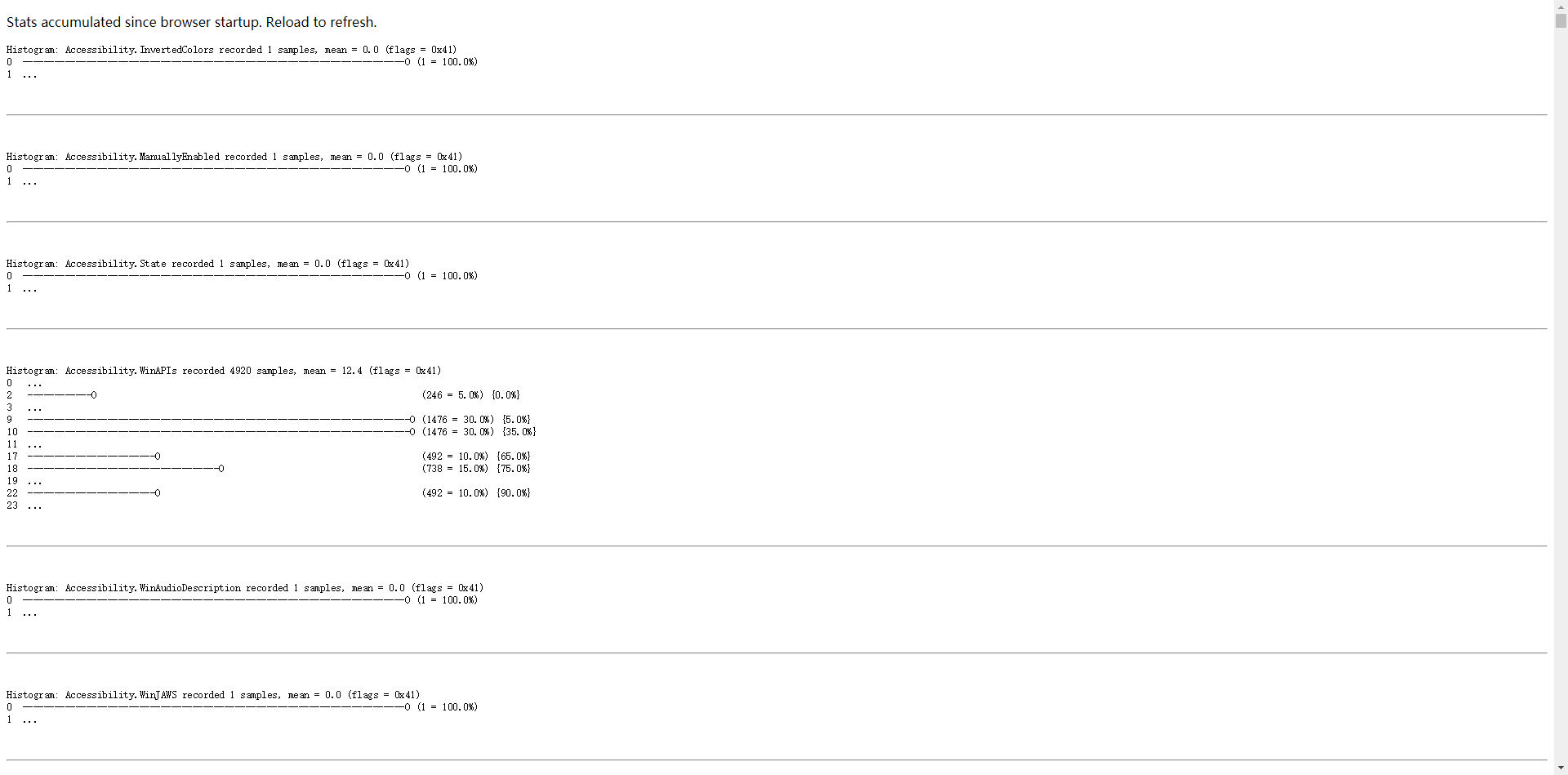
看一下效果,浏览器地址栏输入:chrome://histograms/
chromium之histogram.h的更多相关文章
- chromium之MessagePump.h
上代码,注释已经写得很详细了. 粗看一下,这是个纯虚类,用于跨平台的通用接口. MessagePump,Pump的意思是泵,,MessagePump也就是消息泵,输送消息 namespace base ...
- chromium之MessageLoop浅析
对chromium的MessageLoop非常感兴趣,接下来会详细分析Windows平台的具体实现. 代码版本:chromium-4.0.210.0_p26329 先看一下依赖的文件 message_ ...
- 【Chromium中文文档】Chromium多进程架构
多进程架构 转载请注明出处:https://ahangchen.gitbooks.io/chromium_doc_zh/content/zh//Start_Here_Background_Readin ...
- Chromium
Chromium多进程架构 多进程架构 转载请注明出处:https://ahangchen.gitbooks.io/chromium_doc_zh/content/zh//Start_Here_Bac ...
- Histogram
folly/Histogram.h Classes Histogram Histogram.h defines a simple histogram class, templated on the t ...
- Word histogram
Here is a program that reads a file and builds a histogram of the words in the file: process_file lo ...
- 直方图均衡算法(Histogram Equalized)
Lab1: Histogram Equalization 1. 实验环境(C++) 操作系统版本 MacOS Catalina 10.15 OpenCV4.0 (imgcodecs | core | ...
- 根据直方图 histogram 进行简单的图像检索
https://github.com/TouwaErioH/Machine-Learning/tree/master/image%20identification/Histogram%20retrie ...
- Android编译环境折腾记
题记:感觉是时候写点什么了=_=! 第一次安装了ubuntu14.04.5,官网下载的iso,官网下的jar,编译android4.x需要安装jdk6,更高的版本会有问题,baidu到很多搭建环境的步 ...
随机推荐
- JavaScript练习笔记整理·4 - 6.26
基础练习(1): 我的解答为: function getMiddle(s) { if(s.length%2 == 0) { return s.charAt(s.length/2-1)+s.charAt ...
- Python爬虫教程-13-爬虫使用cookie爬取登录后的页面(人人网)(下)
Python爬虫教程-13-爬虫使用cookie爬取登录后的页面(下) 自动使用cookie的方法,告别手动拷贝cookie http模块包含一些关于cookie的模块,通过他们我们可以自动的使用co ...
- Python unittest模块心得(二)
基础概念介绍请参看: http://www.cnblogs.com/frost-hit/p/8295818.html 组织测试用例 unittest.TestSuite(tests=()): 除了使用 ...
- 工作笔记—hibernate之QueryCriteria
本人用的是sg-uap虚拟环境 //查询方法 //参数 RequestCondition 配合 controller 的 @QueryRequestParam注解可以将前台传入整个对象进行接收 //参 ...
- C#启动外部程序(进程)
通过调用Process类可以启动系统内部(环境变量里的)或者指定位置的程序,例如: Process.Start("notepad");//启动记事本 Process.Start(& ...
- mysql获取表列信息、主键信息
/** * 获取物理表中已存在的列信息 * @param tbName 表名 * @return results 查询结果 */ fun getExistColumnInfo(tbName:Strin ...
- windows中实现有相同的程序运行就不在运行新的程序。
主要是通过互斥量内核对象来实现程序间互斥. // CEcopClientApp 初始化HANDLE m_hMutexMark = NULL;BOOL CEcopClientApp::InitInsta ...
- .C#认证考试试题汇编:第一单元:1,11 第二单元:1,11
第一单元1,11 好久没用异或都快忘了,就让我们一起来了解哈啥子事异或 说的这个,就不经意让我想起书上的几种交换值得方法了 我这儿说的交换的方法是,不使用第三个变量来交换,而是两个 实现条件是C a= ...
- Go语言(二) 继承和重载
继承 package main import "fmt" type Skills []string type person struct { name string age int ...
- JAVA中高访问量高并发的问题怎么解决?
尽量使用缓存,包括用户缓存,信息缓存等,多花点内存来做缓存,可以大量减少与数据库的交互,提高性能. 用jprofiler等工具找出性能瓶颈,减少额外的开销. 优化数据库查询语句,减少直接使用hiber ...