
pyhon文件操作典型代码实现(非常经典!)
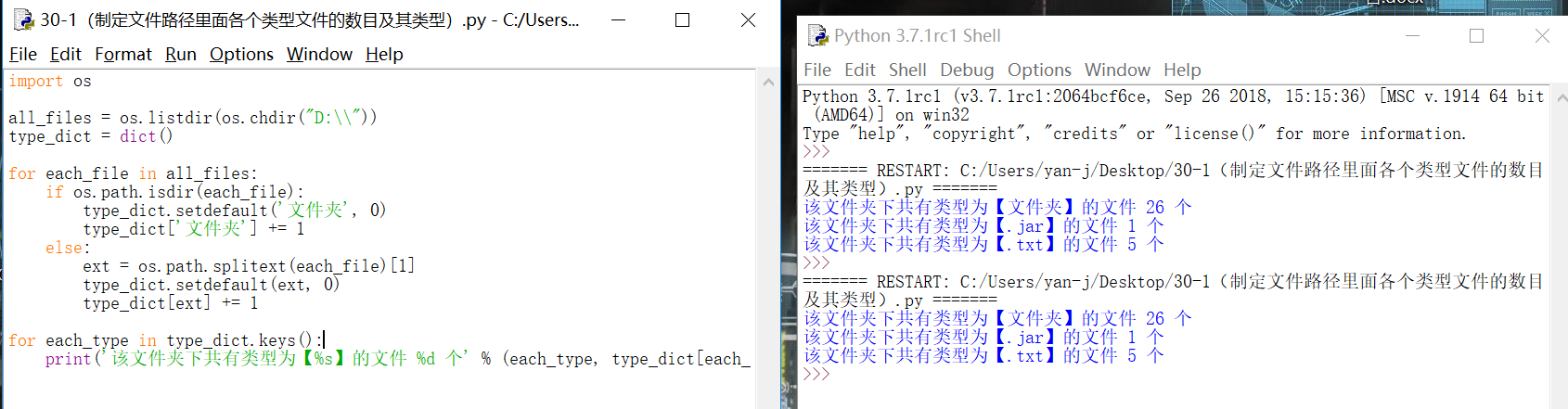
1. 编写一个程序,统计当前目录下每个文件类型的文件数,程序实现如图:
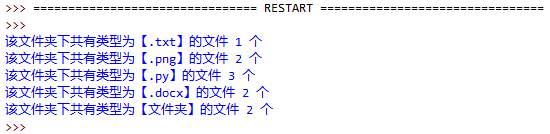
实现代码:
import os
all_files = os.listdir(os.chdir("D:\\"))
type_dict = dict()
for each_file in all_files:
if os.path.isdir(each_file):
type_dict.setdefault('文件夹', 0)
type_dict['文件夹'] += 1
else:
ext = os.path.splitext(each_file)[1]
type_dict.setdefault(ext, 0)
type_dict[ext] += 1
for each_type in type_dict.keys():
print('该文件夹下共有类型为【%s】的文件 %d 个' % (each_type, type_dict[each_type]))
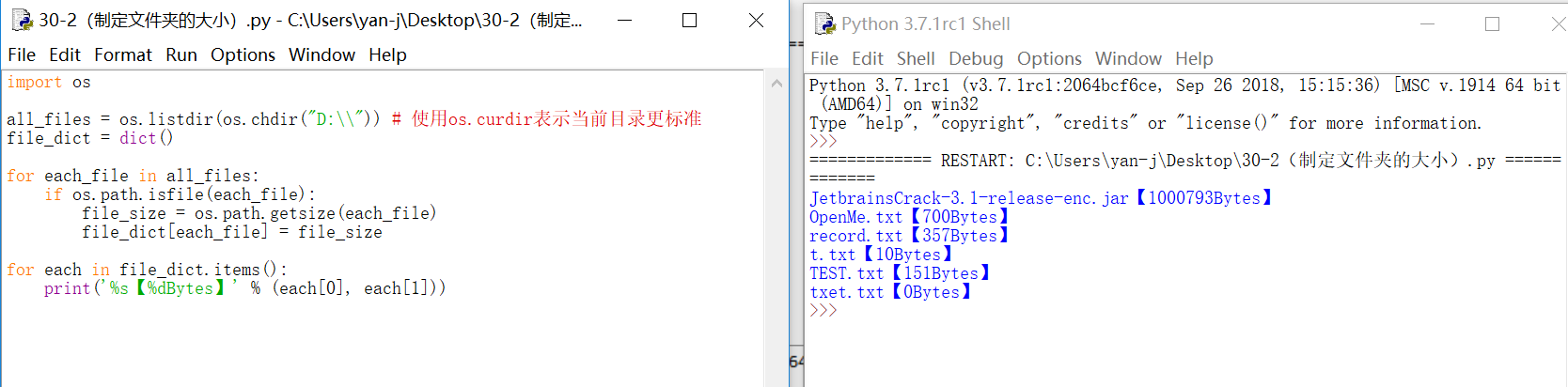
2、编写一个程序,计算当前文件夹下所有文件的大小:
import os
all_files = os.listdir(os.chdir("D:\\")) # 使用os.curdir表示当前目录更标准
file_dict = dict()
for each_file in all_files:
if os.path.isfile(each_file):
file_size = os.path.getsize(each_file)
file_dict[each_file] = file_size
for each in file_dict.items():
print('%s【%dBytes】' % (each[0], each[1]))
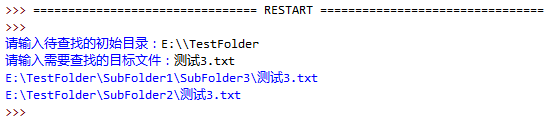
3、编写一个程序,用户输入文件名以及开始搜索的路径,搜索该文件是否存在。如遇到文件夹,则进入文件夹继续搜索:
import os
def search_file(start_dir, target) :
os.chdir(start_dir)
for each_file in os.listdir(os.chdir("C:\\")) :
if each_file == target :
print(os.getcwd() + os.sep + each_file) # 使用os.sep是程序更标准
if os.path.isdir(each_file) :
search_file(each_file, target) # 递归调用
os.chdir(os.pardir) # 递归调用后切记返回上一层目录
start_dir = input('请输入待查找的初始目录:')
target = input('请输入需要查找的目标文件:')
search_file(start_dir, target)
4、 编写一个程序,用户输入开始搜索的路径,查找该路径下(包含子文件夹内)所有的视频格式文件(要求查找mp4 rmvb, avi的格式即可),并把创建一个文件(vedioList.txt)存放所有找到的文件的路径,程序实现如图:
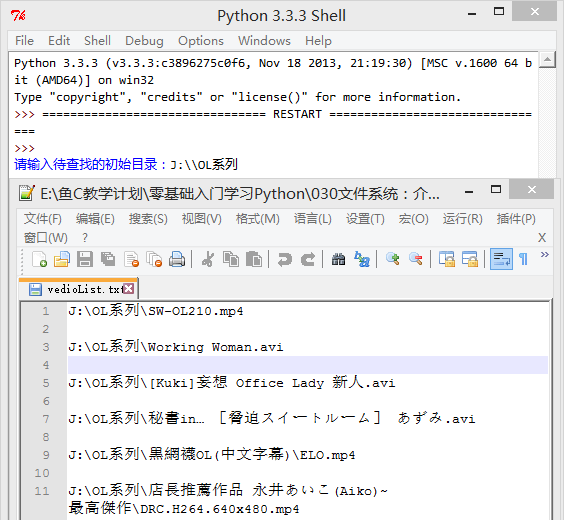
import os
def search_file(start_dir, target) :
os.chdir(start_dir)
for each_file in os.listdir(os.curdir) :
ext = os.path.splitext(each_file)[1]
if ext in target :
vedio_list.append(os.getcwd() + os.sep + each_file + os.linesep) # 使用os.sep是程序更标准
if os.path.isdir(each_file) :
search_file(each_file, target) # 递归调用
os.chdir(os.pardir) # 递归调用后切记返回上一层目录
start_dir = input('请输入待查找的初始目录:')
program_dir = os.getcwd()
target = ['.mp4', '.avi', '.rmvb']
vedio_list = []
search_file(start_dir, target)
f = open(program_dir + os.sep + 'vedioList.txt', 'w')
f.writelines(vedio_list)
f.close()
5、编写一个程序,用户输入关键字,查找当前文件夹内(如果当前文件夹内包含文件夹,则进入文件夹继续搜索)所有含有该关键字的文本文件(.txt后缀),要求显示该文件所在的位置以及关键字在文件中的具体位置(第几行第几个字符)
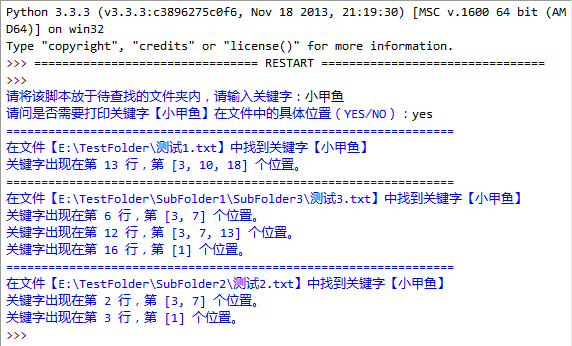
import os
def print_pos(key_dict):
keys = key_dict.keys()
keys = sorted(keys) # 由于字典是无序的,我们这里对行数进行排序
for each_key in keys:
print('关键字出现在第 %s 行,第 %s 个位置。' % (each_key, str(key_dict[each_key])))
def pos_in_line(line, key):
pos = []
begin = line.find(key)
while begin != -1:
pos.append(begin + 1) # 用户的角度是从1开始数
begin = line.find(key, begin+1) # 从下一个位置继续查找
return pos
def search_in_file(file_name, key):
f = open(file_name)
count = 0 # 记录行数
key_dict = dict() # 字典,用户存放key所在具体行数对应具体位置
for each_line in f:
count += 1
if key in each_line:
pos = pos_in_line(each_line, key) # key在每行对应的位置
key_dict[count] = pos
f.close()
return key_dict
def search_files(key, detail):
all_files = os.walk(os.curdir)
txt_files = []
for i in all_files:
for each_file in i[2]:
if os.path.splitext(each_file)[1] == '.txt': # 根据后缀判断是否文本文件
each_file = os.path.join(i[0], each_file)
txt_files.append(each_file)
for each_txt_file in txt_files:
key_dict = search_in_file(each_txt_file, key)
if key_dict:
print('================================================================')
print('在文件【%s】中找到关键字【%s】' % (each_txt_file, key))
if detail in ['YES', 'Yes', 'yes']:
print_pos(key_dict)
key = input('请将该脚本放于待查找的文件夹内,请输入关键字:')
detail = input('请问是否需要打印关键字【%s】在文件中的具体位置(YES/NO):' % key)
search_files(key, detail)
pyhon文件操作典型代码实现(非常经典!)的更多相关文章
- C#各种文件操作的代码与注释
C#各种文件操作的代码与注释,具体看下面代码: using System; using System.Collections.Generic; using System.Linq; using Sys ...
- python系列——文件操作的代码
import numpy as np import os,sys #获取当前文件夹,并根据文件名 def path(fileName): p=sys.path[0]+'\\'+fileName ret ...
- java IO流 对文件操作的代码集合
Io流 按照分类 有两种分类 流向方向: 有输入流和输出流 按照操作类型有:字节流和字符流 按照流向方向 字节流的一些操作 //读文件 FileInputStream fis = new FileIn ...
- VS2010/MFC编程入门之四十五(MFC常用类:CFile文件操作类)
上一节中鸡啄米讲了定时器Timer的用法,本节介绍下文件操作类CFile类的使用. CFile类概述 如果你学过C语言,应该知道文件操作使用的是文件指针,通过文件指针实现对它指向的文件的各种操作.这些 ...
- 文件操作(FILE)与常用文件操作函数
文件 1.文件基本概念 C程序把文件分为ASCII文件和二进制文件,ASCII文件又称文本文件,二进制文件和文本文件(也称ASCII码文件)二进制文件中,数值型数据是以二进制形式存储的, 而在文本文件 ...
- PYDay6- 内置函数、验证码、文件操作、发送邮件函数
1.内置函数 1.1Python的内置函数 abs() dict() help() min() setattr() all() dir() hex() next() slice() any() div ...
- (转载)Mac系统下利用ADB命令连接android手机并进行文件操作
Mac系统下利用ADB命令连接android手机并进行文件操作 标签: Mac adb android 2016-03-14 10:09 5470人阅读 评论(1) 收藏 举报 分类: Androi ...
- python系列——文件操作
打开和关闭 示例:python系列——文件操作的代码 打开模式 读取 写入
- python从入门到大神---4、python3文件操作最最最最简单实例
python从入门到大神---4.python3文件操作最最最最简单实例 一.总结 一句话总结: python文件操作真的很简单,直接在代码中调用文件操作的函数比如open().read(),无需引包 ...
随机推荐
- 二十一、IntelliJ IDEA 控制台输出中文乱码问题的解决方法
首先,找到 IntelliJ IDEA 的安装目录,进入bin目录下,定位到idea.vmoptions文件,如下图所示: 双击打开idea.vmoptions文件,如下图所示: 然后,在其中追加-D ...
- JAVA数据类型能串门不?
JAVA这几种数据类型,能否串门?入了人家门,就得按人家规矩来,入乡随俗哦,难免发生有自觉的 还有不情愿被动的. 自动类型转换 自动类型转换:容量小的数据类型可以自动转换为容量大的数据类型.在图中,黑 ...
- border-radius__边框圆角
1.四个参数: border-radius: 值1 值2 值3 值4;顺序:从左开始,顺时针顺 div{ width: 200px; height: 100px; background-color: ...
- JSP + servlet 源码 实现文件的上传
JSP页面 upLoad.jsp _________________________________ <%@ page language="java" import=&quo ...
- [Doctrine Migrations] 数据库迁移组件的深入解析一:安装与使用
场景分析 团队开发中,每个开发人员对于数据库都修改都必须手动记录,上线时需要人工整理,运维成本极高.而且在多个开发者之间数据结构同步也是很大的问题.Doctrine Migrations组件把数据库变 ...
- ASA 5.0/8.0/9.0 杂记
ASA 10.0 之前的版本都是使用odbc方式连接,由于某个项目的需求,无奈学习一下这些老掉牙的技巧. 1.新建 数据源 (不会的话,自行搜索一下) 2.使用 快捷方式 或者 其他方式 执行 C:\ ...
- django创建第一个子应用-3
在Web应用中,通常有一些业务功能模块是在不同的项目中都可以复用的,故在开发中通常将工程项目拆分为不同的子功能模块,各功能模块间可以保持相对的独立,在其他工程项目中需要用到某个特定功能模块时,可以将该 ...
- ruby配置镜像源
1.打开电脑的cmd窗口,输入如下命令即可查看gem镜像: gem sources l 或是直接使用 gem sources 查询结果如下: C:\Users\Administrator>gem ...
- 安装 RobotFramework 可视化工具 RIDE
1. 概述 robot framework 的安装 可视化工具 ride 的安装 2. 准备 安装缘由 来自一本书 书名: Robot Framework自动化测试修炼宝典 豆瓣上有好评不少, 坏评也 ...
- Java设计模式(15)——行为模式之策略模式(Strategy)
一.概述 概念 UML简图 角色 二.实践 我们先将上述的UML图的抽象情况下的代码写出,然后再给出一个具体的例子 策略接口——当然如果有一些公共的行为,应当使用抽象类! /** * 策略接口 * * ...