
.net core 学习小结之 PostMan报415
- 首先415的官方解释是:对于当前请求的方法和所请求的资源,请求中提交的实体并不是服务器中所支持的格式,因此请求被拒绝。
- 也就是说我所准备的数据格式并不是后台代码使用的数据格式
- 后台代码如下
using System;

using System.Collections.Generic;

using System.ComponentModel.DataAnnotations;

using System.Linq;

using System.Threading.Tasks;

using Microsoft.AspNetCore.Mvc;

namespace JwtAuth.Controllers

{

    using System.Security.Claims;

    using Microsoft.Extensions.Options;

    using Microsoft.IdentityModel.Tokens;

    using Microsoft.AspNetCore.Authentication.JwtBearer;

    //添加dll的引用 Nuget Microsoft.AspNetCore.Authentication.JwtBearer;

    using System.IdentityModel.Tokens.Jwt;

     [Route("api/[controller]")]

    public class AuthController : Controller

    {

        public JwtSettings settings;

        public AuthController(IOptions<JwtSettings> jwtsettings)

        {

            settings = jwtsettings.Value;

        }

        [HttpPost]

        public IActionResult Token([FromBody]LoginInfo model)

        {

            if (ModelState.IsValid)

            {

                if (model.username == "cyao" && model.password == "")

                {

                    //用户合法情况

                    //添加授权信息

                    var claims = new Claim[] { new Claim(ClaimTypes.Name, "cyao"), new Claim(ClaimTypes.Role, "admin") };

                    var key = new SymmetricSecurityKey(System.Text.Encoding.UTF8.GetBytes(settings.SecretKey));

                    var creds = new SigningCredentials(key, SecurityAlgorithms.HmacSha256);

                    var token = new JwtSecurityToken(

                        settings.Issuer,

                        settings.Audience,

                        claims,

                        DateTime.Now,

                        DateTime.Now.AddMinutes(),//过期时间

                        creds);

                    return Ok(new { token = new JwtSecurityTokenHandler().WriteToken(token) });

                }

            }

            return BadRequest();

        }

    }

    public class LoginInfo

    {

        [Required]

        public string username { get; set; }

        [Required]

        public string password { get; set; }

    }

} - 使用POSTMan如何构造一个
[FromBody]?错误示例
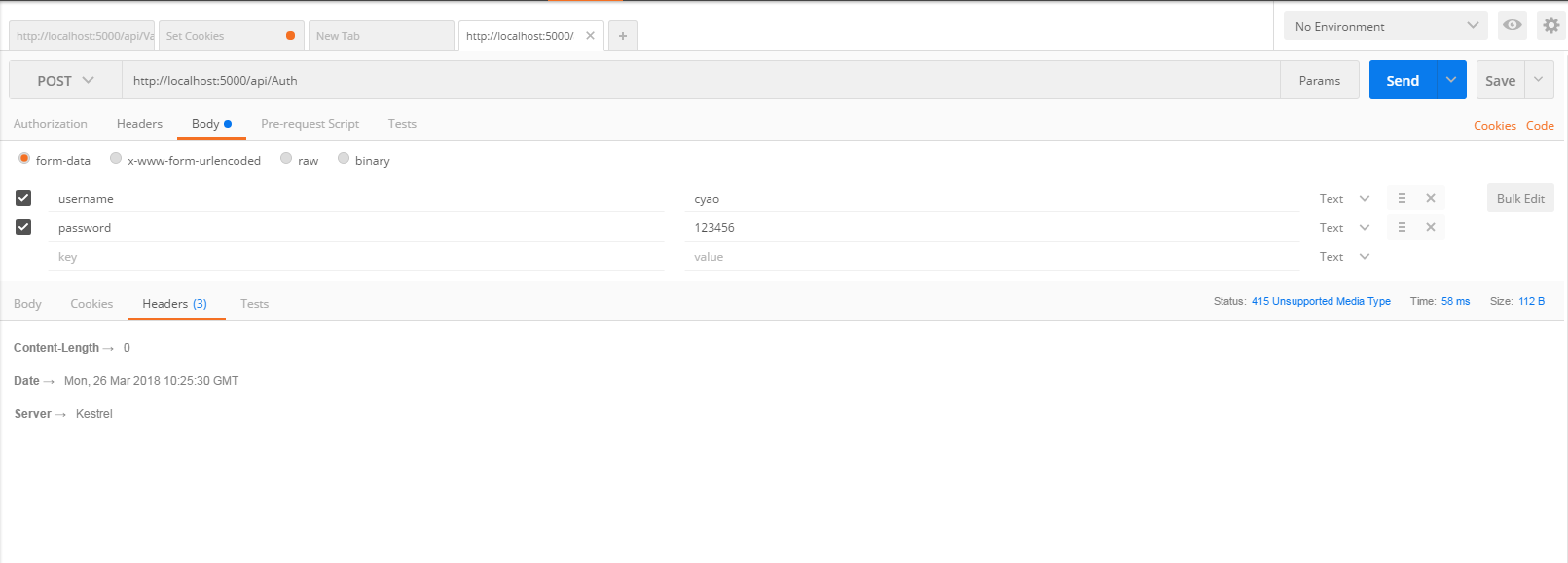 (图1.0)
 - 正确示例如下图2.0
 (图2.0)
 - 或者使用图1.0的配置将后台代码参数的标签改成[FromForm]
.net core 学习小结之 PostMan报415的更多相关文章
- .net core 学习小结之环境配置篇
安装IIs对 netcore 的支持 https://docs.microsoft.com/en-us/aspnet/core/fundamentals/servers/aspnet-core-mod ...
- .net core 学习小结之 自定义JWT授权
自定义token的验证类 using System; using System.Collections.Generic; using System.IO; using System.Linq; usi ...
- .net core 学习小结之 JWT 认证授权
新增配置文件 { "Logging": { "IncludeScopes": false, "Debug": { "LogLeve ...
- .net core 学习小结之 Cookie-based认证
在startup中添加授权相关的管道 using System; using System.Collections.Generic; using System.Linq; using System.T ...
- .net core 学习小结之 配置介绍(config)以及热更新
命令行的配置 var settings = new Dictionary<string, string>{ { "name","cyao"}, {& ...
- objective-c基础教程——学习小结
objective-c基础教程——学习小结 提纲: 简介 与C语言相比要注意的地方 objective-c高级特性 开发工具介绍(cocoa 工具包的功能,框架,源文件组织:XCode使用介绍) ...
- SpringMVC过程中@RequestBody接收Json的问题 总是报415
在SpringMVC中用@RequestBody接收Json的问题,总是报415,经过一翻查找 前台js的post: var postdata = '{"title":" ...
- EntityFramework Core 学习系列(一)Creating Model
EntityFramework Core 学习系列(一)Creating Model Getting Started 使用Command Line 来添加 Package dotnet add pa ...
- python --- 字符编码学习小结(二)
距离上一篇的python --- 字符编码学习小结(一)已经过去2年了,2年的时间里,确实也遇到了各种各样的字符编码问题,也能解决,但是每次都是把所有的方法都试一遍,然后终于正常.这种方法显然是不科学 ...
随机推荐
- jsp三种注释方法
HTML注释(输出注释):指在客户端查看源代码时能看见注释.例如, <!-- this is an html comment.it will show up int the response. ...
- 对TypeScript进行研究
1.npm install -g typescript 在编辑器,将下面的代码输入到greeter.ts文件里: function greeter(person) { return "Hel ...
- Java 集合基础详细介绍
一.Java集合框架概述 集合.数组都是对多个数据进行存储操作的结构,简称Java容器.此时的存储,主要指的是内存层面的存储,不涉及到持久化的存储(.txt, .jpg, .avi,数据库中).Jav ...
- 编译caffe-gpu-cuda及cudnn-tar 下载地址
y下载 https://github.com/BVLC/caffe https://github.com/BVLC/caffe/archive/master.zip gcc caffe安装 有2个问题 ...
- C# 更改 Hashtable key 名称
Hashtable ht = new Hashtable(); ht[; ht["B"] = ht["标题"]; ht.Remove("标题" ...
- python深度学习:矩阵转置(transpose)
转置:即行列转换. import numpy as np import matplotlib.pyplot as plt C=np.array([[1,2,3],[4,5,6]]) # Display ...
- ASP.NET实现文件断点续传
IE的自带下载功能中没有断点续传功能,要实现断点续传功能,需要用到HTTP协议中鲜为人知的几个响应头和请求头. 一. 两个必要响应头Accept-Ranges.ETag 客户端每次提交下载请求时,服务 ...
- 【canvas学习笔记五】使用图片
在canvas里画图有两个步骤: 获得图片源. drawImage()画图. 图片源 canvas支持以下几种图片资源: HTMLImageElement 可以使用Image()方法构造的图片,也可以 ...
- CSS 手动画热销小图标
效果图 HTML 标签 <div class="main"> <div class="small"> <div class=&qu ...
- HDU1022--Train Problem I(栈的应用)
Problem Description As the new term comes, the Ignatius Train Station is very busy nowadays. A lot o ...