
Silverlight 登陆界面
美术水平有限,不喜勿喷。
界面代码,效果如下图
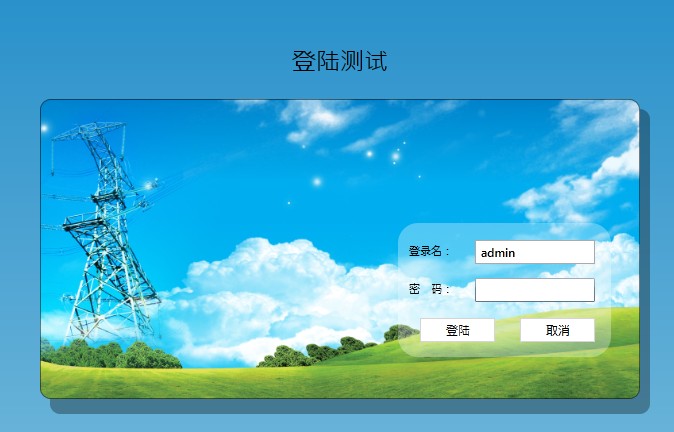
<UserControl x:Class="ElecDemoTelerikSL.Login"

    xmlns="http://schemas.microsoft.com/winfx/2006/xaml/presentation"

    xmlns:x="http://schemas.microsoft.com/winfx/2006/xaml"

    xmlns:d="http://schemas.microsoft.com/expression/blend/2008"

    xmlns:mc="http://schemas.openxmlformats.org/markup-compatibility/2006"

    xmlns:sdk="http://schemas.microsoft.com/winfx/2006/xaml/presentation/sdk"

    xmlns:my="clr-namespace:Drawsee.Sl.AppBase.UserManage.UI;assembly=Drawsee.Sl.AppBase"

    mc:Ignorable="d"

    d:DesignHeight="" d:DesignWidth="">

    <Grid x:Name="LayoutRoot" ScrollViewer.HorizontalScrollBarVisibility="Disabled" ScrollViewer.VerticalScrollBarVisibility="Disabled">

        <Grid.Background>

            <LinearGradientBrush EndPoint="0.5,1" StartPoint="0.5,0">

                <GradientStop Color="#FF007CC3"/>

                <GradientStop Color="#FF93CAE2" Offset=""/>

            </LinearGradientBrush>

        </Grid.Background>

        <StackPanel HorizontalAlignment="Center" VerticalAlignment="Center">

            <TextBlock Text="登陆测试" FontSize="" HorizontalAlignment="Center" Margin="0,0,0,20" />

        <Grid Width="" Height="">

            <Rectangle Fill="#50000000" RadiusX="" RadiusY="" Margin="10,10,-10,-15" />

            <Image Source="images/elec_background.jpg" Height="" HorizontalAlignment="Center" Name="imageBackground" Stretch="Fill" VerticalAlignment="Center" Width="">

                <Image.Clip>

                    <RectangleGeometry RadiusX="" RadiusY="" Rect="0,0,600,300" />

                </Image.Clip>

             </Image>

            <Border BorderBrush="#80000000" BorderThickness="" CornerRadius="" >

            </Border>

            <Grid Margin="358,124,29,42">

                <Rectangle  Stretch="Fill" Fill="#4FFFFFFF" RadiusX="" RadiusY="" />

                <sdk:Label Content="登录名:" Height="" HorizontalAlignment="Left" Name="lblLoginName" VerticalAlignment="Top" Width="" Margin="11,20,0,0" />

                <sdk:Label Content="密   码:" Height="" HorizontalAlignment="Left" Name="lblLoginPwd" VerticalAlignment="Top" Width="" Margin="11,58,0,0" />

                <TextBox Height="" HorizontalAlignment="Left" Name="txtLoginName" VerticalAlignment="Top" Width="" Margin="77,17,0,0" />

                <PasswordBox Height="" HorizontalAlignment="Left"  Margin="77,55,0,0" Name="txtLoginPwd" VerticalAlignment="Top" Width="" />

                <Button Content="登陆" Height="" HorizontalAlignment="Left" Name="btnLogin" VerticalAlignment="Top" Width="" Margin="22,95,0,0" Click="btnLogin_Click" />

                <Button Content="取消" Height="" HorizontalAlignment="Left" Name="btnCancel" VerticalAlignment="Top" Width="" Margin="122,95,0,0" />

                </Grid>

        </Grid>

        </StackPanel>

    </Grid>

</UserControl>
后台代码
public partial class Login : UserControl

    {

        public Login()

        {

            InitializeComponent();

            txtLoginName.Text = "admin";

        }

        private void btnLogin_Click(object sender, RoutedEventArgs e)

        {

            string loginName =txtLoginName.Text.Trim();

            string loginPwd =txtLoginPwd.Password.Trim();

            if (loginName.Equals("admin") && loginName.Equals("admin"))

                this.Content = new MainPage(); //跳转到主页面

            else

                MessageBox.Show("登陆失败!", "提示", MessageBoxButton.OKCancel);

        }

    }
主页面xaml
<UserControl x:Class="SilverlightCreate.MainTest"

    xmlns="http://schemas.microsoft.com/winfx/2006/xaml/presentation"

    xmlns:x="http://schemas.microsoft.com/winfx/2006/xaml"

    xmlns:d="http://schemas.microsoft.com/expression/blend/2008"

    xmlns:mc="http://schemas.openxmlformats.org/markup-compatibility/2006"

    xmlns:sdk="http://schemas.microsoft.com/winfx/2006/xaml/presentation/sdk"

    xmlns:my="clr-namespace:SilverlightCreate"

    mc:Ignorable="d"

    d:DesignHeight="800" d:DesignWidth="1800"  >

    <Grid x:Name="LayoutRoot" VerticalAlignment="Stretch">

        <Grid>

            <Grid.RowDefinitions>

                <RowDefinition Height="80"></RowDefinition>

                <RowDefinition Height="*"></RowDefinition>

            </Grid.RowDefinitions>

            <Grid Grid.Row="0" >

                <Grid.Background>

                    <LinearGradientBrush >

                        <GradientStop Color="#FF007CC3" Offset="0.5" />

                        <GradientStop Color="#FFa9dcfa" Offset="1" />

                    </LinearGradientBrush>

                </Grid.Background>

                <HyperlinkButton Content="操作说明" HorizontalAlignment="Right" VerticalAlignment="Bottom" Foreground="AliceBlue" NavigateUri="http://www.baidu.com" TargetName="_blank" FontSize="16" IsTabStop="False" Height="24" Name="hlbHelp" Width="68" Margin="0,0,0,12" />

                <my:ToolBar HorizontalAlignment="Right" Margin="0,33,100,0" Padding="2" x:Name="toolBar1" VerticalAlignment="Top" />

            </Grid>

            <Grid x:Name="GridMain" Grid.Row="1">

                <Grid.ColumnDefinitions>

                    <ColumnDefinition Width="290" />

                    <ColumnDefinition Width="5" />

                    <ColumnDefinition Width="665*" />

                </Grid.ColumnDefinitions>

                <Grid Grid.Column="0" x:Name="system">

                    <Border BorderBrush="LightGray" BorderThickness="1" CornerRadius="0" />

                </Grid>

                <sdk:GridSplitter Grid.Column="1" HorizontalAlignment="Center" VerticalAlignment="Stretch" Background="#FF027DC3"></sdk:GridSplitter>

                <Grid Grid.Column="2">

                    <Grid x:Name="GridFrame">

                        <Border BorderBrush="LightGray" BorderThickness="1" CornerRadius="0">

                        </Border>

                    </Grid>

                </Grid>

            </Grid>

        </Grid>

    </Grid>

</UserControl>
Silverlight 登陆界面的更多相关文章
- [Django]登陆界面以及用户登入登出权限
前言:简单的登陆界面展现,以及用户登陆登出,最后用户权限的问题 正文: 首先需要在settings.py设置ROOT_URLCONF,默认值为: ROOT_URLCONF = 'www.urls'# ...
- outlook 2016 for windows 每次刷新发送接收邮件会弹出登陆界面
Q: outlook2016 for windows 每次刷新发送接收邮件会弹出登陆界面,office365 ProPlus 都是正常激活了,Word 和Excel都不存在此类问题 A: 排除用户的o ...
- javafx之登陆界面的跳转
界面布局用到的是fxml而非纯java代码,工具是javafx sence builder 账号:account 密码:password 登陆成功: 可以点击退出登陆返回到登陆页面 工程目录: pac ...
- Altium Designer15 卡在登陆界面解决办法:
Altium Designer15 卡在登陆界面解决办法: 在我的电脑系统盘中找到下面目录(注:如果看不到,需要取消隐藏文件选项.) C:\Documents and Settings\Adminis ...
- 描述Linux系统开机到登陆界面的启动过程(计时2分钟)
简述: 1.开机BIOS自检 2.MBR引导 3.grub引导菜单 4.加载内核kernel 5.启动init进程 6.读取inittab文件,执行rc.sysinit,rc等脚本 7.启动minge ...
- alertDialog创建登陆界面,判断用户输入
alertDialog创建登陆界面,需要获取用户输入的用户名和密码,获取控件对象的时候不能像主布局文件那样获得, 需要在onClickListener中获取,代码如下: public boolean ...
- 解决Ubuntu输入正确密码后无法进入桌面,一直停留在登陆界面的问题
在登陆界面按下Ctrl + Shift + F1 进入命令行模式,输入你的用户名和密码之后,敲入下面几行命令就可以了! $ cd - $ sudo chown 你的用户名:你的用户名 .Xauthor ...
- Web 登陆界面---简单模块1
今天学习登陆界面的基本模块,其中几个基本的元素 a元素.form元素.布局元素(table\tr\td).加粗(b).input元素 1.<a href="">内容&l ...
- 一个简单WPF登陆界面,包含记住密码,自动登录等功能,简洁美观
简介:这是一个自己以前用WPF设计的登陆界面,属于一个实验性的界面窗体,如果用于产品还很有不足.但也是有一点学习价值.后台代码略有复杂,但基本上都有注释 分类,略有代码经验的一般都能看懂. 登陆界面外 ...
随机推荐
- C#设计模式(9)——装饰者模式
一.概念 装饰者模式以对客户透明的方式动态地给一个对象附加上更多的责任,装饰者模式相比生成子类可以更灵活地增加功能. 二.模型 三.代码实现 /// <summary> /// 手机抽象类 ...
- Java探索之旅(13)——字符串类String
1.初始化 String类是Java预定义类,非基本类型而是引用类型. public class StudyString { public static void main(String[] args ...
- Learning Python 001 第一个程序
Python 第一个程序 我使用的开发工具是PyCharm软件.我们使用的是Python3.5 for windows . 如果你还没有安装PyCharm软件 和 Python3.5,请到这里来看如果 ...
- java单链表反转
今天做leetcode,遇到了单链表反转.研究了半天还搞的不是太懂,先做个笔记吧 参考:http://blog.csdn.net/guyuealian/article/details/51119499 ...
- 11、scala类型参数
一.类型参数1 1.介绍 类型参数是什么?类型参数其实就类似于Java中的泛型.先说说Java中的泛型是什么,比如我们有List a = new ArrayList(),接着a.add(1),没问题, ...
- 前端中的事件循环eventloop机制
我们知道 js 是单线程执行的,那么异步的代码 js 是怎么处理的呢?例如下面的代码是如何进行输出的: console.log(1); setTimeout(function() { console. ...
- 2017乌鲁木齐区域赛I(带权并查集)
#include<bits/stdc++.h>using namespace std;int f[200010];//代表元long long rl[200010];//记rl[i]为结点 ...
- (PHP)redis List(列表)操作
/** * * List操作 * 列表操作 * 可理解为数组操作 * 插入.删除数据按照一定规律排列的 * 元素可重复 * 适用于队列 * */ //在列表头部插入一个值one,当列表不存在时自动创建 ...
- “FreeTextBox”控件使用——Word编辑器
前言 在敲牛腩新闻发布系统时,添加新闻修改新闻的时候遇到了Word编辑器控件.它是引用了第三方控件,下面关于怎么引用该控件及其一些简单的使用方法进行分析. 内容 在网上找的该插件"FreeT ...
- hdu6070(分数规划/二分+线段树区间更新,区间最值)
题目链接: http://acm.hdu.edu.cn/showproblem.php?pid=6070 题意: 给出一个题目提交序列, 从中选出一个正确率最小的子串. 选中的子串中每个题目当且仅当最 ...