
spring-boot2
1.Spring Boot

1.1.什么是Spring Boot

Java是静态语言,先变异后运行都是静态语言,不编译直接运行是动态语言(js是动态语言不需要编译,因为浏览器可以直接解析)。Java笨重是因为开发一个功能需要导入很多的配置。Spring-boot整合了当前流行的一系列第三方框架,并且做了一系列默认的配置拿来就用,不需要额外的配置。Spring-boot是运行jar并且内嵌了servlet容器(虽然运行的是一个jar,但是内嵌了tomcat,不需要再次部署到tomcat里面去了)。但是并不适合生产环境,生成环境还是可以将工程打成war包去发布,但是在开发阶段只需要打成jar包就可以了。

微服务:把一个个的子功能拆分成一个个的jar包去运行。

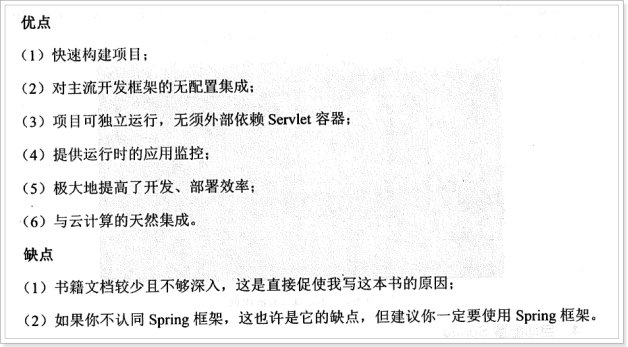
Spring Boot的优缺点
1.1.快速入门

1.1.1.设置spring boot的parent

Spring-boot是spring整合了很多第三方的技术的框架。parent是必须要用的是硬性要求。

<parent>

        <groupId>org.springframework.boot</groupId>

        <artifactId>spring-boot-starter-parent</artifactId>

        <version>1.5.2.RELEASE</version>

    </parent>

说明:Spring boot的项目必须要将parent设置为spring boot的parent,该parent包含了大量默认的配置,大大简化了我们的开发。最新版。

1.1.2.导入spring boot的web支持

因为要开发web项目。

<dependency>

            <groupId>org.springframework.boot</groupId>

            <artifactId>spring-boot-starter-web</artifactId>

        </dependency>

1.1.3.添加Spring boot的插件

这个插件可有可无。

<plugin>

                <groupId>org.springframework.boot</groupId>

                <artifactId>spring-boot-maven-plugin</artifactId>

            </plugin>

1.1.4.编写第一个Spring Boot的应用
package cn.itcast.springboot.demo;//这个包跟下面的包是没有关系的,各自独立的。

import java.nio.charset.Charset;

import org.springframework.boot.Banner.Mode;

import org.springframework.boot.SpringApplication;

import org.springframework.boot.autoconfigure.SpringBootApplication;

import org.springframework.boot.autoconfigure.data.redis.RedisAutoConfiguration;

import org.springframework.context.annotation.Bean;

import org.springframework.context.annotation.Configuration;

import org.springframework.http.converter.StringHttpMessageConverter;

import org.springframework.stereotype.Controller;

import org.springframework.web.bind.annotation.RequestMapping;

import org.springframework.web.bind.annotation.ResponseBody;

//这个类既是一个控制器也是一个spring-boot应用也是一个配置文件

@Controller//一个控制器

//exclude = { RedisAutoConfiguration.class }不想redis自动配置

@SpringBootApplication(exclude = { RedisAutoConfiguration.class })//一个spring-boot应用

@Configuration//一个xml配置文件

public class HelloApplication {//spring-boot的入口类是XXXApplication类。

    @RequestMapping("hello")

    @ResponseBody

    public String hello() {

        return "hello world!!";

    }

    // 自定义消息转化器的第一种方法

    @Bean

    public StringHttpMessageConverter stringHttpMessageConverter() {

        StringHttpMessageConverter converter = new StringHttpMessageConverter(Charset.forName("ISO-8859-1"));

        return converter;

    }

    public static void main(String[] args) {

        // SpringApplication.run(HelloApplication.class, args);  要运行run的应用的类HelloApplication一定要包含@SpringBootApplication注解。有参数指定参数没有参数是args。

        SpringApplication application = new SpringApplication(HelloApplication.class);

        application.setBannerMode(Mode.OFF);

        application.run(args);

    }

}
代码说明:

1、@SpringBootApplication:Spring Boot项目的核心注解,主要目的是开启自动配置。不用配置tomcat。

2、@Configuration:这是一个配置Spring的配置类;

3、@Controller:标明这是一个SpringMVC的Controller控制器;

4、main方法:在main方法中启动一个应用,即:这个应用的入口;
package cn.itcast.springboot.demo;

import java.nio.charset.Charset;

import java.util.List;

import javax.servlet.http.HttpServletRequest;

import javax.servlet.http.HttpServletResponse;

import org.springframework.context.annotation.Configuration;

import org.springframework.http.converter.HttpMessageConverter;

import org.springframework.http.converter.StringHttpMessageConverter;

import org.springframework.web.servlet.HandlerInterceptor;

import org.springframework.web.servlet.ModelAndView;

import org.springframework.web.servlet.config.annotation.InterceptorRegistry;

import org.springframework.web.servlet.config.annotation.WebMvcConfigurerAdapter;

//这个类跟HelloApplication是同级目录,会扫描到,生效。

@Configuration //申明这是一个配置,加入到spring的容器。

public class MySrpingMVCConfig extends WebMvcConfigurerAdapter{

    // 自定义拦截器,所有请求都拦截

    @Override

    public void addInterceptors(InterceptorRegistry registry) {

        HandlerInterceptor handlerInterceptor = new HandlerInterceptor() {

            @Override

            public boolean preHandle(HttpServletRequest request, HttpServletResponse response, Object handler)

                    throws Exception {

                System.out.println("自定义拦截器............");

                return true;

            }

            @Override

            public void postHandle(HttpServletRequest request, HttpServletResponse response, Object handler,

                    ModelAndView modelAndView) throws Exception {

            }

            @Override

            public void afterCompletion(HttpServletRequest request, HttpServletResponse response, Object handler,

                    Exception ex) throws Exception {

            }

        };

        registry.addInterceptor(handlerInterceptor).addPathPatterns("/**");//所有的请求都拦截

    }

    // 自定义消息转化器的第二种方法

    @Override

    public void configureMessageConverters(List<HttpMessageConverter<?>> converters) {

        StringHttpMessageConverter converter  = new StringHttpMessageConverter(Charset.forName("UTF-8"));

        converters.add(converter);

    }

}
application.properties:

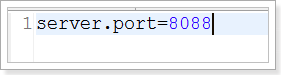
server.port=8088

server.servlet-path=/

spring.resources.static-locations=classpath:/public/

logging.level.org.springframework=DEBUG

jdbc.properties:

jdbc.driverClassName=com.mysql.jdbc.Driver

jdbc.url=jdbc:mysql://127.0.0.1:3306/taotao?useUnicode=true&characterEncoding=utf8&autoReconnect=true&allowMultiQueries=true

jdbc.username=root

jdbc.password=root
1.1.1.启动应用

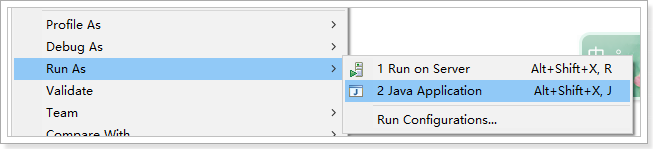
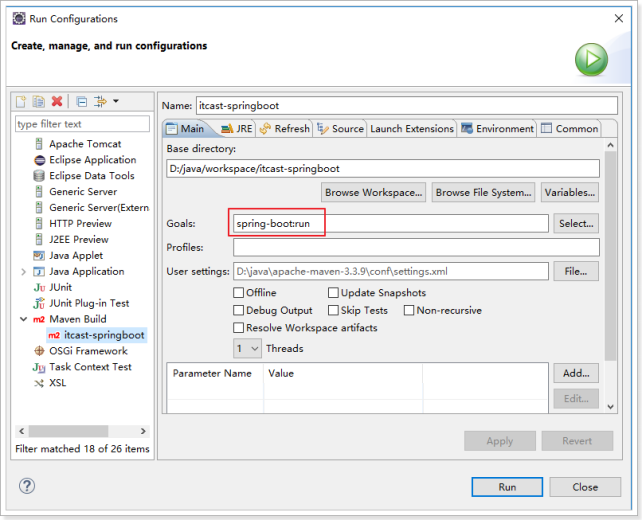
在Spring Boot项目中,启动的方式有两种,一种是直接run Java Application另外一种是通过Spring Boot的Maven插件运行(spring-boot-maven-plugin)。

第一种:
第二种:
启动效果:
看到如下信息就说明启动成功了:
INFO 6188 --- [ main] c.i.springboot.demo.HelloApplication : Started HelloApplication in 3.281 seconds (JVM running for 3.601)
1.1. Spring Boot的核心
1.1.1. 入口类和@SpringBootApplication
Spring Boot的项目一般都会有XXXXXXApplication的入口类,入口类中会有main方法,这是一个标准的Java应用程序的入口方法。
@SpringBootApplication注解是Spring Boot的核心注解,它其实是一个组合注解:

该注解主要组合了以下注解:
@SpringBootConfiguration:这是Spring Boot项目的配置注解,这也是一个组合注解:

在Spring Boot项目中推荐使用@ SpringBootConfiguration替代@Configuration

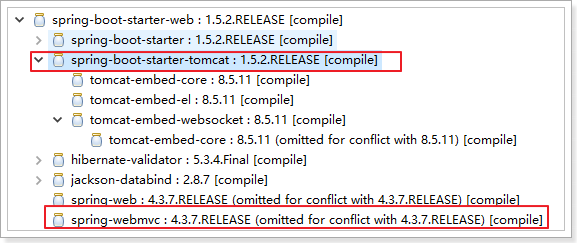
1.@EnableAutoConfiguration:启用自动配置,该注解会使Spring Boot根据项目中依赖的jar包自动配置项目的配置项:

如:我们添加了spring-boot-starter-web的依赖,项目中也就会引入SpringMVC的依赖,Spring Boot就会自动配置tomcat和SpringMVC,他会导入一系列相关的依赖和自动完成配置。
2.@ComponentScan:默认扫描@SpringBootApplication注解所在类的同级目录以及它的子目录。

1.1.1.关闭自动配置

通过上述,我们得知,Spring Boot会根据项目中的jar包依赖,自动做出配置,Spring Boot支持的自动配置如下(非常多):

如果我们不需要Spring Boot自动配置,想关闭某一项的自动配置,该如何设置呢?

比如:我们不想自动配置Redis,想手动配置。

1.1.1.全局配置文件

Spring Boot项目使用一个全局的配置文件application.properties或者是application.yml,在resources目录下或者类路径下的/config下,一般我们放到resources下。

修改tomcat的端口为8088
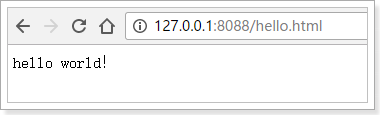
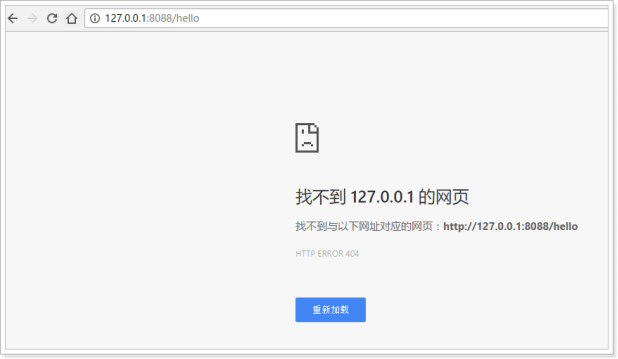
修改进入DispatcherServlet的规则为:*.html

测试:
spring-boot2的更多相关文章
- Spring Boot2.0 设置拦截器
所有功能完成 配置登录认证 配置拦截器 在spring boot2.0 之后 通过继承这个WebMvcConfigurer类 就可以完成拦截 新建包com.example.interceptor; 创 ...
- Spring Boot2.0 静态资源被拦截问题
在Spring Boot2.0+的版本中,只要用户自定义了拦截器,则静态资源会被拦截.但是在spring1.0+的版本中,是不会拦截静态资源的. 因此,在使用Spring Boot2.0+时,配置拦截 ...
- Spring Boot2.0使用Spring Security
一.Spring Secutity简介 Spring 是一个非常流行和成功的 Java 应用开发框架.Spring Security 基于 Spring 框架,提供了一套 Web 应用安全性 ...
- spring boot2 kafka
一.软件版本 1.linux:centos6 2.zookeeper:zookeeper-3.4.1 3.kafka:kafka_2.12-2.2.0 4.jdk:1.8 5.instelliJ Id ...
- spring boot2.0(一 ) 基础环境搭建
1.基础配置 开发环境:window jdk版本:1.8(spring boot2.0最低要求1.8) 开发工具:eclipse 构建方式:maven3 2.POM配置文件 <project x ...
- Spring Boot2.0 整合 Kafka
Kafka 概述 Apache Kafka 是一个分布式流处理平台,用于构建实时的数据管道和流式的应用.它可以让你发布和订阅流式的记录,可以储存流式的记录,并且有较好的容错性,可以在流式记录产生时就进 ...
- Spring Boot2.0自定义配置文件使用
声明: spring boot 1.5 以后,ConfigurationProperties取消locations属性,因此采用PropertySource注解配合使用 根据Spring Boot2. ...
- Spring boot2.0 设置文件上传大小限制
今天把Spring boot版本升级到了2.0后,发现原来的文件上传大小限制设置不起作用了,原来的application.properties设置如下: spring.http.multipart.m ...
- spring boot 2.0(一)权威发布spring boot2.0
Spring Boot2.0.0.RELEASE正式发布,在发布Spring Boot2.0的时候还出现一个小插曲,将Spring Boot2.0同步到Maven仓库的时候出现了错误,然后Spring ...
- 【spring cloud】spring cloud2.X spring boot2.0.4调用feign配置Hystrix Dashboard 和 集成Turbine 【解决:Hystrix仪表盘Unable to connect to Command Metric Stream】【解决:Hystrix仪表盘Loading...】
环境: <java.version>1.8</java.version><spring-boot.version>2.0.4.RELEASE</spring- ...
随机推荐
- win10 microsoft edge 浏览器收藏夹位置
1.打开文件夹,找到(注意 用户名 改为你自己的用户名) C:\Users\用户名\AppData\Local\Packages\Microsoft.MicrosoftEdge_8wekyb3d8bb ...
- CoreImage的模糊滤镜
//1.原始图片 UIImage * image = [UIImage imageNamed:@"1.jpg"]; /****************core image***** ...
- 使用Gitolite搭建Gitserver
Gitolite是一款Perl语言开发的Git服务管理工具.通过公钥对用户进行认证.并可以通过配置文件对些操作进行基于分支和路径的精细控制. Gitolite採用的是SSH协议而且使用SSH公钥认证. ...
- firewalld那些事
FirewallD 提供了支持网络/防火墙区域(zone)定义网络链接以及接口安全等级的动态防火墙管理工具.它支持 IPv4, IPv6 防火墙设置以及以太网桥接,并且拥有运行时配置和永久配置选项.它 ...
- WebStorm初次使用
1. ctrl + / : 单行注释2. ctrl + shift + / : 块注释 3:展开当前函数代码:Ctrl+“+”,收起当前代码:Ctrl+“-” 4:全局查找: Ctrl+Shift+F ...
- eclipse 创建maven web错误Cannot change version of project facet Dynamic web module to 3.1解决方案
Dynamic Web Module 选择“3.1”,java选择“1.8”,报错:Cannot change version of project facet Dynamic web module ...
- 网络启动并安装Debian
网络启动(PXEBoot)并安装Debian的官方文档在这里,不过官方文档有点冗长,我这里假设已经有一台安装好Debian,需要网络安装另一台(这台可以是虚拟机,通过ISO文件等等方式安装的).PXE ...
- [译]GLUT教程 - 交换菜单
Lighthouse3d.com >> GLUT Tutorial >> Pop-up Menus >> Swapping Menus GLUT甚至可以在应用程序过 ...
- 使用javac,手动编译一个java文件的方法
参考<Tomcat与Java Web开发技术详解>中的命令: javac -classpath c:\tomcat\lib\servlet-api.jar ...
- Cannot merge new index 65781 into a non-jumbo instruction! 问题解决(网上摘抄)
我的报了这个错 Error:Execution failed for task ':app:transformClassesWithDexForDebug'.> com.android.buil ...