
服务过美国总统竞选的非传统投票UI [解析及DEMO]

这种非常规的UI,在底层还是由常规的元素组成,在实现上,需要前端开发者想办法,创造(没错,是创造,在现在常规资源的基础上进行组合创造)出非常规的效果。
接下来,我们切入正题。
看到效果图后,我分析了一下,打算这样搭元素结构。最外面一个div,作为这个ui的最外层,里面再来三个div,两个用来放置左右直角梯形(里面再放图片和文字元素),余下的一个做成中间的faceoff图标。
html代码结构是这个样子。
 <div id="faceoff">

     <div id="person1" class="pic_wrap">

         <div class="pic">

          <div class="desc">

           <div class="content">

             Raised in Bloomfield Hills, Michigan, by his parents George and Lenore Romney, Mitt Romney spent two and a half years in France as a Mormon missionary starting in 1966. In 1969 he married Ann Davies, with whom he has had five sons. By 1971, Romney had participated in the political campaigns of both of his parents. He earned a Bachelor of Arts at Brigham Young and in 1975.

         </div>

           <div class="title">Mitt Romney</div>

         </div>

       </div>

     </div>

 <div id="faceoffIcon">FACEOFF</div>

     <div id="person2" class="pic_wrap">

      <div class="pic">

         <div class="desc">

           <div class="title">Barack Obama</div>

           <div class="content">

                    Born in Honolulu, Hawaii, Obama is a graduate of Columbia University and Harvard Law School, where he served as president of the Harvard Law Review. He was a community organizer in Chicago before earning his law degree. He worked as a civil rights attorney and taught constitutional law at the University of Chicago Law School from 1992 to 2004.

                </div>

         </div>

       </div>

     </div>

 </div>
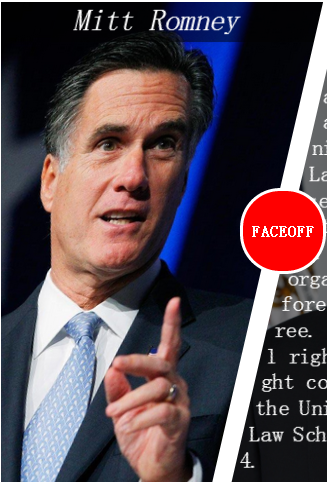
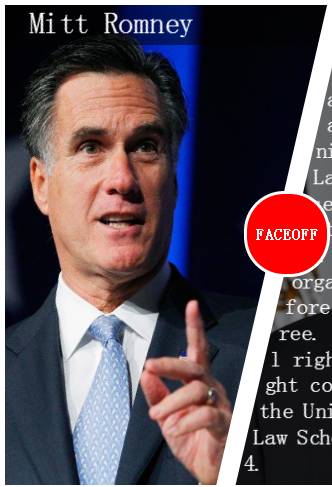
这个好办,我们把图像再扭回来就是了。来,反向扯一下。OK!现在正常了。
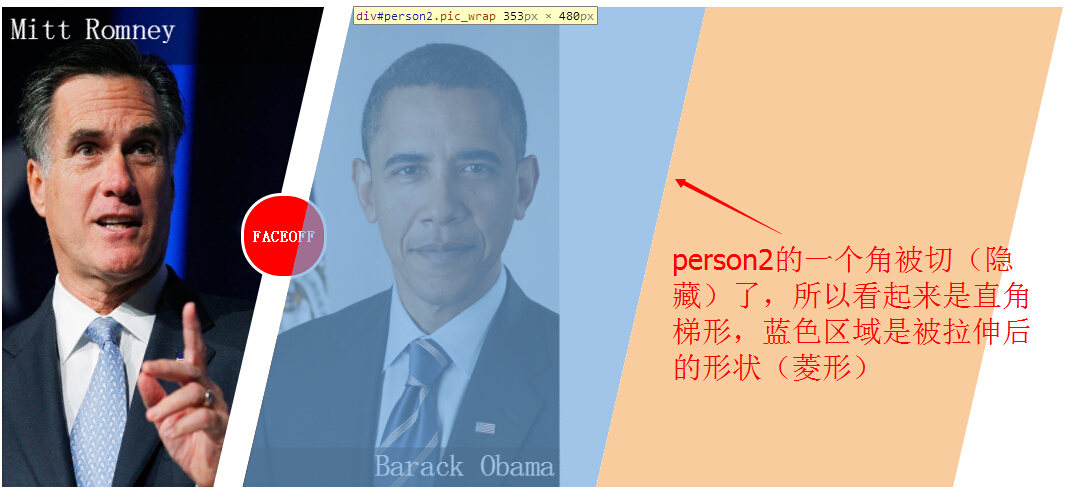
补充一句,这种做法还可以做这种非常规ui

做好了形状,接着来完成文字部分,这种非常规排版方式,adobe有过提议(CSS Shape),但目前CSS Shape只能在Webkit Nightly和Chrome Canary浏览器中实现,等以后等普及后,我们可以做出类似于这种效果。

因为浏览器支持度不够,我们要实现非常规的UI,还是得用别的办法。plusice同学提出,我们可以在文字中插入一些 (空格)达到这个效果,这种方法可行,但难点是,需要找到插入点和应插入的空格数量。
我用另一种办法达到了这个效果,给大家看三张图,大家就能理解了:
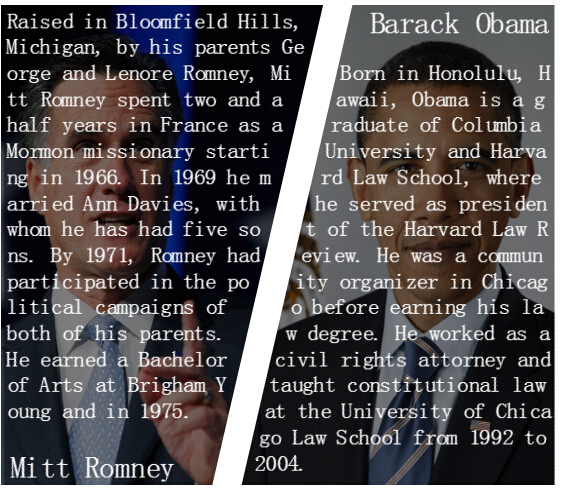
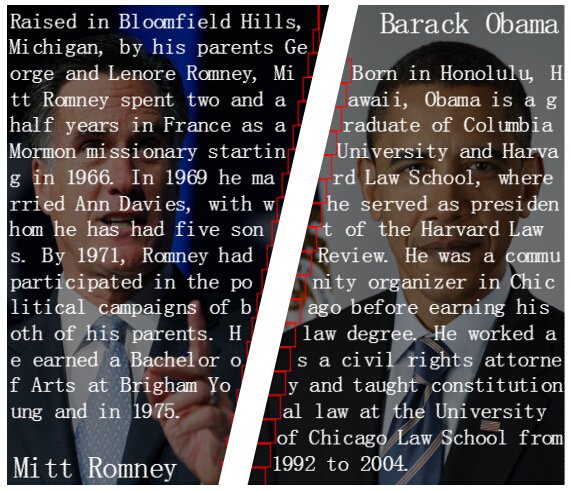
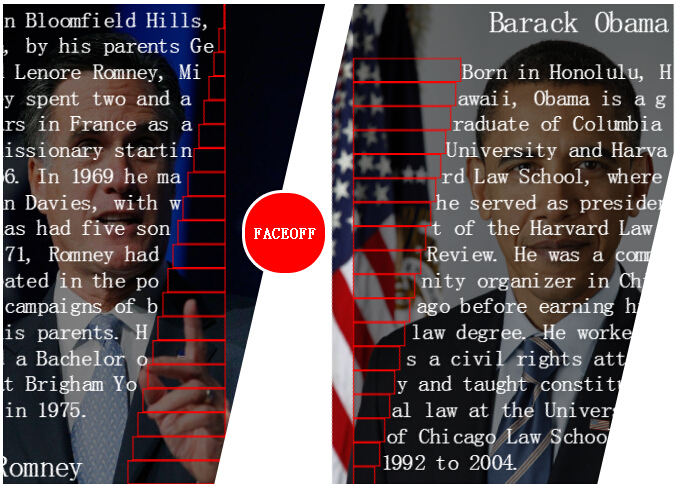
这种做法需要解决的是,这些占位元素的宽度各是多少?这里我们借助程序来实现。
 //依据角的邻边算对边长度

 function getWidth(height) {

   return Math.tan(deg * Math.PI / 180) * height;

 }

 // 依据行数得到角的邻边长度,进而算得对边长度

 function getWidthByLineIndex(i) {

   return getWidth(i * lineHeight);

 }
文本内容完成了,接下来做遮罩。使鼠标在图片上面时,介绍内容滑下来。这个一般是用改变dom的属性实现的,但不是本文的重点,我就偷个懒直接用css3 动画来做了。
 #person1>.pic:hover>.desc {

     -webkit-animation: left-show 0.8s 0s normal forwards;

     -webkit-animation-timing-function: ease-in;

 }

 #person1>.pic>.desc {

     -webkit-animation: left-hide 0.8s 0s normal forwards;

     -webkit-animation-timing-function: ease-out;

 }

 #person2>.pic:hover>.desc {

     -webkit-animation: right-show 0.8s 0s normal forwards;

     -webkit-animation-timing-function: ease-in;

 }

 #person2>.pic>.desc {

     -webkit-animation: right-hide 0.8s 0s normal forwards;

     -webkit-animation-timing-function: ease-out;

 }

 @-webkit-keyframes left-show {

     from {

         margin-top: -440px;

     }

     to {

         margin-top: 0px;

     }

 }

 @-webkit-keyframes left-hide {

     from {

         margin-top: 0px;

     }

     to {

         margin-top: -440px;

     }

 }

 @-webkit-keyframes right-show {

     from {

         margin-top: 440px;

     }

     to {

         margin-top: 0px;

     }

 }

 @-webkit-keyframes right-hide {

     from {

         margin-top: 0px;

     }

     to {

         margin-top: 440px;

     }

 }
hover滑动动画
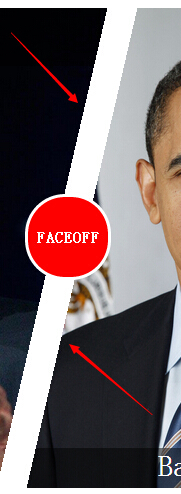
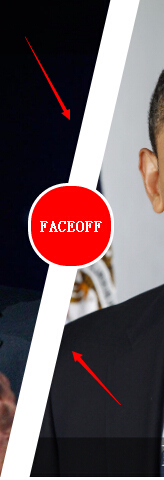
好吧,抱着追求完美的心态,我们来解决这个问题。将元素3d变换不仅可以开启硬件加速,让元素脱离文档流,提升性能,还可以达到我们的目的-反锯齿。但缺点是,字会有点模糊(因为它会把在上面的图或文字等内容当成图片纹理来贴图),不过这个小瑕疵比锯齿好得多。如果大家有别的方法完美消锯齿,也请告诉我。
好,收摊。现在各位感觉到了,实现这个UI其实也不难,要用点巧即可。实现方法不止一种,我感觉我虽然实现了这个需求,但我相信还有别的更优雅的办法。此文仅做抛砖引玉,大家如果有别的实现方法,和我分享下哟。 :)
 <!DOCTYPE HTML>

 <html manifest="" lang="en-US">

 <head>

     <meta charset="UTF-8">

         <title>Faceoff</title>

         <style type="text/css">

 div#faceoff {

     overflow: hidden;

     width: 710px;

 }

 .pic>.desc {

     background-color: rgba(0, 0, 0, 0.5);

     color: white;

 }

 .pic>.desc>.content {

     font-size: 22px;

     line-height: 26px;

     word-break: break-all;

 }

 .pic>.desc>.title {

     font-size: 30px;

     margin-bottom: 20px;

 }

 .pic_wrap {

     -webkit-transform: skewX(-13deg) translateZ(0);

     overflow: hidden;

     width: 353px;

     height: 480px;

     position: relative;

 }

 #person1 {

     left: -87px;

     float: left;

 }

 #person1>.pic {

     width: 461px;

     height: 480px;

     background: url("resources/1.jpg") no-repeat;

     background-position: -51px 0px;

     background-size: 620px 480px;

     -webkit-transform: skewX(13deg);

 }

 #person1>.pic>.desc {

     width: 312px;

     float: left;

     margin-left: 90px;

     margin-top: -440px;

 }

 #person1>.pic>.desc>.title {

     text-align: left;

     padding-left: 5px;

 }

 #person1>.pic>.desc>.content {

     padding: 2px;

     height: 440px;

 }

 #person2 {

     left: -57px;

 }

 #person2>.pic {

     width: 361px;

     height: 480px;

     background: url("resources/2.jpg") no-repeat;

     background-position: 20px -25px;

     background-size: 376px 540px;

     -webkit-transform: skewX(13deg);

     margin-left: -100px;

 }

 #person2>.pic>.desc {

     width: 320px;

     float: right;

 }

 #person2>.pic>.desc>.title {

     text-align: right;

     padding-right: 5px;

 }

 #person2>.pic>.desc>.content {

     padding-right: 2px;

     height: 440px;

 }

 .space {

     /* border: 1px solid red;*/

     height: 22px;

 }

 .space.left {

     float: left;

     clear: left;

 }

 .space.right {

     float: right;

     clear: right;

 }

 #faceoffIcon {

     width: 80px;

     height: 80px;

     position: absolute;

     background-color: red;

     border: 3px solid white;

     border-radius: 40px;

     top: 194px;

     left: 247px;

     z-index: 2;

     color: white;

     line-height: 80px;

     text-align: center;

     font-weight: bold;

 }

 #faceoff:hover>#faceoffIcon {

     display: none;

 }

 #person1>.pic:hover>.desc {

     -webkit-animation: left-show 0.8s 0s normal forwards;

     -webkit-animation-timing-function: ease-in;

 }

 #person1>.pic>.desc {

     -webkit-animation: left-hide 0.8s 0s normal forwards;

     -webkit-animation-timing-function: ease-out;

 }

 #person2>.pic:hover>.desc {

     -webkit-animation: right-show 0.8s 0s normal forwards;

     -webkit-animation-timing-function: ease-in;

 }

 #person2>.pic>.desc {

     -webkit-animation: right-hide 0.8s 0s normal forwards;

     -webkit-animation-timing-function: ease-out;

 }

 @-webkit-keyframes left-show {

     from {

         margin-top: -440px;

     }

     to {

         margin-top: 0px;

     }

 }

 @-webkit-keyframes left-hide {

     from {

         margin-top: 0px;

     }

     to {

         margin-top: -440px;

     }

 }

 @-webkit-keyframes right-show {

     from {

         margin-top: 440px;

     }

     to {

         margin-top: 0px;

     }

 }

 @-webkit-keyframes right-hide {

     from {

         margin-top: 0px;

     }

     to {

         margin-top: 440px;

     }

 }

     </style>

 </head>

 <body>

   <div id="faceoff">

     <div id="person1" class="pic_wrap">

         <div class="pic">

          <div class="desc">

           <div class="content">

             Raised in Bloomfield Hills, Michigan, by his parents George and Lenore Romney, Mitt Romney spent two and a half years in France as a Mormon missionary starting in 1966. In 1969 he married Ann Davies, with whom he has had five sons. By 1971, Romney had participated in the political campaigns of both of his parents. He earned a Bachelor of Arts at Brigham Young and in 1975.

         </div>

           <div class="title">Mitt Romney</div>

         </div>

       </div>

     </div>

 <div id="faceoffIcon">FACEOFF</div>

     <div id="person2" class="pic_wrap">

      <div class="pic">

         <div class="desc">

           <div class="title">Barack Obama</div>

           <div class="content">

                    Born in Honolulu, Hawaii, Obama is a graduate of Columbia University and Harvard Law School, where he served as president of the Harvard Law Review. He was a community organizer in Chicago before earning his law degree. He worked as a civil rights attorney and taught constitutional law at the University of Chicago Law School from 1992 to 2004.

                </div>

         </div>

       </div>

     </div>

 </div>

 <script type="text/javascript">

 //角度为13度

 var deg = 13,

   //占位元素的高

   lineHeight = 22,

   //元素高

   contentHeight = 460,

   //占位元素个数(行数)

   lineCount = Math.ceil(contentHeight / lineHeight),

   //相邻两个占位元素的宽度偏移量

   lineOffset = getWidth(lineHeight),

   //最大占位容器宽度,右侧的占位容器从大到小递减,左侧的占位元素从小到大递增

   lineMaxWidth = getWidth(contentHeight);

 //用占位容器来填充形状

 function SetShape(isRight) {

   var oFrag = document.createDocumentFragment();

   if (isRight) {

     for (var i = 0; i < lineCount; i++) {

       var op = document.createElement("span");

       op.classList.add("space");

       op.classList.add("left");

       // 右侧的占位容器从大到小递减

       op.style.width = (lineMaxWidth - i * lineOffset) + "px";

       oFrag.appendChild(op);

     }

     document.querySelector("#person2 .desc").insertBefore(oFrag, document.querySelector("#person2 .content"));

   } else {

     for (var i = 0; i < lineCount; i++) {

       var op = document.createElement("span");

       op.classList.add("space");

       op.classList.add("right");

       // 左侧的占位元素从小到大递增

       op.style.width = (i * lineOffset) + "px";

       oFrag.appendChild(op);

     }

     document.querySelector("#person1 .desc").insertBefore(oFrag, document.querySelector("#person1 .content"));

   }

 }

 //依据角的邻边算对边长度

 function getWidth(height) {

   return Math.tan(deg * Math.PI / 180) * height;

 }

 // 依据行数得到角的邻边长度,进而算得对边长度

 function getWidthByLineIndex(i) {

   return getWidth(i * lineHeight);

 }

 SetShape(false);

 SetShape(true);

 </script>

     </body>

     </html>
faceoff全部代码
素材两张(尺寸已缩小,可右键下载源图):


本文是博主Arfei Zhang原创,欢迎转载。转载请注明转自博客园,并附上本文链接http://www.cnblogs.com/arfeizhang/p/faceoffdemo.html,谢谢!
服务过美国总统竞选的非传统投票UI [解析及DEMO]的更多相关文章
- 服务过美国总统竞选的非传统投票UI【demo已放出】
=============================== 更新:DEMO和分析已经放出,地址在这里 http://www.cnblogs.com/arfeizhang/p/faceoffde ...
- 美国总统大选,黑客组织“匿名者”(Anonymous)也来凑热闹
美国总统大选,黑客组织"匿名者"(Anonymous)也来凑热闹 黑客组织"匿名者"向美国总统共和党候选人唐纳德•特朗普宣战,发誓将从4月1日开始向其发动大规模 ...
- SPSS分析技术:无序多元Logistic回归模型;美国总统大选的预测历史及预测模型
SPSS分析技术:无序多元Logistic回归模型:美国总统大选的预测历史及预测模型 在介绍有序多元Logistic回归分析的理论基础时,介绍过该模型公式有一个非常重要的假设,就是自变量对因变量多个类 ...
- 枚举--让盗版美国总统wcc给你整明白哈哈
1.为什么要有枚举 Java中的枚举其实是一种语法糖,在 JDK 1.5之后出现,用来表示固定且有限个的对象.比如一个季节类有春.夏.秋.冬四个对象:一个星期有星期一到星期日七个对象.这些明显都是固定 ...
- C#/.NET基于Topshelf创建Windows服务的守护程序作为服务启动的客户端桌面程序不显示UI界面的问题分析和解决方案
本文首发于:码友网--一个专注.NET/.NET Core开发的编程爱好者社区. 文章目录 C#/.NET基于Topshelf创建Windows服务的系列文章目录: C#/.NET基于Topshelf ...
- Python计算美国总统的身高并实现数据可视化
代码如下: import numpy as np import pandas as pd import matplotlib.pyplot as plt data=pd.read_csv('presi ...
- 开源微信管家平台——JeeWx 捷微4.0 微服务版本发布,全新架构,全新UI,提供强大的图文编辑器
JeeWx捷微4.0 微服务版本发布^_^ 换代产品(全新架构,全新UI,提供强大的图文编辑器) JEEWX 从4.0版本开始,技术架构全新换代,采用微服务架构,插件式开发,每个业务模块都是独立的 ...
- 【一起学源码-微服务】Ribbon 源码一:Ribbon概念理解及Demo调试
前言 前情回顾 前面文章已经梳理清楚了Eureka相关的概念及源码,接下来开始研究下Ribbon的实现原理. 我们都知道Ribbon在spring cloud中担当负载均衡的角色, 当两个Eureka ...
- 【一起学源码-微服务】Hystrix 源码一:Hystrix基础原理与Demo搭建
说明 原创不易,如若转载 请标明来源! 欢迎关注本人微信公众号:壹枝花算不算浪漫 更多内容也可查看本人博客:一枝花算不算浪漫 前言 前情回顾 上一个系列文章讲解了Feign的源码,主要是Feign动态 ...
随机推荐
- thinkphp 去掉URL 里面的index.php
例如你的原路径是 http://localhost/test/index.php/home/goods/index.html 那么现在的地址是 http://localhost/test/home/g ...
- Git学习环境搭建和git对用户的增删改查命令
git安装 windows下安装git git下载进入网址: https://git-scm.com/downloads 点击下载,进行安装,安装成功,你会看到图标,点击进入到git bash 查看g ...
- hdu-2688 Rotate---树状数组+模拟
题目链接: http://acm.hdu.edu.cn/showproblem.php?pid=2688 题目大意: 给你n数,(n<=3e6),有两个操作,Q为 当前有多少对数,满足严格递增, ...
- HDU 3639 Hawk-and-Chicken(强连通分量+缩点)
版权声明:本文为博主原创文章.未经博主同意不得转载. https://blog.csdn.net/u013480600/article/details/32140501 HDU 3639 Hawk-a ...
- python实现连续子数组的最大和
题目描述 HZ偶尔会拿些专业问题来忽悠那些非计算机专业的同学.今天测试组开完会后,他又发话了:在古老的一维模式识别中,常常需要计算连续子向量的最大和,当向量全为正数的时候,问题很好解决.但是,如果向量 ...
- [转] JAVA中读取网络中的图片资源导入到EXCEL中
需求 导出人员的信息并且加上人员的照片至EXCEL中 完整的代码 //创建一个表格 HSSFWorkbook wb = new HSSFWorkbook(); HSSFSheet sheet = wb ...
- 将你的静态工程用Grunt管理
最近写了一个静态页面,写完之后都会上传到静态服务器上.但是我遇到一个问题,就是每次修改文件后就要重新找一些代码压缩网站去压缩静态文件.有没有什么办法能够自动化的处理呢?答案当然是肯定的. 我们可以借用 ...
- c/c++基础
如果有你认为重要的知识点,而我这却没有记录下来的,那么期待你分享给我(^U^)ノ~YO. 1.在结构体中,符号->的前面是指针变量,符号.的前面是普通变量. 程序中a->b等价于(*a ...
- 细说 unicode 、utf-8 、utf-16、ascii 、gbk 、gb2312
一.计算机的由来 很久很久以前,有一群人,他们决定用8个可以开合的晶体管来组合成不同的状态,以表示世界上的万物.他们看到8个开关状态是好的,于是他们把这称为”字节“.再后来,他们又做了一些可以处理这些 ...
- 一个操作轻松截取长图,Win10上网截长图小技巧!
截屏的方法有很多,但是有时候我们会遇到比电脑屏幕还大的图,比如网站上的长图.N条引用的评论...你要怎么截取呢?是不是最多只能截全屏?还是要做到第三方的截图软件呢? 下面介绍一种win10电脑自带的滚 ...