
笔记-unittest实战
笔记-unittest实战
1. 框架图
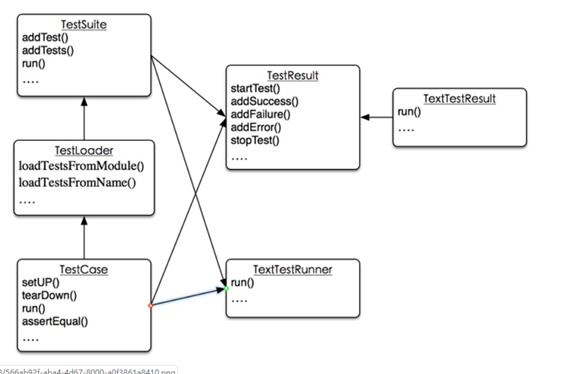
2. 用例
编写自己的测试用例类,继承于基类
class ApiTestCase(unittest.TestCase):
setUp方法会在每一个方法执行前执行
tearDown方法则是在每次方法执行后执行
@unittest.skip(‘跳过用例的测试,《原因》’)
测试方法名都以test_开头
测试方法执行顺序按测试方法名字典排序
简单的执行可以使用unittest.main()
import unittest
import requests
from proxypool.Api.proxy_api import run
from proxypool.Util.getconfig import config
from threading import Thread
from time import sleep
def before_test():
print('starting
webapi...')
thread = Thread(target=run)
thread.daemon = True
thread.start()
print('webapi is
running...')
class ApiTestCase(unittest.TestCase):
# 主页面测试
def test_webapi_mainpage(self):
url = 'http://localhost:8080/'
response =
requests.get(url)
self.assertEqual(response.status_code,
200, 'main page test failed.')
#print(response.text)
#
get页面测试
def test_webapi_get(self):
url = 'http://localhost:8080/get'
response =
requests.get(url)
self.assertEqual(response.status_code,
200, 'get page test failed.')
#
print(response.text)
#
delete页面测试
def test_webapi_delete(self):
url = 'http://localhost:8080/delete?proxy=5.6.4.3:453'
response =
requests.get(url)
self.assertEqual(response.status_code,
200, 'delete page test failed.')
#
print(response.text)
#
status页面测试
def test_webapi_status(self):
url = 'http://localhost:8080/status'
response =
requests.get(url)
self.assertEqual(response.status_code,
200, 'satus page test failed.')
#
print(response.text)
def start_test():
before_test()
print('test
start')
unittest.main()
print('test
end.')
if __name__ == '__main__':
start_test()
注意:setUp和tearDown解决了单个测试方法的环境准备及清理;
但有一些环境是所有测试方法共用的,放在setUp中很低效,在上例中为此定义了一个before_test()方法。
unittest提供了相应方法
setUpClass() 对应的是tearDownClass()
需要注意的是必需加上@classmethod修饰,否则报错
A class method called before tests in an
individual class are run. setUpClass is called with the class as the
only argument and must be decorated as a classmethod():
@classmethod
def setUpClass(cls):
...
重写代码:
# 删除before_test()方法,改为下列方法
class TestCase_WebApi(unittest.TestCase):
@classmethod
def setUpClass(cls):
print('starting
webapi...')
thread = Thread(target=run)
thread.daemon = True
thread.start()
print('webapi is
running...')
3.
test_suite
实例化类,添加测试方法,
实例化TextTestRunner,run()
手动添加用例,可以保证测试执行顺序。
import unittest
from test.test_webapi import TestCaseWebApi
def run_suite():
suite = unittest.TestSuite()
# 添加单个测试用例
suite.addTest(TestCaseWebApi('test_webapi_mainpage'))
# 添加多个测试用例
#
suite.addTests([TestCase_WebApi('test_webapi_get')])
# 声明
runner =
unittest.TextTestRunner()
runner.run(suite)
if __name__ == '__main__':
run_suite()
4.
TestLoader
测试方法,用例,套件,解决了测试方法的层级问题
但上面的手动添加用例还不够方便,能不能自动添加测试方法
class unittest.TestLoader
The TestLoader class is used to create test
suites from classes and modules. Normally, there is no need to create an
instance of this class; the unittest module
provides an instance that can be shared asunittest.defaultTestLoader. Using a
subclass or instance, however, allows customization of some configurable
properties.
testloader提供了多种查找及添加用例的方法,但一般用不到这么深入
有一个非常简单的方式:
def run_testloader():
print('use
TestLoader')
suite =
unittest.defaultTestLoader.discover('.', pattern='test_unittest_*.py', top_level_dir=None)
print(suite)
runner = unittest.TextTestRunner()
runner.run(suite)
if __name__ == '__main__':
# run_suite()
run_testloader()
unittest.defaultTestLoader是testloader的一个实例,一般用这个就可以了
discover有三个参数
第一个指定目录
第二个指定文件名匹配模式
第三个参数不明确,照写即可。
5.
总结
一般情况下上面的案例可以满足大部分测试要求了
笔记-unittest实战的更多相关文章
- AngularJS in Action读书笔记6(实战篇)——bug hunting
这一系列文章感觉写的不好,思维跨度很大,原本是由于与<Angularjs in action>有种相见恨晚而激发要写点读后感之类的文章,但是在翻译或是阐述的时候还是会心有余而力不足,零零总 ...
- Hadoop学习笔记(8) ——实战 做个倒排索引
Hadoop学习笔记(8) ——实战 做个倒排索引 倒排索引是文档检索系统中最常用数据结构.根据单词反过来查在文档中出现的频率,而不是根据文档来,所以称倒排索引(Inverted Index).结构如 ...
- flink学习笔记-flink实战
说明:本文为<Flink大数据项目实战>学习笔记,想通过视频系统学习Flink这个最火爆的大数据计算框架的同学,推荐学习课程: Flink大数据项目实战:http://t.cn/EJtKh ...
- 学习笔记——Maven实战(一)坐标规划
坐标是什么?为什么要规划? 坐标是Maven最基本的概念,它就像每个构件的身份证号码,有了它我们就可以在数以千万计的构件中定位任何一个我们感兴趣的构件.举个最简单的例子,如果没有坐标,使用JUnit的 ...
- 学习笔记——Maven实战(二)POM重构之增还是删
重构是广大开发者再熟悉不过的技术,在Martin Fowler的<重构——改善既有代码的设计>一书中,其定义为“重构(名词):对软件内部结构的一种调整,目的是在不改变软件之可察行为前提下, ...
- 学习笔记——Maven实战(三)多模块项目的POM重构
重复,还是重复 程序员应该有狗一般的嗅觉,要能嗅到重复这一最常见的坏味道,不管重复披着怎样的外衣,一旦发现,都应该毫不留情地彻底地将其干掉.不要因为POM不是产品代码而纵容重复在这里发酵,例如这样一段 ...
- 学习笔记——Maven实战(四)基于Maven的持续集成实践
Martin的<持续集成> 相信很多读者和我一样,最早接触到持续集成的概念是来自Martin的著名文章<持续集成>,该文最早发布于2000年9月,之后在2006年进行了一次修订 ...
- 学习笔记——Maven实战(五)自动化Web应用集成测试
自动化集成测试的角色 本专栏的上一篇文章讲述了Maven与持续集成的一些关系及具体实践,我们都知道,自动化测试是持续集成必不可少的一部分,基本上,没有自动化测试的持续集成,都很难称之为真正的持续集成. ...
- 学习笔记——Maven实战(六)Gradle,构建工具的未来?
Maven面临的挑战 软件行业新旧交替的速度之快往往令人咂舌,不用多少时间,你就会发现曾经大红大紫的技术已经成为了昨日黄花,当然,Maven也不会例外.虽然目前它基本上是Java构建的事实标准,但我们 ...
随机推荐
- LotusScript_批量更改数据库标识符(id)
OA开发中经常要搭建测试环境,测试环境的数据库与原数据库不能有ID冲突现象,以防混淆.以下是一个批量修改数据库标识符的方法,其中,取得这些需要更改的数据库,需要导出源服务器上的数据库路径和名称,方法详 ...
- Java笔记 —— this 关键字
Java笔记 -- this 关键字 h2{ color: #4ABCDE; } a{ color: blue; text-decoration: none; } a:hover{ color: re ...
- 使用C#实现计划任务(corn job)
维基百科上是这样描述计划任务的: “Cron is a time-based job scheduler in Unix-like computer operating systems. Cron i ...
- Eclipse + Tomcat 环境下配置 JSTL 标签
1.下载 jar 包. 网址:http://archive.apache.org/dist/jakarta/taglibs/standard/binaries/ 2.解压后将jstl.jar和stan ...
- CKEditor插件开发
以前做过一个教育项目,是有关在线考试的.其中对编辑器CKEditor做了扩充,增加了插入客观题.主观题.选择题和判断题的功能.这里记述下CKEditor插件开发的过程. CKEditor以前叫FCKE ...
- java:数据库操作JDBC
JDBC详解:https://www.cnblogs.com/erbing/p/5805727.html JDBC存储过程,事务管理,数据库连接池,jdbc的封装框架:https://www.cnbl ...
- 来自NVIDIA开源的pix2pixHD,将Image-to-Image Translation带到了另一个境界
Kuo Ming Lin 分享了 Learning By Hacking 的动图 最近討論最火熱的project之一,來自NVIDIA開源的pix2pixHD,將Image-to-Image Tran ...
- CPU的段寄存器
http://www.cnblogs.com/tolimit/p/4775945.html?utm_source=tuicool&utm_medium=referral CPU的段寄存器 在C ...
- 2016 Al-Baath University Training Camp Contest-1
2016 Al-Baath University Training Camp Contest-1 A题:http://codeforces.com/gym/101028/problem/A 题意:比赛 ...
- Vuex基础-State
官方地址:https://vuex.vuejs.org/zh/guide/state.html 由于 Vuex 的状态存储是响应式的,从 store 实例中读取状态最简单的方法就是在计算属性中返回某个 ...