
android菜鸟学习笔记18----Android数据存储(二)SharedPreferences
数据存储的方式,有比直接文件读写更加简便的方式,那就是操作SharedPreferences。
SharedPreferences一般用于存储用户的偏好设定,暂时不支持多进程操作。
SharedPreferences是一个接口,可以通过Context和Activity中提供的方法获得SharedPreferences的实例。SharedPreferences的数据存放在/data/data/应用包名/shared_pref/目录下。
获取方法:
1.Context.getSharedPreferences(String name, int mode);name用于指定数据存储的文件名,mode同文件读写中的模式。
2.Activity.getPreferences(int mode):返回一个私有的仅能被当前Activity访问的SharedPreferences实例,自动将类名作为文件名。
3.PreferenceManager. getDefaultSharedPreferences(Context context):传入context参数,返回该context上下文所对应的包名作为前缀来命名的文件。
SharedPreferences的使用:
写数据:
通过SharedPreferences.Editor这个内部类的对象来向SharedPreferences对象添加或修改数据。SharedPreferences的edit()方法可以获取这个Editor对象。Editor的putXXX()方法可以添加或修改数据。
添加或修改的数据,还需要通过Editor的commit()方法提交之后才会真正保存到文件中。
读数据:
要读取SharedPreferences中的数据,直接调用它的getXXX()方法即可。
例如,修改上一个示例中的FileUtils,添加writeSp()和readSp()方法:
     public static boolean writeSp(Context context, String data){

            try {

                  SharedPreferences preferences = context.getSharedPreferences("userInfo", Context.MODE_PRIVATE);

                  Editor editor = preferences.edit();

                  if(!data.contains("#")){

                       return false;

                  }

                  String[] strings = data.split("#");

                  editor.putString("username", strings[0]);

                  editor.putString("password", strings[1]);

                  editor.commit();

                  return true;

            } catch (Exception e) {

                  // TODO Auto-generated catch block

                  e.printStackTrace();

                  return false;

            }

       }

       public static String readSp(Context context){

            try {

                  SharedPreferences preferences = context.getSharedPreferences("userInfo", Context.MODE_PRIVATE);

                  String username = preferences.getString("username", "");

                  String password = preferences.getString("password", "");

                  return username+"#"+password;

            } catch (Exception e) {

                  // TODO Auto-generated catch block

                  e.printStackTrace();

            }

            return null;

       }
修改MainActivity的onCreate(),对应读写文件改成调用读写SharedPreferences方法即可。
运行结果:
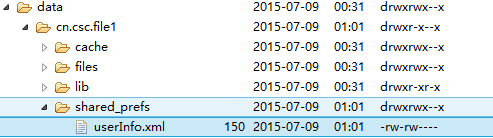
导出这个xml文件:
 <?xml version='1.0' encoding='utf-8' standalone='yes' ?>

 <map>

 <string name="password">abcdef</string>

 <string name="username">dqrcsc</string>

 </map>
修改writeSp()和readSp()方法,改为通过Activity的getPreferences()获取SharedPreferences对象:
SharedPreferences preferences = ((Activity)context).getPreferences(Context.MODE_PRIVATE);
运行结果:

可知,通过Activity获取SharedPreferences对象,默认以当前Activity的全限定名作为文件名。
修改writeSp()和readSp()方法,改为通过PreferenceManager的getDefaultSharedPreferences(Context context)获取SharedPreferences对象:
SharedPreferences preferences = PreferenceManager.getDefaultSharedPreferences(context);
运行结果:

可知,这种方式下数据的存放文件以传入的Context对应的包名作为前缀,然后连上_preferences.xml作为文件名。
android菜鸟学习笔记18----Android数据存储(二)SharedPreferences的更多相关文章
- springmvc学习笔记(18)-json数据交互
springmvc学习笔记(18)-json数据交互 标签: springmvc springmvc学习笔记18-json数据交互 springmvc进行json交互 环境准备 加入json转换的依赖 ...
- android菜鸟学习笔记17----Android数据存储(一)文件读写
假如有如下需求,要求能够记录用户输入的用户名和密码,下次登录时,能直接获取之前保存的用户名密码,并在相应的EditText中显示. 要保存用户输入的数据,最先想到的应该就是文件读写了. 通过对andr ...
- android菜鸟学习笔记24----与服务器端交互(一)使用HttpURLConnection和HttpClient请求服务端数据
主要是基于HTTP协议与服务端进行交互. 涉及到的类和接口有:URL.HttpURLConnection.HttpClient等 URL: 使用一个String类型的url构造一个URL对象,如: U ...
- android菜鸟学习笔记25----与服务器端交互(二)解析服务端返回的json数据及使用一个开源组件请求服务端数据
补充:关于PHP服务端可能出现的问题: 如果你刚好也像我一样,用php实现的服务端程序,采用的是apache服务器,那么虚拟主机的配置可能会影响到android应用的调试!! 在android应用中访 ...
- android菜鸟学习笔记23----ContentProvider(三)利用内置ContentProvider监听短信及查看联系人
要使用一个ContentProvider,必须要知道的是它所能匹配的Uri及其数据存储的表的结构. 首先想办法找到访问短信及联系人数据的ContentProvider能接受的Uri: 到github上 ...
- android菜鸟学习笔记21----ContentProvider(一)ContentProvider的简单使用
ContentProvider是Android四大组件之一,它用来封装数据,并通过ContentResolver接口将数据提供给其他应用.只有当需要在多个应用之间共享数据时才会用到ContentPro ...
- android菜鸟学习笔记14----Android控件(三) ListView的简单使用
MVC模式: MVC的基本原理就是通过Controller连接View和Model.当View中所显示的数据发生变化时,会通知Controller,然后由Controller调用Model中的相关方法 ...
- android菜鸟学习笔记10----Intent及<intent-filter>
关于Bundle: 注意到Activity的onCreate()方法的签名是protected void onCreate(Bundle savedInstanceState),其参数是一个Bundl ...
- android菜鸟学习笔记31----Android使用百度地图API(二)获取地理位置及地图控制器的简单使用
1.获取当前地理位置: Android中提供了一个LocationManager的类,用于管理地理位置.不能通过构造函数获取该类的实例,而是通过Context的getSystemService(): ...
随机推荐
- osgconv使用指南(转)
osgconv是一种用来读取3D数据库以及对它们实施一些简单的操作的实用应用程序,同时也被称作 一种专用3D数据库工具. 用osgconv把其他格式的文件转换为OSG所支持的格式 osgconv是一种 ...
- Jquery.data()的值存放再什么地方的问题?
Where is jQuery.data() stored? Where does jQuery store the values of the data() that it sets to DOM ...
- 系统封装 如何为原生PE集成软件
1 我们首先集成Explorer.老外的BSExplorer比较好用,下载之后得到这些文件,不算太大. 2 这里需要注意,前一章讲解如何打造原生PE已经制作成了ISO,这里想要集成软件还需要回到刚 ...
- jQuery 事件 - delegate() 方法
<html><head><script type="text/javascript" src="/jquery/jquery.js" ...
- Maven 缺省内置变量
1.${project.build.directory} 构建目录,缺省为target 2.${project.build.outputDirectory} 构建过程输出目录,缺省为target/cl ...
- 谈谈PHP网站的防SQL注入
SQL(Structured Query Language)即结构化查询语言.SQL 注入,就是把 SQL 命令插入到 Web 表单的输入域或页面请求参数的查询字符串中,在 Web表单向 Web 服务 ...
- DialogFragment创建默认dialog
代码地址如下:http://www.demodashi.com/demo/12228.html 记得把这几点描述好咯:代码实现过程 + 项目文件结构截图 + 演示效果 前言 在我们项目的进行中不可避免 ...
- web-压力测试学习
https://blog.linuxeye.com/335.html http://bdql.iteye.com/blog/291987 http://www.cnblogs.com/zhuque/a ...
- 在服务端发起一个Post请求
1.http://www.tuling123.com/openapi/api?key=9d2ff29d44b54e55acadbf5643569584&info=? 上面这个请求在服务端发起 ...
- Security Testing Basics
Security Testing BasicsSoftware security testing is the process of assessing and testing a system to ...