
lucene 初探
前言:
window文件管理右上角, 有个搜索功能, 可以根据文件名进行搜索. 那如果从文件名上判断不出内容, 我岂不是要一个一个的打开文件, 查看文件的内容, 去判断是否是我要的文件?
几个, 十几个文件还好, 如果是几百个甚至几万上百万, 我也能这么去找么?
这不是找文件了, 而是找不自在, 找虐.
那这个问题, 该怎么解决呢?
那就牵出了今天的话题了. lucene, 让软件去帮我们找就好了嘛.
lucene初探:
一. 原理介绍:
在介绍原理之前, 先来使用一下百度搜索吧. 这个大家都用过的.
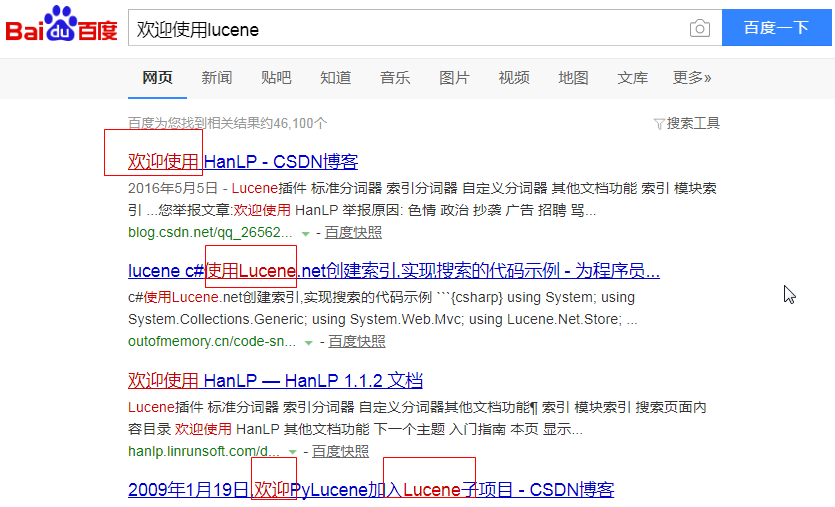
我明明搜索的是: 欢迎使用lucene, 但是从下面的结果来看, 并不是直接搜的全部, 而是将搜索语句进行了一个拆分操作, 然后综合搜索. 最后一条尤其明显.
那lucene里面, 其实也是一样的. 在搜索的时候也会进行拆分操作.
那文档这么多, lucene也是一个一个文件去找么?
我们在进行数据库查询的时候, 在大数据量的时候都可以很快的找到想要的数据, 这是因为数据库将数据进行了有序排列. 这种有序排列, 分两种,
一种叫聚集索引(id), 这个排列是跟具体存储内容无关的, 是数据库根据进入先后自己排的顺序.
另一种叫非聚集索引, 是根据要存储数据的逻辑来排序的.
就像是查字典, 如果后面的字并不按照拼音排序, 而是杂乱无章的, 那么我们通过字典前面的索引, 还是可以快读定位到要查找的字.
lucene在解析文件的时候, 也是建立了索引的. 和数据库一样, 也会生成一个自己的主键id, 根据这个id可以非常快的定位到文件.
除了id之外, 还会解析出非聚集索引. 例如在 a.txt , b.txt 中, 都还有一个 字符串 : "索引", 那么在解析之后, 就会得出这么个东西:
"索引" 2次 1,2
这里是按照次数倒叙排列的, 出现的越多, 越会靠前出现(这里和百度不同, 百度是你给的钱越多, 越靠前).
最后, 可能还需要理解几个对象:
lucene 解析文件的时候会创建 Document 文件对象(相当于数据库中的表的概念), 在Document里面, 有Field 域对象(相当于数据库中的字段, 只不过域可重名),
Field 对象里面就存放着 分词器解析后的结果(Term s). 分词器解析的结果就是 Term .
如在二分分词器里面, "我是中国人" 会被解析成为: "我是"(Term), "是中"(Term), "中国"(Term),"国人"(Term), 然后将这四个Term放在一个Field中.
二. 项目搭建
pom.xml:
这里使用的lucene版本是4.10.3. 最新版本已经到7.2.0了. 这里就不介绍最新版了, 大差不差, 有兴趣的朋友可以自己去看一下.
    <properties>

        <lucene.version>4.10.3</lucene.version>

    </properties>

    <dependencies>

        <!-- https://mvnrepository.com/artifact/org.apache.lucene/lucene-core -->

        <dependency>

            <groupId>org.apache.lucene</groupId>

            <artifactId>lucene-core</artifactId>

            <version>${lucene.version}</version>

        </dependency>

        <!-- https://mvnrepository.com/artifact/org.apache.lucene/lucene-queryparser -->

        <dependency>

            <groupId>org.apache.lucene</groupId>

            <artifactId>lucene-queryparser</artifactId>

            <version>${lucene.version}</version>

        </dependency>

        <!-- https://mvnrepository.com/artifact/org.apache.lucene/lucene-analyzers-common -->

        <dependency>

            <groupId>org.apache.lucene</groupId>

            <artifactId>lucene-analyzers-common</artifactId>

            <version>${lucene.version}</version>

        </dependency>

        <!-- https://mvnrepository.com/artifact/org.apache.lucene/lucene-highlighter -->

        <dependency>

            <groupId>org.apache.lucene</groupId>

            <artifactId>lucene-highlighter</artifactId>

            <version>${lucene.version}</version>

        </dependency>

        <dependency>

            <groupId>org.junit.jupiter</groupId>

            <artifactId>junit-jupiter-api</artifactId>

            <version>RELEASE</version>

        </dependency>

        <!-- https://mvnrepository.com/artifact/commons-io/commons-io -->

        <dependency>

            <groupId>commons-io</groupId>

            <artifactId>commons-io</artifactId>

            <version>2.6</version>

        </dependency>


     <!--ik分词器-->

        <!-- https://mvnrepository.com/artifact/com.janeluo/ikanalyzer -->

        <dependency>

            <groupId>com.janeluo</groupId>

            <artifactId>ikanalyzer</artifactId>

            <version>2012_u6</version>

        </dependency>

    </dependencies>
三. 分词器配置
官方有个推荐的分词器, Stand开头的, 那个分词器是给歪果仁用的, 我们用不了那个.
这里用的是IK分词器, 虽然已经不更新了, 但是这个是可扩展的, 对于新的流行词汇, 加进去之后, 是可以识别出来的. 能满足使用就行了. 对于别的分词器, 有好的, 也可以用.
IKAnalyzer.cfg.xml:
<?xml version="1.0" encoding="UTF-8"?>

<!DOCTYPE properties SYSTEM "http://java.sun.com/dtd/properties.dtd">

<properties>

    <comment>IK Analyzer 扩展配置</comment>

    <!--用户可以在这里配置自己的扩展字典 -->

    <entry key="ext_dict">lucene/ext.dic;</entry>

    <!--用户可以在这里配置自己的扩展停止词字典-->

    <entry key="ext_stopwords">lucene/stopword.dic;</entry>

</properties>
ext.dic:
要锤得锤

吃瓜群众

蓝瘦香菇
stopword.dic:
我
啊
是

a

an

and

are

as

at

be

but

by

for

if

in

into

is

it

no

not

of

on

or

such

that

the

their

then

there

these

they

this

to

was

will

with
四. 新建索引
     /**

     * 索引存放目录

     */

    private String indexDir = "E:\\Java\\mylucene\\temp\\index";

    /**

     * 待解析文件目录

     */

    private String fileDir = "E:\\Java\\mylucene\\temp\\files";

     /**

     * 获取 index 操作对象

     * @return

     * @throws Exception

     */

    private IndexWriter getWriter() throws Exception {

        //1. 创建一个 indexwriter对象

        //1.1 指定索引库的存放位置 directory 对象

        //1.2 指定一个分析器, 对文档内容进行分析

        Directory directory = FSDirectory.open(new File(indexDir));

        Analyzer analyzer = new IKAnalyzer(); //ik分词

        IndexWriterConfig config = new IndexWriterConfig(Version.LUCENE_4_10_3, analyzer);

        IndexWriter indexWriter = new IndexWriter(directory, config);

        return indexWriter;

    }

     /**

     * 创建索引

     *

     * @throws IOException

     */

    @Test

    public void createIndex() throws Exception {

        //1. 获取写入对象

        IndexWriter indexWriter = getWriter();

        //2. 获取要解析的文件

        File[] files = new File(fileDir).listFiles();

        //3. 遍历文件, 存储解析结果

        for (File file : files) {

            //3.1 创建document对象

            Document document = new Document();

            //文件名称

            String file_name = file.getName();

            Field fileNameField = new TextField("fileName", file_name, Field.Store.YES);

            document.add(fileNameField);

            //文件大小

            long file_size = FileUtils.sizeOf(file);

            Field fileSzieField = new LongField("fileSize", file_size, Field.Store.YES);

            document.add(fileSzieField);

            //文件路径

            String file_path = file.getPath();

            Field filePathField = new StoredField("filePath", file_path);

            document.add(filePathField);

            //文件内容

            String file_content = FileUtils.readFileToString(file, "utf-8");

            Field fileContentField = new TextField("fileContent", file_content, Field.Store.YES);

            document.add(fileContentField);

            //3.2. 使用indexwriter对象, 将document对象写入索引库, 此过程中进行索引创建, 并将索引和document对象写入索引库

            indexWriter.addDocument(document);

        }

        //4. 关闭indexwriter对象

        indexWriter.close();

    }
这里我放了两个文档, 一个 国歌.txt, 一个军中绿花.txt.
解析之后, 可以使用 luke 去查看索引. 具体下载地址: https://github.com/DmitryKey/luke/releases/tag/luke-4.10.3
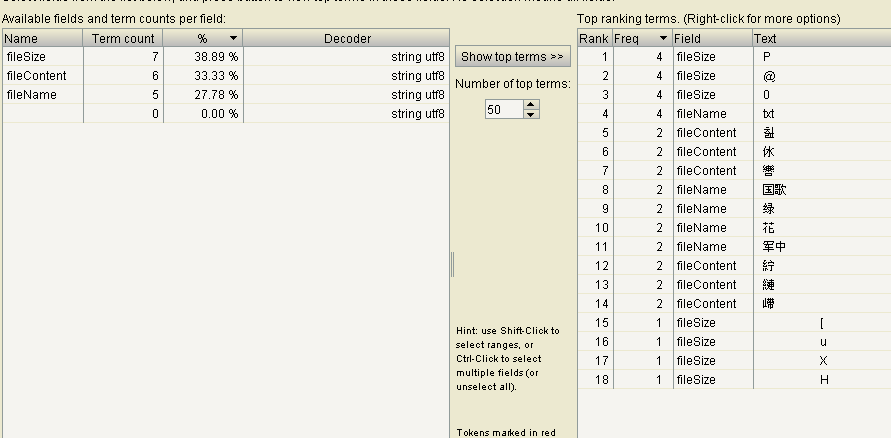
一般文件比较多, 所以看这个, 也没啥太大意义.
五. 索引删除
删除一般有两种, 一种是什么都不管, 一锅端. 另一种是根据条件过滤删除.
     /**

     * 根据条件删除索引

     *

     * @throws Exception

     */

    @Test

    public void deleteBy() throws Exception {

        IndexWriter writer = getWriter();

        //根据条件精确删除

        Query query = new TermQuery(new Term("fileName", "花"));

        writer.deleteDocuments(query);

        //解析查询条件来删除

        QueryParser queryParser = new QueryParser("fileName", new IKAnalyzer());

        Query query1 = queryParser.parse("花");

        writer.deleteDocuments(query1);

        writer.close();

    }
六. 修改索引
     /**

     * 修改索引

     *

     * @throws Exception

     */

    @Test

    public void updateIndex() throws Exception {

        IndexWriter writer = getWriter();

        Document doc = new Document();

        doc.add(new TextField("fileName", "live", Field.Store.YES));

        doc.add(new TextField("fileContent", "live 生活", Field.Store.YES));

        writer.updateDocument(new Term("fileName", "生活"), doc);

        writer.close();

    }
这里的修改是删除再新增的, 其实就是根据 term 删除之前的document, 然后用新的 doc
lucene 初探的更多相关文章
- lucene 初探 - 查询
lucene初探, 是为了后面solr做准备的. 如果跳过lucene, 直接去看solr, 估计有点懵. 由于时间的关系, lucene查询方法也有多个, 所以单独出来. 一. 精确查询 /** * ...
- 【手把手教你全文检索】Apache Lucene初探
PS: 苦学一周全文检索,由原来的搜索小白,到初次涉猎,感觉每门技术都博大精深,其中精髓亦是不可一日而语.那小博猪就简单介绍一下这一周的学习历程,仅供各位程序猿们参考,这其中不涉及任何私密话题,因此也 ...
- [转载] Apache Lucene初探
转载自http://www.cnblogs.com/xing901022/p/3933675.html 讲解之前,先来分享一些资料 首先呢,学习任何一门新的亦或是旧的开源技术,百度其中一二是最简单的办 ...
- 【手把手教你全文检索】Apache Lucene初探 (zhuan)
http://www.cnblogs.com/xing901022/p/3933675.html *************************************************** ...
- Apache Lucene初探
讲解之前,先来分享一些资料 首先,学习任何一门新的亦或是旧的开源技术,百度其中一二是最简单的办法,先了解其中的大概,思想等等.这里就贡献一个讲解很到位的ppt 这是Lucene4.0的官网文档:htt ...
- lucene初探
http://www.cnblogs.com/xing901022/p/3933675.html
- lucene教程【转】【补】
现实流程 lucene 相关jar包 第一个:Lucene-core-4.0.0.jar, 其中包括了常用的文档,索引,搜索,存储等相关核心代码. 第二个:Lucene-analyzers-commo ...
- Lucene全文检索技术学习
---------------------------------------------------------------------------------------------------- ...
- Elasticsearch+Logstash+Kibana教程
参考资料 累了就听会歌吧! Elasticsearch中文参考文档 Elasticsearch官方文档 Elasticsearch 其他——那些年遇到的坑 Elasticsearch 管理文档 Ela ...
随机推荐
- bash多进程
#!/bin/bashCMD_PATH=`dirname $0`#echo $CMD_PATH > /home/wubin/testjava -jar $CMD_PATH/Server.jar ...
- Android 响应menu,back键,点击外部消失
点击外部消失,只需要设置popupWindow.setBackgroundDrawable(new PaintDrawable()); 设置 popupWindow.setFocusable(true ...
- CSS 基础 例子 图片拼合技术
利用background-position xpos ypos 就是以图片的左上角顶点为原点,往下和右都为正,反之为负,移动图片 如: background-position: 15px 20px;( ...
- centos下添加git
CentOS中yum里没有Git,需要手动安装. 首先需要安装git的依赖包 yum install curl yum install curl-devel yum install zlib-deve ...
- Android-Genymotion Unable to load VirtualBox engine
点击Genymotion出现Genymotion Unable to load VirtualBox engine 解决方案: 打开官网,下载VirtualBox 点击安装: 然后再次点击打开Geny ...
- 使用EF操作Oracle数据库小计
1.建表 CREATE TABLE item.ORDERS( ORDERID ) CONSTRAINT PK_ORDERS PRIMARY KEY, ORDERNO ), STOREID ), STO ...
- strom ui Topology 可视化视图各个指标含义说明
In the visualization, spout components are represented as blue, while bolts are colored between gree ...
- [翻译]第二天 - Visual Studio 中的 .NET Core 模版一览
原文: http://michaelcrump.net/part2-aspnetcore/ 免责声明:我不是 .NET Core 开发团队的一员,并且使用的是公开.可用的工具. 简介 该系列文章的完整 ...
- 拖拽TreeViewItem到OCX控件
由于C#在性能方面,和C++还是有不少的差距,所以在项目中有一块是用C++的OCX控件实现,然后包括在WPF项目中.由于C++,C#属于不同的体系架构,造成了许多问题,特使是拖拽TreeViewIte ...
- Button去除边框方法
<Button Content="Button" Style="{StaticResource {x:Static ToolBar.ButtonStyleKey} ...