
webService之helloword(java)
webservice 远程数据交互技术
1.导入jar包(如果是 maven项目导入项目坐标)
2.创建服务
3.测试服务
我们使用maven来做测试服务
pom.xml文件
<project xmlns="http://maven.apache.org/POM/4.0.0" xmlns:xsi="http://www.w3.org/2001/XMLSchema-instance"

	xsi:schemaLocation="http://maven.apache.org/POM/4.0.0 http://maven.apache.org/xsd/maven-4.0.0.xsd">

	<modelVersion>4.0.0</modelVersion>

	<groupId>com.baidu.webservicetest01</groupId>

	<artifactId>webservicetest01</artifactId>

	<version>0.0.1-SNAPSHOT</version>

	<!-- jdk版本1.7 -->

	<build>

		<plugins>

			<plugin>

				<groupId>org.apache.maven.plugins</groupId>

				<artifactId>maven-compiler-plugin</artifactId>

				<version>2.3.2</version>

				<configuration>

					<source>1.7</source>

					<target>1.7</target>

				</configuration>

			</plugin>

		</plugins>

	</build>

	<dependencies>

		<!-- cxf  ws开发包 -->

		<dependency>

			<groupId>org.apache.cxf</groupId>

			<artifactId>cxf-rt-frontend-jaxws</artifactId>

			<version>3.0.1</version>

		</dependency>

			<!-- jetty  服务器包 -->

		<dependency>

			<groupId>org.apache.cxf</groupId>

			<artifactId>cxf-rt-transports-http-jetty</artifactId>

			<version>3.0.1</version>

		</dependency>

		<!-- 使用log4j日志实现 -->

		<dependency>

			<groupId>org.slf4j</groupId>

			<artifactId>slf4j-log4j12</artifactId>

			<version>1.7.12</version>

		</dependency>

		<!-- 使用rs客户端 -->

		<dependency>

			<groupId>org.apache.cxf</groupId>

			<artifactId>cxf-rt-rs-client</artifactId>

			<version>3.0.1</version>

		</dependency>

	</dependencies>

</project>
服务接口
package com.baidu.test;

import javax.jws.WebMethod;

import javax.jws.WebService;

@WebService

public interface TestInterf {

	@WebMethod

	public void eat();

}
服务实现类
package com.baidu.test;

import javax.jws.WebService;

@WebService

public class TestImp implements TestInterf {

	public void eat() {

		System.out.println("该吃饭了");

	}

}
开启服务:
package com.baidu.test;

import javax.xml.ws.Endpoint;

public class PublishTest {

	public static void main(String[] args) {

		TestInterf tt=new TestImp();

		String address="http://localhost:9991/TestInterf";

		Endpoint.publish(address, tt);

		System.out.println("服务启动了");

	}

}
新建项目 和服务器的包结构必须相同
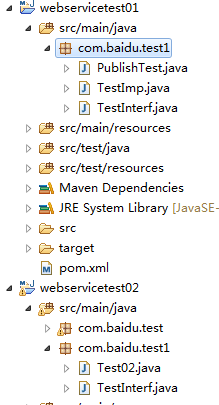
测试项目的 测试接口和服务器的接口必须一致
package com.baidu.test1;

import javax.jws.WebMethod;

import javax.jws.WebService;

@WebService  //标识可以连接服务

public interface TestInterf {

	@WebMethod

	public void eat();

}
测试服务
package com.baidu.test1;

import org.apache.cxf.jaxws.JaxWsProxyFactoryBean;

public class Test02 {

	public static void main(String[] args) {

		// 编写客户端 调用发布WebService服务

		JaxWsProxyFactoryBean jaxWsProxyFactoryBean = new JaxWsProxyFactoryBean();

		jaxWsProxyFactoryBean.setServiceClass(TestInterf.class);

		jaxWsProxyFactoryBean.setAddress("http://localhost:9991/TestInterf");

		// 创建调用远程服务代理对象

		TestInterf proxy = (TestInterf) jaxWsProxyFactoryBean.create();

		proxy.eat();

	}

}
pom.xml 客户pom.xml
<project xmlns="http://maven.apache.org/POM/4.0.0" xmlns:xsi="http://www.w3.org/2001/XMLSchema-instance"

	xsi:schemaLocation="http://maven.apache.org/POM/4.0.0 http://maven.apache.org/xsd/maven-4.0.0.xsd">

	<modelVersion>4.0.0</modelVersion>

	<groupId>com.baidu.webservicetest02</groupId>

	<artifactId>webservicetest02</artifactId>

	<version>0.0.1-SNAPSHOT</version>

	<build>

        <plugins>

            <plugin>

                <groupId>org.apache.maven.plugins</groupId>

                <artifactId>maven-compiler-plugin</artifactId>

                <version>2.3.2</version>

                <configuration>

                    <source>1.7</source>

                    <target>1.7</target>

                </configuration>

            </plugin>

        </plugins>

    </build>

	<dependencies>

		<!-- 要进行jaxws 服务开发 -->

  		<dependency>

			<groupId>org.apache.cxf</groupId>

			<artifactId>cxf-rt-frontend-jaxws</artifactId>

			<version>3.0.1</version>

		</dependency>

		<!-- 内置jetty web服务器  -->

		<dependency>

			<groupId>org.apache.cxf</groupId>

			<artifactId>cxf-rt-transports-http-jetty</artifactId>

			<version>3.0.1</version>

		</dependency>

		<!-- 日志实现 -->

		<dependency>

			<groupId>org.slf4j</groupId>

			<artifactId>slf4j-log4j12</artifactId>

			<version>1.7.12</version>

		</dependency>

	</dependencies>

</project>
webService之helloword(java)的更多相关文章
- webService之helloword(java)rs
webservice之rs(helloworld) 1.pom.xml文件 <dependencies> <!-- 使用CXF RS开发 --> <dependency& ...
- struts1+spring+myeclipse +cxf 开发webservice以及普通java应用调用webservice的实例
Cxf + Spring+ myeclipse+ cxf 进行 Webservice服务端开发 使用Cxf开发webservice的服务端项目结构 Spring配置文件applicationCont ...
- C#动态webservice调用接口 (JAVA,C#)
C#动态webservice调用接口 using System; using System.Collections; using System.IO; using System.Net; using ...
- Axis2 webservice 之使用java调用webservice
在上一篇中写了一个简单了webservice,实现了一个sayHello功能.那么webservice写好之后我们如何使用Java程序来调用webservice呢? 一.java调用的webservi ...
- webservice之helloword(web)rs
spring整合webservice 1.pom.xml文件 <dependencies> <!-- cxf 进行rs开发 必须导入 --> <dependency> ...
- php调用webservice接口,java代码接收不到参数
前段时间做了一个项目的二次开发,有个功能是需要php调用java实现的webservice接口,并传递一些参数给接口,然后按照对方提供的接口说明文档进行传参调用,java那边有接收到请求,但是参数总是 ...
- WebService应用--使用java开发WebService程序
使用Eclipse开发第一个WebService程序,本示例采用的工具为Spring-Tool-Suite,和Eclipse没有本质的区别,开发环境jdk1.7 一.开发步骤: 1.新建名为WebSe ...
- webService之helloword(web)
spring 整合webservice pom.xml文件 <dependencies> <!-- CXF WS开发 --> <dependency> <gr ...
- 做Webservice时报错java.util.List是接口, 而 JAXB 无法处理接口。
Caused by: com.sun.xml.bind.v2.runtime.IllegalAnnotationsException: 1 counts of IllegalAnnotationExc ...
随机推荐
- 定时器中的this和函数封装的简单理解;
一.定时器中的this: 不管定时器中的函数怎么写,它里面的this都是window: 在函数前面讲this赋值给一个变量,函数内使用这个变量就可以改变this的指向 二.函数封装 函数封装是一种函数 ...
- 使用clear来清除localStorage保存对象的全部数据
<!doctype html> <html> <head> <meta charset="utf-8"> <title> ...
- eclipse Tomcat和 MYSQL JAVA web新手开发示例--登录界面连接数据库
登录界面login.jsp 1 <%@ page language="java" import="java.util.*" contentType=&qu ...
- 11.Mysql视图
11.视图11.1 什么是视图 视图view是一张虚拟表,它不存储数据,数据仍在表里,视图由一条查询表的select语句创建,视图只存储select语句. 可以将复杂的查询语句封装成视图,用户可以从视 ...
- android使用Pull解析来自服务器的xml文件时出现错误以及解决方案
直接上代码,代码中有详细注释: 1 public class CheckUpdateManager { 2 private static final String TAG = "CheckU ...
- XiaoKL学Python(D)argparse
该文以Python 2为基础. 1. argparse简介 argparse使得编写用户友好的命令行接口更简单. argparse知道如何解析sys.argv. argparse 模块自动生成 “帮助 ...
- image src base64 svg
1.显示img: 大家可能注意到了,网页上有些图片的src或css背景图片的url后面跟了一大串字符,比如:data:image/png;base64, iVBORw0KGgoAAAANSUhEUgA ...
- spring配置遇到的问题
1.文档根元素 "beans" 必须匹配 DOCTYPE 根 "null" 这个原因是因为我自动扫描mapping.xml的文件路径设置错误,把它设置成spri ...
- Git和SourceTree入门教程
转自CSDN:http://blog.csdn.net/collonn/article/details/39259227 -->本教程适用于主流的开源网站github和bitbucket,个人认 ...
- BZOJ 1874 取石子游戏 - SG函数
Description $N$堆石子, $M$种取石子的方式, 最后取石子的人赢, 问先手是否必胜 $A_i <= 1000$,$ B_i <= 10$ Solution 由于数据很小, ...