
webService之helloword(web)
spring 整合webservice
pom.xml文件
	<dependencies>

		<!-- CXF WS开发 -->

		<dependency>

			<groupId>org.apache.cxf</groupId>

			<artifactId>cxf-rt-frontend-jaxws</artifactId>

			<version>3.0.1</version>

		</dependency>

		<dependency>

			<groupId>org.springframework</groupId>

			<artifactId>spring-context</artifactId>

			<version>4.1.7.RELEASE</version>

		</dependency>

		<dependency>

			<groupId>org.springframework</groupId>

			<artifactId>spring-web</artifactId>

			<version>4.1.7.RELEASE</version>

		</dependency>

		<dependency>

			<groupId>org.springframework</groupId>

			<artifactId>spring-test</artifactId>

			<version>4.1.7.RELEASE</version>

		</dependency>

		<dependency>

			<groupId>junit</groupId>

			<artifactId>junit</artifactId>

			<version>4.12</version>

		</dependency>

	</dependencies>

	<build>

		<plugins>

			<plugin>

				<groupId>org.codehaus.mojo</groupId>

				<artifactId>tomcat-maven-plugin</artifactId>

				<version>1.1</version>

				<configuration>

					<port>9998</port>

				</configuration>

			</plugin>

            <plugin>

                <groupId>org.apache.maven.plugins</groupId>

                <artifactId>maven-compiler-plugin</artifactId>

                <version>2.3.2</version>

                <configuration>

                    <source>1.7</source>

                    <target>1.7</target>

                </configuration>

            </plugin>

        </plugins>

	</build>
web.xml文件
 <context-param>

    <param-name>contextConfigLocation</param-name>

    <param-value>classpath:applicationContext.xml</param-value>

  </context-param>

  <listener>

    <listener-class>org.springframework.web.context.ContextLoaderListener</listener-class>

  </listener>

  <servlet>

    <servlet-name>CXFService</servlet-name>

    <servlet-class>org.apache.cxf.transport.servlet.CXFServlet</servlet-class>

    <load-on-startup>1</load-on-startup>

  </servlet>

  <servlet-mapping>

    <servlet-name>CXFService</servlet-name>

    <url-pattern>/services/*</url-pattern>

  </servlet-mapping>
applicationContext.xml文件
<?xml version="1.0" encoding="UTF-8"?>

<beans xmlns="http://www.springframework.org/schema/beans"

	xmlns:xsi="http://www.w3.org/2001/XMLSchema-instance" xmlns:jaxws="http://cxf.apache.org/jaxws"

	xsi:schemaLocation="

	http://www.springframework.org/schema/beans http://www.springframework.org/schema/beans/spring-beans.xsd

	http://cxf.apache.org/jaxws http://cxf.apache.org/schemas/jaxws.xsd">

	<!--

		serviceClass 服务接口

		address 服务访问地址

	 -->

	<jaxws:server id="userService" address="/userService"

		serviceClass="com.baidu.service.UserService">

		<jaxws:serviceBean>

			<bean class="com.baidu.service.imp.UserServiceImp" />

		</jaxws:serviceBean>

	</jaxws:server>

</beans>
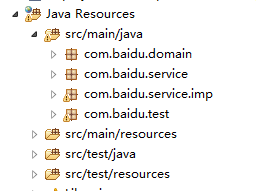
包结构
UserService接口
package com.baidu.service;

import javax.jws.WebMethod;

import javax.jws.WebService;

import com.baidu.domain.User;

@WebService

public interface UserService {

	@WebMethod

	public User get(Integer id);

	@WebMethod

	public void eat();

}
UserServiceImp实现类
package com.baidu.service.imp;

import javax.jws.WebMethod;

import javax.jws.WebService;

import com.baidu.domain.User;

import com.baidu.service.UserService;

@WebService

public class UserServiceImp implements UserService {

	public User get(Integer id) {

		if(id==1){

			User u=new User();

			u.setId(2);

			u.setName("张三");

			return u;

		}

		return null;

	}

	@Override

	public void eat() {

		System.out.println("123");

	}

}
新建一个maven web project项目
pom.xml文件不变
applicationContext.xml文件
<?xml version="1.0" encoding="UTF-8"?>

<beans xmlns="http://www.springframework.org/schema/beans"

	xmlns:xsi="http://www.w3.org/2001/XMLSchema-instance" xmlns:jaxws="http://cxf.apache.org/jaxws"

	xsi:schemaLocation="

	http://www.springframework.org/schema/beans http://www.springframework.org/schema/beans/spring-beans.xsd

	http://cxf.apache.org/jaxws http://cxf.apache.org/schemas/jaxws.xsd">

	<!--

		address 客户端访问服务路径

		serviceClass 配置接口

		serviceBean 配置实现类 -->

	<jaxws:client id="userServiceClient"

		serviceClass="com.baidu.service.UserService"

		address="http://localhost:9998/werservicespring/services/userService" >

		<!-- 来源消息拦截器

		<jaxws:inInterceptors>

			<bean class="org.apache.cxf.interceptor.LoggingInInterceptor"/>

		</jaxws:inInterceptors> -->

		<!-- 输出消息拦截器

		<jaxws:outInterceptors>

			<bean class="org.apache.cxf.interceptor.LoggingOutInterceptor" />

		</jaxws:outInterceptors>-->

	</jaxws:client>

</beans>
在测试之前需要创建接口 包结构也需要一样
package com.baidu.service;

import javax.jws.WebMethod;

import javax.jws.WebService;

import com.baidu.domain.User;

@WebService

public interface UserService {

	@WebMethod

	public User get(Integer id);

	@WebMethod

	public void eat();

}
测试类
package com.baidu.test;

import org.junit.Test;

import org.junit.runner.RunWith;

import org.springframework.beans.factory.annotation.Autowired;

import org.springframework.test.context.ContextConfiguration;

import org.springframework.test.context.junit4.SpringJUnit4ClassRunner;

import com.baidu.domain.User;

import com.baidu.service.UserService;

@RunWith(SpringJUnit4ClassRunner.class)

@ContextConfiguration(locations="classpath:applicationContext.xml")

public class Test01 {

	@Autowired

	private UserService userService;

	@Test

	public void test01(){

		//userService.eat();

		User user = userService.get(1);

		System.out.println(user);

	}

}
webService之helloword(web)的更多相关文章
- webservice之helloword(web)rs
spring整合webservice 1.pom.xml文件 <dependencies> <!-- cxf 进行rs开发 必须导入 --> <dependency> ...
- Python开发WebService:REST,web.py,eurasia,Django
Python开发WebService:REST,web.py,eurasia,Django 博客分类: Python PythonRESTWebWebServiceDjango 对于今天的WebSe ...
- webService之helloword(java)rs
webservice之rs(helloworld) 1.pom.xml文件 <dependencies> <!-- 使用CXF RS开发 --> <dependency& ...
- webService之helloword(java)
webservice 远程数据交互技术 1.导入jar包(如果是 maven项目导入项目坐标) 2.创建服务 3.测试服务 我们使用maven来做测试服务 pom.xml文件 <project ...
- 用.NET WebService Studio调试Web Service解决SOAPAction的问题
话说是这样的,这两天开发一个短信发送功能,客户给了一个 Web Service 地址(没有文档),让我调用就可以发送了, 我在VS 2013添加了服务引用,一切正常,可是执行代理方法时,怎么都报错 R ...
- 翻译-使用Spring WebService生成SOAP Web Service
原文链接:http://spring.io/guides/gs/producing-web-service/ 生成SOAP web service 该指南将带领你使用Spring创建一个基于SOAP的 ...
- 用C#通过反射实现动态调用WebService 告别Web引用
我们都知道,调用WebService可以在工程中对WebService地址进行WEB引用,但是这确实很不方便.我想能够利用配置文件灵活调用WebService.如何实现呢? 用C#通过反射实现动态调用 ...
- Web.config中设置启用webservice远程调试访问
在.NET 中已经默认将webservice的远程调试功能关闭,有的时候我们需要远程调试程序的时候,就需要打开此功能我们只需在webservice的项目的中添web.config的<system ...
- Web.config中设置启用webservice远程调试访问 参数看不到
<system.web><compilation debug="true" /> <!--begin启用webservice远程访问--> &l ...
随机推荐
- C#按制定的环境编译替换不出对应的配置项的解决措施。
1. 比如选择的 编译或者发布 环境是 QA ,但是QA里面配置的 替换节点 实际并没有被替换 解决方案: 在项目文件.csproj中最底部加入一下代码,应该成功.成功将QA的配置节点 替换掉默认的 ...
- PHP——explode的应用(获取字符串,拆为下拉列表)
<?php //定义有默认值的函数 function Main3($f=5,$g=6) { echo $f*$g; } Main3(2,3); echo "<br />&q ...
- Kali xrdp远程桌面
发现论坛没有该教程,在这里分享给需要的基友.源还是要更新的,楼主在网上百度的kali源,而不是linux源,比163.搜狐的源好些.首先安装xrdp: apt-get install xrdp 复制代 ...
- 代码UITableView点击cell跳转
首先,在tableViewController中设置好 代理和数据源方法: @interface FirstTableViewController ()<UITableViewDataSourc ...
- Job for apache2.service failed because the control process exited with error code. See "systemctl status apache2.service" and "journalctl -xe" for details.
环境:Ubuntu 16.04.1 + Django 1.11.15 + Apache 2.4.18 + python 3.5 此篇文章内容提到的第几步,对照以下链接中的步骤 百度云的ubuntu1 ...
- Java的OOP三大特征之一——多态
OOP(面对对象)三大特征之一——多态 What:多态性是指允许不同类的对象对同一消息作出响应,多态性包括参数化多态性和包含多态性,多态性语言具有灵活.抽象.行为共享.代码共享的优势,很好的解决了应用 ...
- ubuntu下安装配置ADB
1.下载SDK Tools for Linux,地址:http://developer.android.com/sdk/index.html 2.解压,将 android-sdk-linux 文件夹放 ...
- 谁说delphi没有IOCP库,delphi新的IOCP类库,开源中: DIOCP组件JSON流模块说明
单元:JSonStream.pas 简介:本单元实现 流和json对象的相互转换,其中有一些保留的key. 依赖:superobject 保留key: __result.errCode 返回的错误编 ...
- Using The jQuery Migrate Plugin
jQuery( html [, ownerDocument ] )Returns: jQuery Description: Creates DOM elements on the fly from t ...
- rm命令删除文件时排除特定文件
删除文件时排除特定文件 www.python tab.com/html/2013/linuxkaiyuan_0205/214.html 删除当前目录下所有 *.txt文件,除了test.txt 1 ...