
webService之helloword(java)
webservice 远程数据交互技术
1.导入jar包(如果是 maven项目导入项目坐标)
2.创建服务
3.测试服务
我们使用maven来做测试服务
pom.xml文件
<project xmlns="http://maven.apache.org/POM/4.0.0" xmlns:xsi="http://www.w3.org/2001/XMLSchema-instance"

	xsi:schemaLocation="http://maven.apache.org/POM/4.0.0 http://maven.apache.org/xsd/maven-4.0.0.xsd">

	<modelVersion>4.0.0</modelVersion>

	<groupId>com.baidu.webservicetest01</groupId>

	<artifactId>webservicetest01</artifactId>

	<version>0.0.1-SNAPSHOT</version>

	<!-- jdk版本1.7 -->

	<build>

		<plugins>

			<plugin>

				<groupId>org.apache.maven.plugins</groupId>

				<artifactId>maven-compiler-plugin</artifactId>

				<version>2.3.2</version>

				<configuration>

					<source>1.7</source>

					<target>1.7</target>

				</configuration>

			</plugin>

		</plugins>

	</build>

	<dependencies>

		<!-- cxf  ws开发包 -->

		<dependency>

			<groupId>org.apache.cxf</groupId>

			<artifactId>cxf-rt-frontend-jaxws</artifactId>

			<version>3.0.1</version>

		</dependency>

			<!-- jetty  服务器包 -->

		<dependency>

			<groupId>org.apache.cxf</groupId>

			<artifactId>cxf-rt-transports-http-jetty</artifactId>

			<version>3.0.1</version>

		</dependency>

		<!-- 使用log4j日志实现 -->

		<dependency>

			<groupId>org.slf4j</groupId>

			<artifactId>slf4j-log4j12</artifactId>

			<version>1.7.12</version>

		</dependency>

		<!-- 使用rs客户端 -->

		<dependency>

			<groupId>org.apache.cxf</groupId>

			<artifactId>cxf-rt-rs-client</artifactId>

			<version>3.0.1</version>

		</dependency>

	</dependencies>

</project>
服务接口
package com.baidu.test;

import javax.jws.WebMethod;

import javax.jws.WebService;

@WebService

public interface TestInterf {

	@WebMethod

	public void eat();

}
服务实现类
package com.baidu.test;

import javax.jws.WebService;

@WebService

public class TestImp implements TestInterf {

	public void eat() {

		System.out.println("该吃饭了");

	}

}
开启服务:
package com.baidu.test;

import javax.xml.ws.Endpoint;

public class PublishTest {

	public static void main(String[] args) {

		TestInterf tt=new TestImp();

		String address="http://localhost:9991/TestInterf";

		Endpoint.publish(address, tt);

		System.out.println("服务启动了");

	}

}
新建项目 和服务器的包结构必须相同
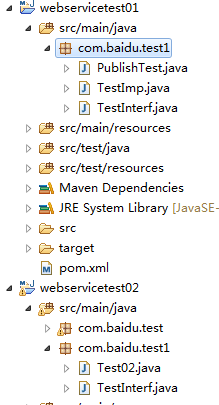
测试项目的 测试接口和服务器的接口必须一致
package com.baidu.test1;

import javax.jws.WebMethod;

import javax.jws.WebService;

@WebService  //标识可以连接服务

public interface TestInterf {

	@WebMethod

	public void eat();

}
测试服务
package com.baidu.test1;

import org.apache.cxf.jaxws.JaxWsProxyFactoryBean;

public class Test02 {

	public static void main(String[] args) {

		// 编写客户端 调用发布WebService服务

		JaxWsProxyFactoryBean jaxWsProxyFactoryBean = new JaxWsProxyFactoryBean();

		jaxWsProxyFactoryBean.setServiceClass(TestInterf.class);

		jaxWsProxyFactoryBean.setAddress("http://localhost:9991/TestInterf");

		// 创建调用远程服务代理对象

		TestInterf proxy = (TestInterf) jaxWsProxyFactoryBean.create();

		proxy.eat();

	}

}
pom.xml 客户pom.xml
<project xmlns="http://maven.apache.org/POM/4.0.0" xmlns:xsi="http://www.w3.org/2001/XMLSchema-instance"

	xsi:schemaLocation="http://maven.apache.org/POM/4.0.0 http://maven.apache.org/xsd/maven-4.0.0.xsd">

	<modelVersion>4.0.0</modelVersion>

	<groupId>com.baidu.webservicetest02</groupId>

	<artifactId>webservicetest02</artifactId>

	<version>0.0.1-SNAPSHOT</version>

	<build>

        <plugins>

            <plugin>

                <groupId>org.apache.maven.plugins</groupId>

                <artifactId>maven-compiler-plugin</artifactId>

                <version>2.3.2</version>

                <configuration>

                    <source>1.7</source>

                    <target>1.7</target>

                </configuration>

            </plugin>

        </plugins>

    </build>

	<dependencies>

		<!-- 要进行jaxws 服务开发 -->

  		<dependency>

			<groupId>org.apache.cxf</groupId>

			<artifactId>cxf-rt-frontend-jaxws</artifactId>

			<version>3.0.1</version>

		</dependency>

		<!-- 内置jetty web服务器  -->

		<dependency>

			<groupId>org.apache.cxf</groupId>

			<artifactId>cxf-rt-transports-http-jetty</artifactId>

			<version>3.0.1</version>

		</dependency>

		<!-- 日志实现 -->

		<dependency>

			<groupId>org.slf4j</groupId>

			<artifactId>slf4j-log4j12</artifactId>

			<version>1.7.12</version>

		</dependency>

	</dependencies>

</project>
webService之helloword(java)的更多相关文章
- webService之helloword(java)rs
webservice之rs(helloworld) 1.pom.xml文件 <dependencies> <!-- 使用CXF RS开发 --> <dependency& ...
- struts1+spring+myeclipse +cxf 开发webservice以及普通java应用调用webservice的实例
Cxf + Spring+ myeclipse+ cxf 进行 Webservice服务端开发 使用Cxf开发webservice的服务端项目结构 Spring配置文件applicationCont ...
- C#动态webservice调用接口 (JAVA,C#)
C#动态webservice调用接口 using System; using System.Collections; using System.IO; using System.Net; using ...
- Axis2 webservice 之使用java调用webservice
在上一篇中写了一个简单了webservice,实现了一个sayHello功能.那么webservice写好之后我们如何使用Java程序来调用webservice呢? 一.java调用的webservi ...
- webservice之helloword(web)rs
spring整合webservice 1.pom.xml文件 <dependencies> <!-- cxf 进行rs开发 必须导入 --> <dependency> ...
- php调用webservice接口,java代码接收不到参数
前段时间做了一个项目的二次开发,有个功能是需要php调用java实现的webservice接口,并传递一些参数给接口,然后按照对方提供的接口说明文档进行传参调用,java那边有接收到请求,但是参数总是 ...
- WebService应用--使用java开发WebService程序
使用Eclipse开发第一个WebService程序,本示例采用的工具为Spring-Tool-Suite,和Eclipse没有本质的区别,开发环境jdk1.7 一.开发步骤: 1.新建名为WebSe ...
- webService之helloword(web)
spring 整合webservice pom.xml文件 <dependencies> <!-- CXF WS开发 --> <dependency> <gr ...
- 做Webservice时报错java.util.List是接口, 而 JAXB 无法处理接口。
Caused by: com.sun.xml.bind.v2.runtime.IllegalAnnotationsException: 1 counts of IllegalAnnotationExc ...
随机推荐
- linux C程序中获取shell脚本输出(如获取system命令输出)
转载自 http://blog.csdn.net/hjxhjh/article/details/7909518 1. 前言 Unix 界有一句名言:“一行shell脚本胜过万行C程序”,虽然这句话有些 ...
- mysql 查看mysql相关信息
登入数据库的时候: select @@version; select version(); 复制代码 mysql> select @@version; +-----------+ | @@ver ...
- React-router4 第二篇url-params url参数
官方文档 以下代码均来自于官方文档 上来一步走 import React from 'react' import { BrowserRouter as Router, Route, Link } fr ...
- 2Y - sort
给你n个整数,请按从大到小的顺序输出其中前m大的数. Input 每组测试数据有两行,第一行有两个数n,m(0<n,m<1000000),第二行包含n个各不相同,且都处于区间[-5000 ...
- ie6 PNG图片透明
_background:none; _filter:progid:DXImageTransform.Microsoft.AlphaImageLoader(src=images/videoTips.pn ...
- sqlserver自带的导入导出工具,分别导入大批量mysql和oracle数据时的感受
sqlserver自带的导入导出工具,分别导入大批量mysql和oracle数据时,mysql经常出现格式转换出错,不好导入 导入的数据量比较大时,还不如自己写个工具导入 今天在导oracle时,想 ...
- (转)JavaScript escape() 函数(该方法不会对 ASCII 字母和数字进行编码,也不会对下面这些 ASCII 标点符号进行编码: * @ - _ + . / 。其他所有的字符都会被转义序列替换。)
JavaScript escape() 函数 JavaScript 全局对象参考手册 定义和用法 escape() 函数可对字符串进行编码,这样就可以在所有的计算机上读取该字符串. 语法 escape ...
- 继承 (js原型链)
原型链是实现继承的主要方法.基本思想:利用原型让一个引用类型继承另一个引用类型的属性和方法. 1.构造函数.原型.实例的关系: 每个构造函数都有原型属性(Prototype),指向一个原型对象(函数创 ...
- Linux下网络排查之ping|traceroute|mtr工具(zz)
1.ping ping使用了ICMP回送请求和回送应答报文.ping工具发出去的数据包没有通过tcp/udp协议,但是要经过ip协议.ping命令计算的时间是数据包的往返总时间. ping命令常用 ...
- Thrift.0
0. Thrift的特性 1. 安装Thrift编译器 [Todo] http://thrift.apache.org/docs/install/ http://thrift.apache.org/d ...