
Oracle中Error while performing database login with the XXXdriver; Listener refused the connection with the following error; ORA-12505,TNS:listener does not currently know of SID given inconnect descrip
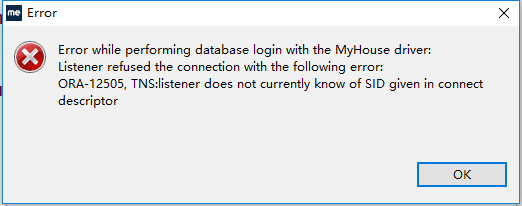
一次连接数据库怎么也连接不上,查了多方面资料,终于找到答案,总结
首先应该保证数据库的服务启动
在myeclipse的数据库视图中点 右键->new 弹出database driver的窗口,
Driver template选择oracle(thin driver),
Driver name 输入oracle
connection URL=jdbc:oracle:thin:@localhost:1521:oracle 注意localhost:1521:oracle中的oracle是数据库得sid换成你自己数据库的sid就可以
username:登陆数据库具有system权限的用户名
password:登陆数据库具有system权限的密码
点击add jar 选择ojdbc14.jar的存放位置,没有得可以到百度下一个叫ojdbc14.jar的文件。
点击test driver 到此成功配置。
关于启动数据库后提示ora-12505的解决方法:
"listener does not currently know of SID given in connect descriptor"
第一种可能
是配置得数据库sid名不正确localhost:1521:oracle 即红字部分不是你本机得sid,那么如何查看本机得sid呢?用如下命令 SELECT NAME FROM v$database;在sqlplus中执行就可以看到,把红字部分换成查询出来的sid就可以。
第二种可能
发现sid配置没有错误,但是还是报错,那可能就是oracle得监听配置出了问题,需要检查listener.ora文件,用记事本打开,
正确配置如下:
# listener.ora Network Configuration File: e:\oracle\product\10.2.0\db_1\network\admin\listener.ora
# Generated by Oracle configuration tools.
SID_LIST_LISTENER =
(SID_LIST =
(SID_DESC =
(SID_NAME = PLSExtProc)
(ORACLE_HOME = e:\oracle\product\10.2.0\db_1)
(PROGRAM = extproc)
)
(SID_DESC =
(GLOBAL_DBNAME = oracle)
(ORACLE_HOME = e:\oracle\product\10.2.0\db_1)
(SID_NAME = oracle)
)
)
LISTENER =
(DESCRIPTION_LIST =
(DESCRIPTION =
(ADDRESS = (PROTOCOL = IPC)(KEY = EXTPROC1))
(ADDRESS = (PROTOCOL = TCP)(HOST = localhost)(PORT = 1521))
)
)
红字部分改成oracle创建时候的sid 保存退出。
---------------------------------------------------------------------
(SID_DESC =
(GLOBAL_DBNAME = oracle)
(ORACLE_HOME = e:\oracle\product\10.2.0\db_1)
(SID_NAME = oracle)
)
GLOBAL_DBNAME= 的内容是用SYSTEM用户登录之后新建sql执行以下代码 :SELECT NAME FROM v$database; 查询出来的数据就是等号后面的内容,切记两个红色字体的名称一定要相同
如果没有这段代码请复制到你的文件中,然后把ORACLE_HOME这个路径修改一下切记两个蓝色路径一定要相同
----------------------------------------------------------------------
Oracle中Error while performing database login with the XXXdriver; Listener refused the connection with the following error; ORA-12505,TNS:listener does not currently know of SID given inconnect descrip的更多相关文章
- Hive中导入Oracle数据错误:Listener refused the connection with the following error: ORA-12505
问题: 今天往Hive中导入Oracle数据的时候碰到了如下错误:Listener refused the connection with the following error: ORA-12505 ...
- Connection to Oracle failed. [66000][12505] Listener refused the connection with the following error: ORA-12505, TNS:listener does not currently know of SID given in connect descriptor .
我安装了Oracle数据库,默认的数据库用户名是system,密码口令是安装过程中你自己设置的.可以先使用命令框,输入 sqlplus system; 然后再输入密码即可. 然后我的数据库连接工具使用 ...
- Listener refused the connection with the following error 错误解决
原文地址 :http://blog.csdn.net/zajin/article/details/17753351 做个备份: 查询数据库当前进程的连接数: select count(*) from ...
- Error while performing database login with the sqljdbc driver:Unable to create connection. Check your URL.
从微软官网下载jdbc驱动包sqljdbc4,运行sqljdbc_4.0.2206.100_chs.exe,将驱动包解压到了Microsoft JDBC Driver 4.0 for SQL Serv ...
- error while performing database login with the xxx driver
在MyEclipse的安装路径下D:\Program Files\MyEclipse 6.0\eclipse下面找到eclipse.ini文件,用记事本打开 eclipse.ini文件 -showsp ...
- Myeclipse连接Mysql数据库时报错:Error while performing database login with the pro driver:unable
driver template: Mysql connector/j(下拉框进行选择) driver name: 任意填,最好是数据库名称,方便查找 connection URL: jdbc:mysq ...
- 66000][12505] Listener refused the connection with the following error: ORA-12505, TNS:listener does not currently know of SID given in connect descriptor oracle.n et.ns.NetException: Listener refuse
新装的idea开发工具后连接数据库出现如题所示错误. 1.网上搜了不少的文章,没有解决我的问题.后来细心看了一下url: 一开始url是这样子的. jdbc:oracle:thin:@:s21_pdb ...
- java.sql.SQLException: Listener refused the connection with the following error: ORA-12505, TNS:list
package DisplayAuthors; import java.sql.*; public class DisplayAuthors { private static final Str ...
- 关于Oracle出现listener refused the connection with the ORA-12505错误,解决方案
出现listener refused the connection with the ORA-12505错误,解决方案: 1.首先重启一下电脑,释放被占用的1521端口 2.重启后打开Oracle D ...
随机推荐
- 【读书笔记】iOS-网络-使用Game Kit实现设备间通信
Apple的Game Kit框架可以实现没有网络状况下的设备与设备之间的通信,这包括没有蜂窝服务,无法访问Wi-Fi基础设施以及无法访问局域网或Internet等情况.比如在丛林深处,高速公路上或是建 ...
- JDK8下maven使用maven-javadoc-plugin插件报错
由于JDK8的doc生成机制比之前的要严谨许多,导致项目用maven打包的时候出错 解决办法: 添加-Xdoclint:none配置 完整配置如下: <plugin> <grou ...
- Unity Profiler GPU Usage(GPU使用情况)
一般情况下性能瓶颈都在CPU上,这儿也列举下几个常见的GPU耗时函数吧. 1 Render.Mesh 绘制网格面(没批处理的面) 2 Batch.DrawStatic 静态批处理 3 Batch.Dr ...
- Android--监听View的两个指头是放大和缩小
private double nLenStart = 0;//监听 WebView所用手势 @Override public boolean onTouch(View v, MotionEvent e ...
- react native 第一次下载app的欢迎页+每次启动app的启动页设计
欢迎各位同学加入: React-Native群:397885169 大前端群:544587175 大神超多,热情无私帮助解决各种问题. 我想我写的这篇博文可以帮助到很多人,接下来要分享的东西,对app ...
- [原创]RedHat 安装MySQL数据库
朋友购买了阿里云的服务器,服务器上自带有CentOS操作系统,但是开发软件需要自己安装,接下来将介绍本地RedHat Linux 5.10虚拟机上搭建Mysql数据库. 一.软件准备 (1)jdk-6 ...
- SQLSERVER NULL和空字符串的区别 使用NULL是否节省空间
SQLSERVER NULL和空字符串的区别 使用NULL是否节省空间 这里只讨论字符串类型,int.datetime.text这些数据类型就不讨论了,因为是否节省空间是根据数据类型来定的 在写这篇文 ...
- 三种方法实现java调用Restful接口
1,基本介绍 Restful接口的调用,前端一般使用ajax调用,后端可以使用的方法比较多, 本次介绍三种: 1.HttpURLConnection实现 2.HttpClient实现 3.Spring ...
- 转:queue
数据结构C#版笔记--队列(Quene) 队列(Quene)的特征就是“先进先出”,队列把所有操作限制在"只能在线性结构的两端"进行,更具体一点:添加元素必须在线性表尾部进行, ...
- 500.19 ,错误:4.00x80070005
直接把网站根目录添加上everyone权限即可