
ZYNQ. Interrupt(2)SPI.AXI TIMER
Shared Peripheral Interrupts (SPI)
SPI 可以接收来自PL的中断,这里使用PL模块 AXI Timer 的中断模式,并连接到CPU。
AXI TIMER
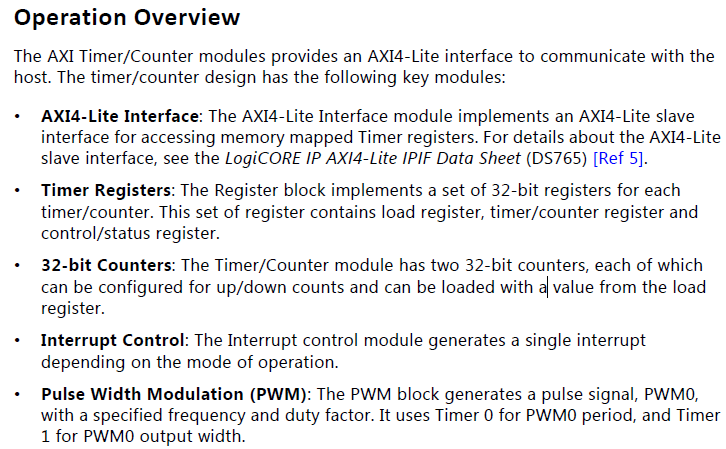
定时器,内部有两个完全相同的TIMER模块。
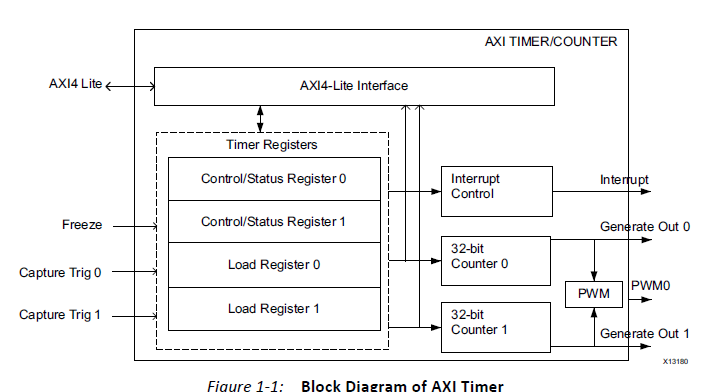
特性:
在手册里可以找到详细的参数和寄存器信息。
硬件系统
需要zynq核和一个AXI Timer,PL的clock可以在zynq核内部设置。
软件部分
这里会使用到xilinx提供的函数库
- 中断 xscugic.h
- 定时器 xtmrctr.h
因为使用了PS端的GPIO,所以还需要另一个库
- GPIO xgpiops.h
大致流程与私有定时器相似:
- 定义定时器、中断控制器和GPIO的结构体
- 初始化定时器、终端控制器和GPIO,以及私有定时器自检
- ARM异常处理初始化,连接系统中断处理程序
- 连接定时器中断程序
- 使能GIC、使能定时器中断、使能ARM中断
- 配置重载、计数器初值,然后开始定时器,等中断
- 废弃这个定时器,通知处理器、通知GIC废弃
code:
//*****************2018/11/27 封装******************
 #include <stdio.h>

 #include "xil_printf.h"

 #include "xparameters.h"

 #include "xgpiops.h"

 #include "sleep.h"

 #include "xtmrctr.h"

 #include "xil_exception.h"

 #include "xscugic.h"

 #define GpioPsDeviceId         XPAR_PS7_GPIO_0_DEVICE_ID

 #define AxiTmrCtrDeviceId     XPAR_TMRCTR_0_DEVICE_ID

 #define XScuGic_DEVICE_ID      XPAR_PS7_SCUGIC_0_DEVICE_ID

 #define TMRCTR_INTERRUPT_ID    XPAR_FABRIC_AXI_TIMER_0_INTERRUPT_INTR

 #define pinLed1 0

 #define pinLed2 9

 #define TIMER_CNTR_0         0

 #define RESET_VALUE             0xFFFFFFFF-(0x5F5E100-1) //1s

 int XGpioPsInit(XGpioPs *XGpioPsPtr);

 int XIntrSysInit(XTmrCtr *XTmrCtrInstancePtr,

         XScuGic *IntcInstancePtr,

         u16 DeviceId,

         u16 IntrId);

 void XTmrCtrIntrHandler(void *CallBackRef, u8 TmrCtrNumber);

 void TmrCtrDisableIntr(XScuGic *IntcInstancePtr, u16 IntrId);

 static XGpioPs GpioPs;

 static XTmrCtr XTmrCtrInstance;

 static XScuGic IntcInstance;

 int valueWriteLed2 = 0x01;

 int valueWriteLed1 = 0x00;

 int main()

 {

     int Status;

     xil_printf("\n\r Hello,world! \n\r"

             "AXI Timer Test\n\r");

     /* Initialize the Gpio driver */

     Status = XGpioPsInit(&GpioPs);

     if (Status != XST_SUCCESS) {

         xil_printf("GPIOPS Initial Failed\r\n");

         return XST_FAILURE;

     }

     /* initialize & connect & enable interrupt system  */

     Status = XIntrSysInit(&XTmrCtrInstance,

                 &IntcInstance,

                 AxiTmrCtrDeviceId,

                 TMRCTR_INTERRUPT_ID);

     if (Status != XST_SUCCESS) {

         xil_printf("Interrupt System Initial Failed\r\n");

         return XST_FAILURE;

     }

     /* set interrupt handler */

     XTmrCtr_SetHandler(&XTmrCtrInstance,

             XTmrCtrIntrHandler,&XTmrCtrInstance);

     /* Setting the timer counter option

      * interrupt Mode and Auto Reload And Up Counter*/

     XTmrCtr_SetOptions(&XTmrCtrInstance, TIMER_CNTR_0,

             XTC_INT_MODE_OPTION );//| XTC_AUTO_RELOAD_OPTION);

     /* Set a reset value */

     XTmrCtr_SetResetValue(&XTmrCtrInstance,

             TIMER_CNTR_0, //

             RESET_VALUE); //

     /* Start the timer counter */

     XTmrCtr_Start(&XTmrCtrInstance, TIMER_CNTR_0);

     while(){

         XGpioPs_WritePin(&GpioPs, pinLed1, valueWriteLed1);

 //        XGpioPs_WritePin(&Gpio, pinLed2, valueWriteLed2);

         sleep();

         xil_printf("--Write Led1: %d--\n",valueWriteLed1);

 //        xil_printf("--Write Led2: %d--\n",valueWriteLed2);

         valueWriteLed1 = valueWriteLed1 & (0x01) ?

                 0x00 :0x01;//~valueWriteLed1;

 //        valueWriteLed2 = valueWriteLed2 & (0x01) ?

 //                0x00 :0x01;//~valueWriteLed2;

         xil_printf("\n-- Do Again --\n");

     }

     /* never reached */

     xil_printf("\n test end\n\r");

     /* Disconnect the interrupt */

     TmrCtrDisableIntr(&IntcInstance, TMRCTR_INTERRUPT_ID);

     return ;

 }

 /* Initialize the timer And GIC device driver ,

  * Connect the Interrupt to GIC And Enable the Interrupt */

 int XIntrSysInit(XTmrCtr *XTmrCtrInstancePtr,XScuGic *IntcInstancePtr,

         u16 DeviceId, u16 IntrId)

 {

     XScuGic_Config *IntcConfig;

     int Status;

     /* Initialize the timer counter*/

     Status = XTmrCtr_Initialize(XTmrCtrInstancePtr, DeviceId);

     if (Status != XST_SUCCESS) {

         xil_printf("AXI TIMER INITIAL FAILED! \n\r");

         return XST_FAILURE;

     }

     /* Initialize the interrupt controller driver */

     IntcConfig = XScuGic_LookupConfig(XScuGic_DEVICE_ID);

     if (NULL == IntcConfig) {

         return XST_FAILURE;

     }

     Status = XScuGic_CfgInitialize(IntcInstancePtr, IntcConfig,

                     IntcConfig->CpuBaseAddress);

     if (Status != XST_SUCCESS) {

         return XST_FAILURE;

     }

     /* Sets the interrupt priority & trigger type

      * for the specified IRQ source */

     XScuGic_SetPriorityTriggerType(IntcInstancePtr, IntrId,

                         0xA0, 0x3);

     /* Initialize the exception table. */

     Xil_ExceptionInit();

     /* Register the interrupt controller handler with the exception table.     */

     Xil_ExceptionRegisterHandler(XIL_EXCEPTION_ID_INT,

                     (Xil_ExceptionHandler)

                     XScuGic_InterruptHandler,

                     IntcInstancePtr);

     /* Connect the interrupt handler  */

     Status = XScuGic_Connect(&IntcInstance, IntrId,

                  (Xil_ExceptionHandler)XTmrCtr_InterruptHandler,

                  XTmrCtrInstancePtr);

     if (Status != XST_SUCCESS) {

         return Status;

     }

     /* Enable the interrupt for the Timer device. */

     XScuGic_Enable(IntcInstancePtr, IntrId);

     /* Enable non-critical exceptions. */

     Xil_ExceptionEnable();

     return XST_SUCCESS;

 }

 void XTmrCtrIntrHandler(void *CallBackRef, u8 TmrCtrNumber)

 {

 //    XTmrCtr *InstancePtr = (XTmrCtr *)CallBackRef;

     XGpioPs_WritePin(&GpioPs, pinLed2, valueWriteLed2);

     xil_printf("--Write Led2: %d--\n",valueWriteLed2);

     valueWriteLed2 = valueWriteLed2 & (0x01) ?

             0x00 :0x01;//~valueWriteLed2;

     return;

 }

 int XGpioPsInit(XGpioPs *GpioPsPtr)

 {

     XGpioPs_Config *ConfigPtr;

     int Status;

     /* Initialize the Gpio driver. */

     ConfigPtr = XGpioPs_LookupConfig(GpioPsDeviceId);

     if (ConfigPtr == NULL) {

         xil_printf("ERROR\n");

         return XST_FAILURE;

     }

     Status = XGpioPs_CfgInitialize(GpioPsPtr,ConfigPtr,

                                     ConfigPtr->BaseAddr);

     if (Status != XST_SUCCESS) {

             print("cfg init err\n");

             return XST_FAILURE;

     }

     //set pin direction

     //value 0 -> input  1 -> output

     XGpioPs_SetDirectionPin(GpioPsPtr, pinLed1, );

     XGpioPs_SetDirectionPin(GpioPsPtr, pinLed2, );

     //value 0 -> disable   1 -> enable

     XGpioPs_SetOutputEnablePin(GpioPsPtr, pinLed1, );

     XGpioPs_SetOutputEnablePin(GpioPsPtr, pinLed2, );

     return XST_SUCCESS;

 }

 void TmrCtrDisableIntr(XScuGic* IntcInstancePtr, u16 IntrId)

 {

     /* Disconnect the interrupt */

     XScuGic_Disable(IntcInstancePtr, IntrId);

     XScuGic_Disconnect(IntcInstancePtr, IntrId);

     return;

 }
via
https://blog.csdn.net/u014485485/article/details/79069445
ZYNQ. Interrupt(2)SPI.AXI TIMER的更多相关文章
- ZYNQ. Interrupt(1)Private Timer
Interrupt zynq的中断. The PS is based on ARM architecture, utilizing two Cortex-A9 processors(CPUs) and ...
- 一步一步学ZedBoard & Zynq(四):基于AXI Lite 总线的从设备IP设计
本帖最后由 xinxincaijq 于 2013-1-9 10:27 编辑 一步一步学ZedBoard & Zynq(四):基于AXI Lite 总线的从设备IP设计 转自博客:http:// ...
- 关于IP核中中断信号的使用---以zynq系统为例
关于IP核中中断信号的使用---以zynq系统为例 1.使能设备的中断输出信号 2.使能处理器的中断接收信号 3.连接IP核到处理器之间的中断 此处只是硬件的搭建,软件系统的编写需要进一步研究. 搭建 ...
- PIC32MZ tutorial -- 32-bit Timer
The microcontroller is PIC32MZ2048ECH144 on the PIC32MZ EC Starter Kit. This microcontroller has fou ...
- Intel 80x86 Linux Kernel Interrupt(中断)、Interrupt Priority、Interrupt nesting、Prohibit Things Whthin CPU In The Interrupt Off State
目录 . 引言 . Linux 中断的概念 . 中断处理流程 . Linux 中断相关的源代码分析 . Linux 硬件中断 . Linux 软中断 . 中断优先级 . CPU在关中断状态下编程要注意 ...
- AXI总线简介
AXI全称Advanced eXtensible Interface,是Xilinx从6系列的FPGA开始引入的一个接口协议,主要描述了主设备和从设备之间的数据传输方式.在ZYNQ中继续使用,版本是A ...
- Make a DAC with a microcontroller's PWM timer
http://www.edn.com/design/analog/4337128/Make-a-DAC-with-a-microcontroller-s-PWM-timer Many embedded ...
- Arduino 与 SPI 结合使用 以及SPI 深层理解
本文主要讲解两部分内容,不做任何转发,仅个人学习记录: 一. Arduino 与 SPI 结合使用 : 二. SPI 深层理解 有价值的几个好的参考: 1. 中文版: https://blog.cs ...
- ARM Linux 3.x的设备树(Device Tree)
1. ARM Device Tree起源 Linus Torvalds在2011年3月17日的ARM Linux邮件列表宣称“this whole ARM thing is a f*cking pai ...
随机推荐
- ini_set的用法介绍
https://www.cnblogs.com/xieqian111/p/5367732.html
- 实验---反汇编一个简单的C程序(杨光)
反汇编一个简单的C程序 攥写人:杨光 学号:20135233 ( *原创作品转载请注明出处*) ( 学习课程:<Linux内核分析>MOOC课程http://mooc.study.163 ...
- java实验报告三
实验三 敏捷开发与XP实践 一.实验内容 1. XP基础 2. XP核心实践 3. 相关工具 二.实验步骤 (一)敏捷开发与XP 软件工程是把系统的.有序的.可量化的方法应用到软件的开发.运营和维护上 ...
- 《Linux内核分析》 第二节 操作系统是如何工作的
Linux内核分析 第二周 操作系统是如何工作的 张嘉琪 原创作品转载请注明出处 <Linux内核分析>MOOC课程http://mooc.study.163.com/course/UST ...
- 第二阶段团队冲刺——One
个人任务: 司宇航:处理第一次启动服务器500的问题. 季方:优化cookie第一次运行出错的问题. 王金萱:修改注册界面. 马佳慧:修改登录界面. 站立会议: 任务看板和燃尽图:
- 第一次Sprint冲刺结果评价
组名 软件项目名称 评价 hzsy 图文转换 这款软件最初的目标是扫描书本上文字转换成电子版,而且也可以将语音转换成文字,但在展示时,没有实现完整的功能,只有简单的界面,看不到更深的实质 ...
- MongoDB给数据库创建用户
一.先以非授权的模式启动MongoDB 非授权: linux/Mac : mongod -f /mongodb/etc/mongo.conf windows : mongod --config c: ...
- Linux基础六(网络管理)
目录 一.网络配置 1. IP 地址配置 2. 网络配置文件 3. 虚拟机网络配置参数 二.网络命令 1. 网络环境查看命令 2. 网络测试命令 三.远程会话安全协议-SSH原理 1. SSH 原理 ...
- 11th 最后的致意
“终于我们不再是师生”,无论日后我们是否是师生,但这段经历是不可否认的,可以说软件工程这一门课程恐怕是我学生生涯中终生难忘的一段体验.即便不是从知识上,从另一个方面来讲,也教给了我一种做人做事的态度. ...
- jdk命令行工具:jstat与jmap
转自文章:http://blog.csdn.net/gzh0222/article/details/8538727 C:\Users\Administrator\Desktop>jstat -g ...